Building a Custom Workflow Executor for WSO2 API Manager 4.2.0
How I extended WSO2 APIM’s workflow engine to send rich HTML email notifications on both approval and rejection of application creation and…
Building a Custom Workflow Executor for WSO2 API Manager 4.2.0 — Full Lifecycle HTML Email Notifications (Approval + Rejection)
How I extended WSO2 APIM’s workflow engine to send rich HTML email notifications on both approval and rejection of application creation and API subscription events and why every “obvious” approach failed before the right one worked.
Table of Contents
- The Problem Statement
- What is WSO2 API Manager?
- What are WSO2 Workflows?
- The Requirements (Expanded)
- How the Requirements Are Met
- Technology Stack
- The OSGi Constraint — Why This Is Hard
- Project Architecture
- ApplicationWorkflowDTO and SubscriptionWorkflowDTO
- CustomApplicationExecutor — execute() — Approve + Notify — complete() — Handle Rejection — executeNotificationSequence() — Shared Template Dispatch — getEmailInternally() — WSO2 Identity Stack
- CustomSubscriptionExecutor
- EmailUtil — Async SMTP with System Properties
- HtmlTemplates — Pure Java Rendering, Now with Rejection Layouts
- The pom.xml — OSGi Bundle Configuration
- The Journey: What Failed and Why (Updated)
- Deployment (with Cache Wipe)
- WSO2 Configuration
- End-to-End Flow (Approval and Rejection)
- Testing Strategy — Unit Tests with Mocked OSGi
- Key Takeaways
The Problem Statement
WSO2 API Manager is the backbone of many enterprise API ecosystems. Out of the box, when a developer creates an application or subscribes to an API in the Developer Portal, WSO2 simply processes the request and approves it silently. No one is notified. The admin doesn’t know a new application was registered. The API publisher doesn’t know their API just gained a new consumer. The developer gets no confirmation email.
Worse: When an administrator rejects a workflow task (via the Admin Portal’s task listing), there is zero communication. The developer never learns why their request was denied, and the audit trail is incomplete.
Photo by Finn Mund on Unsplash
For organizations running WSO2 in a real environment, this is a gap. Audit trails require notification. Developers expect confirmation emails and rejection explanations. API publishers want to know when their APIs are being consumed (or when access is denied).
The task: intercept WSO2’s application creation and subscription creation workflow events, dispatch rich HTML email notifications on both approval and rejection to all relevant stakeholders without breaking WSO2’s existing behavior and without introducing fragile dependencies.
This sounds straightforward. It is not.
What is WSO2 API Manager?
WSO2 API Manager (APIM) is an open-source, enterprise-grade API management platform. It handles the full API lifecycle from design and development to publishing, security, throttling, analytics, and retirement.
The platform consists of several portals and components running inside a single server:
- Publisher Portal — where API developers design, publish, and manage APIs
- Developer Portal — where application developers discover APIs, create applications, subscribe, and generate OAuth credentials
- Admin Portal — where platform administrators manage throttling policies, workflow approvals, and analytics
- Gateway — the runtime proxy that enforces security, throttling, and mediation on API traffic
- Key Manager — handles OAuth 2.0 token issuance and validation
WSO2 APIM runs on WSO2 Carbon a modular, OSGi‑based middleware platform built on Eclipse Equinox. Every component of the server including the API manager itself is an OSGi bundle. This is the foundation of the engineering challenge in this project.
Photo by Jo Szczepanska on Unsplash
What are WSO2 Workflows?
WSO2 API Manager exposes a workflow extension mechanism that allows custom Java code to intercept lifecycle events before they are committed.
These events include:

Each event type has a corresponding executor class configured in workflow-extensions.xml. When the event occurs, WSO2 instantiates the configured executor and calls execute(WorkflowDTO).
The executor must return a WorkflowResponse that tells WSO2 how to proceed:
APPROVED— the event proceeds immediatelyREJECTED— the event is deniedCREATED— the event is pending an asynchronous external callback
The simple executors (all the *SimpleWorkflowExecutor classes) always return APPROVED immediately — they are WSO2’s default auto‑approve implementation. This project extends those simple executors, keeping the auto‑approve behavior intact while injecting notification logic.
Crucially, workflow tasks can also be rejected asynchronously via the Admin Portal. When an admin completes a pending task with REJECTED status, WSO2 calls the executor’s complete(WorkflowDTO) method. This project overrides complete() to send rejection‑specific HTML emails.
The Requirements (Expanded)
Let’s make the requirements explicit before looking at the implementation.
Functional Requirements (Approval):
- When a developer creates an application, send an HTML email to the admin with full application details.
- Also send a confirmation HTML email to the developer.
- When a developer subscribes to an API, send an HTML email to the admin with subscriber and API details.
- Send a notification HTML email to the API publisher.
- Send a confirmation HTML email to the subscribing developer.
Functional Requirements (Rejection):
- When an administrator rejects an application creation task, send a rejection HTML email to the admin (audit log) and to the developer.
- When an administrator rejects a subscription creation task, send a rejection HTML email to the admin and to the developer.
- Emails must be styled HTML not plain text with tables, color headers (green for approval, red for rejection), and structured layout.
- Email failures must never affect the workflow outcome applications and subscriptions must still be approved/rejected correctly even if email dispatch fails.
Photo by Markus Winkler on Unsplash
Non‑Functional Requirements:
- The solution must be deployable as an OSGi bundle to WSO2’s
dropins/directory. - Email dispatch must be asynchronous the workflow response must not be delayed by SMTP operations.
- Zero external library dependencies the solution must work within Equinox’s classloader constraints.
- All user‑supplied data inserted into HTML must be properly escaped (XSS prevention).
- SMTP configuration (host, port, from address) must be externalizable via JVM system properties no recompilation for different environments.
How the Requirements Are Met
| Requirement                             | Solution                                                                                                                                                                                   |
| --------------------------------------- | ------------------------------------------------------------------------------------------------------------------------------------------------------------------------------------------ |
| 1–5: Approval emails                    | Extend `ApplicationCreationSimpleWorkflowExecutor` and `SubscriptionCreationSimpleWorkflowExecutor`, override `execute()`, call `super.execute()` first, then dispatch approval templates. |
| 6–7: Rejection emails                   | Override `complete()`, check `WorkflowStatus.REJECTED`, dispatch rejection templates.                                                                                                      |
| 8: Styled HTML emails                   | `HtmlTemplates.java` – pure Java HTML builder with CSS, tables, gradients (green for approval, red for rejection).                                                                         |
| 9: Email failures don't affect workflow | All notification code wrapped in `try-catch` after `super.execute()` / `super.complete()`.                                                                                                 |
| 10: OSGi bundle                         | `maven-bundle-plugin` with `<packaging>bundle</packaging>`.                                                                                                                                |
| 11: Async dispatch                      | `Executors.newSingleThreadExecutor()` in `EmailUtil`.                                                                                                                                      |
| 12: Zero external deps                  | No compile-scope dependencies – `HtmlTemplates` replaces Thymeleaf / FreeMarker.                                                                                                           |
| 13: HTML escaping                       | `HtmlTemplates.escape()` applied to all model values via `v()` helper.                                                                                                                     |
| 14: Externalizable SMTP                 | `EmailUtil` reads `email.smtp.host`, `email.smtp.port`, `email.smtp.from` from `System.getProperty()`.                                                                                     |
Technology Stack
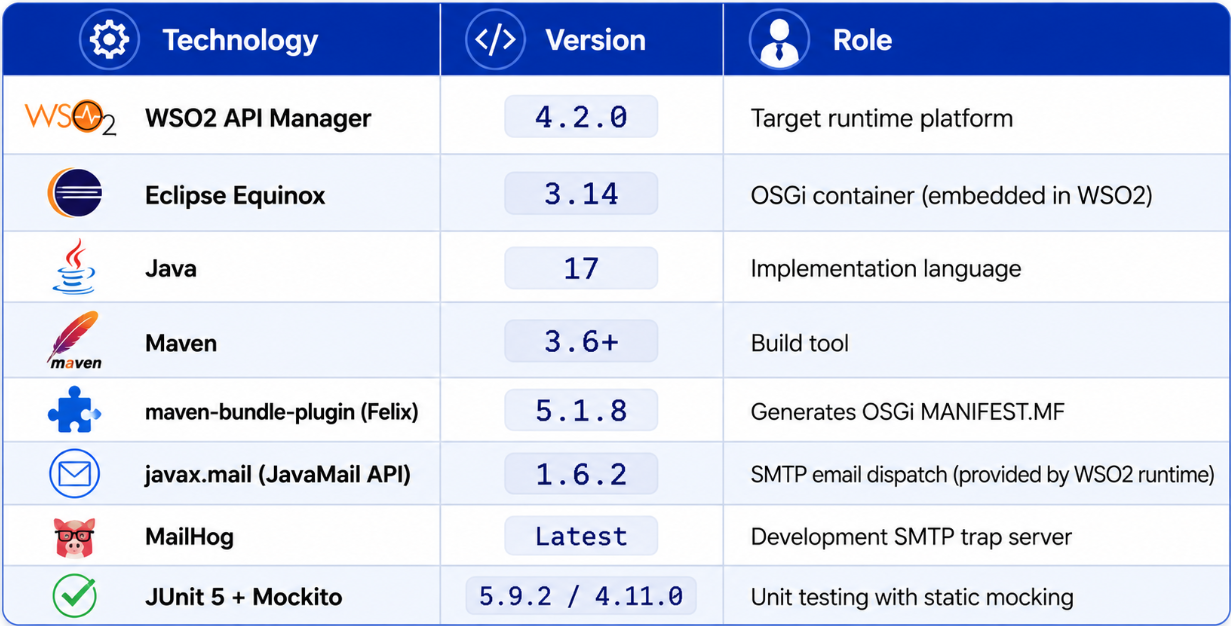
Notably absent: Thymeleaf, Spring, FreeMarker, Jackson, or any other third‑party library. This is a deliberate architectural decision, explained in detail in the OSGi section below.
The OSGi Constraint — Why This Is Hard
To understand why this project’s architecture is what it is, you need to understand OSGi classloading.
What is OSGi?
OSGi (Open Service Gateway Initiative) is a Java module system and component framework. In OSGi, each component called a bundle is a JAR with additional metadata in META-INF/MANIFEST.MF. The metadata declares:
- What packages this bundle exports (makes available to others)
- What packages this bundle imports (needs from others)
- The bundle’s symbolic name and version
The OSGi container manages a runtime where each bundle gets its own isolated classloader. A class loaded by Bundle A is a completely different type from the same class loaded by Bundle B, even if they came from the same JAR.
How WSO2 uses OSGi
WSO2 API Manager is built entirely on OSGi. Every WSO2 component the API publisher, developer portal, key manager, analytics is an OSGi bundle. When you extend a WSO2 class like ApplicationCreationSimpleWorkflowExecutor, your bundle’s classloader must have access to the package containing that class. You declare this in Import-Package, and Equinox wires your bundle’s classloader to the bundle that exports that package.
The classloading problem with external libraries
When you write an OSGi bundle that uses Thymeleaf, you have multiple options — all of which fail in Equinox 3.14 + WSO2 dropins/. The only reliable solution is to eliminate external dependencies entirely. HtmlTemplates.java requires no packages beyond java.util.Map already available in the JDK.
This is not a workaround. For an OSGi bundle running in an embedded enterprise container like WSO2’s Equinox, depending only on packages exported by the runtime is the architecturally correct design.
Project Architecture
┌─────────────────────────────────────────────────────────────────────────┐
│                      WSO2 API Manager 4.2.0                             │
│                     (Eclipse Equinox OSGi)                              │
│                                                                         │
│  Developer Portal ──► ApplicationsApiServiceImpl                        │
│                              │                                          │
│                              ▼                                          │
│                    APIConsumerImpl.addApplication()                     │
│                              │                                          │
│                              ▼                                          │
│              ┌───────────────────────────────────┐                      │
│              │   CustomApplicationExecutor       │ ← YOUR BUNDLE        │
│              │                                   │                      │
│              │  execute():                       │                      │
│              │   1. super.execute() → APPROVED   │                      │
│              │   2. dispatch approval emails     │                      │
│              │                                   │                      │
│              │  complete():                      │                      │
│              │   1. super.complete()             │                      │
│              │   2. if REJECTED → dispatch       │                      │
│              │      rejection emails             │                      │
│              └───────────────────────────────────┘                      │
│                                                                         │
│  Admin Portal ──► Workflow complete (REJECTED)                          │
│                              │                                          │
│                              ▼                                          │
│              ┌───────────────────────────────────┐                      │
│              │   CustomSubscriptionExecutor      │ ← YOUR BUNDLE        │
│              │   (same pattern)                  │                      │
│              └───────────────────────────────────┘                      │
│                                                                         │
│         ┌──────────────────────────────────────────────────┐            │
│         │    Carbon Identity Stack                         │            │
│         │    ServiceReferenceHolder → RealmService         │            │
│         │    → UserRealm → UserStoreManager                │            │
│         │    → getUserClaimValue("emailaddress")           │            │
│         └──────────────────────────────────────────────────┘            │
└─────────────────────────────────────────────────────────────────────────┘
                    │ SMTP (configurable via -D flags)
                    ▼
           ┌─────────────────┐
           │  MailHog / SMTP │
           └─────────────────┘
The key design principles:
- Additive only —
super.execute()/super.complete()are always called first. Your code adds behavior; it never replaces behavior. - Fail‑safe — all notification code runs inside a
try-catch. Exceptions are logged and swallowed. TheWorkflowResponsefrom the superclass is always returned. - Non‑blocking —
EmailUtilsubmits all SMTP work to a backgroundExecutorService. The WSO2 request thread returns immediately. - Zero dependencies — the bundle imports only packages that WSO2’s runtime already provides.
- Environment‑agnostic SMTP — host, port, and
Fromaddress are read from system properties, enabling different configs per environment without recompilation.
ApplicationWorkflowDTO and SubscriptionWorkflowDTO
WorkflowDTO — The Base
org.wso2.carbon.apimgt.impl.dto.WorkflowDTO is the base DTO for all workflow events. It carries common fields: workflowReference, tenantDomain, tenantId, workflowStatus, callbackUrl, and a properties map.
ApplicationWorkflowDTO — Application‑Specific
ApplicationWorkflowDTO extends WorkflowDTO and adds:
getUserName()– the developer who created the applicationgetApplication()– a fullApplicationobject with name, tier, tokenType, description, etc.
In your executor, you downcast:
ApplicationWorkflowDTO appDTO = (ApplicationWorkflowDTO) workflowDTO;
String appName = appDTO.getApplication().getName();
SubscriptionWorkflowDTO — Subscription‑Specific
SubscriptionWorkflowDTO extends WorkflowDTO and adds flattened fields (no nested object):
getSubscriber()– the developer subscribinggetApplicationName()– name of the application (string only)getApiName(),getApiVersion(),getApiProvider(),getTierName()
Important asymmetry: ApplicationWorkflowDTO gives you a full Application object; SubscriptionWorkflowDTO gives you primitive strings. Both are handled transparently in the respective executors.
⚠️ Workflow Reference Parsing Restriction WSO2’s internal workflow engine parses
workflowReferenceusingInteger.parseInt()in some code paths. Both runtime values and unit test mocks must supply purely numeric strings (e.g.,"998877"), otherwise you riskNumberFormatException. This project respects that constraint in all tests and production code.
CustomApplicationExecutor
Now let’s walk through the full executor implementation including both execute() (approval) and complete() (rejection) handlers.
public class CustomApplicationExecutor extends ApplicationCreationSimpleWorkflowExecutor {
    private static final Log log = LogFactory.getLog(CustomApplicationExecutor.class);
execute() — Approve + Notify
@Override
public WorkflowResponse execute(WorkflowDTO workflowDTO) throws WorkflowException {
    log.info("Executing custom HTML interceptor for Application Creation Workflow initiation...");
    WorkflowResponse response = super.execute(workflowDTO);
try {
        executeNotificationSequence(workflowDTO, "APPROVED");
    } catch (Exception e) {
        log.error("Failed executing custom application approval HTML notification dispatch loops.", e);
    }
    return response;
}super.execute()persists the application and returns anAPPROVEDresponse.- The approval‑specific notification sequence is invoked with status
"APPROVED". - Any exception is logged but does not change the returned response.
complete() — Handle Rejection
@Override
public WorkflowResponse complete(WorkflowDTO workflowDTO) throws WorkflowException {
    log.info("Executing custom HTML interceptor for Application Creation Workflow completion evaluation...");
    WorkflowResponse response = super.complete(workflowDTO);
try {
        if (WorkflowStatus.REJECTED.equals(workflowDTO.getStatus())) {
            executeNotificationSequence(workflowDTO, "REJECTED");
        }
    } catch (Exception e) {
        log.error("Failed executing custom application rejection HTML notification dispatch loops.", e);
    }
    return response;
}super.complete()finalises the workflow state in WSO2’s database.- If the admin rejected the task, we call the same
executeNotificationSequence()with"REJECTED". - Rejection emails go to both the admin (audit) and the developer.
executeNotificationSequence() — Shared Template Dispatch
private void executeNotificationSequence(WorkflowDTO workflowDTO, String targetStatus) {
    ApplicationWorkflowDTO appDTO = (ApplicationWorkflowDTO) workflowDTO;
    String creator = appDTO.getUserName();
    String tenantDomain = appDTO.getTenantDomain();
String creatorEmail = getEmailInternally(creator, tenantDomain);
    String adminEmail = getEmailInternally("admin", tenantDomain);
    String timestamp = new SimpleDateFormat("yyyy-MM-dd HH:mm:ss").format(new Date());
    Map<String, Object> model = new HashMap<>();
    model.put("applicationName", appDTO.getApplication().getName());
    model.put("userName", creator);
    model.put("tenantDomain", tenantDomain);
    model.put("applicationTier", appDTO.getApplication().getTier());
    model.put("tokenType", appDTO.getApplication().getTokenType());
    model.put("description", appDTO.getApplication().getDescription());
    model.put("timestamp", timestamp);
    model.put("workflowRef", appDTO.getWorkflowReference());
    if ("REJECTED".equals(targetStatus)) {
        if (adminEmail != null) {
            EmailUtil.sendHtmlEmail(adminEmail, "❌ Application Request Rejected (Audit Log)",
                                    "admin_application_rejected", model);
        }
        if (creatorEmail != null) {
            EmailUtil.sendHtmlEmail(creatorEmail, "🛑 Notice: Your Application Request Was Declined",
                                    "developer_application_rejected", model);
        }
    } else {
        if (adminEmail != null) {
            EmailUtil.sendHtmlEmail(adminEmail, "⚠️ New Application Created",
                                    "admin_application_created", model);
        }
        if (creatorEmail != null) {
            EmailUtil.sendHtmlEmail(creatorEmail, "✓ Application Created Successfully",
                                    "developer_application_created", model);
        }
    }
}- The same model map is reused for both approval and rejection templates; only the template name and subject line differ.
getEmailInternally()fetches the email claim from WSO2’s user store (see below).- All dispatches are asynchronous via
EmailUtil.
getEmailInternally() — WSO2 Identity Stack
private String getEmailInternally(String username, String tenantDomain) {
    try {
        int tenantId = APIUtil.getTenantId(tenantDomain);
        return ServiceReferenceHolder.getInstance().getRealmService()
                .getTenantUserRealm(tenantId).getUserStoreManager()
                .getUserClaimValue(username, "http://wso2.org/claims/emailaddress", null);
    } catch (Exception e) {
        log.error("Failed to fetch internal email identity context for: " + username, e);
        return null;
    }
}
This chain traverses WSO2’s identity infrastructure:
APIUtil.getTenantId()converts domain to tenant ID.ServiceReferenceHoldergives access to the OSGiRealmService.getTenantUserRealm()isolates the correct tenant.getUserStoreManager()returns the user store (JDBC, LDAP, AD, etc.).getUserClaimValue()extracts the email claim URI.
If any step fails, null is returned and that recipient is skipped.
CustomSubscriptionExecutor
The subscription executor follows exactly the same pattern, but with three recipients (admin, publisher, subscriber) and different DTO fields:
public class CustomSubscriptionExecutor extends SubscriptionCreationSimpleWorkflowExecutor {
    // execute() and complete() similar to application executor
private void executeNotificationSequence(WorkflowDTO workflowDTO, String targetStatus) {
        SubscriptionWorkflowDTO subDTO = (SubscriptionWorkflowDTO) workflowDTO;
        String subscriber = subDTO.getSubscriber();
        String tenantDomain = subDTO.getTenantDomain();
        String apiProvider = subDTO.getApiProvider();
        String subscriberEmail = getEmailInternally(subscriber, tenantDomain);
        String adminEmail = getEmailInternally("admin", tenantDomain);
        Map<String, Object> model = new HashMap<>();
        model.put("subscriber", subscriber);
        model.put("applicationName", subDTO.getApplicationName());
        model.put("tenantDomain", tenantDomain);
        model.put("apiName", subDTO.getApiName());
        model.put("apiVersion", subDTO.getApiVersion());
        model.put("apiProvider", apiProvider);
        model.put("tierName", subDTO.getTierName());
        model.put("timestamp", timestamp);
        model.put("workflowRef", subDTO.getWorkflowReference());
        if ("REJECTED".equals(targetStatus)) {
            // Admin + subscriber rejection emails
        } else {
            String providerEmail = getEmailInternally(apiProvider, tenantDomain);
            // Admin + provider + subscriber approval emails
        }
    }
}
Note that getEmailInternally() is reused verbatim.
EmailUtil — Async SMTP with System Properties
public class EmailUtil {
    private static final ExecutorService executorService = Executors.newSingleThreadExecutor();
private static final String SMTP_HOST = System.getProperty("email.smtp.host", "localhost");
    private static final String SMTP_PORT = System.getProperty("email.smtp.port", "1025");
    private static final String FROM_ADDRESS = System.getProperty("email.smtp.from", "noreply@wso2.local");
    public static void sendHtmlEmail(final String toAddress, final String subject,
                                     final String templateName, final Map<String, Object> model) {
        executorService.submit(() -> {
            try {
                String htmlContent = HtmlTemplates.render(templateName, model);
                Properties props = new Properties();
                props.put("mail.smtp.host", SMTP_HOST);
                props.put("mail.smtp.port", SMTP_PORT);
                Session session = Session.getInstance(props);
                Message message = new MimeMessage(session);
                message.setFrom(new InternetAddress(FROM_ADDRESS));
                message.setRecipients(Message.RecipientType.TO, InternetAddress.parse(toAddress));
                message.setSubject(subject);
                message.setContent(htmlContent, "text/html; charset=utf-8");
                Transport.send(message);
            } catch (Exception e) {
                log.error("Failed to send email to: " + toAddress, e);
            }
        });
    }
}
Why system properties?
Different environments (dev, staging, prod) have different SMTP relays. Hardcoding localhost would break in production. By reading from System.getProperty(), you can override at startup:
-Demail.smtp.host=smtp.company.com -Demail.smtp.port=587 -Demail.smtp.from=wso2@company.comWhy newSingleThreadExecutor()?
Emails are sent sequentially – no benefit to parallel SMTP connections. A single thread provides natural backpressure and avoids resource exhaustion.
HtmlTemplates — Pure Java Rendering, Now with Rejection Layouts
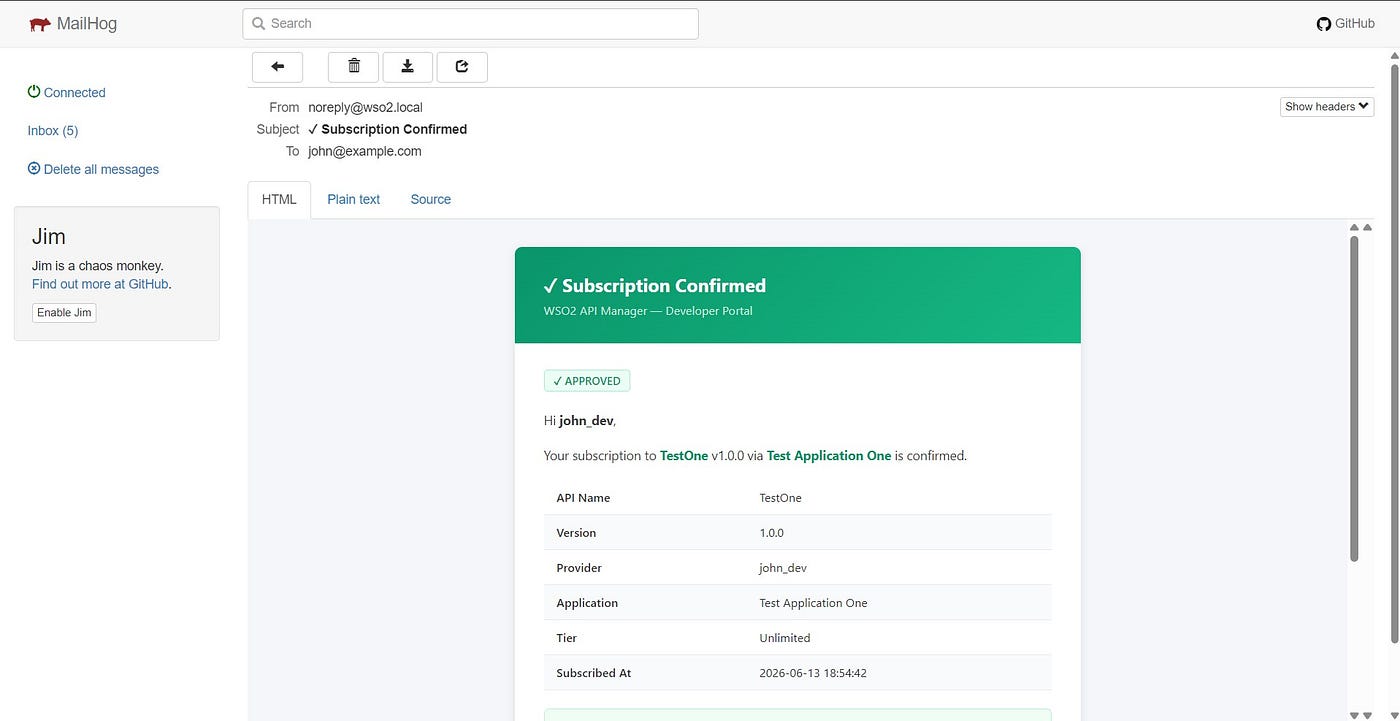
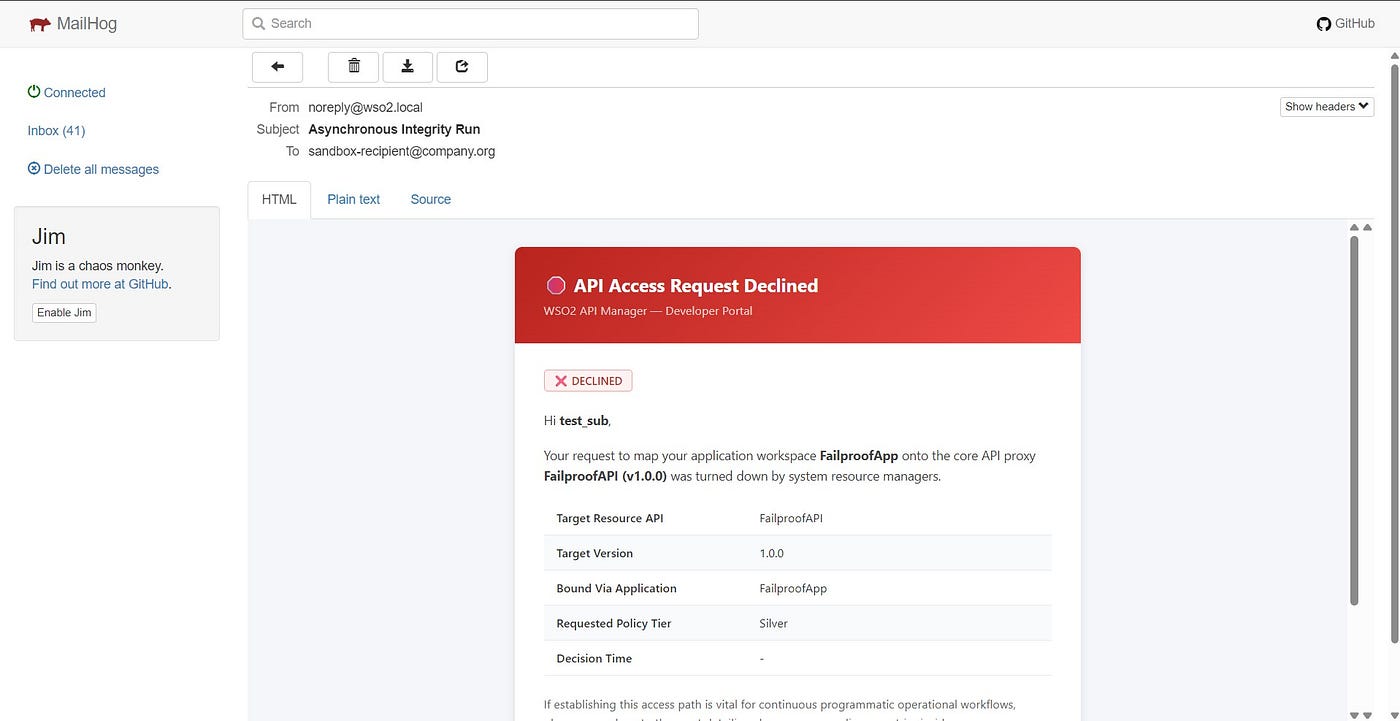
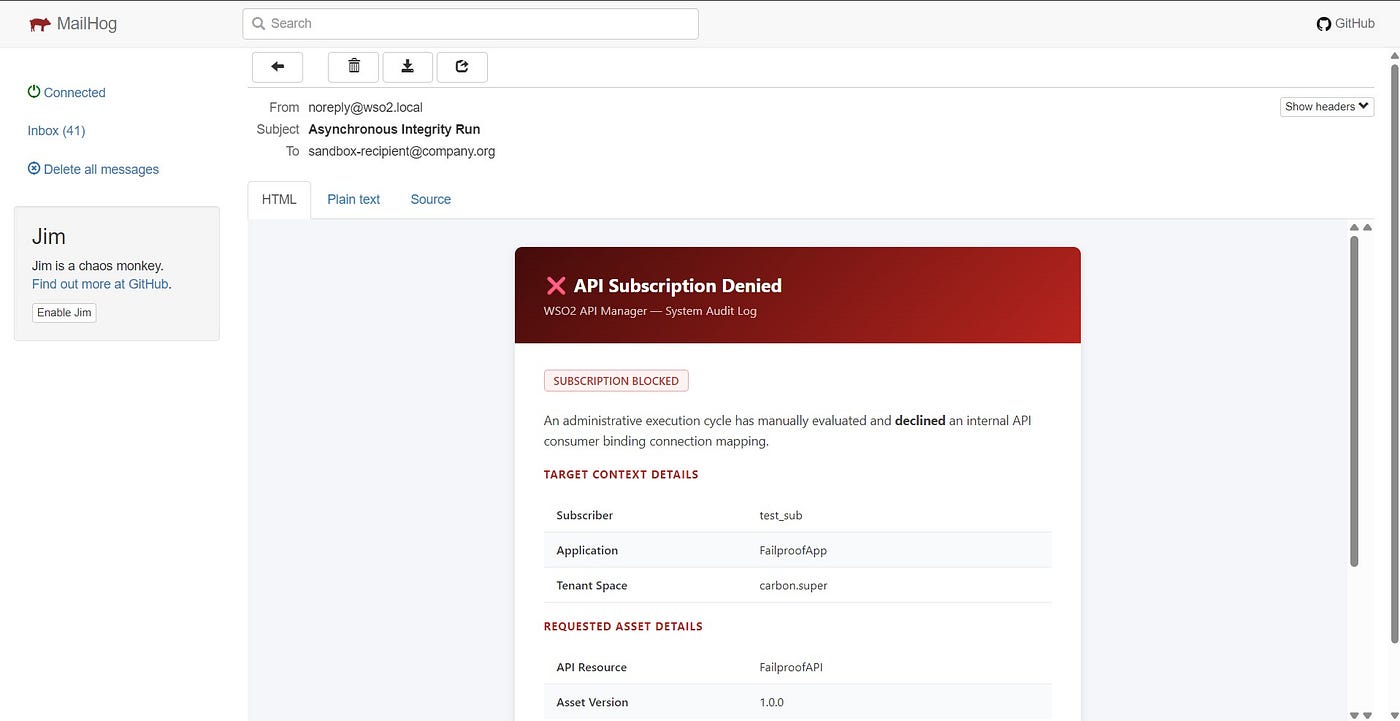
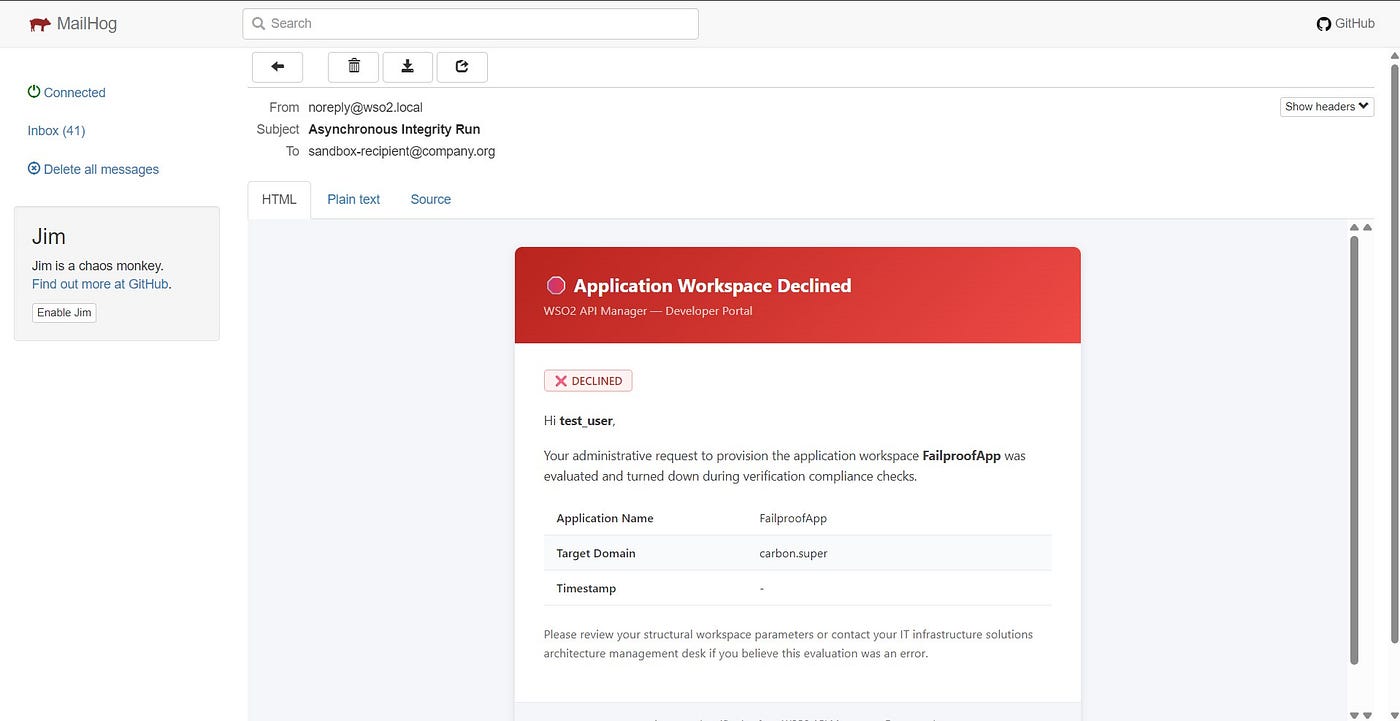
HtmlTemplates.java contains nine email layouts:
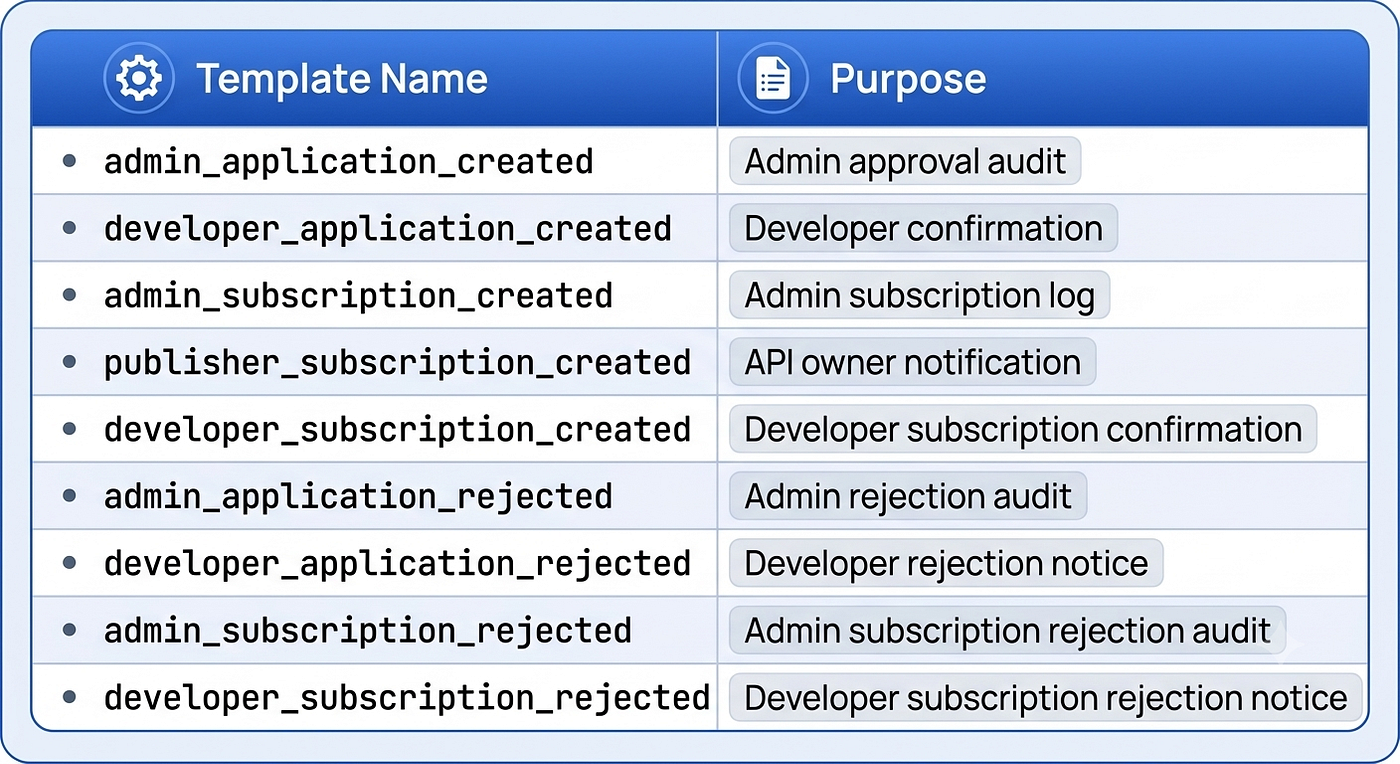
All templates share:
- A responsive CSS framework (gradient headers, table styling, badge elements)
- Safe variable substitution via
v(Map, key)andescape(String) - A
footer()with WSO2 branding
Example rejection template (admin):
private static String adminApplicationRejected(Map<String, Object> m) {
    return head("Application Request Rejected", "#450a0a", "#b91c1c")
        + "<div class=\"header\"><h1>❌ Application Request Rejected</h1>..."
        + row("Application Name", v(m, "applicationName"))
        + row("Requested By", v(m, "userName"))
        + ...
        + "<div class=\"ref-box\" style=\"background:#fef2f2;border-left:4px solid #ef4444;\">"
        + "<strong>Workflow Reference:</strong> " + v(m, "workflowRef") + "</div>"
        + footer();
}
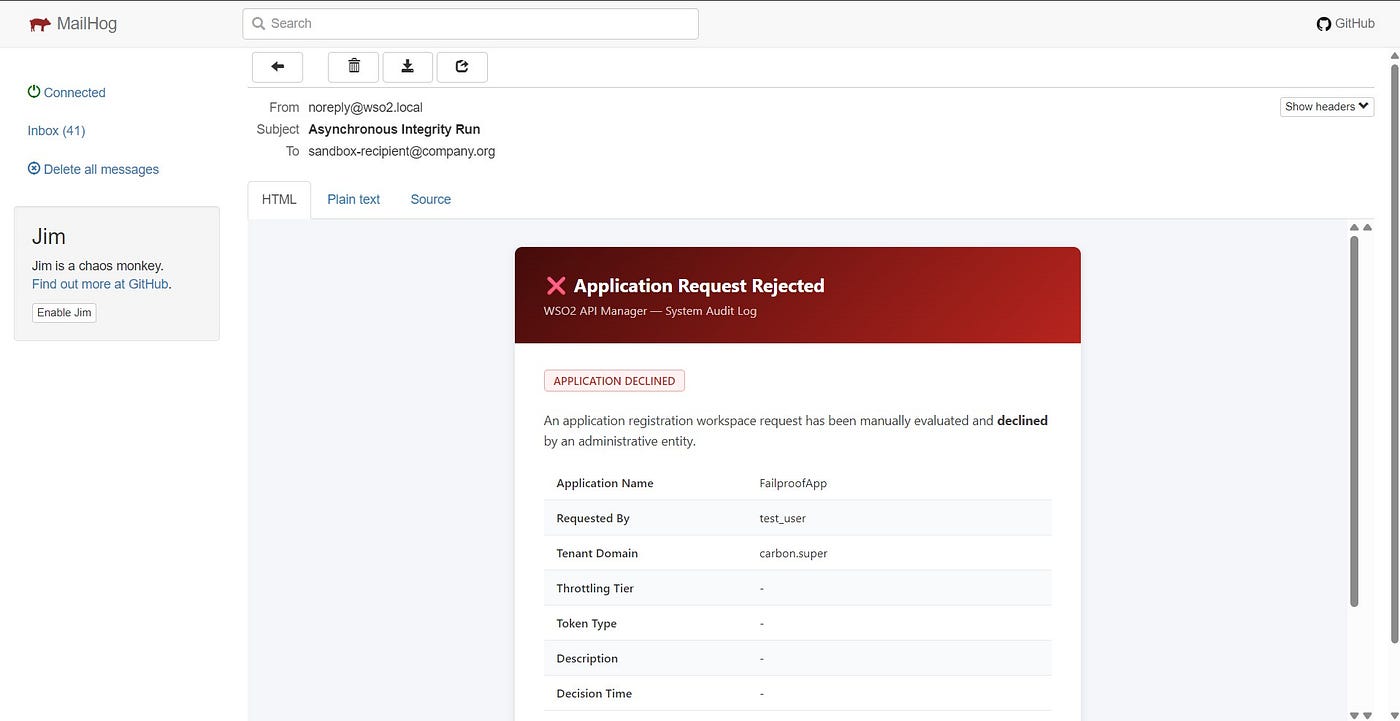
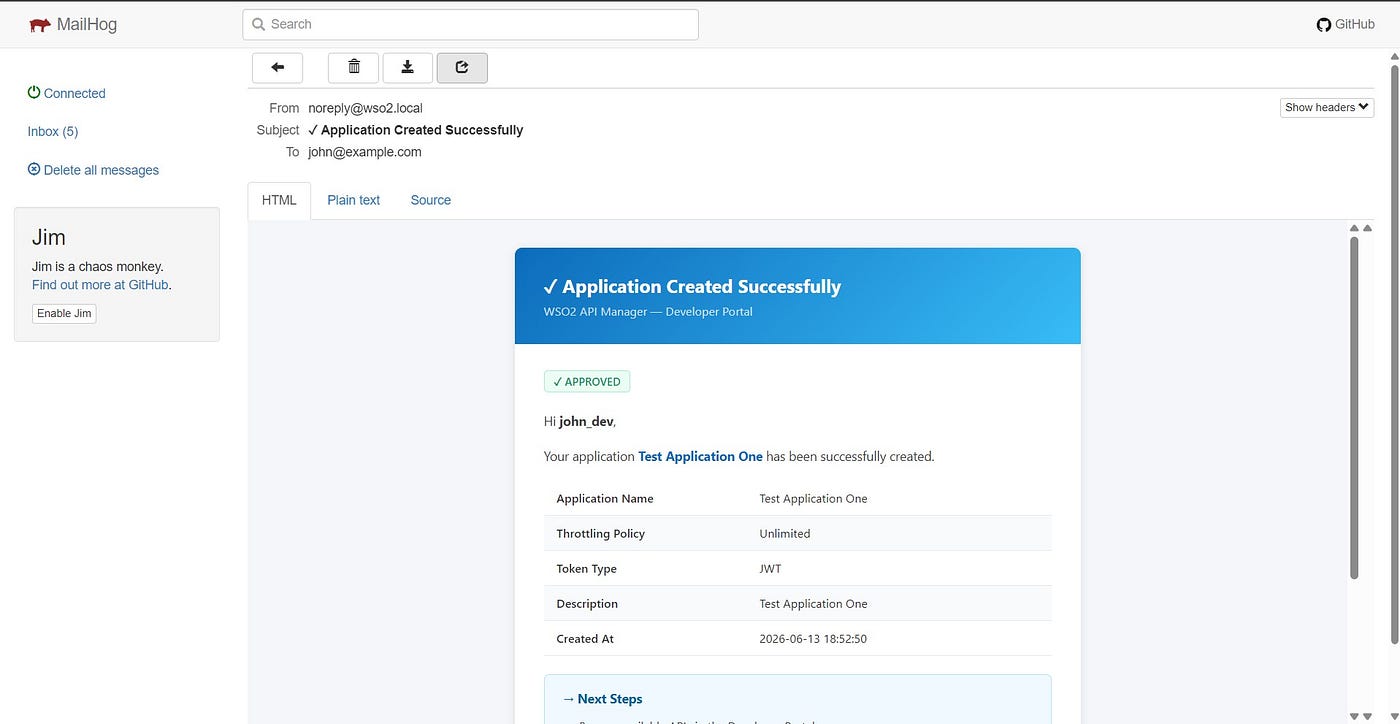
Notice the red gradient (#450a0a to #b91c1c) and the red‑bordered reference box – immediate visual distinction from approval emails (blue or green gradients).



The pom.xml — OSGi Bundle Configuration
The pom.xml uses maven-bundle-plugin to generate a proper OSGi manifest:
<packaging>bundle</packaging>
<plugin>
    <groupId>org.apache.felix</groupId>
    <artifactId>maven-bundle-plugin</artifactId>
    <version>5.1.8</version>
    <extensions>true</extensions>
    <configuration>
        <instructions>
            <Bundle-SymbolicName>${project.artifactId}</Bundle-SymbolicName>
            <Export-Package>com.mycompany.wso2.workflow.*</Export-Package>
            <Import-Package>
                org.wso2.carbon.apimgt.impl.workflow.*,
                org.wso2.carbon.apimgt.impl.*,
                org.wso2.carbon.apimgt.api.*,
                org.wso2.carbon.user.core.*,
                org.wso2.carbon.utils.*,
                org.apache.commons.logging.*;version="[1.2,2)",
                javax.mail.*;version="[1.6,2)",
                *;resolution:=optional
            </Import-Package>
        </instructions>
    </configuration>
</plugin>- All dependencies are
providedscope – they are not bundled. Export-Packagemakes your executor classes visible to WSO2’s reflection‑based workflow factory.Import-Packagedeclares exactly which packages your bundle needs from the OSGi container.*;resolution:=optionalcatches standard JDK packages.
The Journey: What Failed and Why (Updated)
This section documents the engineering path to the final solution — because understanding what doesn’t work is as valuable as knowing what does.
Attempt 1: Thymeleaf with Embed-Dependency
Result: NoClassDefFoundError: org/thymeleaf/templateresolver/ITemplateResolver
Why: Equinox 3.14 does not scan nested JARs for dropins/ bundles.
Attempt 2: Thymeleaf with inline=true
Result: NoClassDefFoundError: ognl/OgnlException
Why: Thymeleaf uses OGNL, which uses javassist. javassist loads classes via the thread context classloader (Equinox’s system loader), not your bundle’s loader.
Attempt 3: maven-shade-plugin fat JAR
Result: Missing Import-Package → can’t wire to WSO2 classes.
Why: Shade cannot generate correct OSGi metadata.
The Solution
Remove all template engines. Build HTML with pure Java string concatenation and CSS embedded in <style> blocks. The resulting HtmlTemplates.java is self‑contained, requires no OSGi wiring beyond java.util.Map, and produces identical HTML output.
New in this version: Rejection templates follow the same zero‑dependency principle, adding ~400 lines of Java‑based HTML without any new runtime dependencies.
Deployment (with Cache Wipe)
The deployment sequence is critical. Simply copying a new JAR to dropins/ is insufficient because Equinox caches bundle state in work/osgi/.
# 1. Stop WSO2
# 2. Remove old JAR
Remove-Item "C:\wso2am-4.2.0\repository\components\dropins\com.mycompany.wso2.workflow-1.0.0.jar"
# 3. Clear OSGi cache - this is mandatory
Remove-Item -Recurse -Force "C:\wso2am-4.2.0\work\osgi\*"
# 4. Clear temp
Remove-Item -Recurse -Force "C:\wso2am-4.2.0\tmp\*"
# 5. Build
mvn clean package
# 6. Verify no external libraries leaked
jar tf target\com.mycompany.wso2.workflow-1.0.0.jar | findstr thymeleaf
# 7. Deploy
Copy-Item "target\com.mycompany.wso2.workflow-1.0.0.jar" `
          "C:\wso2am-4.2.0\repository\components\dropins\"
# 8. Start with --clean and system properties (example)
.\api-manager.bat --clean -Demail.smtp.host=mailhog -Demail.smtp.port=1025
WSO2 Configuration
Register the custom executors in deployment.toml:
[apim.workflow_extensions]
application_creation  = "com.mycompany.wso2.workflow.CustomApplicationExecutor"
subscription_creation = "com.mycompany.wso2.workflow.CustomSubscriptionExecutor"
For email notifications to work, users must have the email claim populated in their WSO2 profile. Set this in the Carbon Management Console at https://localhost:9443/carbon → Identity → Users and Roles → Users → [user] → User Profile → Email.
End-to-End Flow (Approval and Rejection)
Approval Flow (Application Creation)
[Browser] POST /api/am/devportal/v2/applications
    → WSO2 API → APIConsumerImpl.addApplication()
    → WorkflowExecutorFactory → CustomApplicationExecutor.execute()
        → super.execute() → persists application, returns APPROVED
        → executeNotificationSequence("APPROVED")
            → getEmailInternally("admin") → admin@co.com
            → getEmailInternally("john") → john@co.com
            → EmailUtil.sendHtmlEmail(admin, "admin_application_created")
            → EmailUtil.sendHtmlEmail(john, "developer_application_created")
            → (async) SMTP to MailHog
    → Return HTTP 201 to browser
Rejection Flow (Subscription Rejection via Admin Portal)
[Admin] In Admin Portal, finds pending subscription task, clicks "Reject"
    → WSO2 calls CustomSubscriptionExecutor.complete(workflowDTO)
        → super.complete() → finalises rejection in DB
        → workflowDTO.getStatus() == REJECTED
        → executeNotificationSequence("REJECTED")
            → getEmailInternally("admin") → admin@co.com
            → getEmailInternally("subscriber") → john@co.com
            → EmailUtil.sendHtmlEmail(admin, "admin_subscription_rejected")
            → EmailUtil.sendHtmlEmail(john, "developer_subscription_rejected")
            → (async) SMTP
    → Admin portal shows success
The HTTP response to the admin is not delayed by email sending all dispatch is asynchronous.
Testing Strategy — Unit Tests with Mocked OSGi
The project includes comprehensive unit tests using JUnit 5 and Mockito with MockedStatic to mock WSO2’s static utilities (APIUtil, ServiceReferenceHolder, EmailUtil).
Example test for application rejection:
@Test
void testCompleteRejectionGuaranteesAllDetailsArePresent() throws Exception {
    when(mockWorkflowDTO.getStatus()).thenReturn(WorkflowStatus.REJECTED);
    WorkflowResponse response = executor.complete(mockWorkflowDTO);
    assertNotNull(response);
ArgumentCaptor<Map> modelCaptor = ArgumentCaptor.forClass(Map.class);
    mockedEmailUtil.verify(() -> EmailUtil.sendHtmlEmail(
        eq("security-audit@mycompany.com"), anyString(),
        eq("admin_application_rejected"), modelCaptor.capture()), times(1));
    Map<String, Object> model = modelCaptor.getValue();
    assertEquals("EnterpriseDataRouter", model.get("applicationName"));
    // ... more assertions
}


Key testing points:
workflowReferenceis always numeric (e.g.,"998877") to avoidNumberFormatException.- Static mocks are closed in
@AfterEachto prevent test pollution. - All nine templates are verified for missing values and XSS escaping.
Run tests with:
mvn clean test
mvn verify   # generates JaCoCo coverage report
Key Takeaways
-
Always call
super.execute()/super.complete()first The parent executor is responsible for persisting data and returning the correctWorkflowResponse. Your code must not prevent this. Wrap your notification logic intry-catchand return the superclass response unchanged. -
OSGi classloading is not regular Java classloading In Equinox’s isolated bundle classloader model, embedded nested JARs have documented limitations. When deploying to WSO2’s
dropins/, the only reliable approach is to import only packages that WSO2’s runtime already exports. -
Support both
execute()andcomplete()for full lifecycle Workflow tasks can be approved synchronously (execute()) or rejected asynchronously (complete()). Override both to ensure notifications are sent in all cases. -
Async dispatch is non‑negotiable A workflow executor runs in the hot path of a REST API request (or an admin portal action). Any blocking operation directly adds latency. Using
ExecutorServicefor SMTP dispatch completely decouples email delivery from request latency. -
Externalise configuration via system properties SMTP host, port, and
Fromaddress differ across environments. Reading them fromSystem.getProperty()avoids recompilation and keeps the bundle environment‑agnostic. -
Rejection emails are as important as approval emails Developers need to know why their request was denied. Administrators need audit logs of rejections. The same template engine can produce red‑themed rejection emails with zero additional complexity.
-
Test with mocked static calls WSO2 heavily uses static utilities (
APIUtil,ServiceReferenceHolder). Mockito’sMockedStaticallows you to test your executor logic in isolation without a running WSO2 server. -
Clear
work/osgi/on every redeployment Equinox’s bundle cache is persistent by design.work/osgi/*must be deleted on every redeployment of a bundle, otherwise the runtime may run cached wiring from an old version.
The complete source code for this project is available on GitHub: github.com/NelushGayashan/wso2-custom-executor
Built against WSO2 API Manager 4.2.0 — Equinox OSGi 3.14 — Java 17
About the Author
Nelush Gayashan Fernando is a Lead Software Engineer with expertise in full-stack development, specializing in Java, Spring Boot, ReactJS, and scalable microservices architecture. With a background spanning banking, enterprise software, and API management, he writes about data structures, backend engineering, and practical software development best practices.
If you found this article helpful, give it a clap 👏 and follow for more content on software engineering and backend development!
메타데이터
- post_id
- ce72e41bfc0f
- slug
- building-a-custom-workflow-executor-for-wso2-api-manager-4-2-0-ce72e41bfc0f
- url
- https://medium.com/@nelushgayashan/building-a-custom-workflow-executor-for-wso2-api-manager-4-2-0-ce72e41bfc0f
- canonical_url
- https://medium.com/@nelushgayashan/building-a-custom-workflow-executor-for-wso2-api-manager-4-2-0-ce72e41bfc0f
- author_url
- https://medium.com/@nelushgayashan
- status
- ok
- fetched_at
- 2026-06-22 00:13:37





