Customizing QPushButton Background without Losing Native Style (PyQt5)
Overview
Customizing QPushButton Background without Losing Native Style (PyQt5)
Overview
In many PyQt5 applications, you may want to highlight a button with a specific color based on state — for example, red for warnings or green for success. A common approach is to use setStyleSheet() to change the background color.
Why Not setStyleSheet()?
In PyQt (and Qt in general), using setStyleSheet() often breaks the native style of widgets. This means that on Windows, for example, you lose the 3D bevel effect, shadows, and animations.
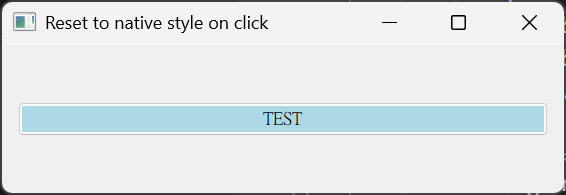
Instead, by overriding paintEvent() and using QStylePainter, we gain precise control over what we change — in our case, just the background fill inside the button, while preserving the rest of the platform's native rendering like borders and pressed states.
❌ setStyleSheet() breaks native look and feel
- It overrides the entire style engine for that widget.
- On Windows, you’ll lose the 3D effect, hover animations, and shadows.
- On macOS and Linux, you lose platform-specific rendering as well.
✅What if you want to:
Change only the inner button color Keep the native border, shadows, and animations Avoid writing fragile CSS-like stylesheets?
Solution: Override paintEvent() and Use QStylePainter
Here’s how we solve it:
- Subclass
QPushButton - Override
paintEvent() - Use
QStylePainterto: Draw the native button first Fill only the inner content area with a customQBrushDraw the label on top - Replace the original button (even if it’s from Qt Designer)
Full Code: QPushColoredButton
[embed]
Why This Approach Works
Here’s how QStylePainter compares to the commonly used setStyleSheet() method:
setStyleSheet()
- ❌ Breaks native look — system borders, shadows, and animations are lost
- ✅ Supports dynamic colors — you can easily change styles via string-based CSS
- ✅ Simple to apply — just call
.setStyleSheet()with a string
QStylePainter (this approach)
- ✅ Preserves native look — keeps 3D borders, system hover effects, etc.
- ✅ Supports dynamic colors — change only the button face color in
paintEvent() - ❌ Requires subclassing — a bit more effort, but precise and safe
By using QStylePainter, we retain full control over the button’s inner appearance (such as background color) while still allowing the operating system to render all other visual elements — such as the pressed animation, focus ring, and native style.
This is ideal for applications that want to highlight buttons or visually categorize states (e.g., warning, active) without breaking platform consistency.

Use Cases
- Color-tag buttons dynamically based on status (e.g., warning, active, selected)
- Maintain consistent look on Windows/macOS/Linux
- Replace existing buttons from
.uifiles created in Qt Designer
Code Link
I’ve published the full code as a GitHub Gist here.
메타데이터
- post_id
- ce7c8a2e380c
- slug
- customizing-qpushbutton-background-without-losing-native-style-pyqt5-ce7c8a2e380c
- url
- https://medium.com/@RainingShrimp/customizing-qpushbutton-background-without-losing-native-style-pyqt5-ce7c8a2e380c
- canonical_url
- https://medium.com/@RainingShrimp/customizing-qpushbutton-background-without-losing-native-style-pyqt5-ce7c8a2e380c
- author_url
- https://medium.com/@RainingShrimp
- status
- ok
- fetched_at
- 2026-07-19 17:05:15



