How to avoid data-mix between clients ?
Separating production data between your clients is highly important for your company’s reputation. Imagine if you are on Netflix, and…
How to avoid data-mix between clients ?
Separating production data between your clients is highly important for your company’s reputation. Imagine if you are on Netflix, and clicking on your profile, you suddenly realize what you see is the profile of someone else… Because of a silly mistake from a developer. That should not even be possible for a developer to be able to do that. That when “tenancy” comes around, which you can traduce by “the way to properly split (and keep separate) your clients’ data”. In this article, we will tackle this from a technical point of view. We will explain how and what we decided for us.
There are two main ways to design an application to support multiple tenants: multi-tenant and single-tenant architectures.
👤 Single-tenant
In a single-tenant architecture, each tenant has its own instance of the application and its own database.
This means that the application and its data are completely separated between tenants.
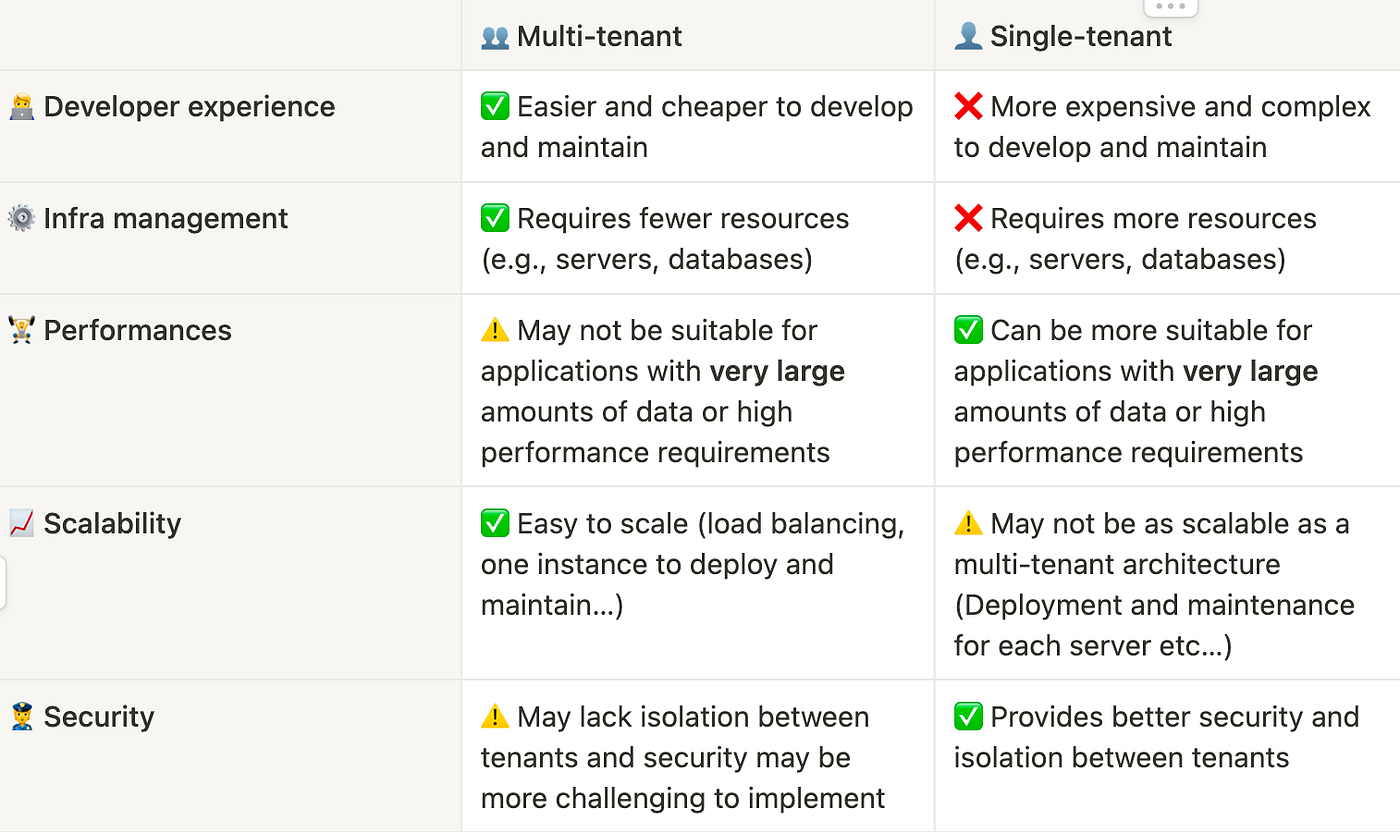
The advantage of this approach is that it provides better security and isolation between tenants, because each tenant’s data is completely separate from the others.
The disadvantage is that it is generally more expensive and complex to develop and maintain, because each tenant requires its own instance of the application.
👥 Multi-tenant
In a multi-tenant architecture, all tenants share the same instance of the application and the same or a separate database.
This means that the application and its data are not separated between tenants.
The advantage of this approach is that it is generally easier and cheaper to develop and maintain, because there is only one instance of the application to manage.
The disadvantage is that tenants may be able to see each other’s data if the application is not properly secured.
👤Single-tenant 🆚 👥 Multi-tenant
Ultimately, the choice between a multi-tenant and single-tenant architecture will depend on the specific needs and requirements of your application.
If security and isolation are critical, a single-tenant architecture may be the better choice.
If cost and simplicity are more important, a multi-tenant architecture may be a better fit.
Based on our specific needs and requirements, the pros of a multi-tenant architecture, such as ease of development and maintenance, resource utilization, and load balancing, outweigh the cons, making it the better choice compared to a single-tenant architecture.
👥 Multi-tenant strategies
There are different strategies to implement a multi-tenant architecture :
Database per Tenant
In this approach, each tenant has their own dedicated database, which is completely separate and isolated from the databases of other tenants.
✅ This ensures that each tenant’s data is completely isolated and secure, and allows for independent scalability for each tenant. Useful for high secrecy, health data… Alto has no plan to handle such data
❗ May be more expensive and complex to develop and maintain, as it requires a separate database for each tenant
❗May require more resources (e.g., servers, storage) compared to the other strategies
Shared Database, Shared Schema
In this approach, all tenants share a single database and the same schema, but each tenant’s data is kept separate using a tenant identifier column in each table.
✅ This allows for better resource utilization and reduced complexity compared to a database per tenant approach, but may not provide as much isolation or security between tenants.
✅ very useful for application that need to have quick centralized stats on all tenants usage and so on without the need to build a data lake to gather the data.
✅ very easy to communicate between tenant, transfer element from one tenant to another, and group tenants for instance.
❗Security may be more challenging to implement, as all tenants share the same database
❗May not be suitable for applications with very large amounts of data or high performance requirements, as all tenants are sharing the same database
Shared Database, Separate Schema
In this approach, all tenants share a single database, but each tenant has their own separate schema within the database, containing their own tables and data.
✅ This allows for better resource utilization and reduced complexity compared to a database per tenant approach.
✅ This also provide good level of isolation and security between tenants that we dont get with a shared database, shared schema approach.
❗However, it may still not provide as much isolation or security as a database per tenant approach.
❗May not be suitable for applications with very large amounts of data or high performance requirements, as all tenants are sharing the same database.
⚠️ Still more complex to develop and maintain compared to a shared database, shared schema approach.
🧪 Proof Of Concepts
Shared Database, Separate Schema
Based on our specific needs and requirements, I considered the Multi-tenant Shared Database with Separate Schema option. This option seemed to offer the isolation we needed for our tenants, while adding minimal complexity.
However, after further evaluation, we identified the following drawbacks 👎 :
🤯 Complexity !
Managing the multi schema with TypeORM was not as easy as I thought and it took me almost a day to figure out how to make TypeORM switch schemas between requests (it seems this is a issue that they have not yet resolved).

src directory structure after implementing the multi-schema approach…
🏭 Scoped Provider ⇒ Low Performance
We would have to use a new DataSource for each request by creating a scoped provider, which would mean that NestJS would instantiate a new provider for each incoming request, resulting in latency and reduced performance for our app.
🪛 Database migration scripts are hard to generate
Since TypeORM does not handle the multi-tenancy multi schema use case, it does not provide an easy way to generate migration scripts for this approach. We would have to manually edit the migration scripts to add the concept of schema into the Postgres queries, which could lead to errors for future migration scripts as the number of scripts increases.

Comment table creation with schema manually added
🥁 And the winner is…
🏆 Same Database, Same Schema using a tenant identifier column.
After conducting the POC 🧪, we determined that the Shared Database, Separated Schema approach is not the most suitable for our needs 🙅 and have decided to choose the Same Database Same Schema using a tenant identifier column.
⚠️ This means we will need to carefully enforce data separation within our code, but we believe this tradeoff is the most reasonable for our situation.
🧑💻 Implementation : Shared Database, Shared Schema
Common classes
To facilitate the use of our multi-tenant strategy in our modules created the following abstract classes, decorators and guards :
- To begin, I added a new field called
**companyIdto our AltoBaseEntity class, it’s a class that every entity in our app extends to share common fields like id, creation date etc… By doing this, we ensured that every tables of our database will have acompanyId**column, which allows us to filter all our queries by this column to isolate data by companies. - Then I created a NestJS global-scoped
**@Guard**that checks if the**companyIdquery parameter is present. If it is not, the `@Guardthrows aBadRequestException.** This helps us enforce the requirement that for every request acompanyId` should be provided in the query params, ensuring that the data returned to each API calls remains properly isolated by company. - I have created the
**AltoBaseRepository**as an abstract class to manage all database operations in our services. To perform their database queries, each module will need to create its own repository that extends the**AltoBaseRepository**. The**AltoBaseRepository**includes a**companyId**in all of its functions to ensure that filters are added to the executed queries for security purposes. - I created a custom parameter decorator called
**@CompanyId**to easily retrieve the**companyId**query parameter in our controller functions. (shortcut for developers)
Using it in Comment
To implement our multi-tenant strategy in the Comment module, this is the approach I took:
- First I created the
**CommentRepository**class that extends**AltoBaseRepository**, this class can implements it’s own custom query if needed but can only use the functions provided by**AltoBaseRepositoryto execute queries on the database. This is done to prevent developers from using directly the `Repository**` class of TypeORM in a way that does not properly segment data by Company. - To utilize NestJS dependency injection to inject the newly created
**CommentRepository**into our**CommentService, I added it to the `providersarray in theCommentModule`**. - With the
**CommentRepository**now available in my service, I updated the**CommentService**to use the**CommentRepository**in place of the TypeORM repository. I also modified all functions to accept the**companyId**argument that I will get from my controller and use the**CommentRepository** functions instead of making my own request. - Finally, I updated the
**CommentController**to utilize the**@CompanyId()**param decorator on all routes of the controller to retrieve the**companyId**query parameter and pass it to the service.
메타데이터
- post_id
- ceb05915eab5
- slug
- how-to-avoid-data-mix-between-clients-ceb05915eab5
- url
- https://medium.com/@contact_48352/how-to-avoid-data-mix-between-clients-ceb05915eab5
- canonical_url
- https://medium.com/@contact_48352/how-to-avoid-data-mix-between-clients-ceb05915eab5
- author_url
- https://medium.com/@contact_48352
- status
- ok
- fetched_at
- 2026-07-26 04:19:54




