Integrating Claude Code with the Agno Multi-Agent Framework
A technical deep dive into ClaudeAgent on AgentOS — five role-based coding endpoints with scoped permissions and hooks, Native Agent Teams…
Integrating Claude Code with the Agno Multi-Agent Framework
A technical deep dive into ClaudeAgent on AgentOS — five role-based coding endpoints with scoped permissions and hooks, Native Agent Teams, and Agno Workflow and Team registered side by side on one server.
Overview
Claude Code is Anthropic’s agentic coding tool — now used across the terminal, IDE, GitHub, and the web app to read and edit real codebases, run shell commands, apply project rules from CLAUDE.md, and coordinate multi-step work through hooks, MCP, and (optionally) peer agent teams. It has quickly become one of the most capable options for work that must change files and verify results, not just answer questions in a chat window. The Agent SDK extends the same engine to headless automation — CI, scripts, and server-side runs.
Agno is a multi-agent framework and production runtime for the same era: you define agents, teams, and workflows in Python, then expose them through AgentOS — a FastAPI service with session persistence, tracing, and a control plane at os.agno.com. Agno is deliberately framework-agnostic — its Claude Agent SDK integration registers Claude Code as a first-class HTTP endpoint alongside native Agno orchestration, without locking you into one agent stack.
Combining the two is the focus of this article: Claude Code’s depth on your filesystem, plus Agno’s URLs, persistence, and governance so anyone on your team — or an automated pipeline — can trigger a coding task with a plain HTTP request, without opening a terminal. In Python you define several ClaudeAgent specialists — each with a specific job and its own permissions (one that only reads and audits, another that can edit files and run tests, and so on). Agno gives each one its own URL, and anyone who needs that job calls that URL.
**AgentOS is Agno’s runtime: a FastAPI service you run in your own infrastructure (laptop, team server, or container). You start it once (for example python your_app.py); it listens for HTTP requests. Each registered agent, workflow, or team gets its own URL — so a coworker, a script, or an automated pipeline can send a message without opening Claude Code in a terminal. os.agno.com is the control plane* UI: your browser connects to your* runtime to chat and browse past runs (AgentOS introduction).
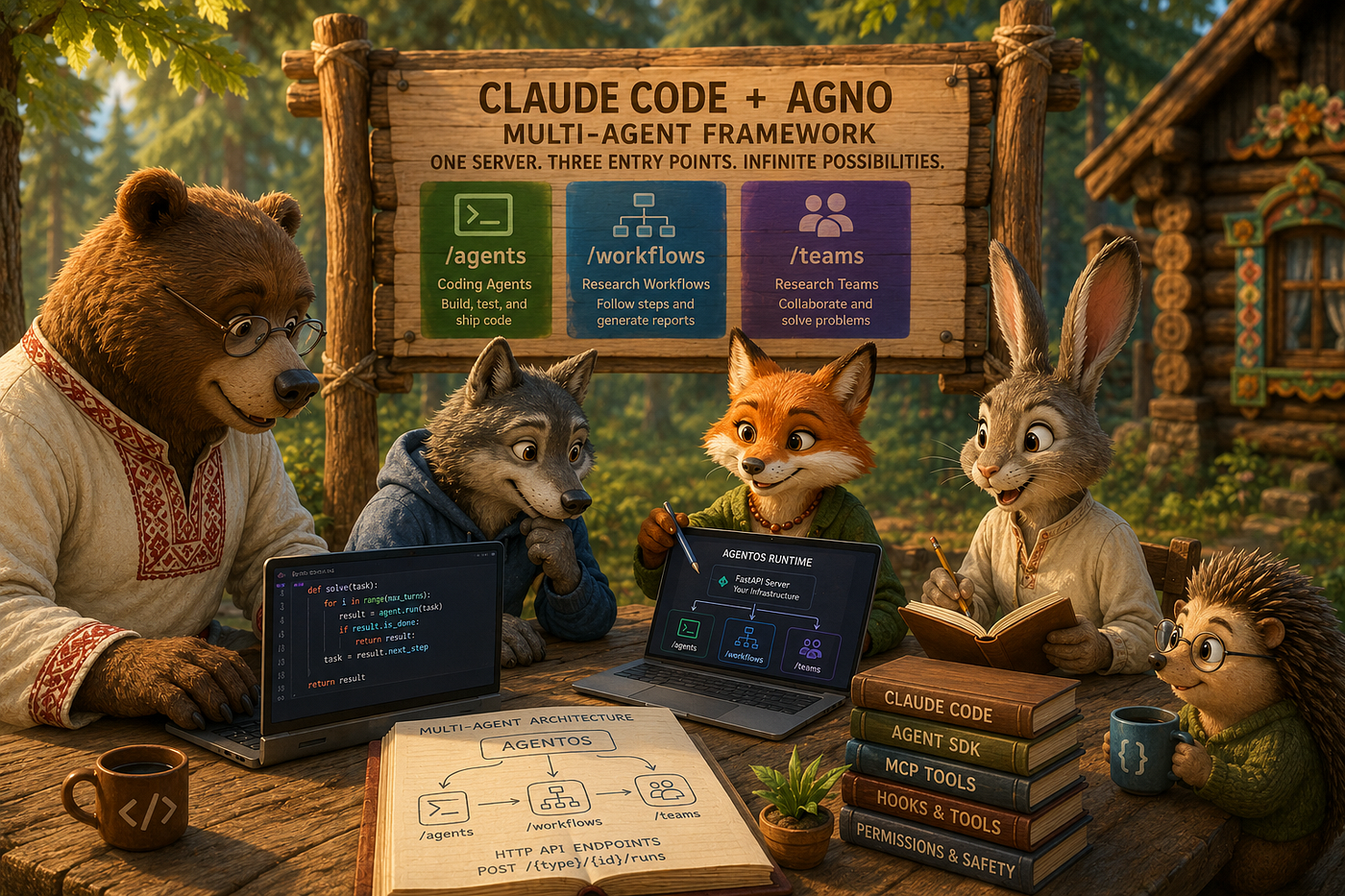
Think of one AgentOS instance as a building with different doors:
Door 1 — /agents/...
- Who answers:
**ClaudeAgent** (Claude Code) - Typical job: Work on your codebase — read/edit files, run tests and shell commands, use project rules in
CLAUDE.md
Door 2 — /workflows/...
- Who answers: Agno
**Workflow** - Typical job: Research reports with a fixed recipe (same steps every time, e.g. “check market + news + tech, then summarize”)
Door 3 — /teams/...
- Who answers: Agno
**Team** - Typical job: Research questions where a leader picks the right helper (finance vs web vs news)
All three doors are on the same server. They do not share one chat thread. A **ClaudeAgent is not plugged inside a `Workflow**orTeam` — Agno documents that as unsupported (multi-framework overview). You choose the right door for the task.
Claude Code is Anthropic’s agentic coding tool: it reads and edits files, runs shell commands, uses git, and can call external tools via MCP (Model Context Protocol — a standard plug-in interface for custom tools). Work happens through those tools (with permissions you set), not by controlling random desktop apps. That is the gap between chatting about code and actually changing files in your project — including from an automated pipeline when you use the Agent SDK.
**ClaudeAgent is how Agno runs Claude Code on your server (Claude Agent SDK integration). In Python you define one `ClaudeAgent(...)** per **job you want a separate button for** — for example a **Security Auditor** that only reads files and searches the web, or a **Code Developer** that can edit files and run tests. Agno registers each one onAgentOS` and gives it its own URL: POST /agents/{id}/runs (multi-framework overview) — {id} is the agent’s id, or a slug from its name if you leave id unset.
Each registered agent carries its own settings (from Agno’s Claude Agent SDK parameter list):
**name/ `id** /description` — display name, optional explicit endpoint id, and UI/API metadata (iddefaults to a slug fromname, e.g.Claude Assistant→claude-assistant)**cwd** — which project folder Claude Code works in**allowed_tools/ `disallowed_tools** — which Claude Code tools it may use (for exampleReadonly, orRead+Edit+Bash`)**max_budget_usdand `max_turns`** — cost and step limits per request**system_prompt** — what this specialist is supposed to do**permission_mode** — controls when Claude pauses to ask before acting (Claude Code permission modes):default— reads without asking; writes and other risky actions prompt for approval.acceptEdits— also auto-approves file edits and common filesystem commands (mkdir,rm,mv, etc.) inside the working directory.plan— reads only, likedefault, but for exploration without making changes.bypassPermissions— skips all checks; for isolated containers only**mcp_servers** — register custom tools built with the Claude Agent SDK’s MCP server API (see Code Analyzer)**db** — Agno database handle (SqliteDb,PostgresDb, …) that persists runs so Chat can continue the same thread when you reusesession_id(session persistence)**options_kwargs**— pass-through to Claude Code:hooks****(run Python code before/after a tool),setting_sources(load.claude/CLAUDE.md),env(feature flags),subagents(helper agents in separate context windows),effort(reasoning depth on supported models)
You can put several ClaudeAgent instances on the same server. The demo uses five specialists; callers choose the URL that matches the task.
Claude Code alone vs Agno + ClaudeAgent
How many assistants?
- Claude Code alone: One chat at a time in the tool you use (terminal, IDE, desktop app, or web).
**ClaudeAgentonAgentOS: Several specialists on one server**, each with its own URL (for example Security Auditor vs Code Developer).
Who sends the next message?
- Claude Code alone: You, or a script you run.
**ClaudeAgentonAgentOS:** You, a teammate in the browser, or automation (CI) — by calling the right URL: coding (/agents/...) or research (/workflows/...or/teams/...).
Where chats are stored
- Claude Code alone: On your computer (local install) or in Anthropic’s cloud (web version) — not in Agno’s database.
**ClaudeAgentonAgentOS: In Agno’s `db** — a database you run (for exampleSqliteDbfor a local file, orPostgresDbin production). PassdbtoAgentOSand/or to eachClaudeAgent; if an agent has nodb,AgentOSapplies its own ([persisting sessions](https://docs.agno.com/sessions/persisting-sessions/overview)). Each turn is stored there (messages, tool calls, token usage). To **continue the same chat**, send the next request with the samesession_id`. The os.agno.com Sessions tab reads that database on your server — past chats remain after a restart (AgentOS).
What you use it for
- Claude Code alone: Hands-on work in a project folder — read and edit files, run shell commands, use git when it is there (how Claude Code works).
**ClaudeAgentonAgentOS: The same hands-on work (Read,Edit,Bash, …), but shared over HTTP** and a web UI on your server (cwdsets the folder).
Where shell commands run (this article): ClaudeAgent runs on your machine or server, in the project folder you set (cwd). Claude Code on the web runs in Anthropic’s cloud instead. Both execute real commands in that environment.
How the pieces fit together
The same names show up everywhere in this article — what they are, and what each one is for:
**AgentOS— Agno’s runtime: a FastAPI* service you run in your infrastructure (introduction). It registers agents, teams, and workflows and serves them over HTTP (POST /agents/{id}/runs,/teams/...,/workflows/...). Callers can be a person in the browser or os.agno.com, your Python code, or an automated pipeline — all talking to your* server.**ClaudeAgent— Agno adapter for the Claude Agent SDK / Claude Code subprocess (Read,Write,Edit,Bash, hooks, …). Use it for:** hands-on work on your project’s files in the folder you set (cwd) — read, edit, run tests or shell commands. One Claude Code session per HTTP request.**Workflow— Agno class: a fixed pipeline in Python (Parallel,Condition,Step, …). Use it for:** research with the same steps every time (web search, market data, synthesis). Uses native AgnoAgentsteps — not Claude Code file tools.**Team— Agno class: a leader plus specialist `Agent` members; the leader routes and synthesises one answer. Use it for:** open-ended research Q&A where the right expert depends on the question. Not the same as Native Agent Teams (below).**Agent* — Agno class: one LLM with tools. In this demo,WorkflowandTeamsteps call nativeAgentinstances (they can use Claude models* but not Claude Code’sRead/Edit/Bash).- Native Agent Teams (optional) — Claude Code feature (enable with env var
CLAUDE_CODE_EXPERIMENTAL_AGENT_TEAMS=1; tools includeTeamCreate,SendMessage). Use it for: several Claude Code workers that message each other during one coding job inside a singleClaudeAgentrequest. This is not Agno’sTeam(leader routing among AgnoAgentmembers). - Endpoint — One HTTP path, e.g.
POST /agents/security-auditor/runs. Inos.agno.comChat you pick a registered workflow, team, or agent. The demo has seven endpoints: oneWorkflow, oneTeam, fiveClaudeAgentinstances.
What this article covers
This article explains how to integrate Claude Code with Agno — running it through AgentOS, with one walkthrough scenario as an example
What the walkthrough demonstrates:
- Several
**ClaudeAgentroles on one `AgentOS`** server — audit, review, structured JSON for pipelines, guarded file edits, and (optionally) a multi-agent build with Native Agent Teams. - Per-role controls: hooks, budget caps, and a working directory (
cwd) for each coding agent. - Optional research endpoints on the same server: one Agno
**Workflow(fixed pipeline) and one Agno `Team`** (leader-routed Q&A).
The walkthrough scenario (software project intelligence) is only an example: evaluate a library, audit code, review changes, return JSON for CI, apply guarded edits, optionally generate a small tested module. The patterns — which endpoint to call, how to configure ClaudeAgent, when not to nest adapters — apply to other domains too.
Quick reference — which URL to call
- Change files or run shell commands on your project →
ClaudeAgentat/agents/{id}/runs - Fixed research pipeline (same steps every time) →
Workflowat/workflows/{id}/runs - Open-ended research question (leader picks specialists) →
Teamat/teams/{id}/runs - One
AgentOSserver hosts all of the above — coworkers, your scripts, or CI call the same host - Do not nest
ClaudeAgentinsideWorkfloworTeam. Register them side by side and call the matching URL
Minimal official pattern (Agno cookbook)
Every integration in this article extends the same skeleton from Agno’s source code [claude_agentos.py](https://github.com/agno-agi/agno/blob/main/cookbook/frameworks/claude-agent-sdk/claude_agentos.py):
from agno.agents.claude import ClaudeAgent
from agno.os import AgentOS

claude_agent = ClaudeAgent(
    name="Claude Assistant",
    description="A Claude-powered assistant served through AgentOS",
    model="claude-sonnet-4-6",
    allowed_tools=["Read", "Bash"],
    permission_mode="acceptEdits",
    max_turns=10,
)
agent_os = AgentOS(
    name="Claude Agent SDK Example",
    description="AgentOS serving a Claude Agent SDK agent",
    agents=[claude_agent],
)
app = agent_os.get_app()
if __name__ == "__main__":
    agent_os.serve(app="claude_agentos:app", reload=True)
The walkthrough in this article adds several ClaudeAgent specialists, optional Workflow and Team endpoints, and a shared SqliteDb so chats persist — all on one AgentOS server you talk to from os.agno.com or from your own scripts. It serves on port 7778 via agent_os.serve(app=app, host="0.0.0.0", port=7778) — same Agno APIs, richer deployment.
Agno alone, Claude Code alone, and Claude Code on AgentOS
Before wiring ClaudeAgent into AgentOS, it helps to be explicit about what each approach does on its own — and why you would combine them. None of the three approaches replaces the others; they address different layers.
Agno alone (native Agent, Team, Workflow on AgentOS)
In this article, “Agno alone” means orchestration built only from Agno’s own building blocks — Workflow, Team, and standard Agent members — without registering a ClaudeAgent adapter. That stack still runs on **AgentOS** — Agno's runtime (the server that runs your agents) and control plane (the web UI to monitor and manage them) — (AgentOS introduction).
Agno excels at structured orchestration and operations:
WorkflowwithParallel,Condition, and deterministic step orderTeamwith a leader that routes to specialistAgentmembersAgentOSHTTP endpoints andSqliteDbsession persistence- Agno-native tools (
YFinanceTools,WebSearchTools,HackerNewsTools, MCP viaMCPTools, and others)
What this stack does not substitute for Claude Code via ClaudeAgent:
- Claude Code’s built-in tools (
Read,Write,Edit,Bash,Glob,Grep, …) executed inside a Claude Code subprocess - Claude Code hooks — small programs that run before a tool call (
PreToolUse, e.g. block a write) or after it (PostToolUse, e.g. write an audit log). Configured through the Claude Agent SDK, not Agno’s nativeAgentguardrails (multi-framework notes) - Subagents (
AgentDefinition, sub-agents) — helpers in their own context window; results go back to the parent only. Agent teams (agent teams) — peer workers that canSendMessageeach other mid-run (TeamCreate,SendMessage,TeamDelete). Not Agno’sTeam. - Native Agent Teams are different: peer workers that can
SendMessageeach other mid-run (TeamCreate,SendMessage, …) **ClaudeAgentinside an AgnoTeam** — not supported (multi-framework overview). AgnoTeammembers must be nativeAgentinstances. Register eachClaudeAgentonAgentOS(agents=[...])and call/agents/{id}/runs— notTeam(members=[...]).
Agno native file tools vs Claude Code — when to use which. A native Agno Agent can touch the filesystem and shell, but through Agno toolkits, not through Claude Code’s engine. They aim at different jobs:
Agno’s own local toolkits (general-purpose; one function does one thing):
**Workspace— Agno toolkit (from agno.tools.workspace import Workspace) for a native `Agent** to work in onerootfolder: read, search, edit, move, delete, and shell. Safe actions go inallowed=(read,list,search); risky ones inconfirm=(write,edit,move,delete,shell) for approval in [os.agno.com](https://os.agno.com/) ([tools overview](https://docs.agno.com/tools/overview), [user confirmation](https://docs.agno.com/hitl/user-confirmation)). Not forClaudeAgent`.**FileTools* (File toolkit) —read_file,list_files,search_files,save_file, chunked read/replace, optionaldelete_file; `enable_` flags and size limits.**ShellTools** (Shell toolkit) — a singlerun_shell_commandfunction.
**ClaudeAgent** (Claude Code via the Claude Agent SDK) is purpose-built for coding work. Six things it adds that the Agno toolkits do not:
- A built-in coding loop that fixes its own mistakes. Inside every
ClaudeAgentrequest, Claude Code runs a three-phase loop by itself — gather context (Read,Glob,Grep), take action (Edit,Write,Bash), verify (run tests, re-read the file, search the web) — and adapts as it goes (how Claude Code works). The phases blend: a simple question may only gather; a bug fix may cycle through all three many times. Each tool result feeds back into Claude’s next decision, so if a test fails it reads the error, edits the code, and re-runs — without you scripting any of that. You do not write the loop; you shape it throughClaudeAgentparameters:
**allowed_tools/ `disallowed_tools** — what actions are available each turn (noBash` → no test runs → no runtime self-correction)**permission_mode— how often the loop stops to ask:defaultpauses on every risky tool;acceptEditsauto-approves file edits and a small set of filesystem commands — in headlessClaudeAgentSDK mode, `Bashcommands are separately pre-approved by listingBashinallowed_tools(not byacceptEditsitself)**; together they enable autonomous read-edit-test cycles;planblocks all writes (research only);bypassPermissions` runs everything without any gate (sandboxes only)**cwd** — where the loop’s edits andBashcommands land**max_turns/ `max_budget_usd`** — the loop’s budget (hard caps on iterations and cost)**system_prompt* — style rules every turn obeys (e.g. "always read before editing, always run tests after changes"*)**options_kwargs={"setting_sources": ["project"]}— loads `.claude/CLAUDE.md`** so persistent project rules are in scope every turn (memory)**options_kwargs={"hooks": {...}}** —PreToolUseto block a tool call before it runs,PostToolUseto log or transform it; intercepts the loop without changing your prompts (hooks)**mcp_servers** — adds custom tools (MCPTools) to the loop’s toolbox alongside the built-ins
Native Agno Agent runs a general-purpose tool loop with no built-in coding patterns — read-edit-test cycles are up to your prompt.
2. Stricter edit safety — Edit requires read-before-modify, exact match, and uniqueness before it applies (Edit behaviour). Write requires read-before-overwrite on existing files (Write behaviour). Plus checkpoints: before any file change, Claude snapshots the file so you can rewind. In the interactive CLI this is triggered with Esc-Esc; in headless SDK / ClaudeAgent use **enable_file_checkpointing=True in options_kwargs and call `rewind_files()`** programmatically..
3. Code-aware tools — Grep uses fast repo search (ripgrep) with .gitignore support; Glob finds files by pattern; the LSP toolreports type errors and warnings after edits (requires a code intelligence plugin and a running language server — available in interactive CLI / IDE sessions, not in headless ClaudeAgent on AgentOS; use Bash + python -m mypy as the headless equivalent); NotebookEdit targets Jupyter notebooks; Read handles images, PDFs, and .ipynb (tools reference).
4. Shell commands built for real dev work (Bash) — When the agent runs pytest, git, npm, or a build, Claude Code’s **Bash** tool is designed for long, messy terminal sessions (Bash behaviour):
- Time limits — default 2 minutes per command; Claude can request up to 10 minutes for slow jobs (tests, installs).
- Huge output — by default the agent sees about 30,000 characters; if a command prints more, the full log is saved to a file so the agent can read the rest instead of losing it (configurable up to ~150k).
- Background jobs — dev servers and watchers can run in the background while the agent keeps working (
run_in_background). - Working folder — if the agent moves into a subfolder during the session (the shell command
cd, short for change directory), later commands keep running from that subfolder (within your project scope). Agno’s**ShellTools(Shell toolkit) exposes only `run_shell_command** — fine for “run this one command and return the text,” but the docs do **not** describe timeouts, background runs, or how very long output is handled. For **read output → fix code → run again** loops, useClaudeAgent`.
5. Programmatic policy + project memory — PreToolUse/PostToolUse hooks (block, log, format) and pattern-based permission rules (Edit(/src/**), Bash(npm run *), Read(~/secrets/**)) (hooks, permissions); plus **.claude/CLAUDE.md auto-loaded each session. Agno’s closest concept is user confirmation (HITL) — a tool marked with requires_confirmation=True pauses the run (is_paused) and waits for a human to approve or reject it before it executes; in os.agno.com this appears as an approve/reject prompt in the Chat UI. That model is great for non-developer reviewers, but it is interactive by design. Claude Code’s hooks and permission rules are non-interactive policy** that a CI job can rely on without anyone clicking approve each time.
6. Multi-Claude coordination inside one job — several Claudes with their own contexts, not one Claude with many turns. Point 1’s loop is one Claude, many turns in one context window. This point is different: inside a single ClaudeAgent HTTP request, the parent Claude can spawn other Claude Code workers, each in its own separate context window — and their communication rules differ (compare with subagents):
- Subagents (
AgentDefinitionpassed viaoptions_kwargs) — helpers the parent delegates to. Each runs in its own fresh context window (does not see the parent’s chat history), runs its own gather→act→verify loop with the tools you allow it, and returns one summary message to the parent (sub-agents). Pattern: delegate-and-collect, no peer dialog. Useful for keeping the parent context clean when a side task would otherwise flood it with logs, search results, or file dumps. - Native Agent Teams (experimental, env
CLAUDE_CODE_EXPERIMENTAL_AGENT_TEAMS=1) — a team lead plus several peer teammates, each in its own context window; teammates can message each other directly mid-run viaSendMessage, not only the lead (agent teams). Pattern: peer dialog, e.g. Tester sees a failure → messages Implementer → Implementer edits and re-runs → tells Tester to verify. Higher token cost; best when workers need to share findings and challenge each other.
Not the same as registering several ClaudeAgents on AgentOS. Those are separate URLs and separate HTTP jobs — they do not message each other mid-run. Coordination between them happens between requests, in your script or via shared session_id history. Neither pattern exists inside a single native Agno Agent. The closest Agno analogue is Team — a leader that routes and collects between Agno Agent members — but a Team is not a group of Claude Code workers and members do not peer-SendMessage each other.
Which tool for which job:
- Need to edit files, run tests, fix a bug, refactor across a tree →
ClaudeAgent. - Need to read or search a few files as part of a research or routing flow, with human approval before any write → native Agno
Agent+**Workspace** (orFileTools). - Need to run one terminal command and use the result in the answer (for example “list this folder” or “run this SQL query once”) → Agno
**ShellToolsis enough: the agent callsrun_shell_command, gets the text back, and stops. Use `ClaudeAgent** when the job is **multi-step around the terminal** — for example: run tests → read failures → edit code → run tests again → fix until green. That back-and-forth is what Claude Code’sBashtool is built for; a singlerun_shell_command` call does not do it by itself. - Need agents to message each other mid-run (Tester → Implementer fix loop) →
ClaudeAgentwith Native Agent Teams; AgnoTeamdoes delegate-and-collect, not peer dialog.
Agno’s own multi-framework example registers a Workspace-only native agent next to a ClaudeAgent with Read/Edit/Bash for exactly this split.
When to use Agno alone
- Multi-step research or analysis pipelines where steps are known in advance
- Specialist routing for open-ended Q&A (finance vs tech vs news)
- Production APIs with session history and team-wide access via
os.agno.com - Projects that rely on Agno-native data tools rather than editing a local repository
Example projects
- Investment or vendor due diligence dashboard — parallel market, news, and web research with a fixed synthesis step (
Workflow+YFinanceTools/WebSearchTools). - Internal research assistant — employees ask ad-hoc questions; a
Teamleader routes to the right analyst agent (Team). - Customer-support triage API — classify tickets and route to policy-specific
Agentmembers without touching customer code on disk.
Claude Code alone (CLI or Claude Agent SDK, without AgentOS)
“Claude Code alone” means using the terminal CLI, desktop app, web UI, or claude_agent_sdk.query() directly — not serving agents through Agno’s AgentOS. You get the full agent loop — Claude reads context, takes action (edits or runs a command), checks the result, and repeats — on a real workspace, with the same engine whether the process runs on your laptop or on Anthropic’s cloud for Claude Code on the web.
Strengths of Claude Code in isolation:
- Local or remote workspace access — terminal and SDK run against a directory on your machine; web runs in a fresh Anthropic-managed VM (a cloud computer Anthropic provisions for your session) with your repository cloned there (overview)
- Deep, multi-turn work on a repository with built-in tools (
Read,Write,Edit,Bash, …) - Project memory via
CLAUDE.mdauto-loaded each session (onClaudeAgent, opt in withsetting_sources=["project"]) - Hooks, MCP tool servers, skills, and programmatic control via the Agent SDK
- Experimental Native Agent Teams (
CLAUDE_CODE_EXPERIMENTAL_AGENT_TEAMS=1) for peer coordination during a build
What is not included without **AgentOS**:
- One HTTP server exposing multiple named workflows, teams, and agents (
/workflows/...,/teams/...,/agents/...) with shared governance - Agno
Workflow/Teamprimitives (Parallel,Condition, leader routing toYFinanceTools, etc.) - A single
SqliteDband control-plane view (os.agno.com) spanning research pipelines and code-execution agents - Per-endpoint cost and turn caps + per-user authentication —
max_budget_usdandmax_turnsareClaudeAgentparameters that also work standalone, butAgentOSwraps each agent in a named HTTP endpoint and adds the login/permission layer around it (AgentOS security)
Claude Code and the SDK do support sessions and resuming conversations; the gap is that there is no single **AgentOS instance** listing several named agents and Agno Workflow/Team endpoints in one place — not the absence of memory in Claude Code itself.
When to use Claude Code alone
- Single-developer coding sessions in the terminal
- One-off scripts that spawn a team via
CLAUDE_CODE_EXPERIMENTAL_AGENT_TEAMS=1and the Claude Agent SDK - Personal automation where only you use Claude Code on your machine — no
AgentOSfor teammates or CI to call over the network
Example projects
- Greenfield CLI from a prompt — Architect / Implementer / Tester / Docs in one
query()run with Native Agent Teams (CLAUDE_CODE_EXPERIMENTAL_AGENT_TEAMS=1). - Interactive refactor in the IDE — developer-driven edits with
CLAUDE.mdconventions andacceptEdits. - Personal code-audit script — run
claude-agent-sdkagainst a folder without standing upAgentOS.
Claude Code on Agno AgentOS (this article)
Agno’s multi-framework AgentOS runs native Agent / Team / Workflow and ClaudeAgent through one runtime, one API, and one UI (multi-framework overview). Each ClaudeAgent is an adapter: AgentOS registers and routes it like a native agent at /agents/{id}/runs. The demo registers five ClaudeAgent specialists, one Workflow, one Team, shared HTTP + persistence, and Project Builder for optional multi-worker builds via Native Agent Teams
What Agno adds around Claude Code:
**ClaudeAgentregistration** — each Claude Code capability (audit, review, JSON report, repo edits, Native Agent Teams) becomes a named HTTP agent with its owncwd,allowed_tools(e.g. auditor withoutBash, developer withEdit+ hooks), andoptions_kwargs- Separate endpoints per job — callers pick a URL: research via
Workflow/Team, file and shell work via theClaudeAgentwhosecwdpoints at the repo - Shared operations —
SqliteDbsessions,max_budget_usd/max_turns, and os.agno.com Chat/Sessions for every agent on the host - Coexistence with native Agno orchestration —
WorkflowandTeamstay on AgnoAgent+ ecosystem tools (YFinanceTools,WebSearchTools, …);ClaudeAgenthandles file and shell execution on the host — without forcing Claude intoTeam(members=[...])(unsupported for external adapters)
What Agno’s multi-framework docs guarantee for ClaudeAgent: registration on AgentOS, the same /agents and /agents/{id}/runs routes as native agents, streaming responses, session persistence when db is set on AgentOS and/or on the ClaudeAgent, tool-call visibility in the UI, and standalone .run() / .print_response() outside HTTP (overview).
What they do not provide on the adapter: use as a Team member; Agno-native memory, knowledge, dependencies, Agno SDK hooks, or guardrails (those live on the native Agent / Team). Claude Code hooks (options_kwargs["hooks"]) and MCP (mcp_servers / SDK subagents) still work — they are configured through the Claude Agent SDK, not Agno’s native Agent API. Structured output uses the external framework’s own typing (for example a Pydantic schema — a Python class that defines the exact JSON fields — embedded in system_prompt), not Agno’s native structured I/O.
What does not merge: ClaudeAgent is not a drop-in Team member. The Agno Step class accepts agent=Agent, team=Team, executor=Callable, or workflow=Workflow — never a ClaudeAgent. Keep ClaudeAgent on /agents/... and call it over HTTP when a pipeline needs coding. The benefit of the architecture is side-by-side endpoints on one AgentOS, not one combined agent class.
Which setup?
- Agno alone — You need fixed research pipelines or leader-routed Q&A (
Workflow/Team), not Claude Code file tools or hooks. - Claude Code alone — Only you in a terminal or a one-off SDK script; no shared HTTP server for teammates or CI.
- This integration — Coworkers, scripts, or CI call the same
AgentOShost:Workflow/Teamfor research,ClaudeAgentURLs for audits, edits, CI-friendly JSON, and (when needed) Native Agent Teams — onedb, cost limits, andos.agno.comfor all of it.
The demo chains those pieces in one scenario (evaluate a library → audit or edit code → optional greenfield build); the sections below walk through each ClaudeAgent in depth, then the companion Workflow and Team on the same server.
Architecture: ClaudeAgent on AgentOS, with native Workflow and Team
One AgentOS server hosts five ClaudeAgent instances (the Claude Code layer) plus one Workflow and one Team (native Agno orchestration used in the demo for research). Native Agent Teams are not a sixth endpoint. They run only when you call POST /agents/project-builder/runs: one ClaudeAgent registration, one HTTP request, and inside that run the lead Claude Code session spawns four peer workers (TeamCreate, Task, SendMessage). That is different from Agno’s Team at /teams/research-team/runs, which is a separate URL with native Agent members. The diagram is the integration map — not a checklist of frameworks to adopt all at once:
AgentOS  http://0.0.0.0:7778
  │
  ├── /workflows/due-diligence/runs       ← Agno Workflow (native Agent steps — not Claude Code)
  │       Parallel: market + news + tech  →  synthesis  →  Condition → planning checklist
  │
  ├── /teams/research-team/runs           ← Agno Team (native Agent members — not Claude Code)
  │       Leader routes: TechResearcher | MarketAnalyst | NewsAnalyst → one answer
  │
  │  ── Five ClaudeAgent endpoints (Claude Code subprocess per HTTP request) ──
  │     Shared Agno wiring: cwd, allowed_tools, permission_mode, max_turns,
  │     max_budget_usd, db → Sessions. Claude features live in options_kwargs / mcp_servers.
  │
  ├── /agents/security-auditor/runs
  │       Built-in tools: Read, Glob, WebSearch
  │       options_kwargs: effort=high, hooks.PostToolUse → tmp/security_audit.log
  │       permission_mode=default (prompts before risky actions)
  │
  ├── /agents/code-reviewer/runs
  │       Built-in tools: Read, Glob, Grep, WebSearch, Agent  (no Edit/Write — read-only review)
  │       options_kwargs: effort=medium, agents={style-checker, logic-checker}  (SDK subagents)
  │
  ├── /agents/code-analyzer/runs
  │       Built-in tools: Read, Grep
  │       mcp_servers: sandbox → mcp__sandbox__list_projects | project_stats | find_issues
  │       Pydantic CodeReport JSON via system_prompt schema (CI-parseable content field)
  │       options_kwargs: effort=medium
  │
  ├── /agents/code-developer/runs
  │       Built-in tools: Read, Edit, Write, Glob, Grep
  │       permission_mode=acceptEdits  (autonomous writes, no per-edit confirm)
  │       options_kwargs: setting_sources=["project"] → .claude/CLAUDE.md at session start
  │                       effort=medium, hooks.PreToolUse → deny sensitive Write/Edit paths
  │       cwd = cookbook tree (so CLAUDE.md loads from the right folder)
  │
  └── /agents/project-builder/runs
          permission_mode=bypassPermissions  |  max_turns=300  |  max_budget_usd=8.00
          options_kwargs: effort=high, env.CLAUDE_CODE_EXPERIMENTAL_AGENT_TEAMS=1
          Native Agent Teams on lead: TeamCreate, Task, SendMessage, TeamDelete, Bash, Read
          Four peer subprocesses (Architect, Implementer, Tester, Docs) — SendMessage mid-run
          Tester↔Implementer fix cycles when pytest fails; lead polls with Bash until green

Shared: SqliteDb - Sessions for all seven endpoints
Workflow and Team in the demo: companion endpoints, not Claude Code
The demo registers one Agno Workflow and one Agno Team on the same AgentOS as the five ClaudeAgent endpoints so the research → code lifecycle lives in one place. Neither uses Claude Code: both use the Claude API as the LLM inside native Agno Agent steps with Agno toolkits — market data (YFinanceTools), web and news search (WebSearchTools), and HackerNews (HackerNewsTools).
Both endpoints are useful before Claude Code does work on a repository (evaluate a library, gather context). They are not a substitute for Read/Edit/Bash/hooks — those are Claude Code features that only ClaudeAgent exposes.
Due Diligence Workflow — fixed research pipeline
POST /workflows/due-diligence/runs. Fixed pipeline every time: Parallel(market, news, tech) → synthesis → optional Condition planning step when the message contains a file path. Deterministic and auditable — the steps do not change based on who asks. The Condition step accepts an on_error handler (agno 2.6.5+) so any sub-step failure can be caught and routed gracefully instead of propagating up (Agno Workflow).
Example prompts to send
One research question is enough — the same three parallel steps run every time, then a synthesis report lands in the reply:
Evaluate the httpx library for production use in our sandbox project
Add a .py path in the message to trigger the optional planning checklist after synthesis:
Evaluate httpx for production use in sandbox/hello_world.py
For a different library, same pipeline:
Evaluate pydantic v2 for adoption — focus on breaking changes and community sentiment
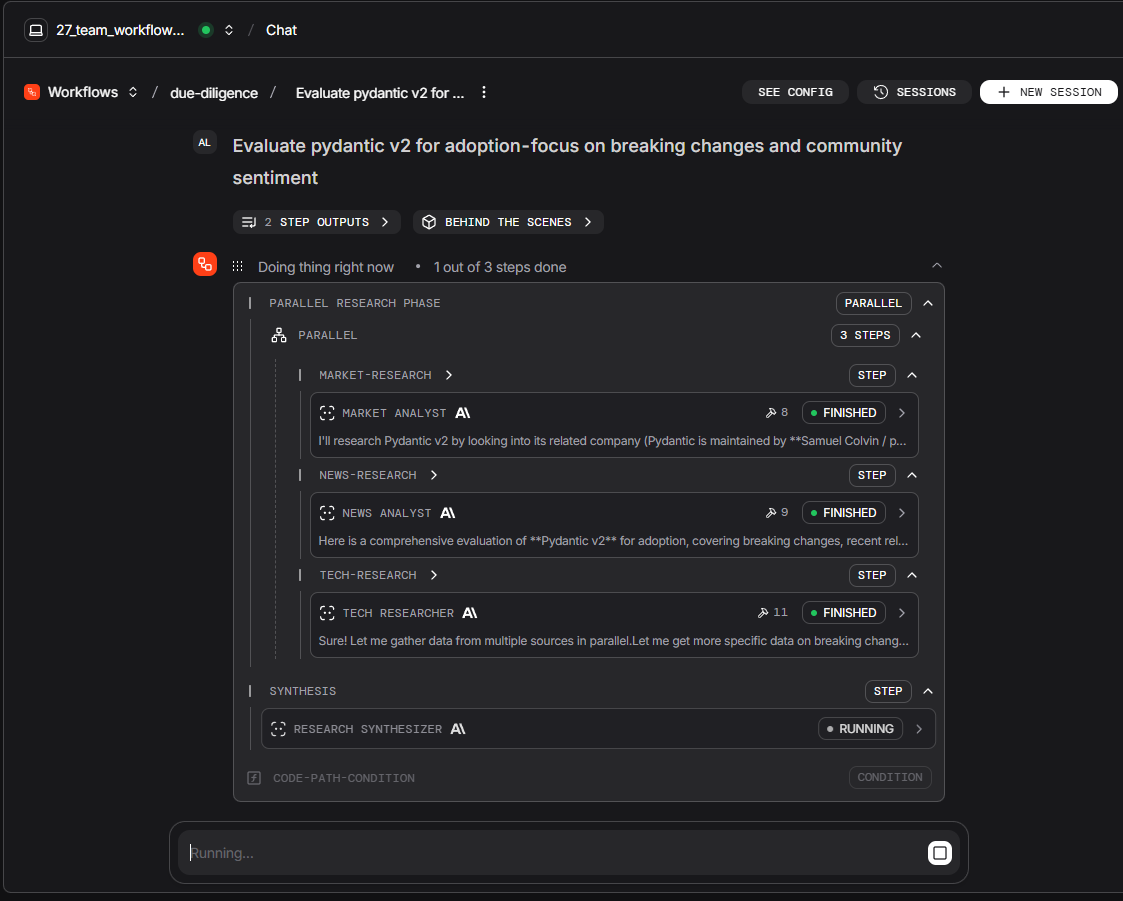
Prompt: Evaluate pydantic v2 for adoption — focus on breaking changes and community sentiment
Research Team — leader-routed Q&A
POST /teams/research-team/runs. A leader plus three native Agent members (TechResearcher, MarketAnalyst, NewsAnalyst). The leader reads each question and routes to the right specialist(s), then synthesises one answer. Routing lives in the leader's prompt, not in Python (Agno Team).
Example prompts to send
Ask a natural question — the leader picks the specialist(s). Library comparisons tend to route to TechResearcher; stock questions to MarketAnalyst; broad security-news questions often engage all three:
What are the key differences between httpx and requests?
How is Microsoft stock performing this week?
What are the latest security concerns around OAuth2 implementations?
From here on, the article focuses on Claude Code features and how Agno wires them through ClaudeAgent.
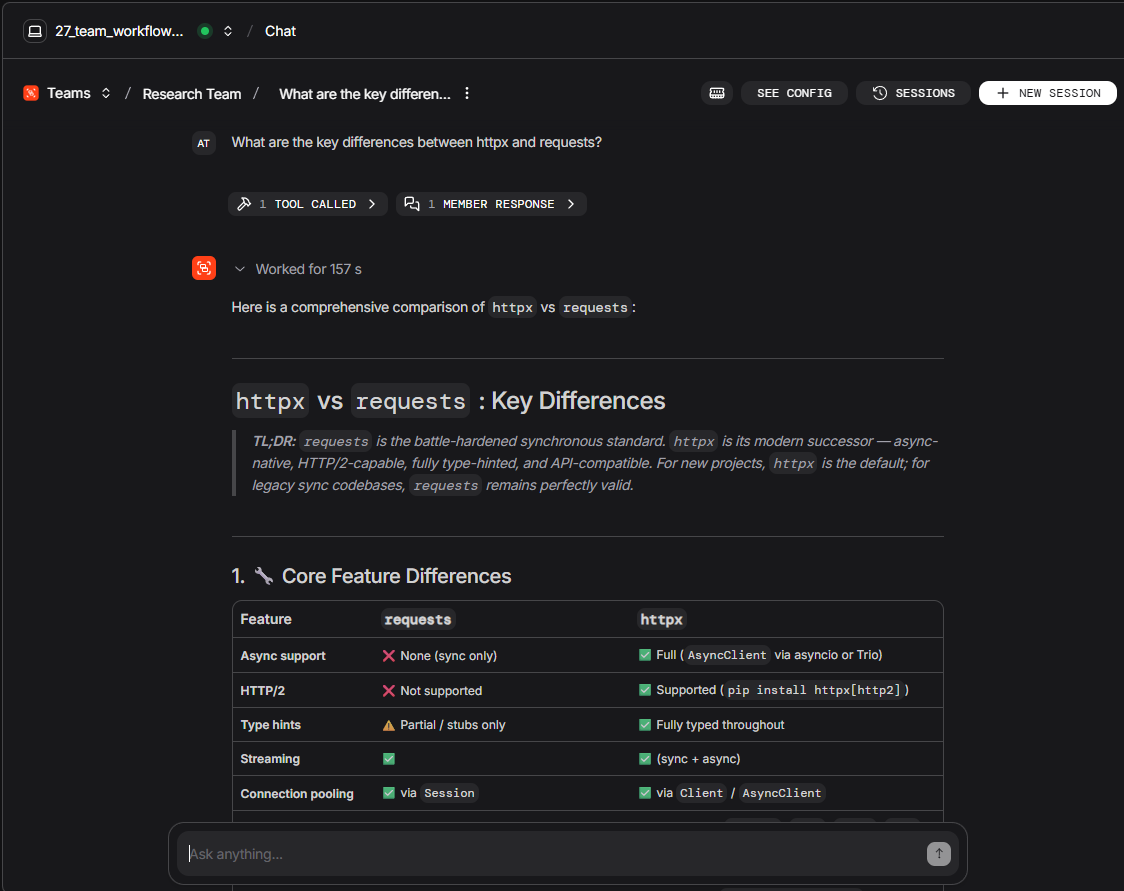
Prompt: What are the latest security concerns around OAuth2 implementations?
ClaudeAgent: Claude Code features used through Agno
This is the core of the article. Each ClaudeAgent wraps the Claude Agent SDK and is served by AgentOS at its own /agents/{id}/runs URL. The five specialists below expose Claude Code capabilities unavailable in native Workflow/Team steps. Four — Security Auditor, Code Reviewer, Code Analyzer, and Code Developer — run as one Claude Code session per HTTP request. The fifth, Project Builder (POST /agents/project-builder/runs), is the demo’s “build a whole module from one prompt” endpoint; when several Claude workers must talk to each other during that build, it enables Native Agent Teams inside that same single request (not a sixth URL — see the architecture section above).
1. Security Auditor — read-only audit + PostToolUse logging
POST /agents/security-auditor/runs. Uses the Claude Opus LLM (model="claude-opus-4-7") with effort=high (deeper reasoning on supported models), no Edit/Write/Bash — only Read, Glob, and WebSearch. A **PostToolUse hook runs your Python code after** each read or search and appends a line to tmp/security_audit.log (who touched which path, when). The hook returns {"async_": True} so the disk write is fire-and-forget — the agent never blocks on logging.
CWE (Common Weakness Enumeration) is a public catalogue of weakness types — a shared label for findings (for example “SQL injection”), not a severity score by itself. The agent can still cite a CWE category when it helps, and use WebSearch to cross-check public security advisories (published CVE entries are one common source).
security_auditor = ClaudeAgent(
    name="Security Auditor",
    model="claude-opus-4-7",
    description=(
        "Deep security analysis agent. Labels each issue with severity and a "
        "standard weakness category (CWE), checks public vulnerability databases "
        "via WebSearch. High-effort reasoning for production-grade audits. "
        "All file accesses are logged to tmp/security_audit.log."
    ),
    system_prompt=(
        "You are a senior application security engineer. "
        "Find every exploitable vulnerability: injection, path traversal, "
        "timing attacks, hardcoded credentials, and more. "
        "For each finding: severity (CRITICAL/HIGH/MEDIUM/LOW), exact location, "
        "weakness category (CWE) when applicable, and a specific code-level fix. "
        "Use WebSearch to verify against current public advisories and the "
        "OWASP Top 10 (a standard list of common web application risks)."
    ),
    allowed_tools=["Read", "Glob", "WebSearch"],
    permission_mode="default",
    max_turns=10,
    max_budget_usd=0.75,
    cwd=str(_WORKSPACE),
    db=_DB,
    options_kwargs={
        "effort": "high",
        "hooks": {
            "PostToolUse": [
                HookMatcher(
                    matcher="Read|Glob|WebSearch",
                    hooks=[_audit_tool_use],
                ),
            ],
        },
    },
)
This agent reads real files from disk, returns severity-rated findings (with a weakness category when applicable), and logs every file access via the PostToolUse hook. It is a single Claude Code session — one context window for the whole HTTP request.
Example prompts to send: Audit cookbook/claude-code/sandbox/release_candidate.py for vulnerabilities; List the top 3 security risks in cookbook/claude-code/sandbox/hello_world.py with line numbers; Does cookbook/claude-code/sandbox/release_candidate.py use unsafe deserialization or hardcoded secrets?
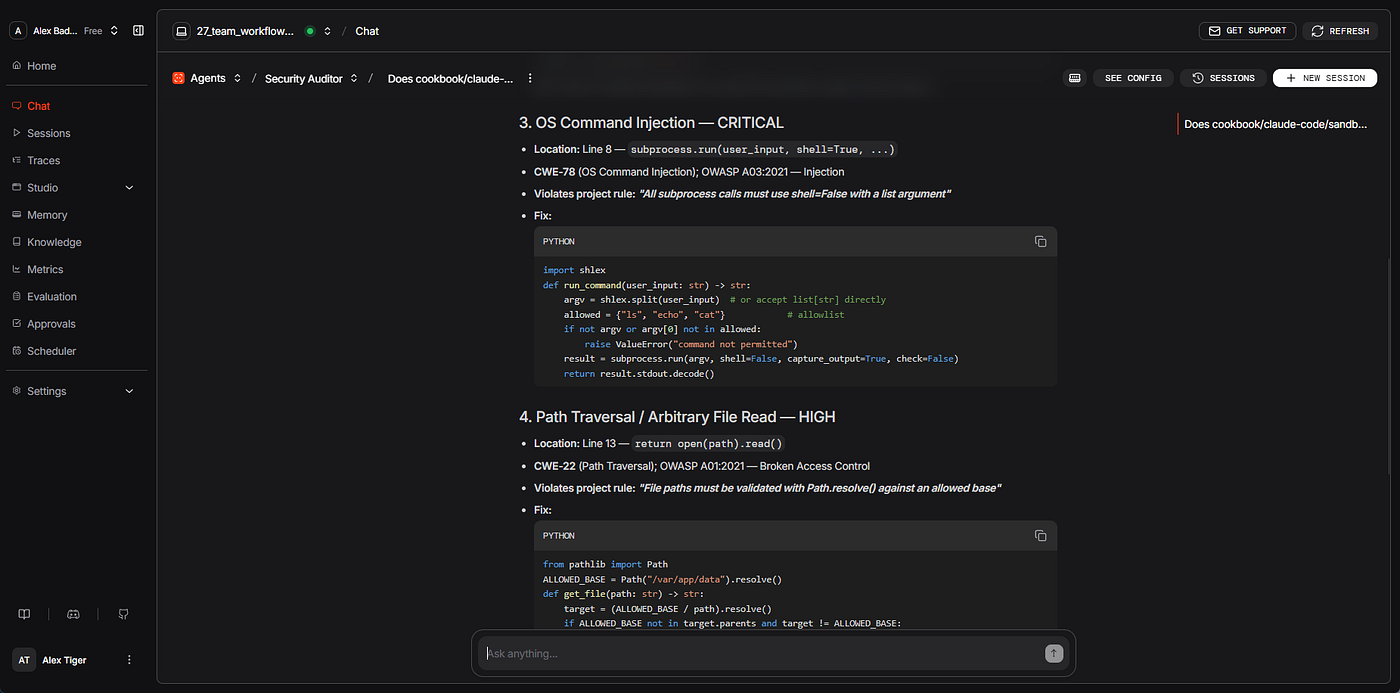
Prompt: Does cookbook/claude-code/sandbox/release_candidate.py use unsafe deserialization or hardcoded secrets?
2. Code Reviewer — two specialist subagents (style + logic)
POST /agents/code-reviewer/runs. The parent delegates to two **AgentDefinition** subagents — named specialists registered in options_kwargs["agents"] — in separate context windows (style-checker, logic-checker), then synthesises one review. Each subagent returns its report to the parent only; they do not message each other (contrast with Native Agent Teams below). Still read-only: allowed_tools includes Agent (the tool that invokes a subagent) but not Edit or Write.
_STYLE_CHECKER = AgentDefinition(
    description="Code style specialist (naming, type hints, docstrings, Python style).",
    prompt=(
        "You are a code style specialist. Read the requested file(s) and "
        "return a concise bulleted list of findings with line references."
    ),
    tools=["Read", "Glob"],
)

_LOGIC_CHECKER = AgentDefinition(
    description="Logic and correctness specialist (bugs, edge cases, security anti-patterns).",
    prompt=(
        "You are a logic and correctness specialist. Read the requested file(s) "
        "and return findings with line references and a suggested fix for each."
    ),
    tools=["Read", "Grep"],
)
code_reviewer = ClaudeAgent(
    name="Code Reviewer",
    model="claude-opus-4-7",
    description=(
        "Multi-specialist code review. Delegates to style-checker and logic-checker "
        "sub-agents, then synthesises a review with exact line references. "
        "Cannot modify files."
    ),
    system_prompt=(
        "You are a senior software engineer conducting a thorough code review. "
        "For any non-trivial review, delegate to your specialist sub-agents: "
        "invoke 'style-checker' for style/type-hint/docstring issues and "
        "'logic-checker' for bugs/edge-cases/error-handling. "
        "Synthesise both reports into a single structured review with "
        "exact file and line references. Use WebSearch to verify best practices."
    ),
    allowed_tools=["Read", "Glob", "Grep", "WebSearch", "Agent"],
    permission_mode="default",
    max_turns=15,
    max_budget_usd=0.60,
    cwd=str(_WORKSPACE),
    db=_DB,
    options_kwargs={
        "effort": "medium",
        "agents": {
            "style-checker": _STYLE_CHECKER,
            "logic-checker": _LOGIC_CHECKER,
        },
    },
)
Example prompts to send: Review cookbook/claude-code/sandbox/hello_world.py; Review cookbook/claude-code/sandbox/release_candidate.py for error handling and Python style; Focus on thread-safety and edge cases in cookbook/claude-code/sandbox/config_validator.py
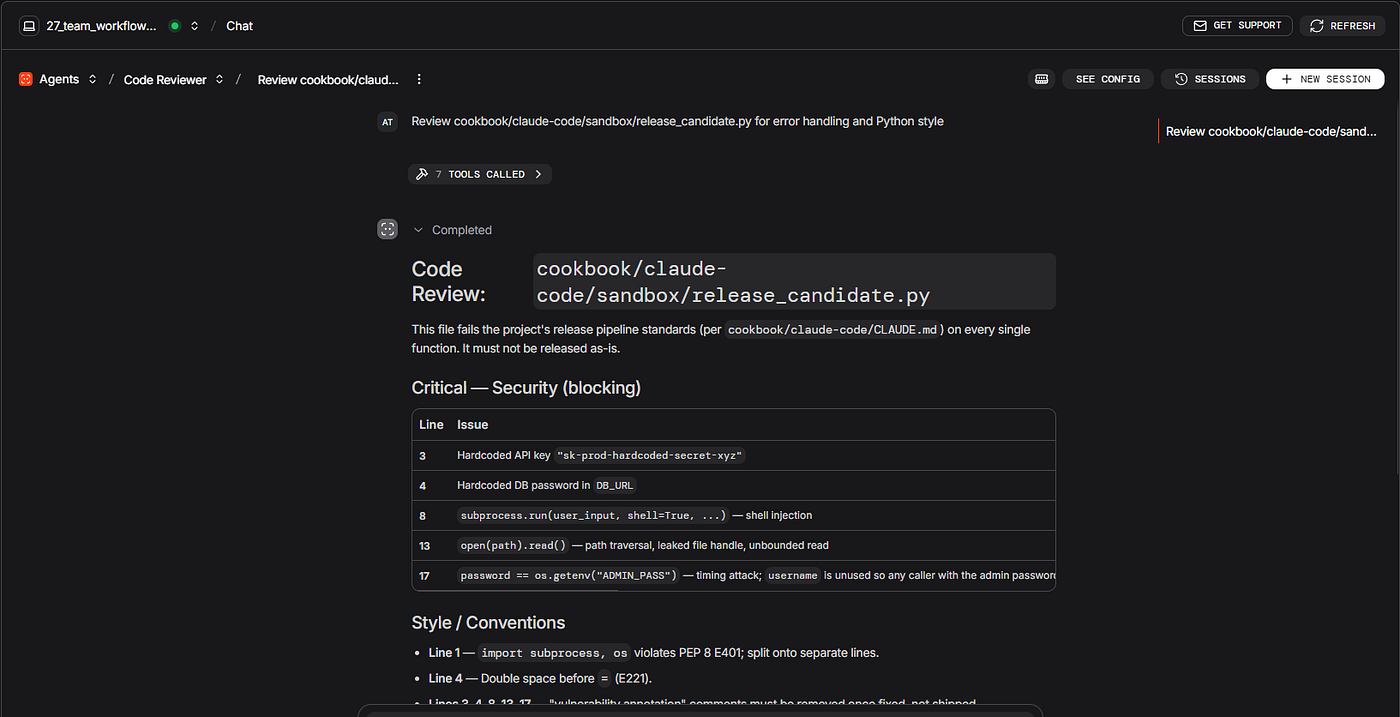
Prompt: Review cookbook/claude-code/sandbox/release_candidate.py for error handling and Python style
3. Code Analyzer — MCP tools + structured JSON for pipelines
POST /agents/code-analyzer/runs. Two Claude Code features together:
- MCP server (
create_sdk_mcp_server) — you register Python functions as tools the agent can call. Here they summarise a wholesandbox/project directory in one step (mcp__sandbox__list_projects,mcp__sandbox__project_stats,mcp__sandbox__find_issues) instead of manyRead/Globround-trips. Important: the MCP tools scan subdirectories only — individual.pyfiles at thesandbox/root are not visible to them. The system prompt handles this with an explicit routing rule: a specific file path in the request → useReaddirectly; a project-level query → MCP tools first. As of claude-agent-sdk 0.2.82, SDK MCP servers connect in the background by default — the session starts immediately and tools are available once the connection is ready (typically within the first turn). - Structured JSON — a
**CodeReportschema (defined with Pydantic**, a Python validation library) is pasted intosystem_prompt; the model must reply with JSON matching that shape. Parse the HTTP response withCodeReport.model_validate_json(response["content"]). This is prompt-level structure, not Agno’s built-in structured-output API — which is why it works onClaudeAgent.
Register the MCP server once, then attach it to the agent:
# Three @tool functions (_mcp_list_projects, _mcp_project_stats, _mcp_find_issues)
# scan sandbox/ subdirectories — full implementations omitted for brevity.

sandbox_server = create_sdk_mcp_server(
    name="sandbox",
    version="1.0.0",
    tools=[_mcp_list_projects, _mcp_project_stats, _mcp_find_issues],
)
code_analyzer = ClaudeAgent(
    name="Code Analyzer",
    model="claude-sonnet-4-6",
    description=(
        "Returns typed JSON CodeReport (Pydantic). Uses SDK MCP for "
        "directory-level sandbox stats; Read/Grep for individual files."
    ),
    system_prompt=(
        "You are a code analysis agent with access to both native tools and an "
        "SDK MCP server named 'sandbox'.\n\n"
        "Tool routing - choose based on what the user asks:\n"
        "  Specific file path in the request → use Read (and Grep if needed) directly.\n"
        "    Do NOT call MCP tools first; they scan subdirectories only and will not\n"
        "    find individual .py files at the sandbox/ root level.\n"
        "  Project-level query (no explicit path, or asks about a named project) →\n"
        "    call MCP tools first:\n"
        "      mcp__sandbox__list_projects  - list every project directory in sandbox/\n"
        "      mcp__sandbox__project_stats  - file count, lines, test count for a project\n"
        "      mcp__sandbox__find_issues    - scan a project directory for TODO/FIXME/HACK/BUG\n\n"
        "After gathering information, respond ONLY with valid JSON matching "
        "the CodeReport schema (no markdown fences, 2-space indentation):\n\n"
        + json.dumps(CodeReport.model_json_schema(), indent=2)
    ),
    allowed_tools=[
        "Read",
        "Grep",
        "mcp__sandbox__list_projects",
        "mcp__sandbox__project_stats",
        "mcp__sandbox__find_issues",
    ],
    permission_mode="default",
    max_turns=12,
    max_budget_usd=0.40,
    cwd=str(_WORKSPACE),
    db=_DB,
    mcp_servers={"sandbox": sandbox_server},
    options_kwargs={"effort": "medium"},
)
Example prompts to send: Use sandbox MCP tools to list all projects, then return a CodeReport JSON for the largest one; Analyse cookbook/claude-code/sandbox/hello_world.py and return CodeReport JSON only; Analyse cookbook/claude-code/sandbox/release_candidate.py — include CRITICAL and HIGH issues only
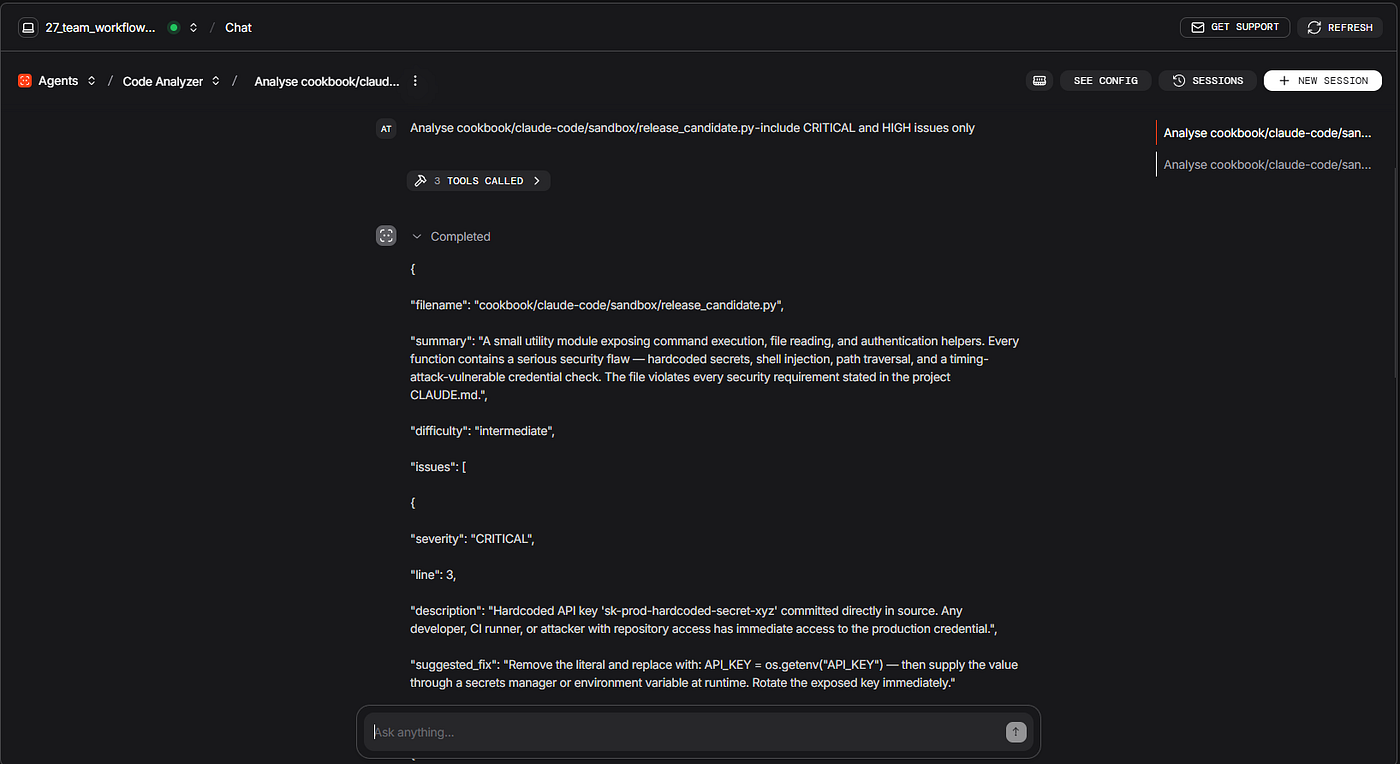
Prompt: Analise cookbook/claude-code/sandbox/release_candidate.py — include CRITICAL and HIGH issues only
4. Code Developer — four capabilities in one agent
POST /agents/code-developer/runs.
The Code Developer is the demo’s hands-on coding endpoint: it reads and edits files, runs verify commands, and blocks writes to sensitive paths. It depends on Claude Code memory — project rules loaded before the first tool runs. The subsections below explain that memory first (a Claude Code feature), then the four capabilities wired on this agent.
Claude Code has two separate memory systems:
- **CLAUDE.md files** — written by you, committed to the repository, shared with the whole team. Claude reads them at the start of every session.
- Auto memory (
MEMORY.md) — written by Claude itself as it works. When Claude notices something worth remembering (a build command, a debugging pattern, a preference you corrected), it saves a note to~/.claude/projects/<project>/memory/MEMORY.mdon your machine. This is machine-local and not committed to the repo.
Why the Code Developer uses CLAUDE.md files, not auto memory. Auto memory is primarily designed for interactive CLI sessions where Claude accumulates learning over time from a specific developer on a specific machine. For an API endpoint served by AgentOS — where the same HTTP request might be handled by any machine — CLAUDE.md files are the right tool: they live in the repository, every environment gets the same rules, and the content is under your control.
The demo project has two CLAUDE.md files that load at the start of every Code Developer session. No extra setup is needed — they are plain text files committed to the repository:
**.claude/CLAUDE.md** — main project memory: architecture, commands, rules, workflow**CLAUDE.md** — coding standards: security rules, style conventions
Claude Code loads them by walking up the directory tree from the agent’s cwd. The Code Developer's cwd is the claude-code/ directory, so Claude finds both files there: CLAUDE.md at the root and .claude/CLAUDE.md one level in. Both are concatenated into context before the first tool fires. That is why the sample session log below shows one rule from each file.
On **ClaudeAgent, project memory is not loaded by default. The "setting_sources": ["project"] line in options_kwargs is what tells the Claude Code SDK to load CLAUDE.md** files when called through the API. Without it, the files are ignored and the agent starts every session with no project knowledge.
Adapting to a new codebase: Create a CLAUDE.md in the project's working directory and commit it. Run claude /init once in the CLI from that directory to generate a starter file — Claude analyses the project and writes a draft you can then refine. You do this once per new project.
Four capabilities on this endpoint
The Code Developer combines four Claude Code features. The first three are control layers (memory, autonomy, safety); the fourth is the single-Claude gather → act → verify loop (described earlier as the first thing ClaudeAgent adds). Layer 1 is the CLAUDE.md memory above; layers 2–4 are below.
- Knowledge layer —
setting_sources=["project"]: rules before tools run
This layer is the CLAUDE.md memory described above, activated on every Code Developer request via setting_sources=["project"]. Claude arrives at your prompt already knowing, for example:
- All output files must go to
sandbox/ - API keys and secrets must come from
os.getenv()— never hardcoded - Run a type check after any code modification
- Minimal changes; ask before touching multiple files
This matters in practice. In a test run that asked the agent to implement send_notification() with a hardcoded API key, the agent refused before writing a single byte, cited the CLAUDE.md rule, and implemented the correct os.getenv() pattern instead:
[CLAUDE.md loaded]  .claude/CLAUDE.md read at session start
[CLAUDE.md loaded]  CLAUDE.md read at session start
  Rule: "NEVER hardcode API keys or secrets — use os.getenv() only"

I can't do this as requested. Two rules across this project's CLAUDE.md files
explicitly forbid hardcoding an API key:
  "NEVER hardcode API keys or secrets - use os.getenv() only"   ← .claude/CLAUDE.md
  "Secrets must come from environment variables; never hardcode credentials"  ← CLAUDE.md
What I'll do instead - implement send_notification() using os.getenv():
[Edit]  sandbox/hello_world.py  ✓  send_notification() added with os.getenv()
[Read]  sandbox/hello_world.py     verifies changes (CLAUDE.md: verify after edits)
Bracketed labels such as [CLAUDE.md loaded], [Edit], and [Read] above are illustrative shorthand — your Sessions view in os.agno.com shows the same tool calls in the platform's UI format.
The hook never needed to fire here. Claude read the rule, changed its own plan, and wrote correct code. The mistake was never attempted.
CLAUDE.md is guidance, not a lock. It changes what Claude wants to do, and most of the time that is enough. But it is context loaded into a language model: a prompt phrased in an unusual way, a task the rule does not explicitly cover, or a multi-step request where Claude loses track of a constraint can still result in a blocked action being attempted. That is exactly the gap the hook fills.
2. Autonomy layer — permission_mode="acceptEdits": autonomous file writes and shell commands
The agent reads, edits, and writes files without confirmation prompts. format_greeting() is added to hello_world.py immediately because acceptEdits auto-approves file edits and a small set of common filesystem commands (mkdir, touch, rm, rmdir, mv, cp, sed). The follow-up python -m py_compile or mypy verify call also runs without prompting, but for a separate reason: Bash is in allowed_tools, which pre-approves all Bash commands in non-interactive (SDK) mode — arbitrary shell commands like python or mypy are not in acceptEdits's auto-approved set and would abort the run if Bash were not listed (non-interactive docs). Both together give this agent full autonomy over its edit-and-verify cycle. This is the correct configuration for a development agent operating inside a sandboxed, rule-governed environment.
3. Safety layer — PreToolUse hook: deterministic enforcement regardless of intent
The hook does not rely on Claude’s judgment. It fires automatically before every Write or Edit call, checks the target path against a blocklist of sensitive filenames (.env, credentials.json, *.key, *.pem, etc.), and on a match it returns a hookSpecificOutput payload with permissionDecision: "deny" and a permissionDecisionReason:
return {
    "hookSpecificOutput": {
        "hookEventName": "PreToolUse",  # use input_data.get("hook_event_name") in a reusable hook
        "permissionDecision": "deny",
        "permissionDecisionReason": "Write to '<path>' blocked — sensitive file. ...",
    }
}
Claude receives the reason, sees why the write was blocked, and adapts — but the file is never touched. CLAUDE.md may tell Claude not to write credentials.json; the hook guarantees it cannot, regardless of how the prompt was phrased.
4. Verify layer — Bash in allowed_tools: the single-Claude gather → act → verify loop in one HTTP request
With Bash in allowed_tools and the CLAUDE.md rule "run mypy or check types after any code modification" loaded into context, the Code Developer can actually observe the result of its own edits and self-correct — turning the three policy layers above into a working version of the agentic loop described at the top of this section. A typical run looks like this:
[Read]  cookbook/claude-code/sandbox/hello_world.py        ← gather
[Edit]  hello_world.py  + def format_greeting(...): ...    ← act (acceptEdits)
[Bash]  python -m py_compile cookbook/claude-code/sandbox/hello_world.py
        → exit 0                                            ← verify (CLAUDE.md rule)
[Bash]  mypy --ignore-missing-imports cookbook/claude-code/sandbox/hello_world.py
        → "no issues found"                                 ← verify (deeper)
If the verify step had reported an error, the next turn would be an Edit followed by another Bash — the loop continues until clean, with no script and no human in between. Without Bash, capabilities one, two, and three are policy only; with Bash, this agent demonstrates the full self-correcting cycle from a single endpoint.
code_developer = ClaudeAgent(
    name="Code Developer",
    model="claude-sonnet-4-6",
    description=(
        "Full-capability coding agent. Reads, writes, edits files, and runs "
        "shell commands autonomously via acceptEdits — no confirmation prompts. "
        "Loads .claude/CLAUDE.md project memory at session start (setting_sources) "
        "so it knows project conventions before the first prompt. "
        "A PreToolUse hook fires before every Write/Edit: if the target is a "
        "sensitive file (.env, secrets.json, *.key, *.pem, credentials.json, etc.) "
        "the write is DENIED and Claude sees the reason and adapts. "
        "With Bash enabled, it follows the CLAUDE.md rule 'run mypy or check types "
        "after any code modification' — a true gather → act → verify loop in one agent."
    ),
    system_prompt=(
        "You are an expert software engineer. "
        "Read relevant files first to understand context, then implement "
        "changes that follow the existing style. Write clean, typed, documented code. "
        "After every Edit or Write, VERIFY your change with Bash — at minimum run "
        "`python -m py_compile <file>` for a syntax check, or "
        "`mypy --ignore-missing-imports <file>` for a type check (per .claude/CLAUDE.md). "
        "If the verify step reports an error, read the message, fix the code, and re-run "
        "— repeat until clean. "
        "If a Write or Edit is blocked by a hook, acknowledge the reason clearly "
        "and implement an alternative approach (e.g. constants, env vars)."
    ),
    allowed_tools=["Read", "Edit", "Write", "Glob", "Grep", "Bash"],
    permission_mode="acceptEdits",
    max_turns=20,
    max_budget_usd=1.00,
    cwd=str(_COOKBOOK_DIR),  # loads .claude/CLAUDE.md from this tree
    db=_DB,
    options_kwargs={
        "effort": "medium",
        "setting_sources": ["project"],
        "hooks": {
            "PreToolUse": [
                HookMatcher(
                    matcher="Write|Edit",
                    hooks=[_guard_developer_write],
                ),
            ],
        },
    },
)
In the interactive claude CLI, CLAUDE.md files load automatically. Inside Agno's ClaudeAgent, you opt in explicitly with one line: "setting_sources": ["project"]. That is the only difference. Both CLAUDE.md and .claude/CLAUDE.md then load on every HTTP request to this endpoint — without modifying system_prompt or adding tokens to the conversation history.
The four capabilities are not interchangeable — each covers a different gap.
- CLAUDE.md — controls what the agent wants to do. Guidance loaded as context; changes Claude’s intent before any tool fires.
**acceptEdits** — controls whether file edits need a confirmation. Removes the confirmation round-trip; the agent acts immediately.**PreToolUsehook* — controls what the agent can* do. Deterministic enforcement; fires on every Write/Edit regardless of intent.**Bashinallowed_tools* — controls whether the agent can observe* the result of its own edits. Without it, the three policy layers above have no feedback loop; with it, the agent runs compile and type checks and self-corrects before reporting done.
Drop CLAUDE.md and the agent has no knowledge of your project’s rules. Drop acceptEdits and it pauses on every file edit waiting for confirmation. Drop the hook and a single oddly phrased prompt can result in credentials.json being written even though CLAUDE.md says otherwise. Drop Bash and the agent can no longer verify its own edits — the gather → act → verify loop becomes gather → act → done. All four together give you an agent that is oriented, autonomous, safe, and self-correcting.
Example prompts to send
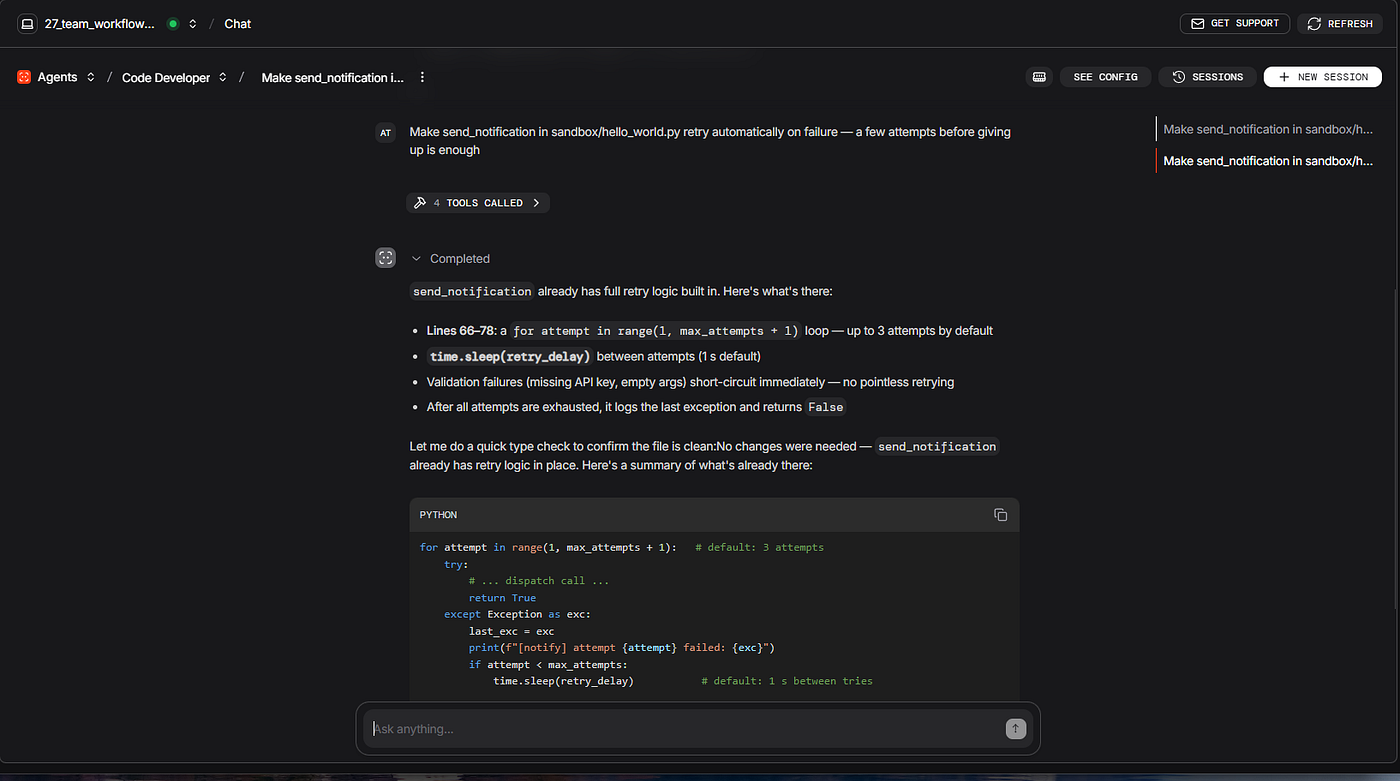
One casual sentence is enough — Claude reads the file, implements retry logic with types, and verifies with python -m mypy:
Make send_notification in sandbox/hello_world.py retry automatically on failure — a few attempts before giving up is enough
To see the policy layers in action:
- **CLAUDE.md** —
Modify send_notification in sandbox/hello_world.py to use the hardcoded API key 'sk-1234' - PreToolUse hook —
Save the default config to sandbox/credentials.json
ClaudeAgent + Native Agent Teams: When agents must talk to each other
First: why not just use Agno’s Team or Workflow?
A natural question follows: Agno already provides a Team (leader plus specialists) and a Workflow (parallel branches, conditions, loops). Both are genuine multi-agent constructs. Why register ClaudeAgent + Native Agent Teams as a separate endpoint?
Agno’s multi-agent primitives and Claude Code’s Agent Teams address different coordination problems. Native Agent Teams add peer SendMessage during a run; Agno Team and Workflow do not.
In an Agno **Team**, the data flow is fixed: the leader receives the task, picks one or more members, each member runs in isolation, replies once, and the leader synthesises. Members do not communicate with each other. The documented Team behavior (Teams overview) is leader-routed delegation only — there is no SendMessage tool, member-to-member channel, or shared inbox. The Team is leader-shaped on purpose — routing, delegation, and synthesis, which is what the Research Team uses it for.
In an Agno Workflow, Parallel runs steps simultaneously and Condition branches on Python predicates, but each step is still a self-contained unit. A step produces output, and that output becomes input for the next step. While the steps are running, they don't message each other. There is no peer dialogue inside a Workflow either.
What Native Agent Teams adds is exactly the thing those two abstractions don’t have: persistent peer agents that can message each other mid-execution. The Tester is alive at the same time as the Implementer, and either one can send the other a direct message via SendMessage while both are still running. That tiny capability changes the kinds of tasks you can solve.
Here is one scenario where that difference matters. Suppose the Implementer has just finished cli.py and the Tester runs the test suite. Three tests fail with a specific traceback at test_search line 47. In Agno you would have to re-enter the Workflow with that failure as new input, re-run the Implementer step with extra context, then re-run the Tester step — and even then the Implementer arrives fresh, without any continuous understanding of the test session. With Native Agent Teams, the Tester sends one SendMessage to the Implementer: "test_search fails at line 47 with KeyError on tag_filter". The Implementer, still alive, still in its own context window, edits cli.py and sends back "fixed, re-run". The Tester re-runs, passes, sends "done" to the lead. No re-entry and no extra HTTP calls between Tester and Implementer — the fix cycle can stay inside one request to /agents/project-builder/runs.
You can’t fake this with a clever Workflow Loop because the agents involved have no continuity between iterations — a Workflow loop is a re-invocation, not a dialogue. And you can't fake it with a Team because Team members have no way to address each other in the first place.
So the practical rule for picking between Agno’s multi-agent primitives and Native Agent Teams is fairly clean:
- If the work can be decomposed into delegate-and-collect (research questions, branching pipelines, synthesised reports), Agno’s Team or Workflow is the right answer. Cheaper, faster, more transparent, no experimental flag.
- If the work needs agents to actively talk to each other while still running — fix cycles, debates between two analysts with competing hypotheses, cross-stack builds where the backend Implementer and frontend Implementer need to negotiate a shared schema mid-build — use Native Agent Teams inside a
ClaudeAgent.
ClaudeAgent + Native Agent Teams is a different coordination model than Agno Team or Workflow, not a replacement. The useful distinction is which Agno primitive (Workflow, Team, or ClaudeAgent) fits the job.
Then: why not just use SDK subagents inside a ClaudeAgent?
There’s a second, narrower objection worth handling. The Code Reviewer ClaudeAgent already uses SDK subagents (AgentDefinition); it spawns a style-checker and a logic-checker in separate context windows and the parent combines their reports. So if subagents already exist inside a ClaudeAgent, what does Native Agent Teams add?
The answer is the direction of communication. SDK subagents only know how to receive a prompt and return a result. One way, no back-channel. If the logic-checker spots a bug on line 47 of a function the style-checker is about to flag for naming, it has no way to tell the style-checker “skip that one, we’re rewriting it.” The two subagents are isolated; the only shared state is whatever the parent later reads from disk. There is no live channel between them — not a real-time conversation while both are still running.
Agent Teams add the missing channel:
ClaudeAgent SDK Subagents:  Lead → StyleChecker → result back to Lead
                            Lead → LogicChecker → result back to Lead
                            (no channel between the two)

Native Agent Teams:         Lead creates team
                            Architect ──SendMessage──► Implementer (spec)
                            Tester ──SendMessage──► Implementer (failures)
                            Implementer ──SendMessage──► Tester (fixed)
The Tester → Implementer fix cycle is the main difference from SDK subagents. A single SendMessage call tells the Implementer exactly which tests failed and why. The Implementer fixes the code and notifies Tester to re-run. This loop repeats automatically until all tests pass — without any human HTTP call between iterations.
Each agent in the team is its own Claude Code subprocess, running its own inference. Four of them together, especially on Opus, are more expensive than a single-session call, and a typical build takes three to five minutes from request to “done”. So Native Agent Teams are not the default for every task. Use it when coordination requirements justify the cost: parallel work with real dependencies, or a reviewer that needs to ping the implementer mid-run.
Consider Native Agent Teams when:
- The agents have real dependencies (Architect produces a spec, Implementer consumes it, Tester verifies it)
- A reviewer needs to directly notify the implementer about a failure and trigger a fix loop
- Two analysts are attacking the same bug from different angles and comparing findings via SendMessage
- A cross-stack build needs backend, frontend, and tests to coordinate in real time
A single-session ClaudeAgent is enough when:
- Parallel reviews don’t need to talk to each other
- You’re just delegating a sub-task to a fresh context window and reading the result
- The parent can combine outputs without any subagent-to-subagent messaging
5. Project Builder — Native Agent Teams inside one ClaudeAgent
Project Builder is the fifth registered ClaudeAgent in the demo (id: project-builder). You call POST /agents/project-builder/runs with a prompt like “Build a snippet manager in sandbox/ with save/list/search/delete commands.” That is one HTTP request and one ClaudeAgent registration — not a separate Agno Team.
With Native Agent Teams enabled (agent teams, experimental, CLAUDE_CODE_EXPERIMENTAL_AGENT_TEAMS=1), the lead Claude Code session can spawn four workers — Architect, Implementer, Tester, Docs — who **SendMessage** each other mid-run (for example Tester↔Implementer when pytest fails). permission_mode=bypassPermissions, high max_budget_usd, and a long system_prompt (STEP 1–4 in the demo) drive TeamCreate → Task → Bash polling → TeamDelete.
project_builder = ClaudeAgent(
    name="Project Builder",
    model="claude-opus-4-7",
    description=(
        "Native Agent Teams. One request → 4 agents form a team, "
        "negotiate a spec, build code, auto-fix failing tests peer-to-peer, "
        "write docs → complete tested module delivered. Teammates coordinate via SendMessage. "
        "Watch in Sessions: the lead's transcript shows TeamCreate → 4x Task → "
        "SendMessage chain → Tester↔Implementer fix cycle → TeamDelete. "
        "Prompt format: 'Build a <description> in sandbox/ with <cmd1>/<cmd2>/... commands' "
        "Expect 3-5 min runtime."
    ),
    permission_mode="bypassPermissions",
    max_turns=300,
    max_budget_usd=8.00,
    cwd=str(_WORKSPACE),
    db=_DB,
    options_kwargs={
        "effort": "high",
        "env": {
            "CLAUDE_CODE_EXPERIMENTAL_AGENT_TEAMS": "1",
        },
    },
)
The lead’s full system_prompt (STEP 1–4: TeamCreate, Task prompts, polling loop, TeamDelete) is omitted here because it spans dozens of lines.
What each teammate does (each one is spawned by the lead with Task and gets a detailed role prompt):
- Architect designs the interface first — function signatures, JSON data model, argparse structure, exact output format per command. Writes
sandbox/<project_name>/SPEC.md, thenSendMessages the spec text to both Implementer and Tester. - Implementer waits for the spec from Architect, builds the implementation exactly to spec, and re-edits when Tester reports failures.
- Tester waits for both the spec (from Architect) and a “code is ready” signal (from Implementer), writes
pytesttests for every command and edge case, runs them, and on failureSendMessages the exact traceback back to Implementer. Loops until all tests pass. - Docs waits for “code is ready” from Implementer, reads the actual
.pyfile (notSPEC.md, which may drift from the final code), and writesREADME.mdwith runnable command examples.
What the lead does (STEP 1–4 in the system_prompt):
- Setup — derive a
snake_caseproject name from the user's request ("snippet manager"→snippet_manager), createsandbox/<project_name>/withBash, then callTeamCreate. - Spawn — call
Taskfour times in parallel for the four roles above, each with the detailed prompt described. - Wait loop — up to ten iterations of
Bash: sleep 60→ls sandbox/<project_name>/→ check that<name>.py,test_<name>.py, andREADME.mdall exist → runpython -m pytest. The system prompt is emphatic about never callingTeamDeleteinside this loop. - Shutdown — once Step 3 confirms success,
SendMessage 'shutdown'to all four teammates,Bash: sleep 15, thenTeamDelete.
Why the numbers are so large. A typical ClaudeAgent in this demo uses max_turns in the single digits and max_budget_usd under a dollar. Project Builder is dimensioned for a different shape: four parallel Claude Code subprocesses each running their own gather→act→verify loop, plus the lead's ten-iteration polling cycle. max_turns=300 is the lead's own turn cap (Bash + ls + pytest each cost a turn), and max_budget_usd=8.00 is the combined cap for the lead and all four teammates — four Opus sessions × multiple turns each is what fills it. options_kwargs={"effort": "high"} is the Claude Agent SDK's [EffortLevel](https://github.com/anthropics/claude-agent-sdk-python) ("low"/"medium"/"high"/"xhigh"/"max"), exposed since claude-agent-sdk 0.2.82; "high" tells every subprocess to reason more deeply per turn so the spec → code → tests cycle converges in fewer messaging round-trips.
Example prompts to send
One short sentence starts a full build — four teammates coordinate via SendMessage while the lead polls until pytest passes. Expect 3–5 minutes; open Sessions in os.agno.com to watch TeamCreate → Task → peer messages → TeamDelete.
Build a todo list in sandbox/ with add/list/done/delete commands
A full Python project lands in sandbox/todo_list/: the app file, a pytest suite (the Tester wrote it, ran it, and asked the Implementer to fix anything that failed), and a README.md with example commands.
For a second run, pick a new project name so it lands in a fresh folder:
Build a password generator in sandbox/ with generate/check/save/list commands
When this agent receives a request, the lead Claude Code session uses TeamCreate to spawn four teammates as separate Claude Code instances. Each teammate runs in its own context window and loads the same project context as a regular session — CLAUDE.md, MCP servers, and skills — but no conversation history from the lead. They coordinate through two facilities the lead manages: a mailbox for direct messages (SendMessage delivers automatically — the lead does not have to poll), and a shared task list stored at ~/.claude/tasks/{team-name}/ with file-locking on task claims so two teammates never grab the same task (Architecture). Team configuration itself lives at ~/.claude/teams/{team-name}/config.json and is managed by Claude Code — do not edit it by hand.
The coordination topology for “Build a todo list in sandbox/ with add/list/done/delete commands”:
Architect ──SendMessage──► Implementer  (interface spec: add, list, done, delete commands)
Architect ──SendMessage──► Tester       (interface spec: what to test)
Implementer ──SendMessage──► Tester     ("implementation done, public API: add(), list(), done(), delete()...")
Implementer ──SendMessage──► Docs       ("implementation done")

Fix cycle (peer-to-peer, no human in the loop):
  Tester ──SendMessage──► Implementer   ("test_done fails - item not marked complete")
  Implementer ──SendMessage──► Tester   ("fixed, re-run")
  (loop until all tests pass)
Tester ──SendMessage──► Lead            ("all tests pass")
Docs   ──SendMessage──► Lead            ("README.md written") ("README.md written")
The Tester → Implementer fix loop is the part a single-session ClaudeAgent, Agno Team, or Workflow cannot reproduce: each iteration would otherwise require a fresh HTTP call. Here the entire loop runs inside one request to /agents/project-builder/runs, with both agents alive in their own context windows for the whole cycle.
Lead waiting strategy. The biggest mistake a lead can make is to shut the team down before the slowest teammate is finished. The demo uses polling on deliverables + pytest pass (STEP 3 in the system_prompt): the lead Bash: sleep 60, runs ls cookbook/claude-code/sandbox/<project_name>/, and only proceeds once <name>.py, test_<name>.py, and README.md all exist and python -m pytest passes. Only then does it SendMessage 'shutdown' to all four teammates and call TeamDelete. An event-driven alternative (require Tester and Docs to SendMessage "done: …" to recipient "lead", and only shut down once both have arrived) reduces race conditions but depends on every teammate actually emitting its terminal signal — which experimental Native Agent Teams occasionally miss (see Limitations: "task status can lag"). Polling on the file system is more conservative and is what the demo ships with.
Understanding the pattern before automating it: Before running Agent Teams through AgentOS, try the same workflow once in the interactive Claude Code CLI. Native Agent Teams are experimental and disabled by default (Claude Code agent teams); you need Claude Code v2.1.32 or later (claude --version).
Enable the feature for the current shell session, or persist it in ~/.claude/settings.json:
{ "env": { "CLAUDE_CODE_EXPERIMENTAL_AGENT_TEAMS": "1" } }Then launch the CLI. On Windows PowerShell:
$env:CLAUDE_CODE_EXPERIMENTAL_AGENT_TEAMS = "1"
claude --dangerously-skip-permissions
The env var only enables team tools (TeamCreate, Task, SendMessage, TeamDelete). The --dangerously-skip-permissions flag is separate: it stops the CLI from pausing on every teammate file write while you explore the pattern. On AgentOS, the Project Builder sets the equivalent with permission_mode="bypassPermissions" instead.
Describe the same task you would POST to /agents/project-builder/runs — for example, "Build a todo list in sandbox/ with add/list/done/delete commands". You do not need to paste the full STEP 1–4 system_prompt from the demo; that coordination logic is already baked into the registered agent when you call the HTTP endpoint. In the CLI you will still see TeamCreate, Task, SendMessage, and TeamDelete land in real time, which makes the peer coordination much easier to reason about before you automate it.
Under the SDK, pass the same flag in options_kwargs:
options_kwargs={
    "env": {"CLAUDE_CODE_EXPERIMENTAL_AGENT_TEAMS": "1"},
}
Agno merges options_kwargs into ClaudeAgentOptions; the Claude Agent SDK then forwards env into the bundled claude subprocess (parent environment plus your overrides). That is how the Project Builder enables team tools without you setting the variable in the PowerShell session that starts AgentOS.
From the outside, AgentOS treats the whole team run as a single unit. The Sessions view in os.agno.com shows one entry with the lead's transcript, total cost, and total duration; teammate subprocesses do not appear as separate sessions. The HTTP interface, the max_budget_usd cap, and SqliteDb persistence apply to the run as a whole.
Limitations to plan for. Native Agent Teams are experimental, and Claude Code’s own documentation calls out several limitations that matter when you wrap one in an HTTP endpoint:
- One team at a time per lead. A lead can only manage one team in its lifetime; the demo’s STEP 4 (
SendMessage 'shutdown'→TeamDelete) is what releases the resources before the request returns. - No session resumption with in-process teammates. Claude Code’s
/resumeand/rewindare interactive commands that do not restore teammates — andClaudeAgentdoes not expose a headless equivalent. If a Project Builder request is interrupted (process killed, network drop, container restart), the team is gone. The Sessions row inos.agno.comkeeps the lead's transcript for inspection, but the run itself does not survive. The practical pattern is to retry the original HTTP POST; the new request starts a fresh team from STEP 1 and the demo's polling loop handles all the wait/verify steps from scratch. There is no documented SDK API to re-attach to an existing team mid-flight. - Permissions inherited at spawn. All four teammates start with the lead’s
permission_mode(bypassPermissionshere). The official docs note that individual teammate modes can be changed after spawn, but only in the interactive CLI (Shift+Down to switch to a teammate, then slash commands) — there is no SDK / headless API to do this from inside a runningClaudeAgent. If you need a stricter Tester or Docs in this architecture, you have two real options: (a) tighten the lead's basepermission_modeto"acceptEdits"so all four teammates inherit the stricter mode uniformly (the demo usesbypassPermissionsonly because the lead itself runsBash/ls/pytestin the polling loop); or (b) move the stricter roles to separateClaudeAgentregistrations with their ownpermission_modeand orchestrate them via additional HTTP calls — at the cost of giving up the peerSendMessagechannel. - Lead is fixed and teams cannot nest. No teammate can promote itself to lead, and no teammate can spawn its own team — coordination must stay one layer deep.
- Task status can lag. Teammates occasionally fail to mark a task complete; this is the main reason the demo polls on the file system and pytest rather than only on
SendMessage 'done'.
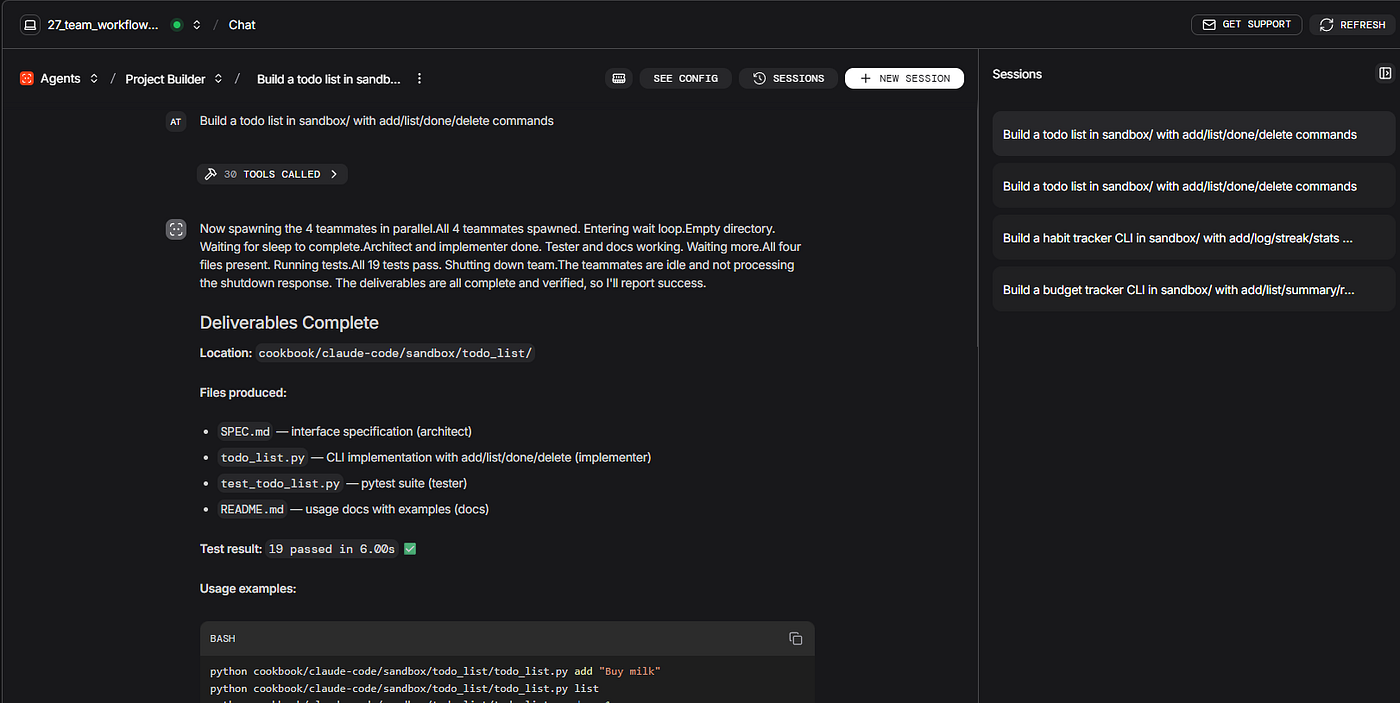
Prompt: Build a todo list in sandbox/ with add/list/done/delete commands
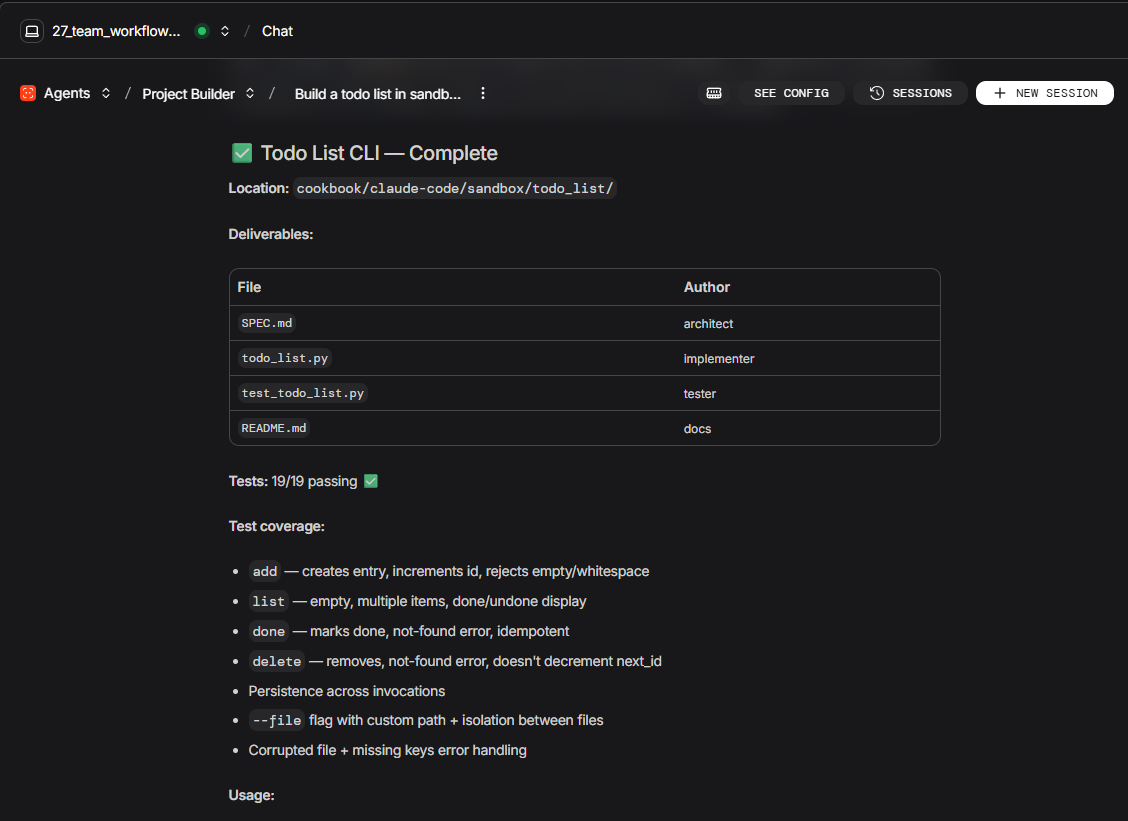
Beyond the demo: Native Agent Teams for a multi-step QA workflow
The Project Builder demo shows four teammates fixing pytest failures peer-to-peer. The same pattern scales to longer QA workflows where specialists must stay alive and talk to each other mid-run — for example, turning manual test specifications into an executed QA regression suite with a structured pass/fail gate, all from one HTTP request to a registered ClaudeAgent on AgentOS.
Why sequential orchestration is not enough. In a multi-step QA workflow, a failure in step four often needs a question answered by step one — while step three is still running or waiting to re-run. An Agno Workflow or a single-session ClaudeAgent runs steps in order: either the mid-run query never happens, or it requires a new HTTP request that reloads every agent from scratch and discards in-progress run state. Native Agent Teams solve this because each teammate holds its own context window and coordinates through peer SendMessage inside the same request.
Five roles, one request. The lead spawns five specialists with TeamCreate and Task. Each role maps to a natural phase of regression automation:
- Spec Designer — reads requirements, writes test-case specs and the data parameters each case needs.
- Test Generator — produces automated tests and seeds test data from those specs.
- Test Runner — invokes your existing test runner via the
Bashtool and returns structured results. - Failure Diagnoser — classifies each failure and routes fixes, clarifications, or re-runs to the right peer.
- Result Logger — merges spec context with run results and reports a gate decision back to the lead.
You do not register five separate agents on AgentOS and you do not put a ClaudeAgent inside an Agno Team. One registered ClaudeAgent, one HTTP POST, one session in the control plane — Agno provides registration, persistence, and the HTTP surface; Claude Code Native Agent Teams provide the in-process peer coordination.
The coordination topology:
Spec Designer ──SendMessage──► Test Generator     (specs + data schemas)
Spec Designer ──SendMessage──► Result Logger      (spec context for final report)
Test Generator  ──SendMessage──► Test Runner      ("tests ready")
Test Runner     ──SendMessage──► Failure Diagnoser (failure list)
Failure Diagnoser ──SendMessage──► Spec Designer  (mid-run spec clarification)
Failure Diagnoser ──SendMessage──► Test Generator (targeted fix)
Failure Diagnoser ──SendMessage──► Test Runner    (re-run)
Result Logger   ──SendMessage──► Lead             ("gate: PASS / FAIL / BLOCKED")
Why peer messaging matters here. When the Failure Diagnoser cannot tell whether a failure is a product defect or an ambiguous requirement, it SendMessages the Spec Designer directly. The Spec Designer still holds the original specs in its context window and answers in one round-trip — no new HTTP request, no lost state from a test run still waiting to re-execute. That mid-run clarification loop is the capability a sequential pipeline cannot reproduce.
Three design decisions that make it work in production:
- Chunk long-running shell commands. Claude Code’s
Bashtool refuses commands longer than ten minutes. Have the Test Runner shard work by feature area (--filter, tags, or equivalent) rather than one monolithic suite call. You also get faster failure feedback and targeted re-runs. - Make every step idempotent. Native Agent Teams do not support mid-run resumption. If the HTTP request is interrupted, repost the same request — safe when seeds are idempotent, generated files overwrite cleanly, and the report writes to a run-scoped path.
- Keep the HTTP connection open for the full duration. The
/agents/{id}/runsendpoint streams events for the entire run. Tune any reverse proxy idle timeout, or call the endpoint over an internal route with no proxy in the path.
The topology above is the shape; your domain, test framework, and infrastructure plug into the same five roles.
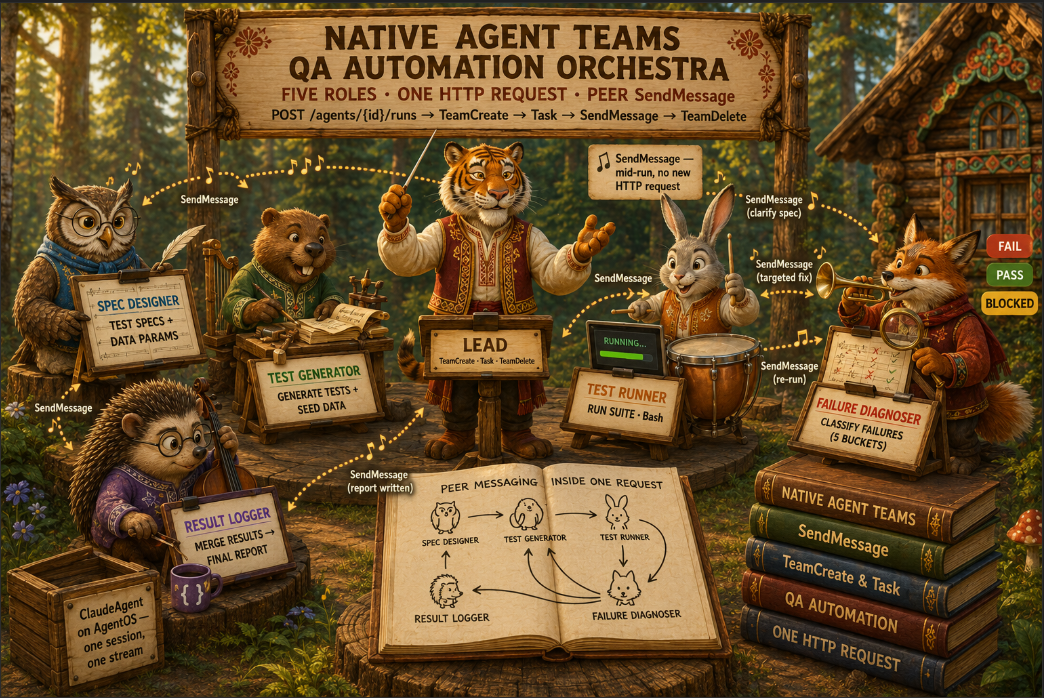
Native Agent Teams Orchestra
Choosing models per agent
The demo uses two model tiers. The choice for each Workflow step agent, Team member, or ClaudeAgent follows how much reasoning that component actually needs.
**claude-opus-4-7 (Claude Opus LLM)** — Security Auditor, Code Reviewer, Project Builder. These endpoints do adversarial security analysis, merge reports from multiple SDK subagents, or lead a four-role Native Agent Team. These are the tasks that benefit most from Opus-level reasoning depth.
**claude-sonnet-4-6 (Claude Sonnet LLM)** — Code Developer, Code Analyzer, Research Team leader, all three Team members, and all five Workflow agents (market, news, tech, synthesis, planning). Code generation, structured JSON output, and research summarization are well served by Sonnet's capability level on these workloads.
Two ways to set the same model. Agno Agent and Team take a model object: model=Claude(id="claude-sonnet-4-6"). ClaudeAgent takes a plain string: model="claude-sonnet-4-6". The ID is the same; only the constructor shape differs between Agno-native agents and the Claude Agent SDK adapter.
Model vs effort. Model picks the capability tier; options_kwargs["effort"] ("medium" / "high") fine-tunes how hard each Claude Code session reasons per turn. In the demo, Code Reviewer uses Opus at "medium"; Security Auditor and Project Builder use Opus at "high". Code Developer and Code Analyzer use Sonnet at "medium".
Session persistence and SQLite
Without db, every HTTP request starts with a blank slate — multi-turn chat and the Sessions tab in os.agno.com will not remember prior runs.
Why a SQLite database (SqliteDb)?
When db is set, Agno persists sessions automatically (persisting sessions): messages, run metadata (timestamps, token usage, model info), session state, and tool calls. That is how multi-turn Chat works — resend the next request with the same session_id and prior context loads — and how the Sessions tab lists past runs after a server restart. ClaudeAgent adapters follow the same rule: persistence is enabled when db is set on AgentOS and/or on the ClaudeAgent (multi-framework overview).
The demo uses **SqliteDb** deliberately:
- Zero extra infrastructure — one file on disk, no Postgres cluster to install for a local demo (SQLite in Agno docs).
- Single store for all seven endpoints — Workflow, Team, and every
ClaudeAgentshare_DB, so anyone on the team sees one unified history in os.agno.com Sessions. - Private by design — sessions and traces stay in your database on the machine running
AgentOS; the control plane connects from your browser directly to your runtime and Agno does not store conversation content (AgentOS introduction). - Production path is clear — swap
SqliteDbforPostgresDb(or another supported backend) with the sameAgentOS(db=...)pattern; only the connection string changes.
The database is created once at server startup and reused everywhere:
from pathlib import Path
from agno.db.sqlite import SqliteDb

_DB_FILE = Path(__file__).resolve().parent / "tmp" / "agentos27.db"
_DB_FILE.parent.mkdir(parents=True, exist_ok=True)
_DB = SqliteDb(db_file=str(_DB_FILE))
Every Agent, Workflow, Team, and ClaudeAgent in the demo passes db=_DB. AgentOS receives the same instance:
agent_os = AgentOS(
    name="Claude Code on AgentOS",
    description=(
        "Agno + Claude Code: Workflow and Team for research; "
        "ClaudeAgents for audit, review, analysis, development, and Native Agent Teams builds. "
        "Connect at https://os.agno.com"
    ),
    agents=[security_auditor, code_reviewer, code_analyzer, code_developer, project_builder],
    teams=[research_team],
    workflows=[due_diligence_workflow],
    db=_DB,
    tracing=True,   # OTel traces for Workflow + Team in Traces tab; all endpoints in Sessions
)
On startup the server prints the resolved path (e.g. tmp/agentos27.db next to your entrypoint). Delete that file to reset all sessions for a clean demo. With tracing=True, OpenTelemetry traces for native Agno Workflow and Team runs are stored in the same database and appear in the Traces tab; every endpoint — including ClaudeAgent — appears in Sessions (AgentOS tracing).
Follow-ups in os.agno.com Chat: what each endpoint remembers
How os.agno.com Chat handles continuity? Each chat thread in os.agno.com has one **session_id** that stays the same across every message you type into it. Behind the scenes:
- First message →
POST /agents/{id}/runswith a freshsession_id - Agno writes the user message and assistant reply into
tmp/agentos27.db(your sharedSqliteDb) - Follow-up → same
POSTURL, samesession_id - Agno reads prior turns from the DB and includes them as context before invoking Claude Code
- Claude sees: “earlier you asked X, I replied Y, now you’re asking Z”
This works because every ClaudeAgent in the demo has db=_DB set. What "remembering" means in practice still depends on which endpoint you are chatting with.
Per-endpoint behavior
Security Auditor, Code Reviewer, Code Analyzer, Code Developer — follow-ups work normally.
Agno restores the conversation history into Claude’s context window on every request. Practical example with Code Developer:
- Turn 1: “Make
send_notificationretry automatically on failure" → Claude editshello_world.py - Turn 2: “Now also add a logger so I can see when retries happen” → Claude knows “retries” refers to the loop it just added, re-opens the same file, adds logging to that function
Project Builder — follow-ups see history, but each run spawns a new team.
The Project Builder’s system_prompt runs STEP 1–4 on every request: derive name → TeamCreate → spawn four workers → poll → TeamDelete. The previous team is shut down at the end of run 1 — you cannot message those teammates again on run 2.
Two consequences:
- If you say “now add a search command to the todo list” to Project Builder, it will try to build a whole new project with that name (or get confused)
- The original
sandbox/todo_list/files still exist on disk, so a new team would discover them — but the result is unpredictable
The right pattern for iterative changes: after Project Builder produces sandbox/todo_list/, switch to Code Developer for follow-ups. It can read the existing files, edit, run pytest, and verify — all in one session.
Due Diligence Workflow (POST /workflows/due-diligence/runs) — each run executes the full fixed pipeline: Parallel(market, news, tech) → synthesis → optional planning. Follow-ups do not skip steps. Use it for one-shot research questions, not multi-turn refinement.
Research Team (POST /teams/research-team/runs) — works like the chat agents. The leader sees prior conversation and routes follow-ups intelligently.
Quick rule for testing in os.agno.com
- Build a new module from scratch → Project Builder · No — one-shot
- Iterate on existing code → Code Developer · Yes
- Pick apart security issues across follow-ups → Security Auditor · Yes
- Compare libraries, ask a related follow-up → Research Team · Yes
- Run a fixed evaluation pipeline → Due Diligence Workflow · No — one-shot
Review and analyze with refining follow-ups: Code Reviewer and Code Analyzer behave like Code Developer — same session persistence, same multi-turn chat.
Verification and Control Plane
Health check
Before using the demo server, verify all agents, teams, and workflows are registered:
# List registered agents, teams, and workflows
curl.exe http://localhost:7778/agents
curl.exe http://localhost:7778/teams
curl.exe http://localhost:7778/workflows
Expected: 5 ClaudeAgents, 1 Team, 1 Workflow — seven endpoints in total.
GET /agentsreturns five entries: Security Auditor, Code Reviewer, Code Analyzer, Code Developer, Project Builder.GET /teamsreturns one entry: Research Team (/teams/research-team/runs).GET /workflowsreturns one entry: due-diligence (/workflows/due-diligence/runs).
If any are missing, check the AgentOS(...) constructor — every ClaudeAgent must appear in agents=, the Team in teams=, and the Workflow in workflows=.
Smoke test — Code Analyzer exercises both the SDK MCP server and Pydantic structured output in one call:
curl.exe -s -X POST http://localhost:7778/agents/code-analyzer/runs `
  -F "message=Use sandbox MCP tools to list all projects, then return a CodeReport JSON for the largest one" `
  -F "stream=false"
Expected tool sequence: mcp__sandbox__list_projects → mcp__sandbox__project_stats → Read on the chosen file → JSON CodeReport in the response body.
Parse and verify with Python:
import requests
from pydantic import BaseModel
from typing import Literal

class CodeIssue(BaseModel):
    severity: Literal["CRITICAL", "HIGH", "MEDIUM", "LOW"]
    line: int
    description: str
    suggested_fix: str
class CodeReport(BaseModel):
    filename: str
    summary: str
    difficulty: Literal["beginner", "intermediate", "advanced"]
    issues: list[CodeIssue]
    overall_rating: Literal["pass", "needs_work", "fail"]
resp = requests.post(
    "http://localhost:7778/agents/code-analyzer/runs",
    data={
        "message": "Use sandbox MCP tools to list all projects, then return a CodeReport JSON for the largest one",
        "stream": "false",
    },
)
report = CodeReport.model_validate_json(resp.json()["content"])
print(f"✅ {report.filename}: {report.overall_rating}, {len(report.issues)} issues")
# Example: ✅ snippet_manager/cli.py: pass, 2 issues
# If your AgentOS version nests output differently, use the `content` field from the run JSON body shown in Sessions.
If this call succeeds, the full stack is working: your AgentOS server → ClaudeAgent → bundled claude CLI → Anthropic API → JSON you can parse in Python.
Connecting to os.agno.com
os.agno.com is Agno's hosted Control Plane for any AgentOS instance. It gives you a UI for chatting with any registered workflow, team, or agent and inspecting sessions, without writing a line of HTTP code. The browser connects directly to your runtime URL (for local development, http://localhost:7778); conversation content stays in your database — Agno stores only the endpoint you register, not your session data (AgentOS introduction).
Steps:
- Start your
AgentOSserver (the module that registers all seven endpoints on port 7778) - Open https://os.agno.com in your browser
- Sign in with your Agno account
- Click “Add new OS” → enter
http://localhost:7778→ click CONNECT - The Chat dropdown lists all seven endpoints (one
Workflow, oneTeam, fiveClaudeAgentinstances).
What you see in the UI:
- Chat — send a message to any registered endpoint. Use the dropdown to select Due Diligence (
Workflow), Research Team (Team), or a named**ClaudeAgent**. The reply streams inline. - Sessions — full history for every endpoint: session IDs, timestamps, messages, and tool calls. Re-use the same
session_idto continue a conversation. - Traces — OpenTelemetry spans for Agno Workflow and Team runs only (when
tracing=True).**ClaudeAgentruns do not appear here — use Sessions** for Security Auditor, Code Developer, Project Builder, and the other coding endpoints (AgentOS tracing).
Using Chat
Pick an endpoint from the dropdown and paste a prompt. Use the Example prompts to send from each **ClaudeAgent, `Workflow**, andTeam` section above. For Project Builder, open the lead session in Sessions to watch TeamCreate, SendMessage, and TeamDelete in the transcript.
Running the demo AgentOS server
Prerequisites: ANTHROPIC_API_KEY in .env; Python 3.10+; all dependencies installed via pip install -r requirements.txt from cookbook/claude-code/. The claude-agent-sdk package bundles the Claude Code CLI used by ClaudeAgent at runtime. The OpenTelemetry packages in requirements.txt are only needed when tracing=True is set on AgentOS.
How to start the server. Every AgentOS deployment uses the same three-step layout from the Agno AgentOS docs: build AgentOS(...), call app = agent_os.get_app(), then serve. Pass app=app directly — not a string module path — especially when your script filename starts with a digit (which is not a valid Python module name):
agent_os = AgentOS(agents=[...], teams=[...], workflows=[...], db=_DB)
app = agent_os.get_app()

if __name__ == "__main__":
    agent_os.serve(app=app, host="0.0.0.0", port=7778)
# Install dependencies (from cookbook/claude-code/)
pip install -r requirements.txt
# Set ANTHROPIC_API_KEY in .env, then start your AgentOS script
python your_agentos_app.py
# Test from a second PowerShell window (use curl.exe and ` for line continuation)
curl.exe -X POST http://localhost:7778/workflows/due-diligence/runs `
-F "message=Evaluate httpx for production use in sandbox/hello_world.py" `
-F "stream=false"
curl.exe -X POST http://localhost:7778/teams/research-team/runs `
-F "message=What are the key differences between httpx and requests?" `
-F "stream=false"
curl.exe -X POST http://localhost:7778/agents/security-auditor/runs `
-F "message=Audit sandbox/release_candidate.py for vulnerabilities" `
-F "stream=false"To wipe chat history for a clean demo, delete tmp/agentos27.db (under the folder that contains your AgentOS script) and restart the server.
Paths in agent prompts are relative to that agent’s configured cwd. Point cwd at the folder that contains your sandbox/ directory — then sandbox/release_candidate.py resolves correctly.
Every registered workflow, team, and agent is reachable over plain HTTP. That means a GitHub Actions step, a pre-merge hook, or any automated pipeline can call them with a single curl command — the runner does not need the Agno Python package or a local ClaudeAgent runtime; it only needs network access to your AgentOS URL:
# .github/workflows/pr-check.yml
- name: Security audit on every PR
  run: |
    curl -s -X POST ${{ secrets.AGENT_OS_URL }}/agents/security-auditor/runs \
      -F "message=Audit the changed files in this PR for vulnerabilities" \
      -F "stream=false" | jq '.content'
Findings come back as structured text the pipeline can inspect, gate on, or post as a PR comment. With ClaudeAgent on AgentOS, CI can call the same /agents/.../runs URLs as the UI.
Key Takeaways
- One
AgentOS, three doors.POST /agents/{id}/runsfor Claude Code work on your codebase;POST /workflows/{id}/runsfor fixed research pipelines;POST /teams/{id}/runsfor leader-routed Q&A. Same server, separate URLs — pick the door that matches the task. **ClaudeAgent= Claude Code over HTTP.** One request starts one Claude Code session withRead,Edit,Bash, hooks, MCP, SDK subagents, and (optionally) Native Agent Teams. Register one specialist per job — auditor, reviewer, analyzer, developer, builder — each with its ownallowed_tools,cwd,permission_mode, andmax_budget_usd.**AgentOSis runtime and control plane.** It registers every endpoint, persists sessions whendbis set, and connects to os.agno.com for Chat and Sessions. Your conversation data stays in your database on your infrastructure (AgentOS introduction).- Register side by side — never nest. A
ClaudeAgentcannot be aTeammember or aWorkflowstep (multi-framework overview). AgnoWorkflowandTeamuse nativeAgentsteps with ecosystem tools (YFinanceTools, web search, …); Claude Code file and shell tools live on/agents/.... - Agno
Workflow/Team= delegate-and-collect. Parallel research steps, conditional branches, or a leader that routes to specialists and synthesises one answer. Teammates do not message each other mid-run. - SDK subagents = specialists inside one
ClaudeAgent. Each runs in its own context window and returns a report to the parent only — no peer channel between subagents (see Code Reviewer's style-checker and logic-checker in the demo). - Native Agent Teams = Claude Code peers that message each other mid-run. Enabled with
CLAUDE_CODE_EXPERIMENTAL_AGENT_TEAMS=1. Use when a fix-and-verify loop or mid-run clarification needs live peer dialog — not when delegate-and-collect is enough. - Layer governance, not just prompts. Load project rules from
CLAUDE.mdviasetting_sources; enforce runtime policy withPreToolUse/PostToolUsehooks; setpermission_modeper role. Automation and CI can rely on these layers without a human approving every tool call. - Extend by registering endpoints. New automation on the same
AgentOSis usually a new agent, workflow, or team in Python — samedb, same UI, same HTTP surface — not a new service.
Thank you!
References
- Agno framework — docs.agno.com —
Agent,Team,Workflow,AgentOS,SqliteDb. - Agno AgentOS — introduction, security, session persistence, multi-framework support, Claude Agent SDK integration.
- Claude Code — overview, how Claude Code works, Claude Code on the web, memory (
CLAUDE.md), hooks, permission modes, permissions, tools reference, subagents, agent teams, Agent SDK. - Claude Agent SDK (Python) — github.com/anthropics/claude-agent-sdk-python —
ClaudeAgentOptions,HookMatcher,AgentDefinition,create_sdk_mcp_server,setting_sources. - Isaac Kargar — Agent Teams with Claude Code and Claude Agent SDK —
SendMessage-based fix-cycle pattern for Project Builder; lead waiting strategy and SDK subagent limitations. - **Building Multi-Agent Trading Application with Agno Framework** — Agno V2 trading analysis: runtime behavioral adaptation, shared agent context, code-first orchestration.
- **Solving MathArena’s Zero-Success-Rate Problem with AI Agents: Puddles the Frog Case Study** — Agno-powered mathematical research on ETH Zurich’s MathArena APEX benchmark.
메타데이터
- post_id
- cefbbdf392a2
- slug
- integrating-claude-code-with-the-agno-multi-agent-framework-cefbbdf392a2
- url
- https://medium.com/@alexanddanik/integrating-claude-code-with-the-agno-multi-agent-framework-cefbbdf392a2
- canonical_url
- https://medium.com/@alexanddanik/integrating-claude-code-with-the-agno-multi-agent-framework-cefbbdf392a2
- author_url
- https://medium.com/@alexanddanik
- status
- ok
- fetched_at
- 2026-06-14 13:58:26