【Explanation】Terraform — 解析 GCP Billing alert 配置
Detailed Explanation of GCP Billing Alert and Budget Parameters in Terraform
【Explanation】Terraform — 解析 GCP Billing alert 配置
Detailed Explanation of GCP Billing Alert and Budget Parameters in Terraform
前言
Google Cloud Platform(GCP)提供了不錯的帳單預算和警報功能,協助使用者監控和控制支出。我們將深入探討如何使用 Terraform 來配置 GCP 的帳單預算和警報,主要會逐步拆解 Terraform 中每個參數的設置,更直覺地理解這些配置的意義,提升基礎設施管理的效率。
實作展開
設定門檻:google_billing_budget
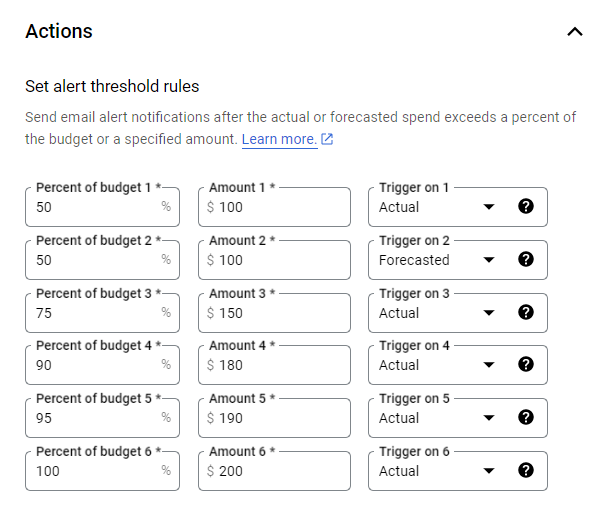
在google_billing_budget資源中,threshold_rules是一個重要的配置部分,用於設定預算觸發的閾值和條件。以下是該配置的詳細說明:
resource "google_billing_budget" "budget" {

  # default: spend_basis = "CURRENT_SPEND"

  threshold_rules {
    threshold_percent = 0.5
  }
  threshold_rules {
    threshold_percent = 0.75
  }
  threshold_rules {
    threshold_percent = 0.90
  }
  threshold_rules {
    threshold_percent = 1
  }

  threshold_rules {
    threshold_percent = 0.5
    spend_basis       = "FORECASTED_SPEND"
  }
**threshold_rules** 定義一個或多個閾值規則,當實際支出或預測支出達到指定的百分比時觸發通知。threshold_percent 指定達到該閾值時的支出百分比。例如,設定 0.5表示當實際支出達到預算總額的 50% 時觸發通知。
**spend_basis**
CURRENT_SPEND: 使用實際支出計算閾值。FORECASTED_SPEND: 使用預測支出計算閾值。
及時獲取關於支出的預警。採取必要措施控制支出,避免超預算。而基於預測支出進行決策,也可以使得管理預算更具前瞻性。
Ooops ~ 但 Terraform 有略顯稍微冗了點,隨手使用 **for_each for_each**是 Terraform 中的控制結構,讓你對集合(例如清單或映射)中的每個元素執行相同的操作,主要作用是動態創建多個資源或配置。
resource "example_resource" "name" {
  for_each = [ "value1", "value2", "value3" ]  # 這裡是一個列表

  name = each.value  # 使用當前元素的值
}
這個例子中,使用了一個簡單清單 ["value1", "value2", "value3"]。for_each 後面跟著集合,這意味著 Terraform 會遍歷這個集合的每個元素,特別在處理多個資源或設定十分實用,假設你要建立多個 Google Cloud Storage Bucket:
variable "bucket_names" {
  type    = list(string)
  default = ["bucket1", "bucket2", "bucket3"]
}

resource "google_storage_bucket" "buckets" {
  for_each = var.bucket_names
  name     = each.value
  location = "US"
}
最後簡單調整如下:
variable "thresholds" {
  type    = list(number)
  default = [0.5, 0.75, 0.9, 0.95, 1.0]
}

resource "google_billing_budget" "budget" {

# ...

  dynamic "threshold_rules" {
    for_each = var.thresholds
    content {
      threshold_percent = threshold_rules.value
      spend_basis       = "CURRENT_SPEND"
    }
  }

  threshold_rules {
    threshold_percent = 0.5
    spend_basis       = "FORECASTED_SPEND"
}補充:dynamic 是 Terraform 中的一個結構,用於動態產生資源或模組中的區塊。當你需要根據條件或集合的內容產生多個相似的區塊時,dynamic特別有用。dynamic "block_name" 聲明你要動態產生一個名為 block_name 的區塊,然後 for_each 遍歷這個集合,為集合中的每個元素產生一個區塊,事實上,有很多重覆的 metadata 或被要求要疊加的資訊,e.g., label, tag 也滿適合使用。
variable "tags" {
  type    = list(string)
  default = ["tag1", "tag2", "tag3"]
}

resource "google_compute_instance" "vm" {
  name         = "example-instance"
  machine_type = "n1-standard-1"
  zone         = "us-central1-a"

  dynamic "tags" {
    for_each = var.tags

    content {
      tag = tags.value  # 使用當前標籤的值
    }
  }
}
指定 Billing Alert 範圍:budget_filter
這邊滿重要的,一般會把細到監控各專案的費用,或是限定各環境的上限,例如研發用環境年費用不能超支多少,以下直接把所有的可用參數及 filter 全部攤開來看,事實上支援還滿多的,我們試挑其中幾個來設定


對照 WebUI 如下畫面

Terraform 參考,留意 project, services, resource_ancestors 而 credit_types_treatment 將在下個重點說明。
resource "google_billing_budget" "budget" {
  billing_account = data.google_billing_account.account.id
  display_name    = "Example Billing Budget"

budget_filter {
    projects = ["projects/${data.google_project.project.number}"]
    credit_types_treatment = "INCLUDE_SPECIFIED_CREDITS"
    # 可用選項及其含義:
    # INCLUDE_ALL_CREDITS:
    # 包括所有類型的信用額度。在計算支出時,所有的信用額度都會被考慮進去。
    # EXCLUDE_ALL_CREDITS:
    # 排除所有類型的信用額度。在計算支出時,不考慮任何信用額度,這意味著實際支出將不會受到折扣或獎勵的影響。
    # INCLUDE_SPECIFIED_CREDITS:
    # 只包括特定的信用額度。在這種情況下,你可以指定要包括的信用額度類型,這樣計算支出時只考慮這些指定的信用額度。

    # services               = ["services/24E6-581D-38E5"] # Bigquery
    # google_billing_budget 配置中,如果你希望在計算預算時排除特定的信用類型(如促銷和免費層),你可以這樣設置:
    credit_types           = ["PROMOTION", "FREE_TIER"]
    resource_ancestors     = ["organizations/123456789"]
}[**resource_ancestors](https://registry.terraform.io/providers/hashicorp/google/latest/docs/resources/billing_budget#resource_ancestors)**

Google Cloud 的資源通常以層級結構組織。通過 resource_ancestors,可以在組織層級管理預算,而 projects 則提供了更細粒度的控制。resource_ancestors用於指定預算將套用於哪些特定的資料夾或組織。它允許你控制預算的適用範圍,使其只涵蓋特定的資源。像是可以使用下列格式來指定資料夾或組織:
folders/{folderId}:指定某個資料夾的IDorganizations/{organizationId}:指定某個組織的 ID
data "google_billing_account" "account" {
  billing_account = "XXXXX-123456-OOOOOO"
}

resource "google_billing_budget" "budget" {
  billing_account = data.google_billing_account.account.id
  display_name    = "Example Billing Budget"

  budget_filter {
    projects = ["projects/${data.google_project.project.number}"]
    credit_types_treatment = "INCLUDE_SPECIFIED_CREDITS"
    credit_types           = ["PROMOTION", "FREE_TIER"]
    resource_ancestors     = [
      "folders/{folderId}",      # 指定特定的文件夹
      "organizations/{organizationId}"  # 指定特定的组织
    ]
  }
}- 靈活性與控制:
resource_ancestors提供了靈活性,使你可以精確控制哪些項目的支出會被納入預算,從而提高預算管理的有效性 - 優化預算監控:透過指定特定的資料夾或組織,可以更清楚地監控和管理特定資源的雲端支出,避免無關資源的干擾
credit_types(Optional)
有上面的重點提到,只有在credit_types_treatment為INCLUDE_SPECIFIED_CREDITS時,credit_types才會生效,並從總費用中扣除相應的信用。確保根據您的實際需求合理設定這些參數,以有效管理預算和費用。
credit_types_treatment
- INCLUDE_ALL_CREDIT > 所有的信用額度都會被考慮進去
- INCLUDE_SPECIFIED_CREDITS + credit_types 一起使用
- EXCLUDE_ALL_CREDITS > 不考慮任何信用額度,不會有折扣獎勵
此參數用於定義在計算支出時需要從總費用中扣除的信用類型,以確定實際支出。這些信用類型會影響預算的門檻計算。

  budget_filter {
    projects = ["projects/${data.google_project.project.number}"]
    credit_types_treatment = "INCLUDE_SPECIFIED_CREDITS"
    # 可用選項及其含義:
    # INCLUDE_ALL_CREDITS:
    # 包括所有類型的信用額度。在計算支出時,所有的信用額度都會被考慮進去。

    # EXCLUDE_ALL_CREDITS:
    # 排除所有類型的信用額度。在計算支出時,不考慮任何信用額度,這意味著實際支出將不會受到折扣或獎勵的影響。

    # INCLUDE_SPECIFIED_CREDITS:
    # 只包括特定的信用額度。在這種情況下,你可以指定要包括的信用額度類型,這樣計算支出時只考慮這些指定的信用額度。

    # services               = ["services/24E6-581D-38E5"] # Bigquery

    # google_billing_budget 配置中,如果你希望在計算預算時排除特定的信用類型(如促銷和免費層),你可以這樣設置:
    credit_types           = ["PROMOTION", "FREE_TIER"]
    # resource_ancestors     = ["organizations/123456789"]
}- 當
credit_types_treatment設定為INCLUDE_SPECIFIED_CREDITS時,您可以在此參數中列出希望包含的信用類型。這意味著這些信用類型將從總費用中扣除,以計算實際支出 - 如果
credit_types_treatment不是INCLUDE_SPECIFIED_CREDITS,則此參數必須留空。換句話說,如果您不打算包含特定的信用類型,則credit_types欄位必須是空數組([])
在 Google Cloud 的預算設定中,所選的信用類型會影響總費用的計算。以下是各種信用類型的詳細說明:
Discounts
這些是自動應用於您的帳單的費用減免選項。
Free tiers(免費套餐) 某些 Google 服務提供免費的使用額度,超出部分才會計費。例如 Google Cloud Storage 和 BigQuery 提供特定額度的免費使用
Sustained use discounts(持續使用折扣) 當您持續使用特定的運算資源(如虛擬機器)時,Google Cloud 會自動為您提供折扣。例如,持續使用VM 的時間越長,您的小時費用可能會減少。
Committed use discounts (resource based)(基於資源的承諾使用折扣) 您可以承諾在一定時間內使用特定類型的資源(如VM),以換取較低的費率。這種折扣通常適用於預測到的長期使用。
Committed use discounts (spend based)(基於支出的承諾使用折扣) 透過承諾在一定時期內達到特定的支出額度,您可以獲得折扣。這種模式適合大規模客戶,能夠確保在預算範圍內獲得更好的費率。
Spending based discounts (contractual)(基於支出的合約折扣) 這些是透過與Google Cloud 簽訂合約而獲得的折扣,通常適用於大型企業,涉及特定的使用量和支出承諾。
Subscriptions(訂閱) 透過訂閱某些服務(如Cloud Functions 的事件處理),您可能會獲得優惠價格。這些通常與服務的使用模式相關聯。
Promotions and others(促銷及其他)
這些通常是臨時或特別優惠,用於吸引新客戶或促銷活動。
Promotions(促銷) 這些是Google Cloud 提供的限時優惠,通常適用於新客戶或特定服務。例如,註冊時可能會有一些免費使用額度,或針對新服務的首次使用折扣。
Other(其他) 可能包括其他特殊優惠或減免,例如教育機構或非營利組織的特別折扣。這些優惠會根據不同的情況而有所不同。
設定預算:amount
- last_period_amount:使用上個結算周期的支出金額,希望根據過去的消費模式來設定預算時特別有用,但要留意需要你有上個結算周期的支出記錄,否則可能會導致錯誤。這種算是可以進行線上預算自動更新,如果你的支出在每個結算周期都有所變化,這種方法可以幫助你自動調整預算,減少手動設定的需要。但…通常這類較少使用,通常一個專案的成本收入會常被拿來檢視,因此我們會直接使用
**specified_amount** 一個定值的預算 作為每月的費用上限 - specified_amount:明確預算,並包含
currency_code,units。
  amount {
    # last_period_amount = true  # 使用上個結算周期的支出金額,希望根據過去的消費模式來設定預算時特別有用

    specified_amount {
      currency_code = "TWD"
      units         = "200"
    }
  }
🐞 踩雷記錄:units 要對照一下目前組織 billing account 設定的 unit,會需要一致,不然會有 error。
{
  "error": {
    "code": 400,
    "message": "Request contains an invalid argument.",
    "status": "INVALID_ARGUMENT"
  }
}
https://github.com/hashicorp/terraform-provider-google/issues/9375
Notification 管理:disable_default_iam_recipients(Boolean)
在Google Cloud 的預算設定中,disable_default_iam_recipients 是重要的可選參數,它們可以影響預算通知的接收者,以下是這個選項的詳細說明

# 在 all_updates_rule 區塊下設定
all_updates_rule {
    pubsub_topic = "projects/${data.google_project.project.number}/topics/${google_pubsub_topic.billing_topic.name}"  # 添加 Pub/Sub 主题
    monitoring_notification_channels = [
      google_monitoring_notification_channel.notification_channel.id,
    ]

    disable_default_iam_recipients = false  # 不禁用默認 IAM 收件人
  }
此選項用於控制是否已停用預設的IAM 收件者。預設情況下,當預算閾值被超出時,系統會向具有特定IAM 角色的使用者發送通知。這些角色包括:Billing Account Administrators、Billing Account Users
- 設定為
true的效果: 如果將此參數設為true,則將停用向預設收件者傳送通知。這表示只有您明確指定的通知管道(如電子郵件、Pub/Sub 等)會接收通知,我的場景中希望帳單管理員能主動納管,因此也使用原生的 GCP 通知服務
這個選項提供了靈活的通知管理功能,可讓您根據組織的需求自訂預算通知的接收者。透過合理配置,可以確保相關人員及時獲得必要的信息,幫助他們更好地管理預算和費用。
Notification:google_monitoring_notification_channel
若要將電子郵件警報傳送給專案擁有者,您需要在Google Cloud 中設定一個監控通知管道,並在預算配置中指定此通知管道。以下是具體的步驟和Terraform 設定範例:
步驟
- 建立監控通知管道:使用
google_monitoring_notification_channel資源建立一個電子郵件通知管道,指定收件者的電子郵件地址 - 將通知頻道新增至預算:在
google_billing_budget的all_updates_rule中,將剛建立的通知頻道新增至monitoring_notification_channels清單
# ...

  all_updates_rule {
    pubsub_topic = "projects/${data.google_project.project.number}/topics/${google_pubsub_topic.billing_topic.name}"  # 添加 Pub/Sub 主题
    monitoring_notification_channels = [
      google_monitoring_notification_channel.notification_channel.id,
    ]

    disable_default_iam_recipients = false  # 不禁用默認 IAM 收件人
    # enable_project_level_recipients = true  # 版本不支援
  }

  # 設定擁有範圍
  depends_on = [module.project-services]

}

resource "google_monitoring_notification_channel" "notification_channel" {
  display_name = "Example Notification Channel"
  type         = "email"

  labels = {
    email_address = "fubar@fubar.com"
  }
}
支援多種類型,由於 email 類型是最常見的使用模式,本案例也採用 Email

Notification:外接 Billing API 至 PubSub
外接 PubSub 可以作什麼?可以作的太多了,細節可以參考先前的幾篇實作
📓 【How-to Guides】GCP FinOps — 使用 Google Cloud Billing API 自動監控成本 📓 *【How-to Guides】GCP Billing — 透過 Push Mail 或以 Slack 進行 billing alert notification*
data "google_billing_account" "account" {
  billing_account = "XXXXX-123456-OOOOOO"
}

data "google_project" "project" {
  project_id = var.gcp_project
}

resource "google_pubsub_topic" "billing_topic" {
  name = "billing-alerts-topic"
}

resource "google_billing_budget" "budget" {
  billing_account = data.google_billing_account.account.id
  display_name    = "Example Billing Budget"

# ...

  all_updates_rule {
    pubsub_topic = "projects/${data.google_project.project.number}/topics/${google_pubsub_topic.billing_topic.name}"  # 添加 Pub/Sub 主题
    monitoring_notification_channels = [
      google_monitoring_notification_channel.notification_channel.id,
    ]

    disable_default_iam_recipients = false  # 不禁用默認 IAM 收件人
    # enable_project_level_recipients = true  # 版本不支援
  }
設定完,最後結果如下
上面大概都吃預設值的就可以處理,但如果在特定產業、FinOps 及內部管理規範有些要求話,在疊加一些 PubSub 設定,並來看看在 Terraform 寫作的精進版。
variable "common_labels" {
  type = map(string)
  default = {
    env     = "sit"
    project = "finops"
    team    = "planning-department"
  }
}

resource "google_pubsub_topic" "billing_topic" {
  name = "billing-alerts-topic"

  labels = var.common_labels
  message_retention_duration = "259200s"  # 3天 = 3 * 24 * 60 * 60 秒

  message_storage_policy {
    allowed_persistence_regions = [
      "asia-east1",
    ]
  }
}
🆕 增加 label
所有的標籤都集中在 common_labels 變數中,未來如果需要修改或新增標籤時,只需在這裡進行修改,代碼更簡潔明瞭。
🆕 增加 message_retention_duration
message_retention_duration 是 Google Cloud Pub/Sub 中的一個屬性,指定了訊息在主題中保留的時間。這個參數的作用訊息保留期限,超過這個時間的訊息將被自動刪除。其次是根據應用需求,你可以設定較短或較長的保留時間。例如,對於即時處理的訊息,可以設定較短的保留時間,而對於需要後續處理的訊息,可以設定較長的保留時間。

🆕 **message_storage_policy的 allowed_persistence_regions 探討**
如果在 Google Cloud Pub/Sub 中不寫 message_storage_policy,則會使用 Google Cloud 的預設儲存策略,這表示會有以下的議題:
無地區限制 訊息可以在任何可用的 GCP 地區進行儲存,這樣提供了更大的靈活性,但可能不符合某些合規性或法律要求
預設行為 GCP 會根據其內部的最佳實踐和負載平衡算法自動選擇儲存地區。這對於大多數用例是足夠的,特別是在你不需要遵循特定的地理數據主權法律時
性能與延遲 儘管預設儲存策略可以自動選擇地區,但對於某些應用,將訊息儲存在離消費者較近的地區可能更有利於降低延遲
# 確認是否有成功引入
gcloud pubsub topics describe billing-alerts-topic --format="json"

{
  "labels": {
    "env": "sit",
    "project": "finops",
    "team": "planning-department"
  },
  "messageRetentionDuration": "259200s",
  "messageStoragePolicy": {
    "allowedPersistenceRegions": [
      "asia-east1"
    ]
  },
  "name": "projects/hello-fubar-world/topics/billing-alerts-topic"
}
🆕 訂閱者設置 **dead-letter topic**
雖然本篇沒有寫作 subscription 方的內容,但在 Google Cloud Pub/Sub 中,設置 dead-letter topic 是一個在訂閱方很好的做法,特別是對於處理訊息失敗的情況。
當某個消息在被處理時多次失敗(超過指定的重試次數),它可以被發送到一個 dead-letter topic,這樣你可以進一步調查為什麼這些消息無法成功處理。這有助於避免消息永遠留在原始主題中,導致消費者無法正常運行。應該將失敗的消息發送到專用的 dead-letter topic,可以集中管理、監控和調查這些錯誤,而不影響正常的消息處理流程。
Sample Code
Sample Code
**main.tf**
data "google_billing_account" "account" {
  billing_account = "XXXXXX-FUBAR-XXXXXX"
}

resource "google_pubsub_topic" "billing_topic" {
  name = "billing-alerts-topic"
}

data "google_project" "project" {
  project_id = var.gcp_project
}

variable "thresholds" {
  type    = list(number)
  default = [0.5, 0.75, 0.9, 0.95, 1.0]
}

resource "google_billing_budget" "budget" {
  billing_account = data.google_billing_account.account.id
  display_name    = "Example Billing Budget"

  budget_filter {
    projects = ["projects/${data.google_project.project.number}"]
    credit_types_treatment = "INCLUDE_SPECIFIED_CREDITS"
    credit_types           = ["PROMOTION", "FREE_TIER"]
    resource_ancestors     = ["organizations/123456789"]
  }

  amount {
    specified_amount {
      currency_code = "TWD"
      units         = "200"
    }
  }

  dynamic "threshold_rules" {
    for_each = var.thresholds
    content {
      threshold_percent = threshold_rules.value
      spend_basis       = "CURRENT_SPEND"  # 根據需要選擇合適的 spend_basis
    }
  }

  threshold_rules {
    threshold_percent = 0.5
    spend_basis       = "FORECASTED_SPEND"
  }

  all_updates_rule {
    pubsub_topic = "projects/${data.google_project.project.number}/topics/${google_pubsub_topic.billing_topic.name}"  # 添加 Pub/Sub 主题
    monitoring_notification_channels = [
      google_monitoring_notification_channel.notification_channel.id,
    ]
    disable_default_iam_recipients = false  # 不禁用默認 IAM 收件人
  }

  depends_on = [module.project-services]

}

resource "google_monitoring_notification_channel" "notification_channel" {
  display_name = "Example Notification Channel"
  type         = "email"

  labels = {
    email_address = "fubar@fubar.com"
  }
}**enableAPI.tf**
module "project-services" {
  source      = "terraform-google-modules/project-factory/google//modules/project_services"
  version     = "~> 12.0"
  project_id  = "hello-fubar-world"
  enable_apis = true
  activate_apis = [
    "storage-api.googleapis.com",
    "iam.googleapis.com",
    "cloudfunctions.googleapis.com",
    "cloudresourcemanager.googleapis.com",
    "compute.googleapis.com",
    "cloudbilling.googleapis.com",  # 添加計費 API
    "billingbudgets.googleapis.com"
  ]

  disable_services_on_destroy = false

}
Reference
- 【Terraform】google_billing_budget
메타데이터
- post_id
- cefc6860ba08
- slug
- explanation-terraform-解析-gcp-billing-alert-配置-cefc6860ba08
- url
- https://medium.com/@kellenjohn175/explanation-terraform-%E8%A7%A3%E6%9E%90-gcp-billing-alert-%E9%85%8D%E7%BD%AE-cefc6860ba08
- canonical_url
- https://medium.com/@kellenjohn175/explanation-terraform-%E8%A7%A3%E6%9E%90-gcp-billing-alert-%E9%85%8D%E7%BD%AE-cefc6860ba08
- author_url
- https://medium.com/@kellenjohn175
- status
- ok
- fetched_at
- 2026-07-25 15:44:25



