Zero Code. One Evening. Live Website.
Building a website with AI, taught me where the real work is
Zero Code. One Evening. Live Website.
Building a website with AI, taught me where the real work is
I used to think the hard part of a personal website was the building. I was wrong.
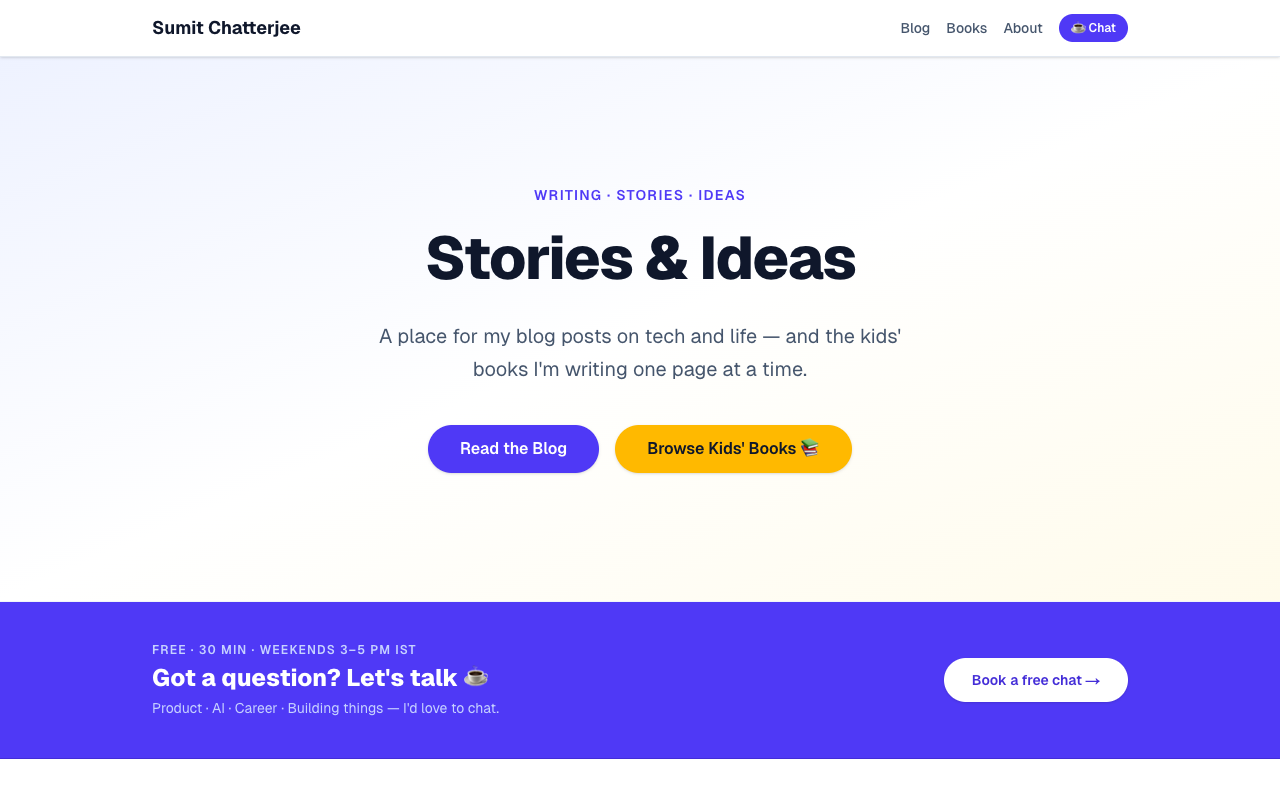
One evening, I described what I wanted to GitHub Copilot CLI. By the end of the night, sumitc.in was live — blog, kids’ books section, custom domain, booking page. The tech wasn’t the hard part. Three questions were — and most people skip the third one entirely:
- Who is this for? (people curious about tech, AI, and building things)
- What value does it create? (a place to read my work and reach out easily)
- What connects everything I do? (products, writing, kids’ books, experiments — all curiosity-driven building)
That third question is the one that gives a site a soul. Without it, you end up with something that looks like a LinkedIn profile. Once I answered all three honestly, everything else snapped into place.

Once the why was clear, the how took one evening.
The tool I used is GitHub Copilot CLI — not the IDE autocomplete you might know, but a conversational AI agent that lives in your terminal. You describe what you want; it writes the code, runs the commands, and asks when it needs a decision from you. No switching tabs. No copy-pasting from ChatGPT. You’re just talking to something that can act.
One thing worth calling out: the model powering it was Claude Sonnet 4.6 — not Opus, not some frontier model people assume you need for “serious” work. The whole site — scaffold, blog wiring, DNS setup, booking page, multi-platform RSS sync — was built on Sonnet. The gap between what Sonnet can do and what people think you need Opus for is much larger than most realise.
Here’s the actual process:
- Described the site in plain English → Copilot scaffolded a full Next.js project
- Wired to existing markdown content → blog posts pulled in automatically
git push→vercel --prod→ two DNS record changes in GoDaddy → live
Total infrastructure cost: zero. Vercel handles SSL, CDN, and auto-deploys on every push.
A few tricks that saved time:
- Use Vercel (not Render) when there’s no backend API
- Always delete old A records before adding new DNS ones
- RSS feeds from Medium and Substack auto-sync titles and dates to the site

The real surprise came after the launch. Because I’d saved all styling preferences and decisions as a reusable Copilot CLI skill, every update became trivial:
- Booking page (Cal.com + Google Calendar): one conversation, one deploy
- Consistent tag colours across blog cards: one instruction
- Nav cleanup, CTA placement, RSS sync: each a single
git push
The site doesn’t feel like a project I finished — it feels like something I can keep shaping. That’s the unlock: build it so coming back is as easy as starting.
If you’re thinking about doing the same — book a 30-min chat, weekends, free. Happy to walk through it.
What’s been stopping you from putting your site live? Drop it in the comments.
I write about AI, product building, and the things I’m making. Follow so you don’t miss the next one.
메타데이터
- post_id
- cf2f1f91f90e
- slug
- zero-code-one-evening-live-website-cf2f1f91f90e
- url
- https://medium.com/@getsumit/zero-code-one-evening-live-website-cf2f1f91f90e
- canonical_url
- https://medium.com/@getsumit/zero-code-one-evening-live-website-cf2f1f91f90e
- author_url
- https://medium.com/@getsumit
- status
- ok
- fetched_at
- 2026-06-20 20:29:01