Day 47: Exploring Deep Learning with Runpod Containers
Introduction
Day 47: Exploring Deep Learning with Runpod Containers
Introduction
Recently, I experimented with deep learning training using Runpod containers. For just $20, I was able to create a container and perform various tasks, from working with pre-trained models like BERT and GPT-2 to building an emotion classification model. The availability of GPU resources significantly accelerated the training process, making the experience highly satisfying. In this blog, I’ll detail the setup process and share the results.
Initial Setup
After setting up the container in Runpod, I began by configuring the environment and checking the system status. Here are some of the key commands I used:
Checking NVIDIA GPU Status
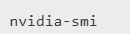
This command helped me monitor the GPU’s status and driver details. It was particularly useful for tracking memory usage and active processes.
Monitoring CPU and Memory Usage

With the htop command, I could view detailed information about CPU, memory, and other system resources. This was invaluable in preventing bottlenecks during training.
Real-Time GPU Monitoring

Using the watch command, I monitored GPU usage at one-second intervals, ensuring optimal resource utilization during the training process.
Utilizing Hugging Face Models
The Transformers library by Hugging Face made it easy to load and train models. I explored both simple examples with pre-trained models like BERT and GPT-2 and more complex tasks like emotion classification.
Loading BERT and GPT-2 Models
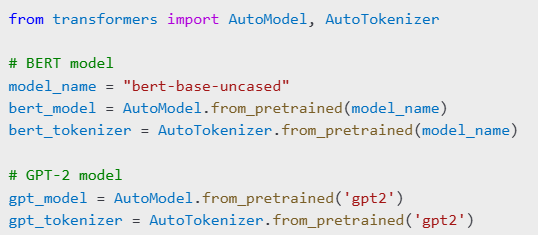
These models allowed me to input text, tokenize it, and pass the tokenized data to the models for output generation.
Training an Emotion Classification Model
To work with Korean text data, I used the KLUE/roberta-base model, a pre-trained model suitable for tasks like sentiment analysis and sentence classification.

I loaded datasets using the datasets library:

Data Preprocessing and Labeling
I extracted the necessary text and labels from a JSON dataset, followed by data preprocessing and tokenization.

Training and Evaluation
Using the Trainer API, I trained the model with the following parameters:
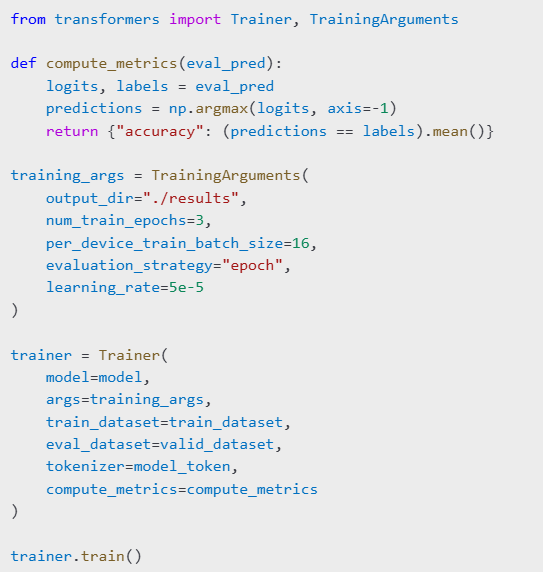
The training resulted in an accuracy of approximately 84% for the emotion classification model.
Key Takeaways
Advantages of Runpod
Runpod simplifies the setup process and provides a GPU-enabled environment, making it ideal for large-scale model training. The cost-effectiveness and speed enhancements were highly valuable.
Utility of Hugging Face
The pre-trained models and datasets offered by Hugging Face significantly reduced the time and effort needed to implement a complete training pipeline.
Areas for Improvement
While training, I encountered GPU memory limitations, requiring adjustments to the batch size. This experience deepened my understanding of model optimization and resource management.
Conclusion
This project showcased the efficiency of using Runpod containers combined with Hugging Face tools for deep learning tasks. It was a rewarding experience, and I’m excited to leverage these platforms for future projects. I highly recommend Runpod for anyone looking to explore model training efficiently. Give it a try and see the results for yourself!
메타데이터
- post_id
- cf2fd95d44b6
- slug
- day-47-exploring-deep-learning-with-runpod-containers-cf2fd95d44b6
- url
- https://medium.com/@godsjh6304/day-47-exploring-deep-learning-with-runpod-containers-cf2fd95d44b6
- canonical_url
- https://medium.com/@godsjh6304/day-47-exploring-deep-learning-with-runpod-containers-cf2fd95d44b6
- author_url
- https://medium.com/@godsjh6304
- status
- ok
- fetched_at
- 2026-06-12 07:40:50