Best Free Portfolio Website for Freelancers in 2026: Google Sites vs Wix vs Canva
Looking for the best free portfolio website for freelancers? Compare Google Sites vs Wix vs Canva to find the perfect platform for your…
Best Free Portfolio Website for Freelancers in 2026: Google Sites vs Wix vs Canva
Looking for the best free portfolio website for freelancers? Compare Google Sites vs Wix vs Canva to find the perfect platform for your freelance business.
As a freelancer, your portfolio website is your digital handshake. It’s often the first impression potential clients get of your work, and honestly? It can make or break whether you land that gig.
But here’s the good news: you don’t need to spend hundreds of dollars or know how to code to build a professional portfolio. Finding the best free portfolio website for freelancers is easier than you think, and there are excellent options available.
This guide compares three popular free portfolio builders — Google Sites, Wix, and Canva, so you can choose the best one for your freelancing needs.
What Makes a Good Portfolio Website?
Before we dive into the comparison, let’s talk about what actually matters in a portfolio website:
- Easy to set up: You want to spend time finding clients, not figuring out website code
- Professional look: First impressions count, and your site needs to look legit
- Shows your work clearly: The whole point is to showcase what you do
- Free or affordable: Especially when you’re just starting out
- No coding required: Not everyone is a tech wizard, and that’s okay
Now let’s see how Google Sites, Wix, and Canva stack up.
Google Sites: Simple and Fast
What It Is
Google Sites is Google’s free website builder. It’s part of Google Workspace (the same ecosystem as Gmail, Google Drive, and Docs), so if you’re already using Google products, this integrates seamlessly.
Pros
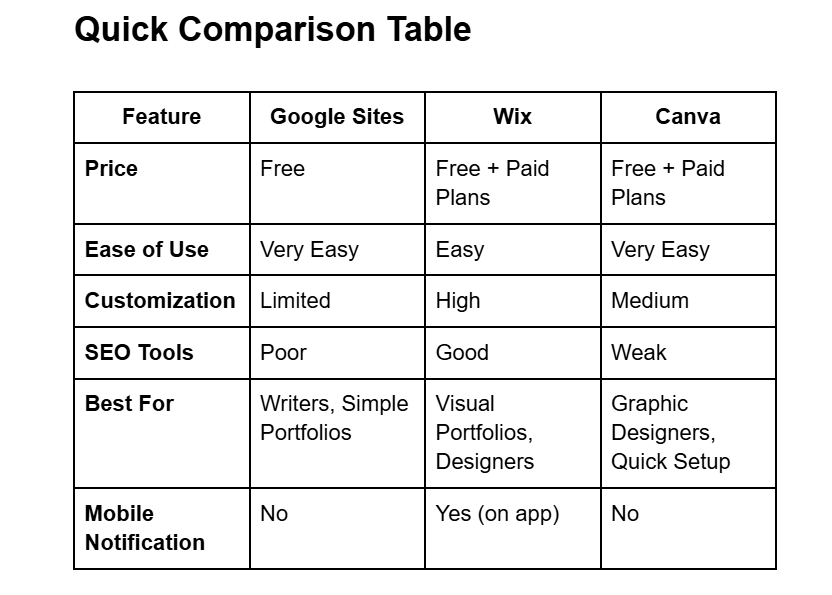
Completely Free: No hidden costs. Zero. You can host your entire portfolio without spending a cent.
Super Easy to Use: The drag-and-drop editor is incredibly simple. If you can use Google Docs, you can build a Google Site. No technical skills needed.
Google Integration: This is huge. You can easily embed documents from Google Drive, presentations from Google Slides, or forms from Google Forms directly into your portfolio. Perfect if your work samples are already stored in Google Drive.
Secure and Fast: Google handles all the security (automatic HTTPS) and hosting, so your site loads quickly and stays safe.
Custom Domain Option: You can connect a custom domain name (like yourname.com) to your Google Site for free if you’ve purchased one separately.
Mobile-Friendly: Sites automatically adjust to look good on phones and tablets.
Cons
Limited Customization: There are only a few basic themes. If you want your portfolio to have a unique, eye-catching design, Google Sites won’t give you much flexibility.
Poor SEO Tools: There’s very little you can do to optimize your site for search engines. No easy way to add meta descriptions or tracking pixels, which means potential clients might have a harder time finding you through Google searches.
Not for Complex Features: You can’t add things like online payments, e-commerce stores, or a proper blog.
Limited Support: No live chat or phone support. If something goes wrong, you’re stuck searching forums for answers.
Scalability Issues: Great for 5–10 pages, but if your business grows and you need something more complex, you’ll hit a wall.
Best For
Writers, consultants, virtual assistants, or anyone who needs a clean, simple “online business card” quickly.
Pricing
Free.
Wix: Beautiful and Professional
What It Is
Wix is one of the most popular website builders out there. It’s known for its beautiful templates and professional-looking designs.
Pros
Easy Drag-and-Drop Editor: Just like Google Sites, no coding needed. The editor is intuitive and beginner-friendly.
Hundreds of Templates: Wix has gorgeous, professionally designed templates specifically for portfolios. There’s something for every style and industry.
Great for Visual Work: If you’re a photographer, designer, illustrator, or any visual creator, Wix has built-in tools for image galleries, animations, and media optimization that make your work shine.
All-in-One Platform: Hosting, security, and customer support are all included. You don’t have to worry about the technical stuff.
Business Tools Included: You can add contact forms, online booking, live chat, and even e-commerce features as your business grows.
Scalability: The Wix App Market lets you add more features over time, from email marketing to appointment scheduling.
Basic SEO Tools: Wix provides an SEO checklist, editable meta tags, and alt text options to help your site show up in search results.
Cons
Template Lock-In: Once you pick a template and publish your site, you can’t switch to a different one without rebuilding everything from scratch.
Can Be Slow: If you load up your site with high-resolution images, videos, and apps, it might start loading slowly, which hurts user experience and SEO.
Limited Deep Customization: While flexible, Wix doesn’t give you full code-level control like WordPress does.
Can’t Export Your Site: If you decide to leave Wix, you can’t take your site with you. You’d have to rebuild it on another platform.
Free Version Has Ads: The free plan displays “This site was created with Wix” ads and uses a Wix subdomain (yourname.wixsite.com), which looks less professional.
Manual Updates for Non-Visual Work: If you’re a writer, adding new articles means manually copying and pasting each piece, which can get tedious.
Best For
Designers, photographers, artists, or anyone who wants a visually stunning portfolio and doesn’t mind a bit of a learning curve.
Pricing
Free version available. Paid plans start around $16/month to remove ads and get a custom domain.
Canva Websites: Design-Focused and Quick

What It Is
Canva is primarily a graphic design tool, but it also offers a simple website builder. If you’re already using Canva for social media graphics or branding, this is a natural extension.
Pros
Super Easy to Use: Canva’s drag-and-drop interface is incredibly intuitive. Even complete beginners can create something professional-looking in minutes.
Tons of Templates and Assets: Massive library of templates, stock photos, icons, and fonts. Great for overcoming creative blocks.
Cost-Effective: The free version is functional, and Canva Pro is affordable compared to professional design software.
Web-Based and Mobile-Responsive: Works from any device, and sites automatically adjust for mobile viewing.
Brand Consistency: With Canva Pro, you can upload your logos, fonts, and color palettes to keep everything on-brand across your portfolio and marketing materials.
Simple Website Publishing: You can publish your portfolio as a one-page website with a free my.canva.site domain or connect a custom domain.
Cons
Limited Functionality: Canva is not a full website builder. You can’t add custom code (HTML/CSS), e-commerce features, or complex functionality.
Lacks Uniqueness: Because so many people use the same templates and design elements, portfolios can start looking similar and generic.
Not Ideal for All Industries: Works great for creative fields, but might look less professional in traditional industries like finance or law.
Export Limitations: You can’t easily export multi-layered files for editing in professional software like Adobe Illustrator.
Weak SEO Tools: Very limited SEO capabilities compared to dedicated website builders, so you’ll struggle to rank in search engines.
Generic Branding Elements: If you create a logo using free Canva elements, it can’t be trademarked.
Best For
Visual creators, social media managers, graphic designers, or anyone already comfortable with Canva who wants to create a quick, design-heavy portfolio.
Pricing
Free version available. Canva Pro costs around $13/month.
My Personal Experience Building a Freelance Portfolio
When I started freelancing as an administrative assistant for coaches and course creators, I first used Canva to build my portfolio. It looked nice, but it didn’t really give me what I needed. The functionality was too limited for showcasing my services properly.
So I switched to Wix. And honestly? I loved it at first. One feature that really stood out was the mobile notification — whenever I sent my portfolio to a potential client and they visited my site, I’d get a notification on my phone. That was amazing. It helped me build confidence knowing that my cold DMs and emails were actually being opened and checked out.
But here’s the thing: Wix made it very obvious I was using the free version. At the bottom of every page, it said “This site was made with Wix. Make yours.” That made my portfolio look unprofessional and a bit tacky, honestly.
So I switched again to Google Sites. And I love it. It’s easy, fast to set up, and I appreciate the simplicity. No flashy ads, no “made with” banners — just clean and professional.
Until I’m ready to invest in a full custom website, I’m sticking with Google Sites.
Best Free Portfolio Website for Freelancers: Which Should You Choose?
Choose Google Sites if:
- You’re a writer, consultant, or VA
- You need something fast and free
- You want simplicity over fancy design
- You already use Google Drive and Docs
Choose Wix if:
- You’re a designer, photographer, or visual creator
- You want a beautiful, professional-looking portfolio
- You don’t mind the ads on the free version (or you’re willing to upgrade)
- You want visitor notifications and advanced features
Choose Canva if:
- You’re already using Canva for design work
- You need something super quick and visual
- You’re okay with limited functionality
- You’re in a creative field where design matters most
Bonus: WordPress If you’re serious about SEO and want full control, consider WordPress. It has a steeper learning curve, but it’s the best option for long-term growth and visibility.
Frequently Asked Questions
Do I need a portfolio website as a freelancer? Yes. Even if you use platforms like Upwork or Fiverr, having your own portfolio website makes you look more professional and gives you control over how you present your work.
Can I use free versions professionally? Yes, but with limitations. Free versions often have ads or branded URLs (like yourname.wixsite.com), which can look less professional. If you’re serious about freelancing, investing $10–20/month for a paid plan is worth it.
Which is easiest to set up? Google Sites and Canva are the easiest. You can have a basic portfolio up in under an hour.
Which free portfolio website is best for freelancers who need SEO? Wix has the best SEO tools among these three free options. Google Sites and Canva are quite limited in SEO capabilities.
Can I switch platforms later? Yes, but it’s not always easy. Google Sites and Canva are simple to rebuild elsewhere. Wix doesn’t let you export your site, so you’d have to start from scratch.
Final Thoughts: Finding Your Best Free Portfolio Website
The best free portfolio website for freelancers depends on what you do and what you need.
If you want simple and fast, go with Google Sites. If you want beautiful and professional, go with Wix. If you’re already using Canva for design, stick with Canva Websites.
Start with one, test it out, and don’t be afraid to switch if it’s not working for you. Your portfolio will evolve as your freelancing business grows — and that’s perfectly normal.
Now go build that portfolio and start landing clients!
메타데이터
- post_id
- cf3acfe07bfb
- slug
- best-free-portfolio-website-for-freelancers-in-2026-google-sites-vs-wix-vs-canva-cf3acfe07bfb
- url
- https://medium.com/@andimaonah/best-free-portfolio-website-for-freelancers-in-2026-google-sites-vs-wix-vs-canva-cf3acfe07bfb
- canonical_url
- https://medium.com/@andimaonah/best-free-portfolio-website-for-freelancers-in-2026-google-sites-vs-wix-vs-canva-cf3acfe07bfb
- author_url
- https://medium.com/@andimaonah
- status
- ok
- fetched_at
- 2026-07-25 17:01:00




