I tested every free Loom alternative I could find. Here’s what’s actually worth using.
Loom’s free plan used to be decent. Then Atlassian bought them. Now you get 25 videos and 5 minutes of recording time. That’s it…
I tested every free Loom alternative I could find. Here’s what’s actually worth using.
Loom’s free plan used to be decent. Then Atlassian bought them. Now you get 25 videos and 5 minutes of recording time. That’s it. Twenty-five videos, total, not per month. Five minutes per recording. For a tool that’s supposed to replace meetings, that barely covers one standup update.
I got frustrated enough to spend a week testing alternatives. I downloaded apps, installed Chrome extensions, recorded the same demo video on each platform, and compared everything from recording quality to how fast I could share a link. Some of these tools surprised me. Some disappointed me. Here’s what I found.
What happened to Loom’s free plan?
Before getting into alternatives, let me be specific about what Loom offers now.
Loom’s pricing page shows four tiers. The Starter plan is free, but it caps you at 25 videos and 5-minute recordings. If you record one standup per day, you’ll burn through your entire video library in less than a month. And once you hit that limit? The next tier is Business at $18/user/month.
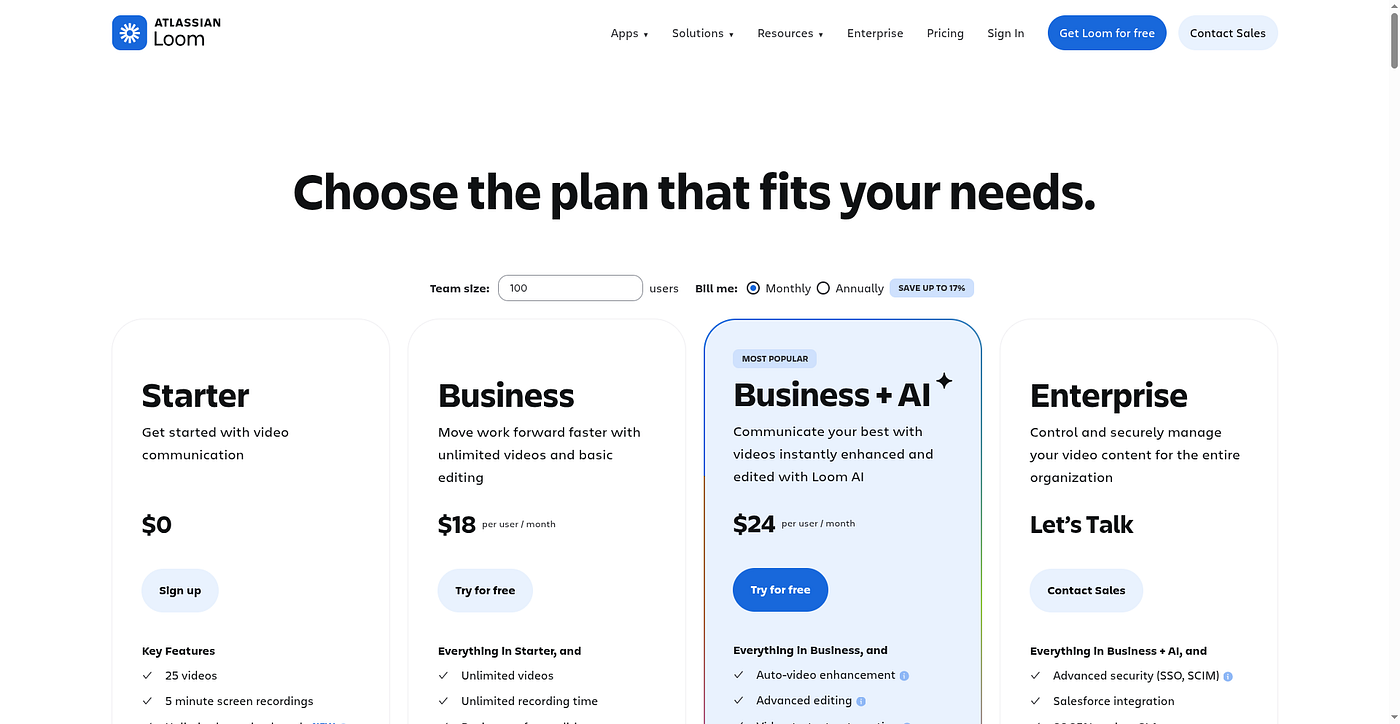
Loom’s current pricing shows a very limited free tier
Loom’s Starter plan gives you 25 videos total with a 5-minute cap. Business jumps to $18/user/month.
For solo creators or small teams, that jump from free to $18 is steep. I wanted to find something that doesn’t punish you for actually using it.
NeetoRecord
I almost skipped this one. The name isn’t catchy, and it’s part of a bigger suite of tools I’d never heard of (Neeto, made by a company called BigBinary). But then I looked at their pricing page and did a double take.
The free plan includes 200 videos per month, per user. Each video can be up to 15 minutes. And the feature list? Video analytics, auto-generated transcripts, chapters, summaries, custom domain, video embedding, noise cancellation, zoom effects, splitting and merging, share link expiry, and custom roles and permissions. All free. Unlimited team members.

NeetoRecord gives you 200 videos/month on the free plan with features most tools charge for.
I kept looking for the catch. There isn’t one that I could find. The paid Pro plan is $5/user/month (or $30/year) and removes the Neeto branding, bumps recording to 2 hours per video, and adds unlimited videos. That’s it. Compare that to Loom’s $18/month and the math basically does itself.
Their philosophy is interesting. The site says they “compete on price” and grow through word of mouth instead of ad budgets. That explains why most people haven’t heard of them.
The recording experience itself is solid. They have a desktop app for Windows, macOS, and Linux (Loom doesn’t even support Linux), plus a Chrome extension. The auto-generated transcripts worked well in my testing. I could search through transcripts to find specific parts of longer recordings, which is genuinely useful for tutorial content.
The chapters feature caught my attention too. It automatically breaks your video into navigable sections, so viewers can jump to the part they care about instead of scrubbing through a 10-minute recording.
Where it falls short: the editing tools are still “coming soon.” You can split and merge clips, but you can’t do the kind of polished editing you’d get with Tella or a dedicated video editor. The UI is functional but won’t win any design awards. If you need your recordings to look gorgeous, this isn’t the tool. If you need them to work and cost nothing? It’s hard to beat.
Best for: Teams that need a Loom replacement without paying anything. Seriously, 200 videos/month on free is wild.
Tella: when you want your screen recordings to actually look good
Tella is a different animal. Where NeetoRecord focuses on being affordable and functional, Tella focuses on making you look like you hired a video production team.

Tella positions itself as the screen recorder that edits videos for you.
The core idea is “clips, not takes.” Instead of recording one long take and hoping you don’t mess up, you record in small pieces and Tella stitches them together with transitions. You can rearrange clips, add backgrounds, drop in zoom effects, and swap between multiple layouts (screen only, webcam only, side by side) without touching a timeline editor.
Their AI editing features are what sold me during testing. You can delete all silences with one click. Remove every “um” and “uh.” Edit your video by editing the transcript text, like deleting a paragraph from a document. For someone who records a lot of course content or product demos, this is a massive time saver.
The comparison on their site between a typical Loom recording and a Tella recording is blunt: one looks like a quick screen capture, the other looks like something you’d post on YouTube. And based on my testing, that’s not far from the truth.

Tella Pro starts at $13/user/month billed yearly. Premium is $19/month.
The downside: there’s no free plan. You get a 7-day trial with no credit card required, and then it’s $13/user/month on the Pro plan (yearly billing) or $19/month for Premium. That’s cheaper than Loom’s Business tier, but it’s still not free. The Pro plan gets you unlimited videos, unlimited recording, AI editing, 4K export, and team workspaces. Premium adds custom branding and a custom domain.
Testimonials from users who switched from Loom are everywhere on their site. One that stood out: “First I downgraded Loom to the free plan. Then I stopped using it entirely,” from a LinkedIn user named Alberto Di Risio. Another Twitter user, Mona, wrote “Have been using loom for 3 years now and Tella just kicks them out of the market imo.” That’s the kind of thing you usually only find from genuinely happy users.
Tella works in the browser and has a Mac app (Windows too). Speaker notes let you jot down talking points that appear on screen while you record, which eliminates that deer-in-headlights moment when you forget what you were going to say.
Best for: Course creators, founders recording product demos, anyone who wants polished videos without learning Final Cut Pro.
Cap: the open-source option people keep recommending
Cap showed up in every Reddit thread and YouTube video I watched about Loom alternatives. It has 17,500 stars on GitHub, which in the open-source world means people are paying attention.

Cap has three modes: Instant (record and share immediately), Studio (record locally in full quality, then edit), and Screenshot (capture and beautify screenshots). The Studio mode is the standout feature. It records at the highest quality to your device with no compression, and then you can customize backgrounds, padding, rounded corners, and cursor effects before sharing.
The open-source angle is genuinely compelling. Your recordings can be stored on your own S3 bucket if you want, so you’re never locked into their infrastructure. For teams with compliance requirements or anyone who just wants to own their data, this matters.
Cap’s free version is usable. You get unlimited local recordings and shareable links up to 5 minutes. The Desktop License is $58 one-time or $29/year for commercial use and full Studio mode. Cap Pro at $8.16/month (annual) gets you unlimited cloud storage, custom domain, team spaces, and a Loom video importer. That last one is clever. They literally built a tool to help you migrate away from Loom.
Where Cap impressed me most was the native app quality. It’s built natively for Mac and Windows (not Electron), so it feels fast and responsive. The zoom effects are smooth. The background blur actually looks good. Multiple testimonials mention uninstalling both Loom and Screen Studio after trying Cap.
Where it falls short: it’s still young. Some features feel beta-ish. The AI features (auto transcription, summaries, chapters) are only available on the Pro plan. And being open source means updates happen on community time, not corporate deadlines. You’ll occasionally hit rough edges.
Best for: Developers and privacy-conscious teams who want to own their recording data. People who care about software freedom.
## What I’d actually recommend
If money is tight and you need something right now, start with NeetoRecord. The free plan is absurdly generous. Two hundred videos a month with transcripts, chapters, and analytics is more than most paid plans offer elsewhere. It won’t make your videos look cinematic, but it’ll get the job done.
If you’re a creator or founder who sends videos to customers, investors, or students, look at Tella. The $13/month is worth it if video quality directly impacts how people perceive your brand. The clips-based recording and AI editing save real time.
If you care about open source, data ownership, or just want a beautifully designed native app, try Cap. The community is active, the product is improving fast, and the one-time desktop license at $58 is a steal.
메타데이터
- post_id
- cf3b6648b2cb
- slug
- i-tested-every-free-loom-alternative-i-could-find-heres-what-s-actually-worth-using-cf3b6648b2cb
- url
- https://medium.com/@john_69867/i-tested-every-free-loom-alternative-i-could-find-heres-what-s-actually-worth-using-cf3b6648b2cb
- canonical_url
- https://medium.com/@john_69867/i-tested-every-free-loom-alternative-i-could-find-heres-what-s-actually-worth-using-cf3b6648b2cb
- author_url
- https://medium.com/@john_69867
- status
- ok
- fetched_at
- 2026-06-25 07:00:49