How Schema Validation Saved My MCP Tool from AI Assumption
When building custom MCP (Model Context Protocol) tools, schema validation can make or break how AI agents use your tool. I recently…
How Schema Validation Saved My MCP Tool from AI Assumption
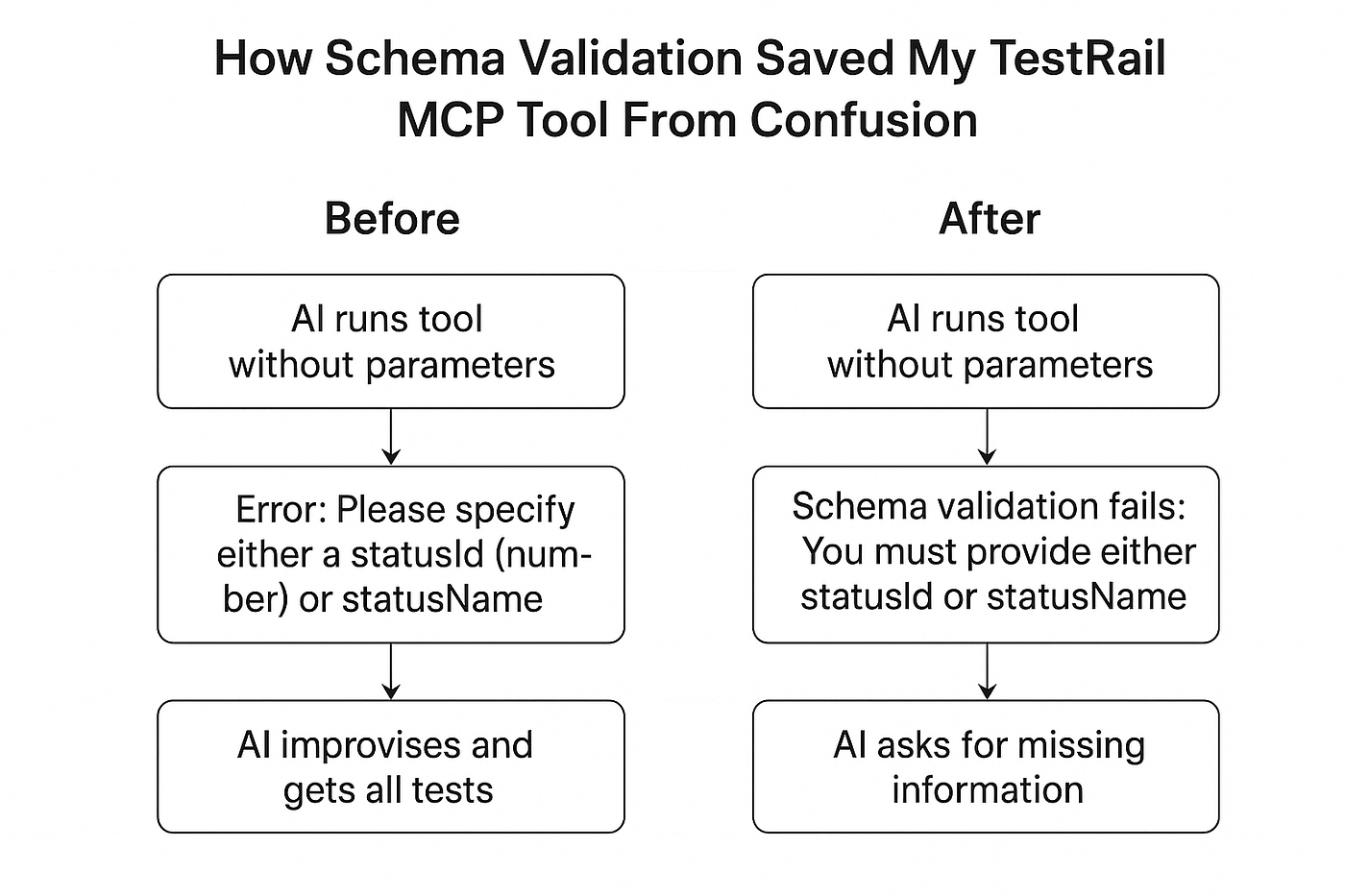
When building custom MCP (Model Context Protocol) tools, schema validation can make or break how AI agents use your tool. I recently learned this lesson the hard way while working on a TestRail MCP server.
In this post, I’ll share a real debugging journey: how my Testrail MCP tool initially allowed the AI (claude-sonnet-4) to misuse it, why my runtime safeguard didn’t help, and how I finally unlocked the real power of schema validation with Zod.
The Setup: A Tool to Get Tests by Status
I created a TestRail MCP Server tool called get-tests-by-status. Its job was simple:
- Take a runId (e.g., the test run number)
- Take either a statusId or a statusName
- Return matching tests from TestRail API
Here’s what the initial tool definition looked like:
mcpServer.tool(
  "get-tests-by-status",
  "Get all tests from a test run by run ID filtered by status",
  {
      runId: z.number(),
      statusId: z.number().optional(),
      statusName: z.string().optional(),
      limit: z.number().optional(),
      offset: z.number().optional()
  },
  async ({ runId, statusId, statusName, limit, offset }) => {
      if (!statusId && !statusName) {
          throw new Error(
            "Please specify either a statusId (number) or statusName (string) to filter tests by status. " +
            "For example: statusId: 5 for 'Failed' or statusName: 'Passed'"
          );
      }      // fetch logic here...
  }
);
👉 Notice something important here:
I was already using Zod (z.number(), z.string()), but only for type validation.
The “must provide either statusId or statusName” rule was enforced by a manual runtime safeguard.
The Problem Before Schema Validation
Here’s what happened in practice when I tried using the tool with Amazon Q CLI, an agentic AI assistant.
🤖 You are chatting with claude-sonnet-4> provide title of test cases from test run 1234 using get-tests-by-status tool🛠️ Using tool: get-tests-by-status from testrail-mcp-server
{
"name": "get-tests-by-status",
"arguments": {}
}Allow this action? [y/n/t]✔️ Completed in 0.3sAnd the AI responded:
Let me get all test cases from the run first to see what's available,
then I can filter by status if needed.
Then it started calling other tools (get-test-run, get-test-statuses, get-cases-by-suite) — completely bypassing the fact that get-tests-by-status requires either a statusId or statusName.
Even though my code had this safeguard:
if (!statusId && !statusName) {
  throw new Error("Please specify either a statusId (number) or statusName (string)");
}
the AI didn’t stop or ask me for missing parameters. Instead, it improvised.
That’s when I realized: runtime checks run too late — the AI has already gone off track.
The Fix: Real Schema Validation with Refinement
The breakthrough came when I used Zod’s .refine() to push the rule into the schema itself:
const getTestsSchema = z.object({
  runId: z.number(),
  statusId: z.number().optional(),
  statusName: z.string().optional()
}).refine(data => data.statusId || data.statusName, {
  message: "❗ You must provide either statusId or statusName."
});
Updated tool definition:
mcpServer.tool(
  "get-tests-by-status",
  "Get tests from a TestRail run filtered by status. You must provide either statusId (number) or statusName (string).",
  getTestsSchema,
  async ({ runId, statusId, statusName }) => {
      // fetch logic...
  }
);
The Result: AI Behavior Changed
Now let’s see the difference.
🤖 You are chatting with claude-sonnet-4> provide title of test cases from test run 1234 using get-tests-by-status tool🛠️ Using tool: get-tests-by-status
{
"name": "get-tests-by-status",
"arguments": {}
}⚠️ Schema validation error:
The get-tests-by-status tool requires either a statusId (number) or statusName (string).Instead of guessing or chaining other tools, the AI responded:
Which one would you like me to use?For example:
• statusId: 5 for Failed
• statusName: "Passed"Finally! Schema validation guided the AI back to me instead of letting it go astray.
Why This Matters
This experience taught me an important distinction:
- Runtime safeguards (
if (!statusId && !statusName)) catch errors only after the tool is already called incorrectly. - Schema validation with Zod refinements prevents the AI from calling the tool wrong in the first place — it forces the agent to ask the user.
What is Zod?
Zod is a TypeScript-first schema validation library. It lets you:
- Define input contracts declaratively
- Enforce type safety and custom rules
- Fail early and guide AI (or users) to provide valid inputs
When to Use Schema Validation
- Always when your tool requires certain parameters to work correctly
- When there are business rules across fields (e.g., must provide one of two, but not both)
- To help AI agents know what to ask the user for
- Don’t overuse it for trivial things where defaults are fine
Key Takeaways
- Using Zod just for field typing (
z.string(),z.number()) isn’t enough. - Without schema-level rules, the AI will happily misuse your tool.
- Runtime safeguards catch errors late — schema validation enforces contracts early.
- Refinements (
.refine()) are where the real power of schema validation comes in.
💡 Next time you’re building an MCP tool, ask yourself:
- Do I just want to type-check inputs?
- Or do I need the AI to respect the rules of my domain?
If it’s the latter, lean on schema validation. Your tools — and your AI interactions — will thank you.
✍️ This story is based on my real debugging session building a TestRail MCP Server tool.
메타데이터
- post_id
- cf7113b2bfb4
- slug
- how-schema-validation-saved-my-mcp-tool-from-ai-assumption-cf7113b2bfb4
- url
- https://medium.com/@sudarkashyap15/how-schema-validation-saved-my-mcp-tool-from-ai-assumption-cf7113b2bfb4
- canonical_url
- https://medium.com/@sudarkashyap15/how-schema-validation-saved-my-mcp-tool-from-ai-assumption-cf7113b2bfb4
- author_url
- https://medium.com/@sudarkashyap15
- status
- ok
- fetched_at
- 2026-07-13 14:44:14



