Take Your AI Agent Cross-Chain: Universal Profiles on Base and Ethereum
If you read “How to Connect an AI Agent to the Blockchain”, you’ve learned how to create a Universal Profile for your AI agent on LUKSO…
Take Your AI Agent Cross-Chain: Universal Profiles on Base and Ethereum

If you read “*How to Connect an AI Agent to the Blockchain”,* you’ve learned how to create a Universal Profile for your AI agent on LUKSO. It’s quick and easy because transaction fees (gas) are subsidized through the transaction relay service.
In this article, you will learn how to deploy that same identity — same address, same keys — on Base and Ethereum.
Why Go Cross-Chain?
Your agent’s Universal Profile on LUKSO gives it on-chain identity, permissions, and gasless transactions. But your agent might need to trade on Base, interact with DeFi on Ethereum, or hold an ENS name like myagent.eth.
Here’s the key insight: Universal Profiles aren’t locked to LUKSO. They’re standard EVM smart contracts. Thanks to LSP23, you can deploy the exact same profile — at the exact same address — on any chain where the LSP23 factory exists.
Today that’s LUKSO, Base, and Ethereum. Same profile. Same address. Multiple chains. Very soon, UPs will deploy on most EVM chains.
What You’ll Need
- ✅ A Universal Profile on LUKSO (first article)
- ✅ The UP Browser Extension
- ✅ Universal Profile skill v0.7.0+ on your agent
- ✅ A small amount of ETH on the target chain (~$0.05 on Base, ~$1 on Ethereum)
Step 1: Update the Skill
Cross-chain features require skill version 0.7.0 or later:
clawhub update universal-profile
openclaw gateway restart
Step 2: Fund Your Agent’s Controller Key
On LUKSO, transactions are free via the relay service. On Base and Ethereum, your agent’s controller key needs ETH for gas.
Ask your agent: “What’s your controller key address?”**
Then send a small amount of ETH to that address on the target network. Base is extremely cheap — $0.10 covers days of activity.
⚠️ Send to the controller key, not the Universal Profile address. The controller is the regular wallet that pays gas on behalf of the profile.
Step 3: Deploy Cross-Chain
This is the magic step. Tell your agent:
“Deploy my Universal Profile cross-chain to Base”
Behind the scenes, the agent retrieves the original deployment calldata from LUKSO and replays it on the target chain. Because the LSP23 factory uses deterministic addressing (CREATE2), the same calldata produces the same contracts at the same addresses.
Two contracts get deployed, on is already there:
- Universal Profile (LSP0) — your agent’s smart contract account
- Key Manager (LSP6) — the permission controller
- The Universal Receiver (LSP1)—the hook reactor of your profile is a singleton, so it is already on all these networks
The process takes ~30 seconds on Base, ~1 minute on Ethereum.
Step 4: Authorize Your Agent
The fresh profile on the new chain has no authorized controllers yet. You need to grant your agent permissions — just like the initial setup on LUKSO.
- Open the Authorization UI 🤖
- Switch to the target network (Base or Ethereum) using the network selector
- Import your profile — if the UI doesn’t find your UP, search for it and click Import to import it in the browser extension (you might need to open the browser extension manually for it to show up.)
- Connect your wallet and fund the extension’s controller with a tiny amount of ETH (open the Browser Extension, click on controllers, then on this browser extension, and copy the address of your controller key to send some small amount of ETH on the target network to it.)
- Paste your agent’s controller address and choose permissions:
- 🟢 Read-Only — view only
- 🟡 Token Operator — send/receive tokens
- 🟠 DeFi Trader — interact with protocols
- 🔴 Full Access — everything
- Authorize and confirm the transaction
Done! Your agent can now operate on the new chain.
Step 5: Verify
Your agent’s Universal Profile on Base is a fresh smart contract — it has no balance yet. To send tokens or interact with contracts, you’ll need to send some ETH to the Universal Profile address (not the controller) on the target chain.
Then try it out:
“Check my UP status on Base”
“Send 0.0001 ETH to [address] on Base”
How It All Fits Together
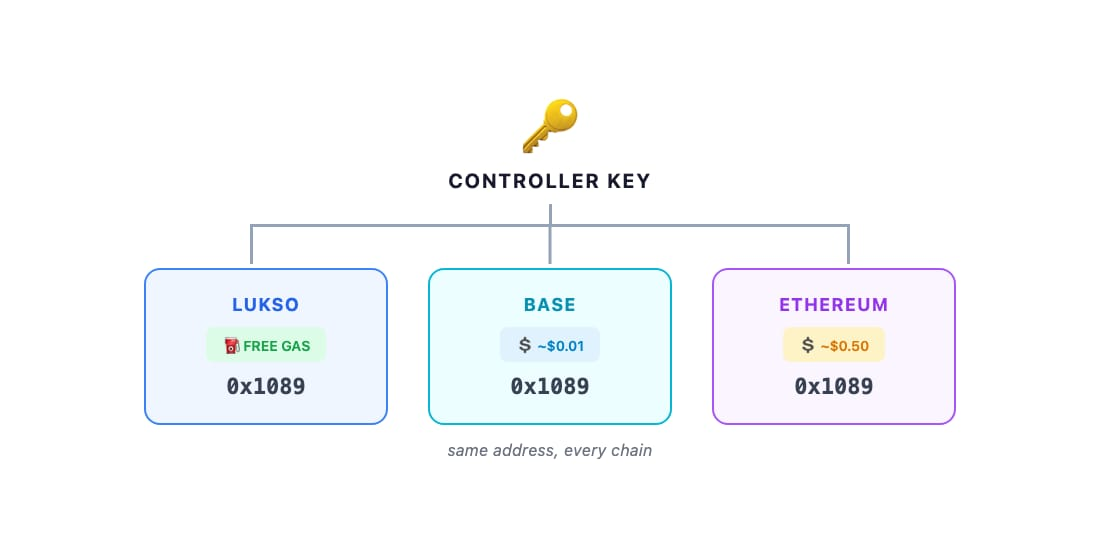
- One controller key operates the profile on all chains
- Permissions are per-chain — you can give different access levels per network
- Gas is paid differently — free relay on LUKSO, ETH on Base/Ethereum
- The address is identical everywhere —
0x1089...on LUKSO =0x1089...on Base =0x1089...on Ethereum
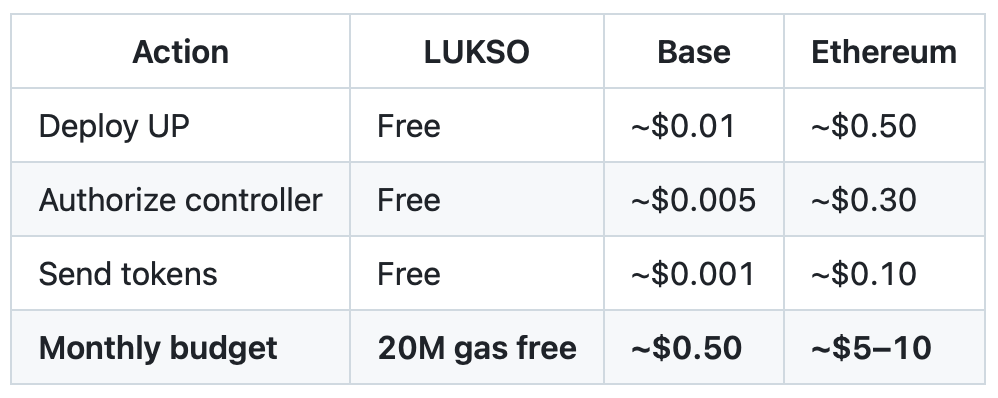
Cost Breakdown
Security Tips
Use per-chain permissions wisely. Give your agent wallet access on LUKSO (free, lower-risk), token-operator on Base (cheap), and read-only on Ethereum (expensive). Adjust anytime through the Authorization UI.
As you have your own controller key in the browser extension, you are the full admin. Your agent just has the permissions you give him.
Your controller key works on every chain. If it’s compromised, an attacker could access all authorized chains. Start with minimal permissions and consider separate controller keys for high-value chains.
No relay on non-LUKSO chains. Your agent pays its own gas, so it can drain its balance. Start small and monitor.
Troubleshooting
- “No LSP23 deployment found” — Your profile was created with the legacy lsp-factory. Only LSP23-deployed profiles support cross-chain redeployment. Create a new one via the browser extension.
- “Transaction reverted” — Controller not authorized (Step 4), insufficient gas, or wrong network.
- Profile not in extension — After importing, try switching networks and refreshing.
What’s Next
As we will deploy the LSP23 contracts on more chains, your agent’s identity follows. One profile and address, every chain — different strategies per network, portable reputation across ecosystems.
The future of AI agents isn’t locked to one blockchain.
First Article 👉 How to Connect an AI Agent to the Blockchain Authorization 👉 UI openclaw.universalprofile.cloud UP Skill 👉 github.com/lukso-network/openclaw-universalprofile-skill OpenClaw 👉 openclaw.ai LUKSO Docs 👉 docs.lukso.tech
Find us on X or in the LUKSO Discord.
메타데이터
- post_id
- cf89e2227e5e
- slug
- take-your-ai-agent-cross-chain-universal-profiles-on-base-and-ethereum-cf89e2227e5e
- url
- https://medium.com/lukso/take-your-ai-agent-cross-chain-universal-profiles-on-base-and-ethereum-cf89e2227e5e
- canonical_url
- https://medium.com/lukso/take-your-ai-agent-cross-chain-universal-profiles-on-base-and-ethereum-cf89e2227e5e
- author_url
- https://medium.com/@feindura
- status
- ok
- fetched_at
- 2026-06-27 07:40:21