JavaScript — Part 1
Programming:
JavaScript — Part 1
Programming:
What is programming?
Programming is the process of creating instructions that a computer can follow to perform specific tasks. It involves writing code using programming languages to solve problems, automate processes, and build applications or systems. Programmers design, test, and maintain software to make computers perform desired functions efficiently and accurately.
JavaScript:
What is JavaScript?
JavaScript is a high-level, interpreted programming language used to make web pages interactive and dynamic. It runs directly in web browsers, enabling features like animations, form validation, and real-time updates. Along with HTML and CSS, JavaScript is one of the core technologies of web development, powering both frontend and backend applications.
[embed]List: JavaScript | Curated by Aditya Kumar | Medium JavaScript · 1 stories on Mediummedium.com
Here are the main features of JavaScript:
-
Lightweight and Interpreted — Executes directly in the browser without compilation.
-
Object-Oriented — Supports objects, inheritance, and encapsulation.
-
Dynamic Typing — No need to declare variable types.
-
Event-Driven — Responds to user actions like clicks or keypresses.
-
Platform Independent — Runs on any device with a browser.
-
Asynchronous and Single-Threaded — Uses callbacks, promises, and async/await for non-blocking operations.
-
Client-Side and Server-Side Support — Works in browsers and with Node.js on servers.
-
Prototype-Based — Inheritance is achieved through prototypes, not classes.
What is Node.js?
Node.js is an open-source, cross-platform runtime environment that allows developers to run JavaScript outside of a web browser. It uses the V8 JavaScript engine (from Google Chrome) to execute code efficiently. Node.js is widely used for building fast, scalable server-side applications, APIs, and real-time web services like chat apps.
Variables in JavaScript:
What is a variable?
A variable lets you store, use, and modify data in your code.
Syntax:
let name = “Aditya”;
Ways to Declare Variables:
-
var — old method (function-scoped)
-
let — modern way (block-scoped, recommended)
-
const — for values that shouldn’t change

Rules for writing the variable:

Example: first code/ declaring variables

const, let and var in JavaScript
Important point about var: var is globally scoped, var can be updated and redeclared within its scope


Important point about let: let can be updated but not redeclared. Let has block scope.

Also, const must be initialised:

Also, var and let can be left uninitialized

Primitives and Objects in JavaScript:
What are Data Types in JavaScript?
JavaScript data types are mainly divided into two categories:

Primitive Data Types:
Primitive types are basic, single-value data types. They are immutable (cannot be changed directly) and copied by value.

Example: primitive data type

Example: use of typeof

Objects in JavaScript
Objects are collections of key–value pairs. They are non-primitive and copied by reference (not by value).
A very basic object:

Example: printing something which is not in the object will return undefined

Operators and Expressions:
What Are Operators and Expressions?
· Operators are symbols that perform operations on values and variables.
· Expressions are combinations of values, variables, and operators that produce a result
Types of operators:

Arithmetic operator:

Increment operator and decrement operator:
Example: a++

Example: ++a

Example: b —

Example: — b

So, basically:

Assignment operator:

Comparison operator:

Comparison operator: === (strict equality) and !== (strict inequality)


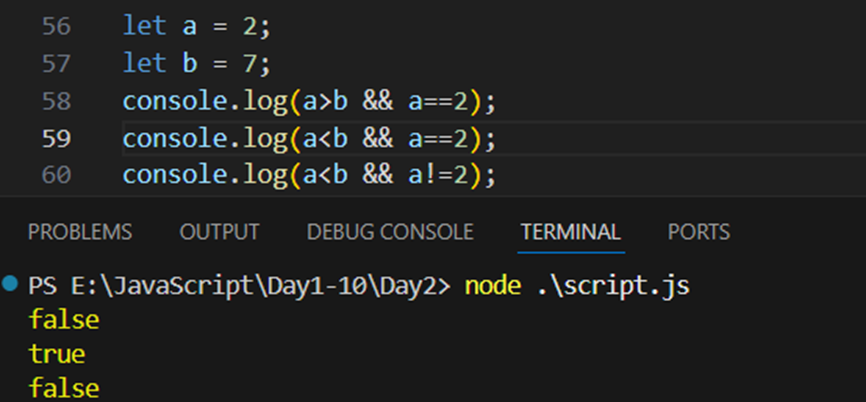
Logical operator:
What are Comments in JavaScript?
Comments are notes written inside the code that the JavaScript engine ignores during execution. They are used to explain code, make it readable, or temporarily disable parts of code.
Types of Comments in JavaScript

Example:

Conditional expressions in JavaScript:
What are Conditional Expressions in JavaScript?
Conditional expressions are used to make decisions in a program. They allow your code to execute different actions based on conditions (true or false).
Basic Conditional Statements

Difference Between if and switch

Example: how to take user input? We will use “Prompt” to do so.
Code:

Output:

By default, value entered in the prompt will be treated as a string. We can prove it using the “typeof” as shown below:

Now, we want to convert this string to numberic type then we will use “parseInt” as shown below:

Now, coming to the conditionals:
Example: if statement

Example: if else statement

Example: if else if else statement

Example: ternary operator

Example: switch and prompt and parseInt

For loops in JavaScript:
What are Loops in JavaScript?
Loops are used to repeat a block of code as long as a specific condition is true. They help reduce repetition and make code more efficient.
Types of Loops in JavaScript

What is a for Loop in JavaScript?
A for loop is used to run a block of code multiple times — automatically and efficiently. It is one of the most common looping structures in JavaScript.
Syntax:
for (initialization; condition; update) {
// code to be executed repeatedly
}
Example: a basic for loop to print 0 to 4

Example: a basic for loop to print from 0 to 5 with the same above code

Example: to print from 1 to 5

Example: what if we wrote i+1 in 6th line and i = 0 in 5th?

Example: sum of n natural number

Example: sum of n natural number where n is the input from the user (say he entered 5)

Example:

Example:

Example:

Example: factorial of 5

Example: for… in loop

Example: to print both key and value using the for … in loop

Example: for…of loop

Difference between for…in and for… of:

Best Practices
-
Use for when the number of iterations is known.
-
Use while when the number of iterations depends on a condition.
-
Use do…while when you need at least one execution.
-
Use for…in for objects, and for…of for arrays or strings.
-
Always include a condition that stops the loop — avoid infinite loops!
While loops in JavaScript:
What is a while Loop?
A while loop in JavaScript is used to run a block of code repeatedly as long as a given condition is true. If the condition becomes false, the loop stops running.
Syntax
while (condition) {
// code to execute repeatedly
}

Example: using while loop prints number from 0 to n-1

Example: to print from 0 to n

While loops in JavaScript:
What is a do…while Loop?
A do…while loop is a type of loop that executes the code block at least once, and then repeats it as long as the given condition is true.
Note: The main difference from a while loop is that: do…while checks the condition after running the code once.
Syntax
do {
// code to execute
} while (condition);
Example: printing 0 to n-1

Example: printing 0 to n

Example: here the condition doesn’t meet, so ran at least for once.

Functions in JavaScript:
What is a Function?
A function in JavaScript is a block of code designed to perform a specific task. It allows you to reuse code, make it organized, and reduce repetition.
Syntax of a Function
function functionName(parameters) {
// code to execute
return value; // optional
}

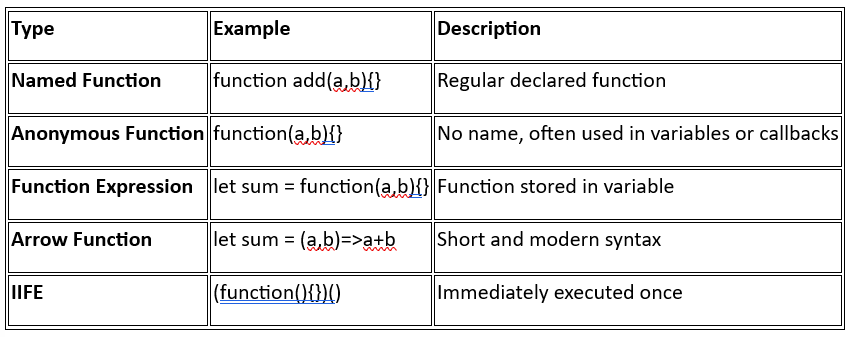
Types of Functions
Example: functions with parameters

Example: functions where we passed the exact values instead of variables.

Example: use functions to print the round off for the same above code, for that we will use Math.round() as shown below

Example: now in case we don’t invoke the function, it will remain as it is, no output:

Example: functions without parameters

Example: functions without parameters but with return

Example: same function but with parameters

Example: same function with parameters

Example:

Example:

Example:

Example: arrow function in JS without any parameters

Example: arrow function with parameters

Example: arrow function with return and parameters

Example: arrow function with return and no parameters

Strings in JavaScript:
What is a String?
A string in JavaScript is a sequence of characters enclosed in quotes. Strings can include letters, numbers, symbols, or spaces.
Syntax
let str1 = “Hello”; // Double quotes
let str2 = ‘World’; // Single quotes
let str3 = JS; // Backticks (Template literals)
Key Points
-
Strings can be enclosed in single (‘) or double (“) quotes.
-
Backticks ` allow template literals — embedding variables and expressions.
-
Strings are immutable — cannot change individual characters directly.
String Methods:

Example: a very basic example of string, also 3 ways to declare and initialize

Indexing in string:
The string “Hello” has 5 characters: H, e, l, l, o.

Now, to get the length of the string, we uses .length:

Now, to get the character as per the index value:

Example: index to be printed is 1 more than the length of string, then undefined is returned.

Example: string using backtick

Example: printing variable in backtick, called string interpolation

Example: template literal and quotes

Common Escape Sequences

Example: valid writing of double and single quotes in JS without using escape sequence character

Example: using the escape sequence character

Also,
· Template literals are ES6 feature.
· Strings are 0-indexed.
· Strings are immutable.
· + operator can concatenate numbers as strings if one operand is a string.
· Multi-line strings cannot be created with single or double quotes.
Example: using + on strings


Example: strings are immutable

JavaScript String Methods:
String Methods in JavaScript
JavaScript provides built-in methods to work with strings. All these methods return new strings — because strings are immutable.
Example: .length -> to get the length of the string

Example: escape sequence character are treated as 1 character

Example: .toUpperCase() to convert all characters to Upper case

Example: .toLowerCase() to convert to lower case.

Example: .slice() -> to get the part of string

Example: .replace(old,new)

Example: .trim()

Example: .concat()

Example: using for…of loop to print character of strings

Introduction to Arrays:
What is an Array?
An Array is a special variable that can store multiple values in a single variable. Each value in an array is called an element, and each element has an index (starting from 0).
Ways to Create Arrays

Array Indexing
· Index starts from 0
· Last element index = array.length — 1
Important to remember:

Example: basic arrays

Example: another way to create an array, as well as we are printing

Example: accessing values of arrays

Example: to get the length of the array

Example: arrays are mutable

JavaScript Array Methods:
JavaScript Array Methods
Arrays in JavaScript come with many built-in methods to add, remove, search, and manipulate elements easily.
Example: .toString()

Example: .join()

Example: .pop()

Example: .push()

Example: .shift()

Example: .unshift()

Example: delete operator

Example:

Example: .concat() doesn’t change the original array

Example: .sort()

Example: .sort()

Example: to sort in descending order, we will use function

Example: .reverse()

Example: .splice()

Example: .slice()

Using Loops with Arrays in JavaScript:
Why Use Loops with Arrays?
When you have multiple elements in an array, you often need to:
· Access each element one by one
· Perform an operation on each element
· Search, modify, or calculate something
Loops help you iterate (go through) all array elements efficiently.
Common Loop Types Used with Arrays

Example: to print the elements of the array using the for…loop

Example: to print the element where the elements of the array be the strings.

Example: we can also use forEach loop to print the elements of the array

Example: Arrya.from is used to create an array from any other object.

Example: for..of loop and array

Example: for … in loop and array

Example: for..in loop to print the elements of array.

Map, Filter & Reduce in JavaScript :
map()
Concept:
· Creates a new array by applying a function to each element of the original array.
· Original array remains unchanged.
Syntax:
array.map(function(element, index, array) {
// return new value for new array
})
Example:

Example:

Example:

Example:

filter()
Concept:
· Creates a new array with only the elements that pass a condition.
· Original array remains unchanged.
Syntax:
array.filter(function(element, index, array) {
// return true to keep element, false to discard
})
Example: to filter out those values of array whose value is less than 10.

Example:

reduce()
Concept:
· Reduces an array to a single value (sum, product, object, etc.).
· Applies a function to each element, accumulating a result.
Syntax:
array.reduce(function(accumulator, currentValue, index, array) {
// return updated accumulator
}, initialValue)
Example:

Example:

Key Differences

Contact Me: 📧 Email: adii.utsav@gmail.com 🔗 LinkedIn: https://www.linkedin.com/in/aditya-kumar-3241b6286/ 💻 GitHub: https://github.com/Rememberful
메타데이터
- post_id
- cf985a90cace
- slug
- javascript-part-1-cf985a90cace
- url
- https://medium.com/@adii.utsav/javascript-part-1-cf985a90cace
- canonical_url
- https://medium.com/@adii.utsav/javascript-part-1-cf985a90cace
- author_url
- https://medium.com/@adii.utsav
- status
- ok
- fetched_at
- 2026-07-13 06:23:13






