Subagents in Gemini CLI
If you were at Google Cloud Next last week, you probably heard the chatter. Between sessions and at the developer booths, one question kept…
Subagents in Gemini CLI
If you were at Google Cloud Next last week, you probably heard the chatter. Between sessions and at the developer booths, one question kept coming up: “Can we use subagents in Gemini CLI?” Well, yes, you can, and we are thrilled to announce that subagents are officially available.
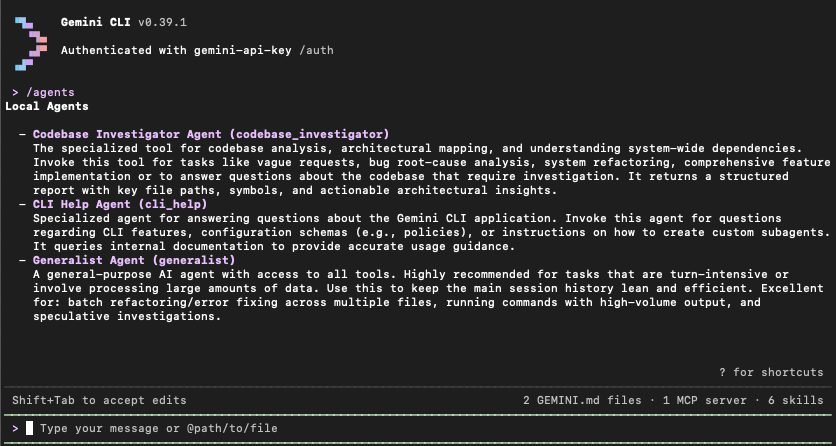
What Are Subagents? As developer workflows grow more complex, maintaining context and performance in your AI sessions becomes critical. Subagents are specialized, expert AI assistants that operate alongside your primary Gemini CLI session. Rather than bogging down the main agent with dozens of file searches, high-volume data parsing, or deep codebase investigations, the primary agent now acts as a strategic orchestrator. It delegates specific, repetitive sub-tasks to these specialized team members.
Each subagent operates entirely in isolation. They have their own dedicated context windows, custom system instructions, curated tools, and MCP servers. Once a subagent finishes its execution, it consolidates the work into a single response back to the main agent. This architecture prevents context pollution, keeping your primary session lightning-fast, lean, and focused on big-picture decision-making.
Parallel Performance and Customization Subagents aren’t just single-threaded assistants; you can dispatch multiple subagents in parallel. Whether you need to research five different topics simultaneously or refactor several distinct components, parallel execution drastically reduces your total task time.
Out of the box, Gemini CLI ships with built-in experts like generalist, cli_help, and codebase_investigator. You can explicitly call them using the @agent syntax (e.g., @codebase_investigator Map out the authentication flow).
Even better, you can build your own. By simply defining a Markdown file with YAML frontmatter in your .gemini/agents directory, you can create custom experts tailored precisely to your team's codebase and standards.
Subagents are available now. Upgrade your Gemini CLI today, type /agents, and start building your ultimate AI developer team!
메타데이터
- post_id
- cfadf0e55c7d
- slug
- subagents-have-arrived-in-gemini-cli-cfadf0e55c7d
- url
- https://medium.com/@fhinkel/subagents-have-arrived-in-gemini-cli-cfadf0e55c7d
- canonical_url
- https://medium.com/@fhinkel/subagents-have-arrived-in-gemini-cli-cfadf0e55c7d
- author_url
- https://medium.com/@fhinkel
- status
- ok
- fetched_at
- 2026-06-13 16:00:06





