Python Class Types -Explained Simply (Python Classes Internals — Post 1/7)
If you are new to Python (or not-so-new and still confused about classes), this post is for you. It explains six different kinds of classes…
Python Class Types -Explained Simply (Python Classes Internals — Post 1/7)
If you are new to Python (or not-so-new and still confused about classes), this post is for you. It explains six different kinds of classes in Python, what problem each one solves, and when you should use which one.
What is a Class? (Quick Refresher)
A class is a blueprint for creating objects.
class Dog:
    def __init__(self, name):
        self.name = name

def bark(self):
        return "Woof!"
d = Dog("Buddy")
print(d.bark())   # Woof!
This is like defining a blueprint for a dog — every dog has a
nameand canbark(), and creating an object (liked) means you make a specific dog from that blueprint.
In Python, every class silently inherits from object:
class Dog:
    pass

#is the same as:

class Dog(object):
    pass
*class Dog:is the same asclass Dog(object):— every class in Python inherits fromobjectby default.*
Class Types: Six Types
There are six common patterns for classes in Python. You don’t need to memorize all of them, just know what they are and when each one is useful.
1. Regular Class
Use this when: You want to model any normal thing — a person, product, order, configuration, service, etc.
What it is:
A plain class that does not try to do anything fancy. It stores data (__init__) and implements behavior (methods).
class BankAccount:
    def __init__(self, owner, balance=0):
        self.owner = owner
        self.balance = balance

    def deposit(self, amount):
        self.balance += amount

    def withdraw(self, amount):
        if amount > self.balance:
            raise ValueError("Insufficient funds")
        self.balance -= amount\

acc = BankAccount("Sherry", 1000)
acc.deposit(500)
acc.withdraw(200)
print(acc.balance)
This small BankAccount example shows how a class organizes data and behavior together in one place.
__init__is the setup part — it runs when you create the account (acc = BankAccount("Sherry", 1000)).depositandwithdraware actions — they tell the account what you can do with the money.- The
withdrawmethod also protects the account — it checks if you have enough money before allowing withdrawal. If not, it shows an error.
In simple terms: A class is like a mini‑program inside a box — it holds data (
owner,balance) and safe rules /method(deposit,withdraw) that work together.
2. Child Class (Inheritance)
Use this when:
One thing is a more specific version of another, for example, Car is a kind of Vehicle.
What it is: A class that inherits from another class, so it reuses and extends behavior.
class Vehicle:
    def __init__(self, brand):
        self.brand = brand
    def start(self):
        return "Vehicle started"

class Car(Vehicle):              # Car extends Vehicle
    def honk(self):
        return "Beep beep!"
my_car = Car("Toyota")
print(my_car.start())   # Vehicle started
print(my_car.honk())Vehicleis a base class with common behavior (start).Car(Vehicle)meansCarinherits fromVehicle, so it automatically getsbrandandstart().Caradds its own methodhonk(), showing reuse + extension — the classic idea of inheritance.
In simple terms:
Caris a special kind of Vehicle that can start (like any vehicle) and also honk (like a car
Important :
Always call super().__init__() in the child class:
class ElectricCar(Car):
    def __init__(self, brand, battery):
        super().__init__(brand)        # ✅ initialize parent first
self.battery = battery- Always call
super().__init__()in the child class so that the parent class is properly set up (like storingbrand) before adding child‑specific data (likebattery).
In simple terms:
super().__init__(brand)means: First do what the parent (Car/Vehicle) does when creating an object, then add the extra details forElectricCar.
3. Abstract Class
Use this when:
You want to force other classes to implement certain methods, for example, payment gateways that must all provide pay() and refund().
What it is: A class that cannot be instantiated directly — it only exists as a template for others.
from abc import ABC, abstractmethod

class PaymentGateway(ABC):
    @abstractmethod
    def pay(self, amount):
        pass
    @abstractmethod
    def refund(self, amount):
        pass

class Razorpay(PaymentGateway):
    def pay(self, amount):
        return f"Paid ₹{amount} via Razorpay"
    def refund(self, amount):
        return f"Refunded ₹{amount} via Razorpay"

# PaymentGateway()  ❌ TypeError - abstract class cannot be instantiated
This example shows how to enforce a contract in Python:
from abc import ABC, abstractmethodgives you the tools to create abstract classes — special classes that cannot be created directly.PaymentGatewayis an abstract base class. It declares that every payment gateway must implement.pay()and.refund(), but it does not provide their implementation.Razorpayinherits fromPaymentGatewayand must implement both methods — if it doesn’t, Python will raiseTypeErrorwhen you try to instantiate it.- The last line (
PaymentGateway()is commented withTypeError) tells you: you can’t create an object fromPaymentGatewayitself — you must use concrete child classes likeRazorpay.
In simple terms: An abstract class is a ‘template’ with rules. You can’t use it directly, but you must follow its rules when you create real classes from it. Use an abstract class when you want to enforce a contract — “if you inherit from me, you must implement
payandrefund.”
4. Data Class
Use this when:
Your class is mostly about storing data — not complex behavior. You want to avoid writing __init__, __repr__, etc., manually.
What it is:
A class that is automatically generated with __init__, __repr__, __eq__, and more.
from dataclasses import dataclass, field
@dataclass
class Employee:
    name: str
    department: str
    salary: float = 0.0
    skills: list = field(default_factory=list)
emp = Employee("Sherry", "Engineering", 80000.0)
print(emp)
# Employee(name='Sherry', department='Engineering', salary=80000.0, skills=[])
@dataclass automatically:
- Creates classe
__init__so you can writeEmployee("Sherry", "Engineering", 80000.0) - Creates
__repr__soprint(emp)shows a nice, readable line likeEmployee(name='Sherry', department='Engineering', salary=80000.0, skills=[]) - Handles defaults and mutable‑default‑safe fields (via
field(default_factory=list)).
# Without dataclass (same behavior, more code)
from typing import List

class Employee:
    def __init__(self, name: str, department: str, salary: float = 0.0, skills: List[str] = None):
        self.name = name
        self.department = department
        self.salary = salary
        self.skills = skills if skills is not None else []

    def __repr__(self):
        return (f"Employee(name='{self.name}', department='{self.department}', "
                f"salary={self.salary}, skills={self.skills})")

emp = Employee("Sherry", "Engineering", 80000.0)
print(emp)
# Employee(name='Sherry', department='Engineering', salary=80000.0, skills=[])
Edge cases you can control:
# Make it immutable:
@dataclass(frozen=True)
class Config:
    host: str
    port: int
# config.host = "new"   ❌ FrozenInstanceError
This small example shows two important things data classes can do:
frozen=Truemakes the class immutable — once you create aConfigobject, you cannot change any of its fields. If you try, Python will raise an error, which is good if this is a configuration that should never be modified after setup.
# Validate data:
@dataclass
class Product:
    price: float
    def __post_init__(self):
        if self.price < 0:
            raise ValueError("Price cannot be negative")

# Create valid object
p = Product(10.5)
print(p)      # Product(price=10.5)

# This will raise ValueError
# p_invalid = Product(-5) ❌ ValueError: Price cannot be negative__post_init__lets you validate the data after the object is created. For example,Productchecks thatpriceis not negative right after__init__finishes. This is very useful when you want to catch invalid data early, instead of letting bugs propagate silently.
Use a data class when the class is data-first —
Employee,Student,Config,Point(x, y)— not a heavy behavior object.
5. Singleton Class
Use this when: You want only one instance to exist — for example, a database connection, a logger, or a global configuration.
What it is: A class that returns the same object every time it is created.
class DatabaseConnection:
    _instance = None

    def __new__(cls):
        if cls._instance is None:
            cls._instance = super().__new__(cls)
        return cls._instance
db1 = DatabaseConnection()
db2 = DatabaseConnection()
print(db1 is db2)   # True
This is the basic singleton pattern:
- The class stores one shared instance in
cls._instance. - Every time you call
DatabaseConnection(), it first checks if an instance already exists. - If not, it creates one and saves it; otherwise it returns the existing one.
db1 is db2printsTrue, which means they are the same object in memory, not two different ones.
In simple terms: This is like having one shared database connection that the whole program reuses instead of creating new ones every time.
Thread‑safe version:
import threading
class ThreadSafeSingleton:
    _instance = None
    _lock = threading.Lock()
    def __new__(cls):
        with cls._lock:
            if cls._instance is None:
                cls._instance = super().__new__(cls)
        return cls._instance
This is the thread‑safe singleton version:
- It adds
threading.Lock()so that only one thread at a time can enter the critical section. - The
with cls._lock:block protects the check‑and‑create logic. - This prevents race conditions when two threads try to create the instance at the same time.
In simple terms: The basic singleton works fine in single‑threaded code, the thread‑safe version is what you use when your program runs in multi‑threaded environments (like web servers) and you still want only one shared instance.
6. Metaclass (Brief Introduction)
Use this when: You want to control how classes themselves are created (not object behavior). Used by Django ORM, SQLAlchemy, Enum
A metaclass is a class that creates classes
Simple hierarchy:
Class → creates objects
Metaclass → creates classes
Example:
class Dog:
    pass

d = Dog()

print(type(d))   # Dog
print(type(Dog)) # type
Here:
Dogis a classdis an objecttypeis the metaclass that created the Dog class
When we write a class normally:
class Dog:
    sound = "Woof"
Python internally does something similar to this:
Dog = type("Dog", (), {"sound": "Woof"})Here:
"Dog"→ class name()→ parent classes{}→ attributes and methods of the class
So
**typebuilds the class. In Python the default metaclass is `type`**.
Why Metaclasses Exist
Since type creates classes, we can customize class creation.
This means we can:
- automatically add methods
- enforce rules on classes
- register classes automatically
- modify class attributes
Frameworks often use this technique. Examples: Django ORM registers models automatically
Creating a Custom Metaclass
A custom metaclass inherits from type.
Usually we override **__new__**, which runs when the class is being created.
Example:
class AutoGreet(type):
    def __new__(mcs, name, bases, dct):
        dct["greet"] = lambda self: f"Hello from {name}!"
        return super().__new__(mcs, name, bases, dct)

# tell Python to use our metaclass AutoGreet
class Person(metaclass=AutoGreet):
    pass

#Create an object:
p = Person()
print(p.greet())

# Output: Hello from Person!
Parameters:
mcs→ the metaclass itselfname→ class namebases→ parent classesdct→ dictionary containing class attributes and methods
Here we modify the dictionary before the class is created.
Even though the Person class never defined greet(), the metaclass automatically added the method when the class was created.
What Happens Internally
When Python sees this:
class Person(metaclass=AutoGreet):
    pass
It roughly does something like:
Person = AutoGreet("Person", (), {})
AutoGreet.__new__(AutoGreet, "Person", (), {}
In Simple Terms
Think of it like a factory system:
AutoGreet (Metaclass)
        ↓
creates Person (Class)
        ↓
creates p (Object)
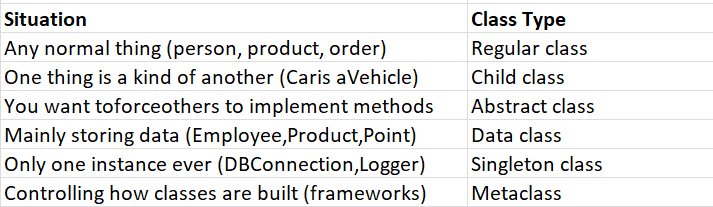
A Quick Reference Guide
Series Roadmap:
**Post 1/7** — "Python Classes → Internals" series

Next → **Post 2**: __new__ vs __init__ — how objects get built

Full roadmap:
Post 1: Types of Classes ✅
Post 2: __new__ vs __init__
Post 3: object - The Root of Every Class
Post 4: type - class factory
Post 5: type vs object
Post 6: metaclasses
Post 7: PyObject/PyTypeObject internals

Hope you'll find this journey helpful! 🐍
메타데이터
- post_id
- cfc9924ef44c
- slug
- python-class-types-explained-simply-cfc9924ef44c
- url
- https://medium.com/@Zeba_/python-class-types-explained-simply-cfc9924ef44c
- canonical_url
- https://medium.com/@Zeba_/python-class-types-explained-simply-cfc9924ef44c
- author_url
- https://medium.com/@Zeba_
- status
- ok
- fetched_at
- 2026-06-12 18:14:10
