Argo CD ApplicationSets Explained
If you’ve used Argo CD for any length of time, you’ve probably hit the point where managing individual Application resources starts to feel…
Argo CD ApplicationSets Explained
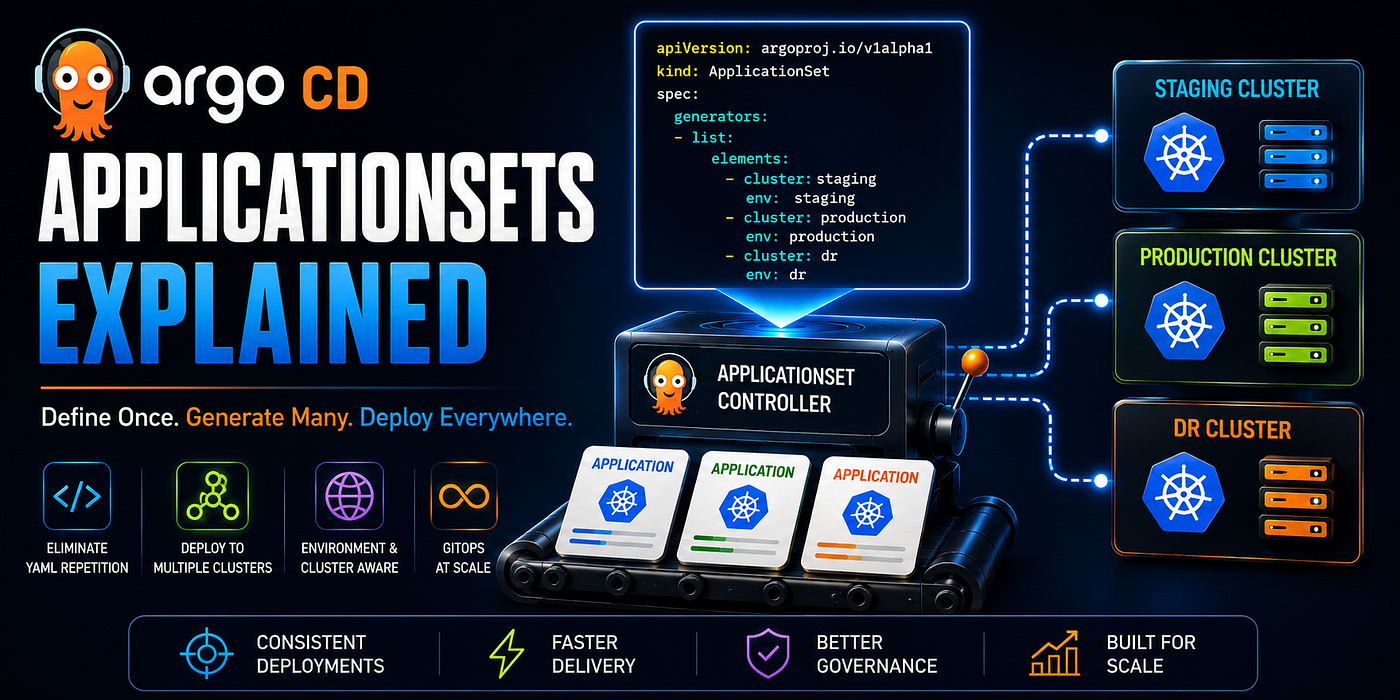
If you’ve used Argo CD for any length of time, you’ve probably hit the point where managing individual Application resources starts to feel like maintenance work. You have the same application deployed across staging, production, and DR. You add a new microservice and repeat the same YAML block three times with slightly different values. You onboard a new cluster and manually create a dozen Application resources to match what the other clusters already have.
ApplicationSets were built to solve exactly this. Instead of writing one Application manifest per environment, per cluster, or per service, you write one ApplicationSet that generates all of them. The generator does the repetition. You handle the logic.
What an ApplicationSet actually is
An ApplicationSet is a Kubernetes custom resource that tells Argo CD how to generate Application resources dynamically. It has two parts: a generator that produces a set of parameters, and a template that defines what Application to create for each set of parameters.
apiVersion: argoproj.io/v1alpha1
kind: ApplicationSet
metadata:
  name: my-applicationset
  namespace: argocd
spec:
  generators:
    - list:
        elements:
          - env: staging
          - env: production
  template:
    metadata:
      name: "myapp-{{env}}"
    spec:
      project: default
      source:
        repoURL: https://github.com/your-org/gitops-repo
        targetRevision: main
        path: "apps/myapp/{{env}}"
      destination:
        server: https://kubernetes.default.svc
        namespace: "myapp-{{env}}"
      syncPolicy:
        automated:
          prune: true
          selfHeal: true
This generates two Application resources: myapp-staging and myapp-production. Each points to a different path in the repository. If you add a third element to the list, Argo CD creates a third Application. Remove one and Argo CD deletes the corresponding Application automatically.
That automatic deletion is controlled by the syncPolicy on the ApplicationSet itself. By default, if a generator entry is removed, the generated Application and all its resources are deleted. If you want to prevent accidental deletion, set preserveResourcesOnDeletion: true on the ApplicationSet's sync policy.
Generators: the engine behind ApplicationSets
The generator is what makes ApplicationSets powerful. Different generators fit different use cases.
List generator
The simplest. You provide a hardcoded list of parameter sets. Good for a small, fixed number of environments.
generators:
  - list:
      elements:
        - cluster: prod-us-east
          url: https://prod-us-east.example.com
          region: us-east-1
        - cluster: prod-eu-west
          url: https://prod-eu-west.example.com
          region: eu-west-1
        - cluster: staging
          url: https://staging.example.com
          region: ap-south-1
Each element can have any keys you want. Those keys become template variables.
Cluster generator
Generates one Application per cluster registered in Argo CD. When you add a new cluster to Argo CD, the ApplicationSet automatically creates Applications for it. No manual intervention.
generators:
  - clusters:
      selector:
        matchLabels:
          environment: production
The selector filters which clusters participate. A cluster labeled environment: production gets the generated Applications. A staging cluster without that label does not. This is the pattern for fleet management: add a cluster, label it, and it automatically receives the full application set.
Built-in variables from the cluster generator: {{name}}, {{server}}, {{metadata.labels.environment}}, and any other metadata on the cluster secret.
Git generator
Two variants: directory-based and file-based.
Directory generator creates one Application per directory matching a pattern in your repository:
generators:
  - git:
      repoURL: https://github.com/your-org/gitops-repo
      revision: main
      directories:
        - path: apps/*
If your repository has apps/frontend, apps/api, and apps/worker, this generates three Applications, one per directory. Add a new directory, push to Git, and Argo CD creates the Application automatically. This is the canonical way to implement the App of Apps pattern without manually maintaining a list of applications.
File generator reads JSON or YAML files from a repository and uses their contents as template parameters:
generators:
  - git:
      repoURL: https://github.com/your-org/gitops-repo
      revision: main
      files:
        - path: "clusters/*/config.json"
Each config.json can contain structured data:
{
  "cluster": {
    "name": "prod-us-east",
    "url": "https://prod-us-east.example.com",
    "region": "us-east-1",
    "nodeCount": 20
  },
  "app": {
    "replicas": 5,
    "imageTag": "v1.4.2"
  }
}
In the template, reference these as {{cluster.name}}, {{app.replicas}}, and so on. This turns your repository into a data source for generating cluster-specific configuration.
Matrix generator
Combines two generators, producing the Cartesian product. Every combination of the first generator’s output with the second generator’s output becomes a set of parameters.
generators:
  - matrix:
      generators:
        - list:
            elements:
              - app: frontend
              - app: api
              - app: worker
        - clusters:
            selector:
              matchLabels:
                environment: production
If you have three applications and four production clusters, this generates twelve Applications: every app deployed to every cluster. Add a fifth cluster and four new Applications appear. Add a fourth app and four more appear. The matrix scales the combinations automatically.
Merge generator
Takes multiple generators and merges their outputs by a common key. Useful when you have base configuration and cluster-specific overrides.
generators:
  - merge:
      mergeKeys:
        - server
      generators:
        - clusters:
            values:
              replicas: "2"
              imageTag: "stable"
        - list:
            elements:
              - server: https://prod-us-east.example.com
                replicas: "10"
                imageTag: "v2.1.0"
Every cluster gets replicas: 2 and imageTag: stable by default. The prod-us-east cluster has those values overridden to replicas: 10 and imageTag: v2.1.0. The merge happens on the server field.
Template: what gets generated
The template section defines the Application resource that gets created for each set of generator parameters. Any generator variable can be used as {{variableName}}.
template:
  metadata:
    name: "{{cluster.name}}-{{app}}"
    labels:
      app: "{{app}}"
      cluster: "{{cluster.name}}"
  spec:
    project: default
    source:
      repoURL: https://github.com/your-org/gitops-repo
      targetRevision: main
      path: "apps/{{app}}"
      helm:
        valueFiles:
          - "values-base.yaml"
          - "values-{{cluster.name}}.yaml"
    destination:
      server: "{{cluster.url}}"
      namespace: "{{app}}"
    syncPolicy:
      automated:
        prune: true
        selfHeal: true
      syncOptions:
        - CreateNamespace=true
The helm.valueFiles pattern is worth noting. You can layer a base values file with a cluster-specific override file. Every cluster gets the same base configuration, and per-cluster differences live in separate files. The ApplicationSet template references both.
Template patch
Template patch lets individual generator elements override specific parts of the template. Useful when most Applications are identical but a few need different sync policies or source configurations.
spec:
  generators:
    - list:
        elements:
          - app: frontend
            env: production
          - app: api
            env: production
            repoURL: https://github.com/your-org/api-special-repo
  template:
    metadata:
      name: "{{app}}-{{env}}"
    spec:
      source:
        repoURL: https://github.com/your-org/gitops-repo
        path: "apps/{{app}}"
  templatePatch: |
    spec:
      source:
        repoURL: "{{repoURL}}"
The templatePatch is a partial Application spec that merges into the template for elements that define the relevant fields. The api element has repoURL defined, so it gets a different source repository. The frontend element doesn't define repoURL, so it uses the template default.
Common patterns
Multi-cluster fleet management. Register clusters in Argo CD with environment labels. Use the cluster generator with label selectors to deploy applications to all clusters of a given type. New clusters join the fleet by getting the right label. No Application manifests written manually.
Environment promotion. Use a Git generator pointing to environment directories (envs/staging, envs/production). Each directory contains the values for that environment. Promote a change by updating the production directory in Git.
Microservice onboarding. Use a directory generator pointing to services/*. Adding a new service directory to the repository automatically creates an Application for it. Removing the directory removes the Application. The platform team manages the ApplicationSet once; product teams manage their service directory.
The things that will trip you up
Generated Applications are owned by the ApplicationSet. You can’t edit a generated Application directly in a meaningful way. The ApplicationSet will overwrite your changes on the next reconciliation. If you need to make a one-off change to a generated Application, either update the ApplicationSet template or detach the Application from the ApplicationSet first.
The cluster generator uses Argo CD cluster secrets, not your kubeconfig. If a cluster is registered in Argo CD but not labeled correctly for your selector, it won’t appear in the generated Applications. Always verify cluster labels with kubectl get secret -n argocd -l argocd.argoproj.io/secret-type=cluster.
Template variables that don’t exist silently render as empty strings. If you reference {{cluster.name}} but the generator doesn't produce a cluster.name key, the Application gets created with an empty string in that field. The ApplicationSet won't error. You'll discover it when the Application points at a path or namespace that doesn't exist. Always test generators with small element lists before scaling up.
Deletion protection needs to be explicit. By default, removing a generator element deletes the generated Application and all the Kubernetes resources it manages. In production, set preserveResourcesOnDeletion: true and use a separate cleanup process for intentional removals. The first time you accidentally delete a generator entry in production without this setting, you'll wish you had it.
ApplicationSets move the repetition out of your GitOps workflow and into a generator that handles it automatically. The manual maintenance of Application-per-environment YAML disappears. New clusters, new services, and new environments join the system by satisfying the generator’s conditions rather than by someone writing another manifest.
Write the generator once. Let Argo CD do the rest.
Tom Jose is a DevOps Engineer at KotaiCode, where the team helps companies get their Kubernetes and AWS infrastructure production-ready.
메타데이터
- post_id
- cfebd5dc1b13
- slug
- argo-cd-applicationsets-explained-cfebd5dc1b13
- url
- https://medium.com/kotaicode/argo-cd-applicationsets-explained-cfebd5dc1b13
- canonical_url
- https://medium.com/kotaicode/argo-cd-applicationsets-explained-cfebd5dc1b13
- author_url
- https://medium.com/@Tomjosetj31
- status
- ok
- fetched_at
- 2026-07-09 20:10:33