How I Caught an Infostealer in 4 Minutes: A Fake GTA 6 Installer Investigation: Technical Blog
From download to containment, the full kill chain, every step.
How I Caught an Infostealer in 4 Minutes: A Fake GTA 6 Installer Investigation: Technical Blog
From download to containment, the full kill chain, every step.
It’s 10:12 AM on June 25th.
A user named Ryan searches Google for “GTA 6 free download PC.” He finds something. Downloads it. GTA6_Setup_Crack_2026.exe. 84.7 MB. The domain looked legitimate enough in the search results.
By 10:16 AM, the malware was dead.
But in those 4 minutes, the attacker had already established persistence, accessed browser credential stores, staged data for exfiltration, and attempted to call home.
This is what that investigation looked like, step by step.
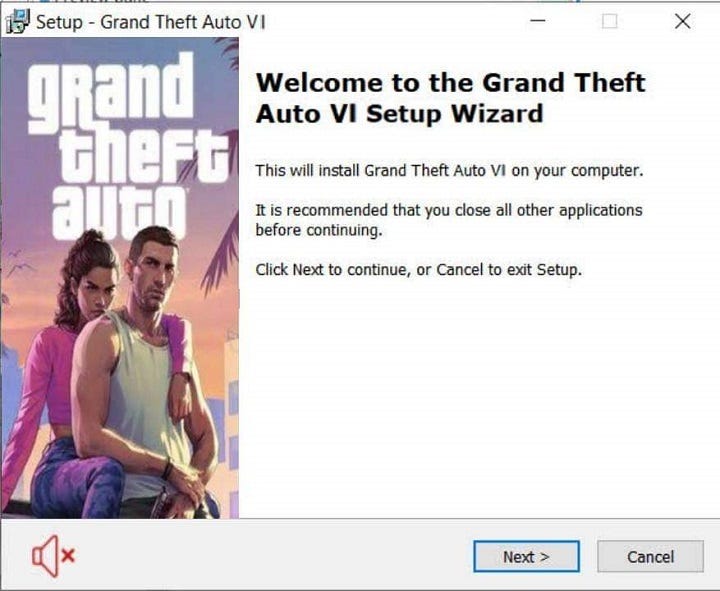
Image Source: Reddit
How it started: the download
10:12:08 — File Created
Path: C:\Users\Ryan\Downloads\GTA6_Setup_Crack_2026.exe
Process: chrome.exe
File Size: 84.7 MB
Signed: No
No exploit here. No vulnerability. Ryan double clicked the file himself. This is MITRE T1204, User Execution. The hardest vector to block technically because the user is the delivery mechanism.
The naming is deliberate. “Crack” signals piracy, which is exactly what someone searching for a free game expects to see. The file size is calibrated i.e 84.7 MB feels right for a game installer. And .exe on Windows is the path of least resistance.
SHA256 comes back malicious. Unsigned. Unknown publisher. That’s detection opportunity number one, but it requires someone checking before execution. Most users don’t.
The process tree: where intent becomes visible
This is the part that matters most. When an alert fires, the process tree is your first read of what actually happened.
explorer.exe
└── GTA6_Setup_Crack_2026.exe
    ├── cmd.exe /c start /min powershell.exe
    │   -ExecutionPolicy Bypass -WindowStyle Hidden
    │   └── powershell.exe
    │       ├── reg.exe → HKCU Run key
    │       └── schtasks.exe → RockstarGameUpdater task
    │
    └── GTA6_Launcher.exe (dropped)
        └── vcruntime_update.exe
            ├── whoami.exe
            ├── ipconfig.exe /all
            ├── systeminfo.exe
            └── net.exe user
Read that tree like a story.
The installer spawns cmd.exe with a hidden PowerShell. That PowerShell creates a registry run key and a scheduled task. Both point to vcruntime_update.exe, the actual infostealer, dropped into AppData\Roaming\Microsoft\Windows\.
Then the infostealer runs recon. whoami, ipconfig, systeminfo, net user. It wants to know what machine it's on, who's logged in, what's running, and whether it's worth stealing from.
A legitimate game installer does none of this.
Persistence: why a reboot wouldn’t have saved Ryan
10:13:37 — reg.exe
HKCU\Software\Microsoft\Windows\CurrentVersion\Run\RockstarGameUpdater
→ C:\Users\Ryan\AppData\Roaming\Microsoft\Windows\vcruntime_update.exe

10:13:48 — schtasks.exe
Task: RockstarGameUpdater
Trigger: At logon
Action: vcruntime_update.exe
Two persistence mechanisms. Registry run key and a scheduled task, both pointing to the same implant.
One persistence mechanism can happen by accident. Two shows the attacker expected to get caught and planned around it. Delete the registry key, the scheduled task still fires on next logon. Delete the task, the registry key still runs it. You have to find and remove both.
The file path itself is misdirection. AppData\Roaming\Microsoft\Windows\ sounds like a legitimate Windows location. The filename vcruntime_update.exe sounds like Visual C++ Runtime, a real Windows component. It's designed to blend into Task Manager.
Credential access: the real payload
10:14:02 — vcruntime_update.exe accesses:
├── Chrome\User Data\Default\Login Data
├── Chrome\User Data\Default\Cookies
├── Edge\User Data\Default\Login Data
└── Firefox\Profiles\*.default-release\logins.json

10:15:10 — syscache_4931.zip created in Temp
10:15:22 — Upload attempt to panel-gta-support[.]top:8080
Size: 2.3 MB
Result: BLOCKED
An unsigned binary from a fake game installer has exactly zero legitimate reasons to open Chrome’s Login Data. The moment you see that file path in your process activity, the verdict is credential theft. Full stop.
The ZIP file tells you the exfiltration plan: harvest credentials, compress them, stage in Temp, upload to C2. The 2.3 MB upload was blocked. But an earlier 4.8 KB check-in at 10:14:32 succeeded, likely sending machine metadata to the attacker’s server before the larger transfer was caught.
Assume all of Ryan’s browser credentials are compromised. Don’t wait for confirmation.
C2 communication: what the network logs said
10:14:25 — cdn-rockstar-update[.]com → 185.225.73[.]44
10:14:40 — api-gta6launcher[.]xyz → 91.239.130[.]24
10:15:19 — panel-gta-support[.]top → 45.148.10[.]92
10:15:44 — rawcdn-gamepatch[.]site → 172.67.182[.]19
Four things to notice here.
Every domain uses Rockstar/GTA branding. Every domain uses a cheap TLD .xyz, .top, .site. All four queries came from the malicious process, not from a browser. And none of these domains have any legitimate traffic, low prevalence is a high-fidelity signal.
The sequence: initial beacon at 10:14:32 (4.8 KB sent, likely machine info), credential exfiltration attempt at 10:15:22 (blocked), secondary payload download at 10:15:47 from PowerShell.
The attacker was still trying to pull down a second stage payload while the first was being blocked. They move fast.
The 5 questions to ask when this alert hits your queue
Was this user-initiated?
Yes. explorer.exe → GTA6_Setup_Crack_2026.exe. Ryan ran it himself. No exploit.
What is the payload? Infostealer with possible RAT staging. Primary behaviour is credential theft. Secondary payload download suggests planned upgrade to remote access.
What data is compromised? Assume all browser credentials. The 4.8 KB check-in likely transmitted machine info. The 2.3 MB credential archive was blocked but staged.
Is there persistence? Two mechanisms. Registry run key and scheduled task. Both must be removed before reimaging.
True positive or false positive? True positive. Unsigned binary, piracy naming, masqueraded filenames, credential access from a game installer, suspicious domains, dual persistence, PowerShell with bypass flags. Not one of these is benign. All of them together? This is done.
Containment and cleanup
Immediate: isolate the host, kill all suspicious processes, block the four domains and four IPs, preserve logs before rebooting.
Remove persistence:
reg delete "HKCU\...\Run" /v RockstarGameUpdater /f
schtasks /delete /tn RockstarGameUpdater /fDelete: GTA6_Setup_Crack_2026.exe, vcruntime_update.exe, RockstarService.exe, install_helper.tmp, syscache_4931.zip
For credentials: force password reset, revoke all active sessions, re-enroll MFA, monitor account activity for 30 days. Any password saved in any browser on that machine is compromised.
Threat hunt across your environment using file hashes, the registry key name, the scheduled task name, and the four C2 domains. If one machine ran this, check whether the same installer showed up elsewhere in your download logs.
What this investigation teaches you And What If you Want To Watch A Similar One Live With Me ?
The 4-minute window is the lesson nobody talks about enough.
10:13:21 — execution. 10:16:05 — EDR kill. Three minutes and 44 seconds. In that window the attacker established persistence, ran recon, accessed credentials, staged data, and attempted exfiltration.
Modern malware doesn’t wait. It runs its full routine immediately, because it assumes it will be caught and wants to complete as much as possible before that happens.
Your detection needs to be faster than the attacker’s completion time — not faster than the attacker’s first action.
The process tree is always your first read. A legitimate installer spawns a setup wizard. It doesn’t spawn cmd.exe → hidden PowerShell → reg.exe → schtasks.exe. That chain, in that order, tells you everything you need to know before you've looked at a single network log.
And credential access is always intent. Not scanning. Not coincidental. If an unsigned binary opened Chrome’s Login Data, that’s a breach, not a detection.
I am running Live Malware Triage: Real SOC Investigation on 4th July.
I’ll walk through a real malware alert exactly the way I do it at work. No slides, no simulation, just my screen, a suspicious EDR alert, and my complete thought process out loud. Seats are limited. The recording won’t be free after the session. If you want to watch this, the live session is your only shot.
Register here: 👉 https://topmate.io/learnwithmanubhavsharma/2158017
If you want to build the instinct to move through an investigation like this from scratch, my Cybersecurity Foundations course covers exactly this, investigation workflow, log reading, and how to think through a process tree before you’ve spent a year in a SOC.
Want me to look at your specific resume or talk through your roadmap?
👉 SOC Resume Review 👉 Career Clarity Call
Weekly SOC investigation breakdowns, straight to your inbox:
메타데이터
- post_id
- cff1aee7c6f6
- slug
- how-i-caught-an-infostealer-in-4-minutes-a-fake-gta-6-installer-investigation-technical-blog-cff1aee7c6f6
- url
- https://systemweakness.com/how-i-caught-an-infostealer-in-4-minutes-a-fake-gta-6-installer-investigation-technical-blog-cff1aee7c6f6
- canonical_url
- https://systemweakness.com/how-i-caught-an-infostealer-in-4-minutes-a-fake-gta-6-installer-investigation-technical-blog-cff1aee7c6f6
- author_url
- https://medium.com/@letshackit
- status
- ok
- fetched_at
- 2026-07-09 04:10:03