Coming Soon : Tool Ghauri-GUI Easy Solution for Scann SQL Injection.
Hello, I’m Isriade Putra.
Coming Soon : Tool Ghauri-GUI Easy Solution for Scann SQL Injection.
Hello, I’m Isriade Putra.
As a penetration tester, I often face repetitive tasks: testing web application endpoints for SQL Injection vulnerabilities.
Most of the time, I rely on sqlmap or ghauri, two popular tools for SQLi exploitation.
However, there are some classic problems that make the workflow less efficient.
1. Repeated Request Files
Whenever I want to use the -r option, I have to:
- Intercept the request using Burp Suite.
- Save it as a
.txtfile. - Run
sqlmap -r request.txtorghauri -r request.txt.
If there are many endpoints, I need to create multiple request files. Even if I just want to test different parameters, I end up making new files again and again. This becomes time-consuming, repetitive, and inefficient.
2. Not All URLs Can Be Scanned Directly
Besides the file issue, there are other challenges:
- A simple GET request can be scanned directly with
-u. - But for POST requests, parameters are in the body, not in the URL.
- Some applications also use cookies, authorization headers, CSRF tokens, or even JSON/XML payloads.
In these cases, ghauri/sqlmap must be provided with the full raw request (via -r).
This means I almost always go back to the same step: creating request files manually.
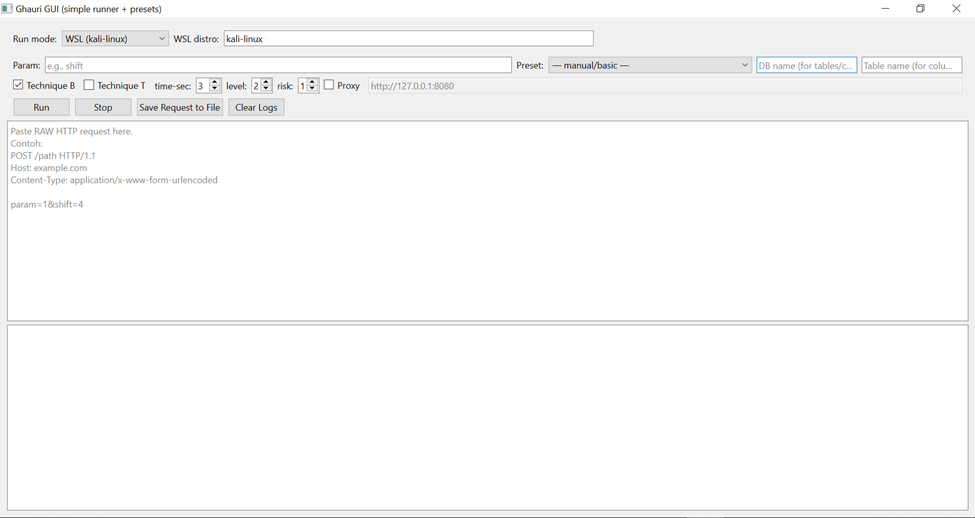
And that made me think: “Why not build a small GUI tool that can automate this process?”
The Solution: Ghauri GUI
So, I built a simple desktop tool using Python + PySide6, which I named Ghauri GUI.
How it works:
- Copy the raw request from Burp Suite.
- Paste it into the GUI application.
- Specify the parameter to focus on.
- Click Run.
The tool will automatically:
- Save the raw request to a temporary file.
- Run ghauri with the chosen parameter.
- Display the scan results directly in the log panel.
Advantages of This Tool
With this tool, I no longer waste time creating request.txt files manually for each target.
Just copy–paste once → click Run → and it works.
Some key advantages include:
- Time-saving: no more repeated request file creation.
- Flexible: supports both GET and POST requests.
- User-friendly: everything is done within a single GUI window.
- Powerful: still leverages all ghauri features, including boolean-based, time-based, database dump, etc.
- Windows-friendly: this tool runs directly on Windows and can even leverage WSL (Windows Subsystem for Linux) to execute ghauri. This makes it more practical, since many pentesters use Windows as their daily environment.
Closing
For me, this simple tool significantly improves pentesting workflows, especially when testing multiple endpoints quickly. Although the features are still basic, Ghauri GUI provides convenience and efficiency compared to repeatedly creating manual request files.
Sometimes, the best solution isn’t a big, complex tool, but a small automation that reduces repetition. And for me, Ghauri GUI is exactly that. 🚀
When Will It Be Released?
Follow me on Medium for updates — I’ll soon share the Ghauri-GUI.exe release. If all goes well, I plan to share it on Wednesday. Thank you! 🙏
메타데이터
- post_id
- d04bdf00ea33
- slug
- coming-soon-tool-ghauri-gui-easy-solution-for-scann-sql-injection-d04bdf00ea33
- url
- https://medium.com/@raflesiait/coming-soon-tool-ghauri-gui-easy-solution-for-scann-sql-injection-d04bdf00ea33
- canonical_url
- https://medium.com/@raflesiait/coming-soon-tool-ghauri-gui-easy-solution-for-scann-sql-injection-d04bdf00ea33
- author_url
- https://medium.com/@raflesiait
- status
- ok
- fetched_at
- 2026-07-22 14:41:42


