Mastering Facet: A guide to Type-Safe Projections in C#
In this post, I want to highlight Facet’s features and demonstrate how to use them with concrete examples. From generating your DTO’s and…
Mastering Facet: A guide to Type-Safe Projections in C

In this post, I want to highlight Facet’s features and demonstrate how to use them with concrete examples. From generating your DTO’s and projections, mappers and even EF Core integration, to advanced features and best practices.
Introduction: The Problem with Traditional DTOs
If you’ve worked with modern C# applications, you’ve likely written code like this countless times:
public class User
{
    public int Id { get; set; }
    public string FirstName { get; set; }
    public string LastName { get; set; }
    public string Email { get; set; }
    public string PasswordHash { get; set; }
    public decimal Salary { get; set; }
    public DateTime CreatedAt { get; set; }
}

// Now you need a DTO for your API...
public class UserDto
{
    public int Id { get; set; }
    public string FirstName { get; set; }
    public string LastName { get; set; }
    public string Email { get; set; }
    // Excluding PasswordHash and Salary for security
}

// And a mapper...
public static UserDto ToDto(this User user)
{
    return new UserDto
    {
        Id = user.Id,
        FirstName = user.FirstName,
        LastName = user.LastName,
        Email = user.Email
    };
}
This pattern is repetitive, error-prone, and becomes a maintenance nightmare as your domain models grow. When you add a property to User, you need to remember to update every DTO, every mapper, and every LINQ projection. Miss one, and you’ve got a bug.
Facet
What is Facetting?
Think of a diamond. The whole stone is your domain model, it contains everything about the entity. But when you view it from different angles, you see different facets, specific views that show only what matters from that perspective.
In software terms, faceting is the process of defining focused, compile-time views of your domain models. Instead of manually creating DTOs and mappers, you declare what you want, and Facet generates everything at compile-time using C# source generators.
The key benefits:
- Zero runtime cost: everything is generated at compile time
- Type-safe: compiler errors if you reference properties that don’t exist
- No reflection: pure C# code generation
- Automatic maintenance: change your domain model, and facets update automatically
- Works everywhere: LINQ, Entity Framework Core, APIs, anywhere you need projections
Getting Started
First, install Facet via NuGet:
dotnet add package Facet
dotnet add package Facet.Extensions        # For mapping helpers
dotnet add package Facet.Extensions.EFCore # For EF Core integration
dotnet add package Facet.Mapping           # For custom mappings
Understanding Facets: The Basics
Let’s start with a simple example. Say you have a User entity:
public class User
{
    public int Id { get; set; }
    public string FirstName { get; set; }
    public string LastName { get; set; }
    public string Email { get; set; }
    public string PasswordHash { get; set; }
    public decimal Salary { get; set; }
    public DateTime CreatedAt { get; set; }
}
To create a public-facing facet that excludes sensitive data, for example, you can simply:
[Facet(typeof(User), "PasswordHash", "Salary")]
public partial record UserPublicDto;

// Or

[Facet(typeof(User), exclude: ["PasswordHash", "Salary"])]
public partial class UserPublicDto
{
    public string ExtraProperty { get; set; }
};
That’s it! Facet generates a complete record with:
- All properties from User except PasswordHash and Salary
- A constructor for creating instances
- LINQ projection expressions
- Mapping methods
Using it is just as simple:
// Single object mapping
User user = GetUserFromDatabase();
var dto = user.ToFacet<UserPublicDto>();

// Collection mapping
List<User> users = GetUsers();
var dtos = users.SelectFacets<UserPublicDto>();

// In EF Core queries - automatic SQL projection!
var dtos = await dbContext.Users
    .Where(u => u.IsActive)
    .SelectFacet<UserPublicDto>()
    .ToListAsync();
The Include vs Exclude Pattern
Facet gives you two strategies for defining what goes into your facet:
Exclude Pattern (Default)
Use this when you want most of the properties but need to hide a few:
// Everything except these fields
[Facet(typeof(User), "PasswordHash", "Salary", "InternalNotes")]
public partial record UserApiDto;
Include Pattern
Use this when you want only specific properties:
// Only these fields
[Facet(typeof(User), Include = ["FirstName", "LastName", "Email"])]
public partial record UserContactDto;
This is perfect for filter DTOs or search forms where you only need a subset of properties.
Handling Complex Domain Objects: Nested Facets
Real-world applications have complex object graphs. Here’s how Facet handles them elegantly.
Step 1: Define your domain models
public class Address
{
    public string Street { get; set; }
    public string City { get; set; }
    public string State { get; set; }
    public string ZipCode { get; set; }
    public string Country { get; set; }
}

public class Company
{
    public int Id { get; set; }
    public string Name { get; set; }
    public string Industry { get; set; }
    public Address Headquarters { get; set; }
}

public class Employee
{
    public int Id { get; set; }
    public string FirstName { get; set; }
    public string LastName { get; set; }
    public string Email { get; set; }
    public string PasswordHash { get; set; }
    public decimal Salary { get; set; }
    public Company Company { get; set; }
    public Address HomeAddress { get; set; }
    public DateTime HireDate { get; set; }
}
Step 2: Create Facets from Bottom-Up
// 1. Start with Address - it has no dependencies
[Facet(typeof(Address))]
public partial record AddressDto;

// 2. Create Company facet - it references Address
[Facet(typeof(Company), NestedFacets = [typeof(AddressDto)])]
public partial record CompanyDto;

// 3. Create Employee facet - it references both
[Facet(typeof(Employee),
    exclude: ["PasswordHash", "Salary"],
    NestedFacets = [typeof(CompanyDto), typeof(AddressDto)])]
public partial record EmployeeDto;
What happens here?
When Facet generates EmployeeDto, it:
- Copies basic properties from Employee
- Automatically maps Company -> CompanyDto
- Automatically maps Address -> AddressDto
- Generates proper constructors and projections that handle all the nesting
Using it is seamless:
Employee employee = GetEmployee();
var dto = employee.ToFacet<EmployeeDto>();

// dto.Company is now CompanyDto
// dto.Company.Headquarters is now AddressDto
// dto.HomeAddress is now AddressDto
Step 3: Handling Collections
Collections work automatically! Facet intelligently maps List<T>, arrays, IEnumerable<T>, ICollection<T>, etc.
public class Order
{
    public int Id { get; set; }
    public string OrderNumber { get; set; }
    public DateTime OrderDate { get; set; }
    public List<OrderItem> Items { get; set; }
    public Address ShippingAddress { get; set; }
}

public class OrderItem
{
    public int Id { get; set; }
    public string ProductName { get; set; }
    public decimal Price { get; set; }
    public int Quantity { get; set; }
}

// Define the facets
[Facet(typeof(OrderItem))]
public partial record OrderItemDto;

[Facet(typeof(Order), NestedFacets = [typeof(OrderItemDto), typeof(AddressDto)])]
public partial record OrderDto;

// Usage - List<OrderItem> automatically becomes List<OrderItemDto>!
var orderDto = order.ToFacet<OrderDto>();
## Complex Multi-Level Nesting
public class Department { public int Id { get; set; } public string Name { get; set; } public Company Company { get; set; } public Employee Manager { get; set; } public List<Employee> Staff { get; set; } }
[Facet(typeof(Department), NestedFacets = [typeof(CompanyDto), typeof(EmployeeDto)])] public partial record DepartmentDto;
// This automatically handles: // - Department.Company → CompanyDto // - Department.Company.Headquarters → AddressDto (nested in CompanyDto) // - Department.Manager → EmployeeDto // - Department.Manager.Company → CompanyDto // - Department.Manager.HomeAddress → AddressDto // - Department.Staff → List<EmployeeDto> // And all their nested properties!
## Handling Circular References with MaxDepth and PreserveReferences

Facet provides two complementary mechanisms to handle these scenarios safely. Consider these common scenarios:
// Scenario 1: Bidirectional references public class Author { public int Id { get; set; } public string Name { get; set; } public List<Book> Books { get; set; } // Author references Books }
public class Book { public int Id { get; set; } public string Title { get; set; } public Author Author { get; set; } // Book references Author - circular! }
// Scenario 2: Self-referencing (organizational hierarchy) public class Employee { public int Id { get; set; } public string Name { get; set; } public Employee Manager { get; set; } // Points up the hierarchy public List<Employee> DirectReports { get; set; } // Points down - circular! }
Without protection, trying to create facets for these models would cause:
- Compile-time issues: Source generator stack overflow
- Runtime issues: Infinite recursion when constructing facets
- IDE crashes: Visual Studio/Rider hanging during code generation

**MaxDepth**

MaxDepth controls how many levels deep the source generator will recurse when creating nested facets, default value is 3.
// Define facets with circular references - MaxDepth prevents infinite recursion [Facet(typeof(Author), MaxDepth = 2, NestedFacets = [typeof(BookDto)])] public partial record AuthorDto;
[Facet(typeof(Book), MaxDepth = 2, NestedFacets = [typeof(AuthorDto)])] public partial record BookDto;
**How it works:**

The depth counter tracks nesting levels:
- Level 0: Root object (e.g., Author)
- Level 1: First level nested objects (e.g., Books collection)
- Level 2: Second level nested objects (e.g., Book.Author)
- Level 3: Would be `Book.Author.Books`, stopped at MaxDepth = 2

## PreserveReferences: Runtime Circular Detection

PreserveReferences enables runtime tracking of object instances to detect when the same object is being processed multiple times.

**Default value**: **true** (recommended for safety)

This prevents:
- Infinite loops when the same object appears multiple times
- Duplicate processing of shared references
- Memory exhaustion from circular object graphs

# Entity Framework Core Integration

One of Facet’s most powerful features is seamless EF Core integration.

When you use SelectFacet<T>() in an EF Core query, Facet generates an **expression tree **that EF Core translates directly to SQL:
// This generates optimal SQL with only the columns you need! var employees = await dbContext.Employees .Where(e => e.IsActive) .SelectFacet<EmployeeDto>() .ToListAsync();
// SQL generated: // SELECT e.Id, e.FirstName, e.LastName, e.Email, ... // FROM Employees e // WHERE e.IsActive = 1
## Automatic Navigation Property Loading

The magic part: You **don’t need .Include()** for nested facets!
// Normal: you need to remember to include var employees = await dbContext.Employees .Include(e => e.Company) .ThenInclude(c => c.Headquarters) .Include(e => e.HomeAddress) .Select(e => new EmployeeDto { ... }) .ToListAsync();
// WITH Facet: automatic! var employees = await dbContext.Employees .SelectFacet<EmployeeDto>() .ToListAsync();
// Facet analyzes the nested facets and generates proper JOINs automatically!
## Reverse Mapping: Update Entities

Facet can also help with updates:
[HttpPut("employees/{id}")] public async Task<IActionResult> UpdateEmployee(int id, EmployeeUpdateDto dto) { var employee = await dbContext.Employees.FindAsync(id); if (employee == null) return NotFound();
// Updates only the properties that changed
employee.UpdateFromFacet(dto, dbContext);

await dbContext.SaveChangesAsync();
return NoContent();
}
// With change tracking for auditing var result = employee.UpdateFromFacetWithChanges(dto, dbContext); if (result.HasChanges) { logger.LogInformation( "Employee {Id} updated. Changed: {Properties}", employee.Id, string.Join(", ", result.ChangedProperties)); }
# Custom Mapping: Beyond Simple Projection

Often, your DTOs need computed properties or transformations that can’t be done with simple property copying. Facet supports this through **mapping** **configurations**.

## Synchronous Custom Mapping

Let’s say you want to add computed properties:
// Define the mapper public class UserDtoMapper : IFacetMapConfiguration<User, UserDetailDto> { public static void Map(User source, UserDetailDto target) { // Computed property target.FullName = $"{source.FirstName} {source.LastName}";
    // Calculated age
    target.Age = CalculateAge(source.DateOfBirth);

    // Business logic
    target.MembershipLevel = DetermineMembershipLevel(source);
}

private static int CalculateAge(DateTime birthDate)
{
    var today = DateTime.Today;
    var age = today.Year - birthDate.Year;
    if (birthDate.Date > today.AddYears(-age)) age--;
    return age;
}

private static string DetermineMembershipLevel(User user)
{
    // Your business logic here
    return user.CreatedAt < DateTime.Now.AddYears(-5) ? "Gold" : "Silver";
}
}
// Apply the mapper to your facet [Facet(typeof(User), exclude: ["PasswordHash", "Salary"], Configuration = typeof(UserDtoMapper))] public partial record UserDetailDto { public string FullName { get; set; } public int Age { get; set; } public string MembershipLevel { get; set; } }
The mapper executes **after** the basic property copying, so you can focus only on the custom logic.

## Asynchronous Custom Mapping

Sometimes you need to fetch additional data asynchronously (database lookups, API calls, etc.):
public class UserProfileMapper : IFacetMapConfigurationAsync<User, UserProfileDto> { public static async Task MapAsync( User source, UserProfileDto target, CancellationToken cancellationToken = default) { // Async database call target.ProfilePicture = await GetProfilePictureAsync(source.Id, cancellationToken);
    // Async external API call
    target.ReputationScore = await CalculateReputationAsync(source.Email, cancellationToken);

    // Regular computed property
    target.FullName = $"{source.FirstName} {source.LastName}";
}

private static async Task<string> GetProfilePictureAsync(int userId, CancellationToken ct)
{
    // Your async logic here
    await Task.Delay(100, ct); // Simulated async work
    return $"https://cdn.example.com/avatars/{userId}.jpg";
}

private static async Task<int> CalculateReputationAsync(string email, CancellationToken ct)
{
    // Call external service
    await Task.Delay(100, ct);
    return 850;
}
}
[Facet(typeof(User), "PasswordHash", "Salary")] public partial record UserProfileDto { public string FullName { get; set; } public string ProfilePicture { get; set; } public int ReputationScore { get; set; } }
// Usage - note the async methods var dto = await user.ToFacetAsync<User, UserProfileDto, UserProfileMapper>();
// For collections - parallel execution! var dtos = await users.ToFacetsParallelAsync<User, UserProfileDto, UserProfileMapper>();
## Dependency Injection in Mappers

For more complex scenarios, you can inject services into your mappers:
public class UserEnrichedMapper : IFacetMapConfigurationAsyncInstance<User, UserEnrichedDto> { private readonly IProfileService _profileService; private readonly ILocationService _locationService; private readonly ILogger<UserEnrichedMapper> _logger;
public UserEnrichedMapper(
    IProfileService profileService,
    ILocationService locationService,
    ILogger<UserEnrichedMapper> logger)
{
    _profileService = profileService;
    _locationService = locationService;
    _logger = logger;
}

public async Task MapAsync(
    User source,
    UserEnrichedDto target,
    CancellationToken cancellationToken = default)
{
    try
    {
        // Use injected services
        target.ProfileData = await _profileService.GetProfileAsync(source.Id, cancellationToken);
        target.Location = await _locationService.GetLocationAsync(source.Id, cancellationToken);
    }
    catch (Exception ex)
    {
        _logger.LogError(ex, "Failed to enrich user {UserId}", source.Id);
        throw;
    }
}
}
// Usage with DI var mapper = serviceProvider.GetRequiredService<UserEnrichedMapper>(); var dto = await user.ToFacetAsync(mapper);
# Advanced Features

## Nullable Properties for Query DTOs

Need a filter DTO where all properties are nullable (for optional filters)?
[Facet(typeof(User), Include = ["FirstName", "LastName", "Email", "IsActive"], NullableProperties = true, GenerateBackTo = false)] public partial record UserFilterDto;
// All properties are nullable: // string? FirstName, string? LastName, bool? IsActive, etc.
// Perfect for query parameters! public async Task<List<UserDto>> SearchUsers(UserFilterDto filter) { var query = dbContext.Users.AsQueryable();
if (filter.FirstName != null)
    query = query.Where(u => u.FirstName.Contains(filter.FirstName));

if (filter.LastName != null)
    query = query.Where(u => u.LastName.Contains(filter.LastName));

if (filter.IsActive.HasValue)
    query = query.Where(u => u.IsActive == filter.IsActive.Value);

return await query.SelectFacet<UserDto>().ToListAsync();
}
## Copy Data Annotations

Preserve validation attributes from your domain models:
public class User { [Required] [StringLength(100)] public string FirstName { get; set; }
[EmailAddress]
public string Email { get; set; }
}
[Facet(typeof(User), Include = ["FirstName", "Email"], CopyAttributes = true)] public partial record UserRegistrationDto;
// Generated with attributes preserved: // [Required] // [StringLength(100)] // public string FirstName { get; init; } // // [EmailAddress] // public string Email { get; init; }
## Generate Multiple Output Types

Facets can be classes, records, structs, or record structs:
[Facet(typeof(User))] public partial class UserClass;
[Facet(typeof(User))] public partial record UserRecord;
[Facet(typeof(User))] public partial struct UserStruct;
[Facet(typeof(User))] public partial record struct UserRecordStruct;
**Auto-Generate CRUD DTOs**

For rapid API development, auto-generate standard CRUD DTOs:
[GenerateDtos(Types = DtoTypes.All, OutputType = OutputType.Record)] public class Product { public int Id { get; set; } public string Name { get; set; } public decimal Price { get; set; } public DateTime CreatedAt { get; set; } }
// Automatically generates: // - CreateProductRequest (excludes Id, CreatedAt) // - UpdateProductRequest (includes Id) // - ProductResponse (includes everything) // - ProductQuery (all properties nullable) // - UpsertProductRequest (for create or update)
With smart audit field exclusions:
[GenerateAuditableDtos( Types = DtoTypes.Create | DtoTypes.Update, ExcludeProperties = ["Password"])] public class User { public int Id { get; set; } public string Name { get; set; } public string Password { get; set; } public DateTime CreatedAt { get; set; } // Auto-excluded public string CreatedBy { get; set; } // Auto-excluded public DateTime UpdatedAt { get; set; } // Auto-excluded public string UpdatedBy { get; set; } // Auto-excluded }
# Best Practices

## Use meaningful Facet names

Name your facets based on their **purpose**, not just appending “Dto”:
// ❌ Generic names public partial record UserDto;
// ✅ Descriptive names public partial record UserPublicProfile; public partial record UserAdminView; public partial record UserSearchResult; public partial record UserRegistrationRequest;
## Create Facets bottom-up

Always create facets for leaf nodes first, then build up:
// ✅ Correct order [Facet(typeof(Address))] // No dependencies public partial record AddressDto;
[Facet(typeof(Company), NestedFacets = [typeof(AddressDto)])] public partial record CompanyDto; // Depends on AddressDto
[Facet(typeof(Employee), NestedFacets = [typeof(CompanyDto), typeof(AddressDto)])] public partial record EmployeeDto; // Depends on both
## Use Exclude for public API’s, Include for specific use cases
// ✅ For public APIs - hide sensitive data [Facet(typeof(User), "PasswordHash", "Salary", "SSN")] public partial record UserPublicApi;
// ✅ For specific features - only what's needed [Facet(typeof(User), Include = ["Id", "FirstName", "LastName"])] public partial record UserAutocomplete;
## Keep matters focused!

Don’t put business logic in mappers, keep them for **presentation concerns** only:
// ✅ Good - presentation logic public class UserMapper : IFacetMapConfiguration<User, UserDto> { public static void Map(User source, UserDto target) { target.FullName = $"{source.FirstName} {source.LastName}"; target.DisplayAge = $"{CalculateAge(source.DateOfBirth)} years old"; target.MemberSince = source.CreatedAt.ToString("MMMM yyyy"); } }
// ❌ Bad - business logic belongs in domain layer public class UserMapper : IFacetMapConfiguration<User, UserDto> { public static void Map(User source, UserDto target) { // Don't do this - business logic should be in domain target.CanPurchase = source.Age >= 18 && source.AccountStatus == "Active"; target.CreditLimit = CalculateCreditLimit(source); // Business logic! } }
# Performance Considerations

Facet is built for performance:
- **Compile-time generation**: Zero runtime overhead
- **No reflection**: Pure C# code
- **Optimal SQL**: Only fetches needed columns in EF Core
- **Competitive with hand-written code**: Benchmarks show performance on par with or better than popular alternatives

## Benchmark results

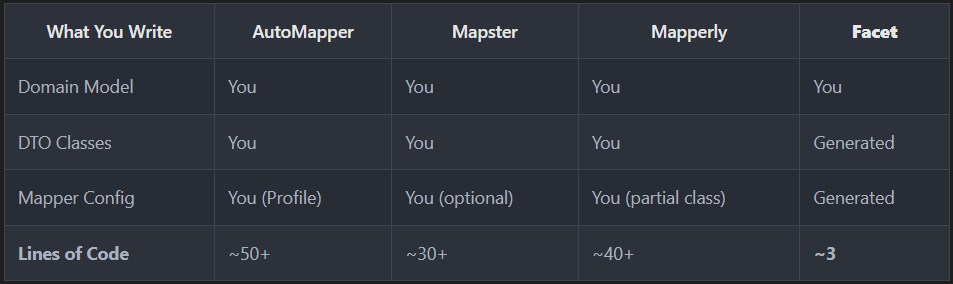
All libraries perform within ~10% of each other — the real benefit of Facet is **developer productivity** and **maintainability**.

Single object mapping:
- **Facet**: 15.93 ns, 136 B allocated
- Mapperly: 15.09 ns, 128 B allocated
- Mapster: 21.90 ns, 128 B allocated

Collection mapping (10 items):
- Mapster: 192.55 ns, 1,416 B allocated
- **Facet**: 207.32 ns, 1,568 B allocated
- Mapperly: 222.50 ns, 1,552 B allocated

# Conclusion

Facet eliminates the boilerplate of DTOs and mapping while providing:
- **Type safety**: compiler catches errors
- **Performance**: zero runtime cost, optimal SQL
- **Maintainability**: change once, update everywhere
- **Flexibility**: from simple projections to complex custom mappings
- **Integration**: works seamlessly with EF Core, LINQ, and ASP.NET Core

By treating projections as **compile-time concerns** rather than runtime code, Facet lets you focus on your domain logic instead of plumbing code.

Start using Facet today =)

For more information, visit the[ GitHub repo](https://github.com/Tim-Maes/Facet), [NuGet page](https://www.nuget.org/packages/Facet) or the [documentation](https://github.com/Tim-Maes/Facet/tree/master/docs)!

Thanks!
메타데이터
- post_id
- d06f552a99ae
- slug
- mastering-facet-a-guide-to-type-safe-projections-in-c-d06f552a99ae
- url
- https://medium.com/@timmaes/mastering-facet-a-guide-to-type-safe-projections-in-c-d06f552a99ae
- canonical_url
- https://medium.com/@timmaes/mastering-facet-a-guide-to-type-safe-projections-in-c-d06f552a99ae
- author_url
- https://medium.com/@timmaes
- status
- ok
- fetched_at
- 2026-06-23 19:38:28