Building a Cross-Platform Audio Transcription & MOM Generator on Azure
Stack: .NET 8 · Angular 16 · Azure Blob Storage · Azure Speech Batch API v3.2 · Azure OpenAI · Docker · Kubernetes
Building a Cross-Platform Audio Transcription & MOM Generator on Azure
Stack: .NET 8 · Angular 16 · Azure Blob Storage · Azure Speech Batch API v3.2 · Azure OpenAI · Docker · Kubernetes
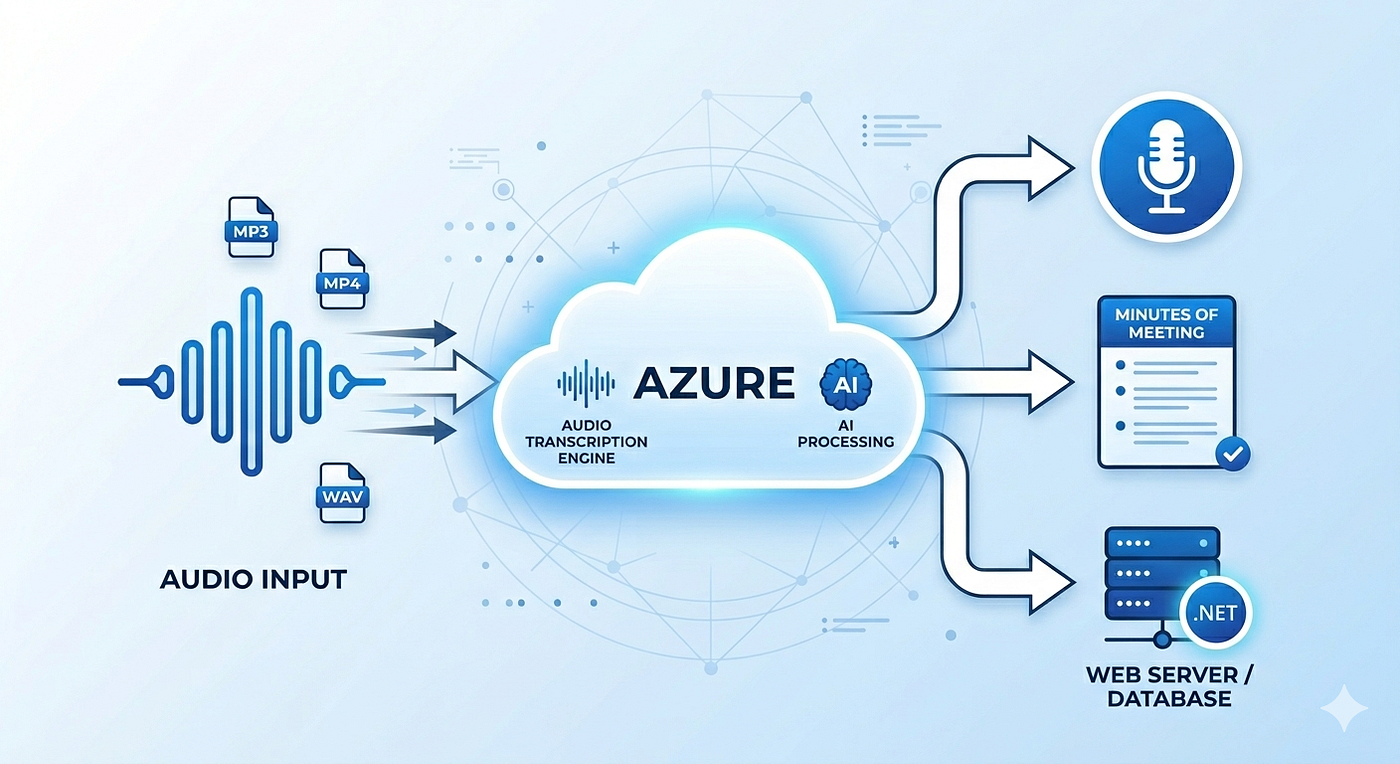
We built a feature that accepts MP3, MP4, and WAV files, transcribes them using Azure Speech Services, and generates structured Minutes of Meeting (MOM) via Azure OpenAI — running on both Windows (local) and Linux (Docker/Kubernetes). Here’s what it took to get there.
The Flow
- User uploads audio/video from Angular UI → Azure Blob Storage
- Frontend sends the blob SAS URL to the .NET 8 API
- API submits the URL to Azure Speech Batch Transcription API v3.2
- API polls job status every 5 seconds (max 5 minutes)
- Transcript is sent to Azure OpenAI → structured MOM in Markdown
- UI receives both the transcript and MOM
What We Tried Before Getting It Right
Approach Problem Azure Speech SDK Only accepts WAV. No MP3/MP4 support. NAudio (MP3 decoding) Works on Windows. Crashes on Linux — depends on mfplat.dll (Windows Media Foundation). FFmpeg in Docker Cross-platform, but adds ~200MB to the image via apt-get install. Too heavy. Azure Batch Transcription API Accepts MP3/MP4/WAV via blob URL. Azure decodes it. Zero local dependencies.
The winning insight: stop processing audio locally. Hand the blob URL to Azure and let it handle decoding entirely server-side.
Key Implementation
1. Submit the Transcription Job
var requestBody = new
{
    contentUrls = new[] { blobSasUrl },
    locale = "en-US",
    displayName = $"Transcription_{DateTime.UtcNow:yyyyMMddHHmmss}",
    properties = new { punctuationMode = "DictatedAndAutomatic" }
};
var request = new HttpRequestMessage(HttpMethod.Post, $"{BatchSpeechUrl}/transcriptions");
request.Headers.Add("Ocp-Apim-Subscription-Key", SpeechKey);
request.Content = JsonContent.Create(requestBody);var response = await _httpClient.SendAsync(request);
var result = await response.Content.ReadFromJsonAsync<JsonElement>();return result.GetProperty("self").GetString()!; // Job URL for polling2. Poll Until Done
for (int i = 0; i < 60; i++) // 60 x 5s = 5 minutes max
{
    await Task.Delay(5000);
var job = await GetJobStatus(jobUrl);
var status = job.GetProperty("status").GetString(); if (status == "Succeeded") return await FetchTranscript(job);
if (status == "Failed") throw new Exception("Transcription failed");
}throw new TimeoutException("Job did not complete within 5 minutes.");3. Generate MOM via Azure OpenAI
var messages = new[]
{
    new { role = "system", content = "Generate structured Minutes of Meeting in Markdown. Include: Summary, Attendees, Decisions, Action Items, Next Steps." },
    new { role = "user",   content = $"Transcript:\n\n{transcript}" }
};
Architecture: Before vs. After
BEFORE
Angular UI → .NET API → Decode locally (NAudio/FFmpeg) → Speech SDK → Transcript
                              ⚠ Windows only / +200MB Docker
AFTER
Angular UI → Azure Blob → .NET API → Batch API (Azure decodes) → OpenAI → MOM
✅ No native deps. Works everywhere.Challenges Faced
1. Azure Speech SDK — WAV only The real-time SDK works well but only accepts PCM/WAV. Adding MP3/MP4 support meant pre-processing audio before every call, which led us down the NAudio path.
2. NAudio — Windows Media Foundation crash on Linux NAudio decoded MP3/MP4 perfectly on Windows but threw a DllNotFoundException: mfplat.dll the moment we ran the Docker container on Linux. Windows Media Foundation doesn't exist on Linux. Our entire Kubernetes production environment is Linux — so this was a hard blocker.
3. FFmpeg — Bloated the Docker image FFmpeg solved the platform issue but required apt-get install ffmpeg directly in the Dockerfile, adding ~200MB to the image. In a Kubernetes setup where images are pulled across multiple nodes, that's real overhead — plus it brought native binary versioning and security patching into our CI/CD pipeline.
4. Azure Batch Transcription API — The fix that solved everything Switching to the Batch API eliminated all three problems at once. No local audio processing, no native dependencies, no Dockerfile changes. The image stayed lean and ran identically on both Windows and Linux.
Key Takeaways
- Use cloud-native APIs — offload audio decoding to Azure, not your container
- Avoid native binaries (NAudio, FFmpeg) in Dockerized workloads — they break cross-platform compatibility
- Batch API is async — always design for fire-and-poll, not synchronous response
- Set file size limits by format — WAV is uncompressed; cap it lower than MP3/MP4 to avoid timeouts
Building something similar? Drop a comment — happy to go deeper on any part of this.
메타데이터
- post_id
- d09f72edac2e
- slug
- building-a-cross-platform-audio-transcription-mom-generator-on-azure-d09f72edac2e
- url
- https://medium.com/@abrahamab7777/building-a-cross-platform-audio-transcription-mom-generator-on-azure-d09f72edac2e
- canonical_url
- https://medium.com/@abrahamab7777/building-a-cross-platform-audio-transcription-mom-generator-on-azure-d09f72edac2e
- author_url
- https://medium.com/@abrahamab7777
- status
- ok
- fetched_at
- 2026-07-11 13:47:56



