Content Delivery Networks — Netflix Serves You a Video in 5ms.
A deep dive into how Content Delivery Networks actually work — and why the modern web would collapse without them.
Content Delivery Networks — Netflix Serves You a Video in 5ms. Here’s the Infrastructure Behind That.
A deep dive into how Content Delivery Networks actually work — and why the modern web would collapse without them.
Picture this: you’re in Mumbai, it’s Friday night, and you hit play on a Netflix show. The video starts in under a second. But Netflix’s servers are in Virginia.
The raw physics of that don’t add up. A signal traveling across ~13,000 km of fiber, bouncing through routers, crossing undersea cables — that’s at minimum 150–200ms of latency, one way. For streaming video? That’s a disaster.
Yet it works. Instantly, reliably, for 260 million subscribers around the world simultaneously.
The answer isn’t faster internet. It’s a CDN — and once you understand how one works, you’ll never look at a website the same way again.
What a CDN Actually Is
A Content Delivery Network is a globally distributed system of servers that cache and serve content from locations close to the end user — instead of from a single distant origin server.
The key word is cache. CDNs don’t move your origin server closer to users. They make copies of your content and store those copies all over the world, so that users are almost always hitting a server nearby.
Without a CDN: Mumbai user → US data center → 200ms latency. With a CDN: Mumbai user → Mumbai edge server → 5ms latency.
That 40x speed improvement isn’t magic. It’s geography, clever caching, and a lot of engineering.
The Three-Tier Architecture Nobody Tells You About
Most explanations of CDNs describe two layers: your server, and the CDN. The reality is three.
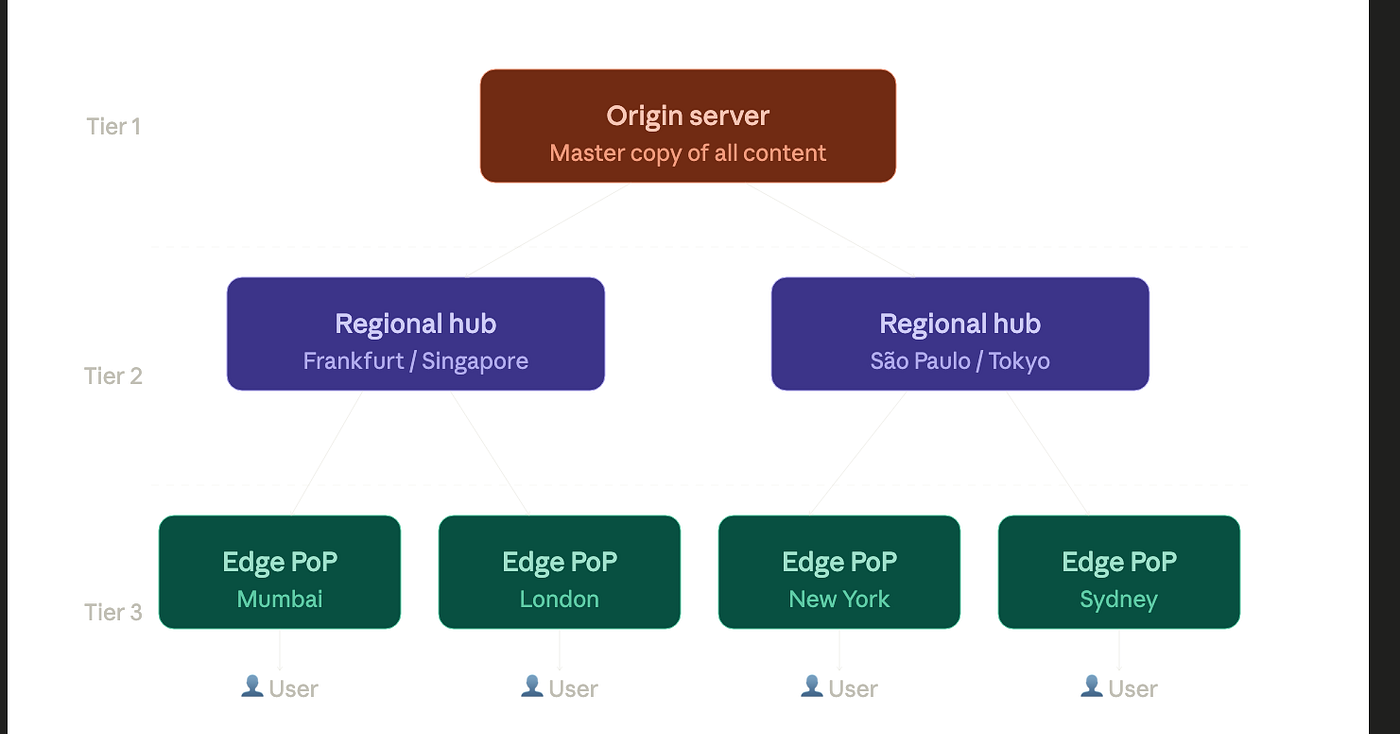
Origin Server — The single source of truth. Your actual server, wherever it lives. Expensive to hit directly; the entire goal of a CDN is to ensure most traffic never reaches it.
Regional Hubs (Mid-Tier / Shield Nodes) — Large caches positioned at major internet exchange points: Frankfurt, Singapore, São Paulo. These exist to solve the “thundering herd” problem. Without them, when 1,000 edge nodes simultaneously request the same new file, all 1,000 hit your origin at once. Regional hubs consolidate those requests into one.
Edge PoPs (Points of Presence) — The servers closest to end users. When you request an image from Netflix, you’re hitting one of these. Cloudflare alone has 300+ PoPs worldwide. Akamai has over 4,000.
Understanding this three-tier hierarchy is crucial, because it explains behaviors that otherwise seem strange — like why a piece of content can be “cached” at the regional level but still cause a brief delay the first time a new edge node serves it.
Cache Hits, Cache Misses, and the 99% Goal
Every CDN request falls into one of two buckets.

Cache Hit — The edge node already has the file. It responds in milliseconds. Your origin server is never contacted. This is the goal, and well-configured CDNs achieve 90–99% cache hit rates on static content.
Cache Miss — The file isn’t in the edge’s cache. This happens on the very first request after a deploy, when a file’s TTL has expired, or for rarely-requested content. The request travels up through the regional hub to origin. On the way back, each layer — hub, then edge — stores a copy. Every subsequent request from users near that edge node will be a cache hit.
This is the beautiful self-healing property of CDNs: the first user to request a file after a miss essentially “warms” the cache for everyone who comes after them.
TTL (Time-to-Live) controls how long a cached file is considered valid before the CDN fetches a fresh copy. A hero image might have a TTL of 365 days. An API response might be 10 seconds. HTML pages are often set to 0 — never cache — because they change frequently and must always be fresh.

The Full Request Lifecycle (Under 20ms)
When your browser requests https://static.netflix.com/logo.png, here's exactly what happens:

Step 1 — DNS lookup. Your browser resolves the domain. The CDN’s DNS server uses GeoDNS or Anycast to return the IP address of the edge PoP closest to you — not a fixed IP, but a dynamic one chosen based on your location.
Step 2 — Anycast routing. Multiple CDN edge nodes around the world advertise the same IP address via BGP. Your traffic is automatically routed to the topologically nearest one. You don’t choose it — the internet routing infrastructure does.
Step 3 — Edge PoP cache check. The PoP looks up the file in its in-memory or SSD cache. If the TTL is valid, it’s a cache hit. The response comes back immediately.
Step 4 — Cache miss (if applicable). The PoP sends a request upstream to the regional hub. If the hub also misses, it goes to origin. On the way back, every tier stores a copy.
Step 5 — Response delivered. The content reaches your browser. The browser stores it locally too — so a page reload doesn’t even touch the CDN.
The entire round trip, for a cache hit, can complete in under 5ms.
The Concepts That Actually Matter in Production
Cache invalidation / purging — When you push a new build, old cached files need to go. CDNs offer APIs for purging content globally. Cloudflare can propagate a purge to all 300+ PoPs in roughly 150ms. Without purging, users see stale content until TTL naturally expires — which, for a year-long TTL, is a long time to wait.
Cache-Control headers — The origin server tells the CDN what to do via HTTP headers. Cache-Control: public, max-age=31536000 means cache this for a year. Cache-Control: no-store means never cache this. Getting these right is one of the most impactful performance optimizations a web developer can make.
Cache keys — By default, CDNs cache per URL. But you can vary the key. Want to serve different image sizes to mobile vs. desktop? Include the User-Agent or a custom header in the cache key. This is how responsive CDN delivery works without maintaining separate URLs for every variant.
Origin shielding — A single designated regional hub sits between all edge PoPs and origin. The origin only ever receives requests from this one source, not from 300 edge nodes simultaneously. This is called “shielding,” and it’s the difference between origin servers that cruise and origin servers that get crushed.
How the Giants Do It
Netflix — Open Connect
Netflix doesn’t rent CDN capacity. They built their own, and then took it a step further: they ship custom server appliances directly to ISPs. When you stream a show, the bytes often come from a machine physically inside your internet provider’s data center — sometimes less than 5ms away. Netflix pre-loads popular content onto these appliances every night during off-peak hours, so they’re ready before the evening rush.
Cloudflare
Cloudflare processes roughly 3 trillion requests per month across 300+ cities. Their network uses Anycast — every PoP advertises the same IP prefix — so any request automatically hits the nearest node. This architecture also means DDoS attacks are absorbed at the edge before they ever reach your origin, because the attack traffic is distributed across hundreds of locations rather than concentrated at one target.
Akamai
One of the oldest CDN providers, Akamai serves an estimated 15–30% of all web traffic. When you watch a live sporting event on a major broadcaster, there’s a good chance it’s running through Akamai’s adaptive media delivery platform, which dynamically adjusts video bitrate based on your connection speed while serving from the nearest edge location.
Amazon CloudFront
CloudFront’s advantage is deep integration with the AWS ecosystem. Your origin can be S3, an Application Load Balancer, API Gateway, or EC2. The combination of S3 + CloudFront is the canonical way to serve a static React or Vue app globally, often at near-zero cost for moderate traffic. With 600+ points of presence across 90+ cities, requests travel over AWS’s private backbone network rather than the unpredictable public internet.
The Part Most People Get Wrong: CDNs Accelerate Dynamic Content Too
The default assumption is that CDNs are for static files — images, CSS, JavaScript. That’s where they shine, but modern CDNs do considerably more.
Route optimization — Even for completely uncacheable API calls, CDNs can shave 20–40% off latency by routing requests over their private fiber backbone from the nearest PoP to origin, bypassing the unpredictable hops of the public internet.
Edge computing — Cloudflare Workers, Fastly Compute, and AWS Lambda@Edge let you run code at the edge node itself. You can personalize HTML, run A/B tests, validate JWTs, or rewrite URLs — all without a round trip to origin. Shopify’s storefront rendering now runs at Cloudflare’s edge. The implication is significant: latency-sensitive logic no longer has to live on a central server.
TLS termination at the edge — The TLS handshake, which adds 100–300ms on a first connection, is handled at the nearest PoP rather than at a distant origin. For HTTPS sites — which is all of them now — this single optimization makes a measurable difference in perceived load times.
Why This All Matters
Every major website you use today — Google, YouTube, Amazon, Apple, Netflix — routes virtually all their traffic through CDN infrastructure. It’s not an optimization. It’s a prerequisite.
Without CDNs, a website popular in one country would be slow or unusable in another. Live video streaming at scale would be technically impossible. A single DDoS attack would take down services that millions depend on. The internet, as we experience it, is built on this distributed caching layer that most users never think about and most developers underestimate.
The next time a video loads in under a second, or a global app feels as fast in Tokyo as it does in New York — that’s not magic. That’s a 4,000-node distributed system that’s been quietly doing its job since before most of us had smartphones.
Want to go deeper? The AWS CloudFront architecture — with Lambda@Edge, S3 origins, and WAF integration — is one of the most instructive real-world implementations of these concepts. It’s worth a look if you’re building anything that needs to scale globally.
메타데이터
- post_id
- d0adce3cf714
- slug
- content-delivery-networks-netflix-serves-you-a-video-in-5ms-d0adce3cf714
- url
- https://medium.com/@shweta.shrivastava/content-delivery-networks-netflix-serves-you-a-video-in-5ms-d0adce3cf714
- canonical_url
- https://medium.com/@shweta.shrivastava/content-delivery-networks-netflix-serves-you-a-video-in-5ms-d0adce3cf714
- author_url
- https://medium.com/@shweta.shrivastava
- status
- ok
- fetched_at
- 2026-06-10 15:53:41