Logical Function in DAX
How DAX logical functions empower smarter decisions in Power BI
Logical Function in DAX
How DAX logical functions empower smarter decisions in Power BI

Image by Author
Every data analyst or scientist has a job of data cleaning that involves data collected by business websites and stored on the company’s servers, but it does not all end up there. We have a responsibility to clean and structure that data, and we are also applying logical functions on that particular data. Well, if you’re doing that with programming, I think it’s a little bit complicated for those newbies who have not even known the programs, but on the business intelligence side, we have a great tool that is Power BI, and it provides outstanding logical functions that we use without any complex coding. In this article, we will break down the concept of logical functions, and we will also take a hands-on look to understand it better.
Table of Contents
- Logical function
- IF
- AND
- SWITCH
Logical Function
DAX contains a variety of Logical functions. These functions allow us to test if the condition in an expression evaluates as true or false.
IF
The IF function checks the condition in an expression. It returns one value if the condition is true and another value if the condition evaluates as false. For handling multiple conditions, nested IF is used.
Syntax:
IF (<condition>, <true value>, <false value>)Create a Timezone column in the Sales Person table:
Sales Persons are located in different locations. We can create a new column in the table to show their time zones.
In this example, we will use only a few time zones and leave the others blank. We can store these time zones in the new column, Ohio, Florida, in EST, and Illinois, in CST. Since we have multiple conditions, nested IF will be used.
The steps to create the TimeZone column in the Sales Person table are as follows:
- In the Table view, select the Sales Person table, and from the Home tab, select New Column.

- Enter these DAX expressions.
Time Zone = If('Sales Person'[Location] = "Ohio", "EST",If('SalesPerson'[Location] = "Florida","EST", If('Sales Person'[Location] ="Illinois","CST")))In the previous expression, the If condition states that if Sales Person Location is Ohio, then store EST as the value in the new column; if Sales Person Location is Florida, then store EST as the value in the new column; if Sales Person Location is Illinois, then store CST as the value in the new column.
- After executing this expression, in the Table view, check the Sales Person table for the new column Time Zone.
AND
This function tests whether both conditions are true. It returns True if both conditions are true; otherwise, it returns False.
Syntax:
AND (<logical expression 1>,<logical expression 2>)Find Good and Bad Orders by Sales:
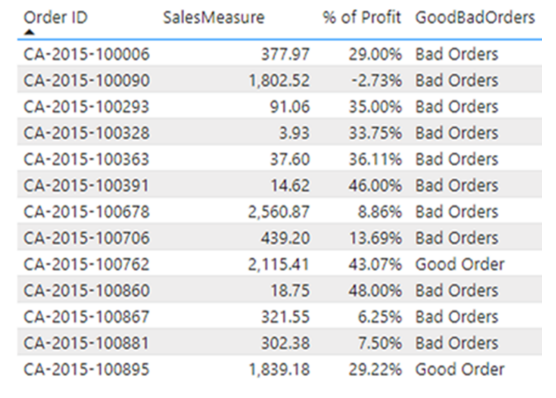
We will classify orders as good or bad based on Sales and Profit. Orders with Sales greater than 1000 and a % of Profit greater than 10% will be labeled as Good Orders.
If this condition is not met, orders will be labeled as Bad Orders. Since we are checking two conditions, the AND function will be used.
The steps to Find Good and Bad Orders by Sales using AND are as follows:
- Create a New Column on the Orders table, and use the DAX expression.
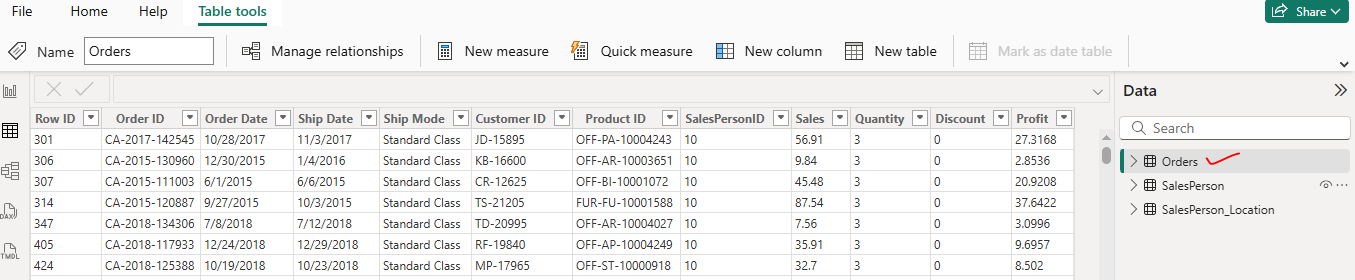
GoodBadOrders = If(AND(Orders[SalesMeasure] > 1000, Orders[% of Profit] >.1), "Good Order","Bad Orders")This expression uses both IF and AND functions.
- Create a table visualization, and from the Orders table, select Order ID, Sales Measure, % of Profit, and the calculation we created earlier for GoodBadOrders.
SWITCH
The Switch function evaluates an expression and returns the options based on the evaluated value. It is similar to IF, but IF only returns True or False unless it is a nested IF. The Switch function removes the need for nested IFs and returns multiple values based on the expression.
Syntax:
SWITCH(<expression>, <value1>, <result 1>, <value2>, <result 2> …,<else result>Create a new column for the month names from Order Date in the Orders table:
The steps to create the month names from Order Date are as follows:
- Select the Orders table, and create a New Column using the DAX expression.
OrderMonth = Switch(MONTH(Orders[OrderDate]),1,"Jan",2,"Feb",3,"Mar",4,"Apr", 5, "May", 6, "June", 7,"July", 8, "Aug" , 9, "Sept", 10, "Oct", 11, "Nov", 12, "Dec", "Invalid month number")- In the Table View, check the Orders table for the OrderMonth column.

Switch is similar to IFs but avoids the use of nested IFs.
The other functions under this category are as follows:
- Coalesce: Returns the first expression that evaluates to a value. If all expressions evaluate to a Blank, then Blank is returned.
- True: Returns the logical value TRUE.
- False: Returns the logical value FALSE.
- IFError: This computes an expression and returns a specified value if the expression returns an error; otherwise, it returns the value of the expression.
- NOT: This returns the logical opposite of the value computed by an expression. If the value in the expression returns True, the NOT function will return False, and vice versa.
- OR: Tests if at least one of the logical expressions is True. The function returns False only if both arguments are false.
The logical functions help in creating a new column based on conditions. They can also be nested, as we saw in the example using IF and AND.
Explore More:
Connect with us:
LinkedIn — https://www.linkedin.com/in/a-i-hub-979263342/
Facebook — https://www.facebook.com/yashlearninghub/
GitHub — https://github.com/codeaihub1998
Thanks For Reading
메타데이터
- post_id
- d0f050f7dbd2
- slug
- logical-function-in-dax-d0f050f7dbd2
- url
- https://medium.com/@yashvaantlakham73/logical-function-in-dax-d0f050f7dbd2
- canonical_url
- https://medium.com/@yashvaantlakham73/logical-function-in-dax-d0f050f7dbd2
- author_url
- https://medium.com/@yashvaantlakham73
- status
- ok
- fetched_at
- 2026-06-21 15:33:18