ROS2 from Zero: A No-Code Reference for Beginners
Every core concept you need before writing your first ROS2 node — explained without code.
ROS2 from Zero: A No-Code Reference for Beginners
Every core concept you need before writing your first ROS2 node — explained without code.
When I started learning ROS2, I took notes. Lots of notes. They were useful, but they were messy — a collection of definitions, metaphors, and half-formed questions.
This post is the cleaned-up version. It covers all the foundational ideas I needed before I wrote my first ROS2 node, organized into one no-code reference.
If you are starting ROS2 and want the big picture before you touch a terminal, this is for you.
How to use this post: Read it once for the overview, then come back to any section when you need a definition.
What Is ROS2?
ROS2 stands for Robot Operating System 2. The name is misleading.
ROS2 is not an operating system. It is:
- A communication middleware — how robot programs talk to each other.
- A set of tools for building, running, and debugging robot software.
- A collection of reusable libraries for navigation, perception, manipulation, and more.
- A framework for organizing code into modular, reusable pieces.
ROS2 is not:
- A programming language. You write C++ or Python.
- A real-time operating system. It runs on Linux.
- An AI framework. It can host AI, but it is not AI itself.
- The robot’s brain. It carries signals; it does not make decisions.
The simplest definition: ROS2 is a framework that lets independent robot programs send typed messages to each other over named streams.
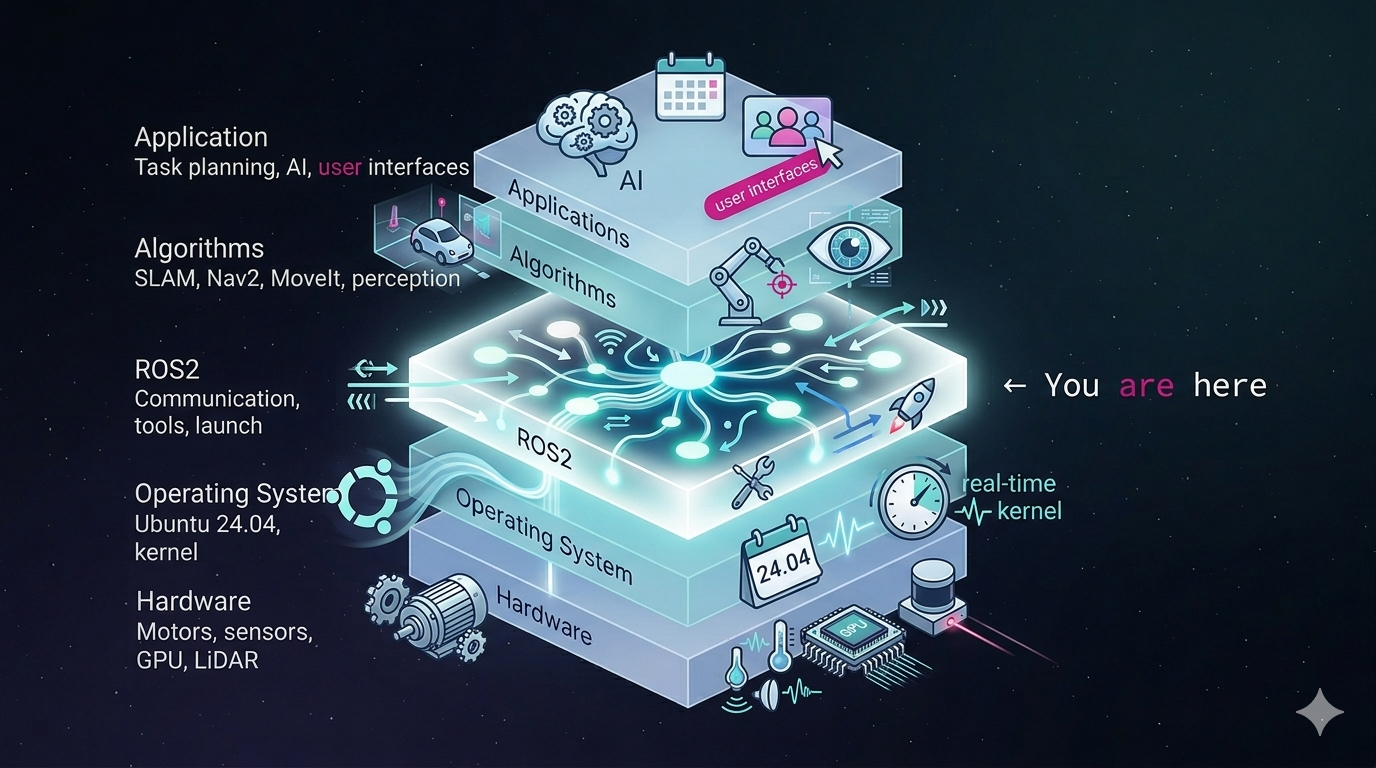
The metaphor: If your robot is a body, ROS2 is the nervous system. It connects muscles, sensors, and the brain. It is not the body, not the muscles, and not the brain.
Why Does ROS2 Exist?
A robot is not one program. It is many.
A typical mobile robot might have:
- A LiDAR driver producing scans at 10 Hz.
- A camera driver producing images at 30 Hz.
- A localization algorithm estimating position.
- A path planner deciding where to go.
- A motor controller executing velocity commands.
- A user interface sending goals.
These programs:
- Run at different rates.
- Are written by different people.
- May fail independently.
- Need to communicate without being tightly tied together.
Writing all of this as one giant program is possible. It is also a maintenance nightmare. Change the planner, and you risk breaking the LiDAR driver. Add a new sensor, and you rewrite half the system.
ROS2 solves this by giving each subsystem its own program — called a node — and a clean way for nodes to communicate.
The takeaway: ROS2 exists because robot software is naturally modular, and modular programs need a communication framework.
When Should You Use ROS2?
You do not need ROS2 for every robot.
If you are building a simple robot with one sensor and one motor, a single Python or C++ program may be enough. ROS2 adds overhead: packages, build tools, launch files, and a learning curve.
Consider ROS2 when:
- Your robot has multiple sensors and actuators.
- Different people work on different subsystems.
- You want to reuse existing libraries like Nav2 or SLAM Toolbox.
- You need to run nodes on multiple machines.
- You want to swap components without rewriting the whole system.
The takeaway: ROS2 is a scaling tool. It becomes valuable when a single program is no longer enough.
The Compute Graph
The central idea of ROS2 is the compute graph.
A compute graph is a live map of how your robot’s programs are connected. It has three basic building blocks.
Node
A node is a single program that does one job.
Examples:
- A LiDAR driver node reads the sensor and publishes laser scans.
- A path planner node subscribes to sensor data and publishes paths.
- A motor controller node subscribes to velocity commands and drives the motors.
A node is the unit of computation in ROS2. It is also the unit of modularity. You can start, stop, replace, or debug one node without rewriting the whole system.
Topic
A topic is a named data stream.
Examples:
/scancarries laser scan data./cmd_velcarries velocity commands./odomcarries odometry estimates.
Topics are like radio channels. A node broadcasts on a channel. Other nodes tune in. The broadcaster does not know who is listening.
Message
A message is the typed data structure that travels on a topic.
If a topic is a radio channel, a message is the packet of information being sent. Messages have defined fields and types.
For example, a velocity command message might have two fields:
linear— how fast the robot moves forward or backward.angular— how fast the robot turns.
Both fields have a type, such as a decimal number. This agreement on structure lets different nodes understand each other.
Publisher and Subscriber
- A publisher sends messages to a topic.
- A subscriber receives messages from a topic.
The LiDAR node is a publisher on /scan. The planner node is a subscriber on /scan. The planner may also be a publisher on /cmd_vel, which the motor controller subscribes to.
Decoupling
The most important property of the compute graph is decoupling.
The LiDAR node does not know the planner exists. It just publishes /scan. The planner does not know the LiDAR's internals. It just subscribes to /scan.
This means:
- You can swap the planner without touching the LiDAR driver.
- You can add a logger or visualizer that also subscribes to
/scan. - You can run nodes on different machines without rewriting them.
The takeaway: The compute graph lets you build a robot as a collection of independent, replaceable parts.
ROS1 vs ROS2
ROS1 was released in 2007 and built for research labs. It worked well but had hard limits.
+------------------------------+-------------------------+-------------------------------+
| Feature                      | ROS 1                   | ROS 2                         |
+------------------------------+-------------------------+-------------------------------+
| Communication                | Custom TCP/ROS protocol | DDS (industry-standard)       |
| Real-time                    | Not supported           | Supported with extensions     |
| Embedded / Microcontrollers  | No                      | Yes, via micro-ROS            |
| Security                     | None built-in           | Encryption, authentication    |
| Multi-robot                  | Difficult               | Native support                |
| Build System                 | catkin                  | colcon + ament                |
+------------------------------+-------------------------+-------------------------------+
The key change was replacing ROS1’s custom networking layer with DDS, a publish-subscribe middleware standard.
This matters because:
- ROS2 inherits DDS’s reliability, security, and performance.
- ROS2 can communicate with non-ROS systems that also use DDS.
- The ROS2 team no longer maintains a custom transport protocol.
The takeaway: ROS2 is not an upgrade to ROS1 with new features. It is a rewrite with a different architecture, built for production robots.
DDS: The Hidden Layer
DDS stands for Data Distribution Service. It is the middleware underneath ROS2.
You rarely interact with DDS directly. ROS2’s C++ and Python client libraries wrap it. But understanding that DDS exists explains many ROS2 behaviors.
DDS handles:
- Discovery: Nodes find each other automatically. There is no central nameserver like ROS1’s
roscore. - Transport: Messages move between nodes. This can happen over shared memory, UDP multicast, or the network.
- Quality of Service (QoS): Rules about reliability, durability, and message history.
- Serialization: Data is converted to a wire format so it can move between machines.
Why UDP Multicast for Discovery?
DDS uses UDP multicast for discovery instead of a central nameserver for two reasons:
- No single point of failure. A central nameserver can crash, become a bottleneck, or require manual configuration. If it goes down, nodes stop discovering each other. With multicast, every node participates in discovery directly.
- Plug-and-play networking. A new node can join the network, send a multicast announcement, and immediately be discovered. No central registry needs to be started first.
DDS vs ROS_DOMAIN_ID
There is an important distinction here.
- DDS is the middleware that makes nodes talk. It handles discovery, transport, serialization, and QoS.
- ROS_DOMAIN_ID is an environment variable that scopes discovery. Nodes with different domain IDs cannot see each other.
Think of DDS as the phone network. Think of ROS_DOMAIN_ID as the area code. The network carries the calls; the area code decides which phones ring.
The takeaway: DDS does the hard networking work. ROS2 wraps DDS so you do not have to think about it most of the time.
Why Publish/Subscribe Fits Robotics
ROS2 uses a publish/subscribe pattern for most communication. It is not the only option, but it is the default for a reason.
Consider the alternatives.
Direct Function Calls
planner.plan(scan_data)
This is simple but tightly coupled. The planner must know about the scanner. You cannot easily move the planner to another machine or replace the scanner.
Shared Memory
Both programs agree on a block of memory and read/write it.
This is fast but brittle. Both sides must agree on the memory layout. It does not work across a network.
Request/Response
One node asks a question and waits for an answer.
This is good for occasional queries. It is bad for streaming sensor data because the caller must block and wait for every response.
Publish/Subscribe
A node publishes data to a topic. Any number of nodes can subscribe.
Pub/sub wins in robotics because it is:
- Many-to-many: Multiple nodes can publish or subscribe to the same topic.
- Asynchronous: The publisher does not wait for subscribers.
- Location-transparent: Subscribers can be on the same machine, another machine, or another robot.
- Time-decoupled: With the right QoS settings, a subscriber that starts late can still receive old messages.
The takeaway: Pub/sub matches how robots actually produce and consume data: continuously, from many sources, by many consumers.
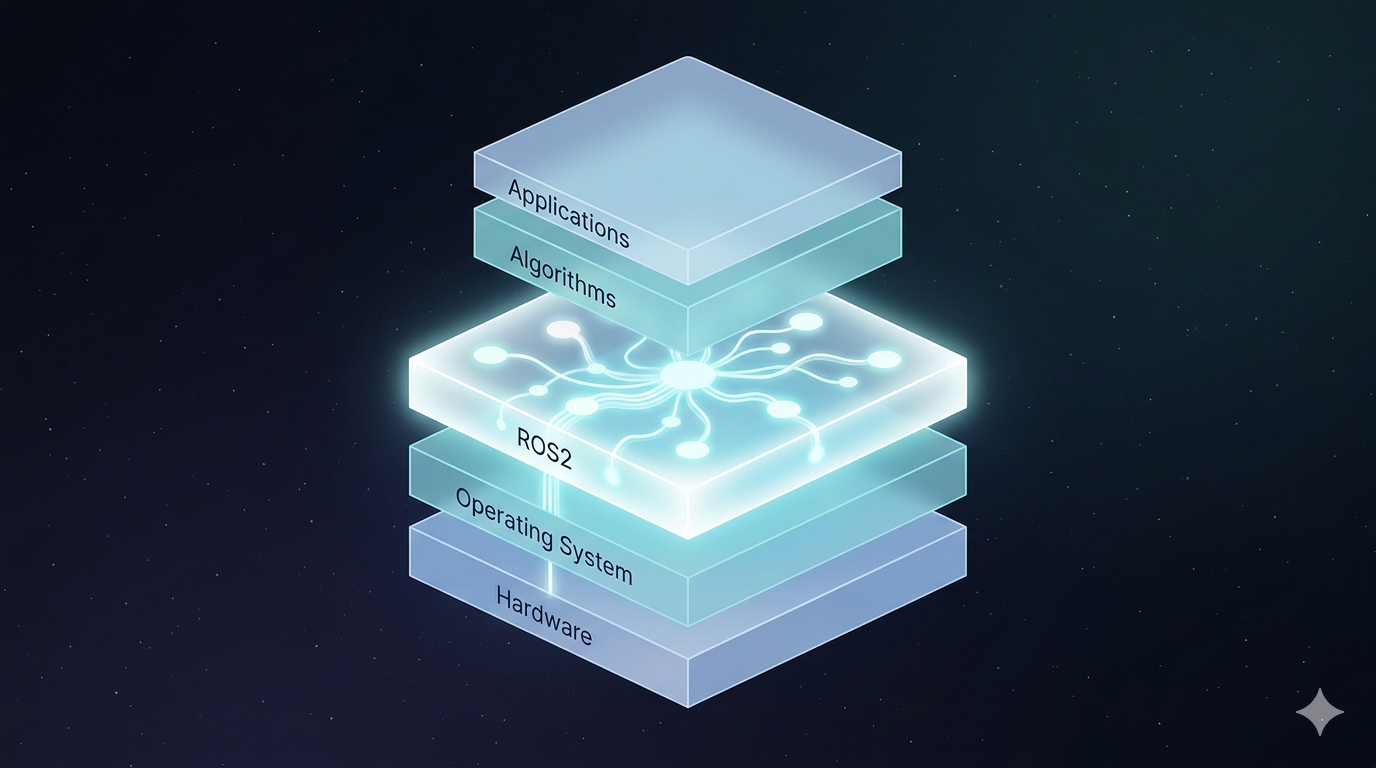
Where ROS2 Sits in the Stack
It helps to see where ROS2 fits in a complete robot system.
Topics are not the only way nodes communicate. ROS2 also has services and actions.
Imagine a robot that can navigate to a room and pick up an object.
Services
A service is a synchronous request/response pattern.
One node offers a service. Another node calls it and waits for a response.
Good for:
- “Compute a path from the kitchen to the living room.”
- “What is the robot’s current battery level?”
- “Save the current map to disk.”
A service uses two message types: a request type and a response type.
Actions
An action is an asynchronous goal-oriented pattern.
One node asks another to perform a long-running task. The server accepts the goal, sends progress updates, and eventually returns a result. The client can also cancel the goal.
Good for:
- “Go to the kitchen.” — with updates like “halfway there.”
- “Pick up the object on the table.” — with updates like “arm moving,” “gripping,” “done.”
- “Explore this room.” — with updates on areas covered.
An action is built from:
- A goal service
- A feedback topic
- A result topic
- A cancel service
How They Relate to Topics and Messages
Services and actions are not separate core building blocks. They are communication patterns built on top of nodes, topics, and messages.
PatternTimingBest ForTopic (pub/sub)AsynchronousContinuous data streamsServiceSynchronousOne-off queries and commandsActionAsynchronous with feedbackLong-running tasks
The takeaway: Use topics for streaming data, services for questions, and actions for goals.
ROS2 Communication Interfaces
Before nodes can communicate, they must agree on what the data looks like. ROS2 uses interface files to define these agreements.
There are three types.
.msg Files
A .msg file defines the fields of a topic message.
For example, a velocity command message might be defined like this:
float64 linear
float64 angular
It is like defining the columns of a table or the fields of a struct.
.srv Files
A .srv file defines the request and response messages for a service.
It has two parts separated by three dashes:
float64 target_x
float64 target_y
---
bool success
string message
The top half is what the client sends. The bottom half is what the server replies with.
.action Files
An .action file defines the goal, result, and feedback messages for an action.
It has three parts separated by three dashes:
string room_name
---
bool arrived
---
float64 percent_complete
The first part is the goal. The second part is the final result. The third part is ongoing feedback.
Interface Definition Language
ROS2 uses an Interface Definition Language (IDL) to describe these communication contracts. IDL lets nodes written in different languages agree on the shape of the data.
The takeaway: Interfaces are contracts. They ensure that a publisher and subscriber, or a client and server, agree on what data is being exchanged.
Quality of Service (QoS)
QoS is worth a brief mention because it shows up everywhere in ROS2.
QoS policies let you control how messages are delivered. The two most important policies for beginners are:
- Reliability: Should the middleware guarantee delivery, or is it okay to drop messages?
- Reliable: Resend lost messages. Good for commands.
- Best-effort: Deliver if possible, but do not retry. Good for high-frequency sensor data where old messages are useless.
- Durability: Should new subscribers receive old messages?
- Volatile: Only deliver messages published after the subscriber starts.
- Transient-local: Keep the last message and deliver it to late subscribers. Useful for things like a map that does not change often.
QoS is part of DDS, and ROS2 exposes it directly. A common beginner mistake is mismatched QoS: a reliable publisher talking to a best-effort subscriber can behave unexpectedly.
The takeaway: QoS lets you tune the trade-off between reliability and performance for each topic.
Key Vocabulary
- Node: A program that performs computation. The unit of modularity.
- Topic: A named bus over which nodes exchange messages.
- Message: A typed data structure sent over a topic.
- Publisher: A node that sends messages to a topic.
- Subscriber: A node that receives messages from a topic.
- Service A request/response mechanism for one-off queries.
- Action A goal-oriented mechanism with feedback and result.
- Parameter: A per-node configuration value.
- DDS: The middleware under ROS2 that handles discovery and transport.
- QoS: Quality of Service policies for reliability and message history.
- ROS_DOMAIN_ID: An environment variable that scopes which nodes can discover each other.
Common Misconceptions
These are easy traps to fall into as a beginner.
“ROS2 is an operating system.”
No. It runs on top of Linux. It is middleware.
“ROS2 is the robot’s brain.”
No. It carries signals. Intelligence lives in the nodes you write.
“You need ROS2 to build any robot.”
No. You can write raw C++ or Python that talks directly to hardware. ROS2 makes organization and scaling easier, but it is optional for simple robots.
“ROS2 handles real-time.”
Not by default. It can be part of a real-time system, but that requires extra design.
“Nodes must run as separate processes.”
No. ROS2 supports multi-process nodes and single-process composition. Multi-process is safer because a crash isolates to one node. Single-process can be faster because communication may avoid copying data.
Quick Reference: Topic vs Service vs Action
Topic
- Pattern: Publish/subscribe
- Timing: Asynchronous
- Best for: Continuous data streams
- Example:
/scan,/cmd_vel - Built from: Node + topic + message
Service
- Pattern: Request/response
- Timing: Synchronous
- Best for: One-off queries and commands
- Example: “Get current robot state”
- Built from: Node + service + two messages
Action
- Pattern: Goal + feedback + result
- Timing: Asynchronous
- Best for: Long-running tasks
- Example: “Go to the kitchen”
- Built from: Node + service + topics + three messages
The One-Page Mental Model
If you only remember one thing, remember this:
ROS2 lets independent robot programs talk to each other through named, typed data streams.
A robot is many programs: sensors, planners, controllers. Each becomes a node. Nodes send messages on topics. The live wiring diagram of nodes and topics is the compute graph.
Under the hood, DDS handles discovery, transport, and serialization. ROS2 wraps DDS so you can focus on robot logic instead of networking.
For occasional queries, nodes use services. For long tasks with progress updates, they use actions. These patterns are built on top of the same nodes, topics, and messages.
That is the whole foundation. Everything else — packages, launch files, build tools, simulators — exists to support this idea.
What to Learn Next
This post covers the philosophy of ROS2. The next steps are practical:
- Workspaces and packages: How ROS2 code is organized.
- URDF: How to describe a robot’s physical structure.
- Publishers and subscribers in practice: Writing nodes that talk over topics.
- Services and actions in practice: Implementing request/response and goal-oriented behavior.
- Launch files: Starting many nodes at once.
Each of these builds on the mental model above. Get the model right, and the tools become much easier.
메타데이터
- post_id
- d14c0368d53c
- slug
- ros2-from-zero-a-no-code-reference-for-beginners-d14c0368d53c
- url
- https://medium.com/@shoaib6174/ros2-from-zero-a-no-code-reference-for-beginners-d14c0368d53c
- canonical_url
- https://medium.com/@shoaib6174/ros2-from-zero-a-no-code-reference-for-beginners-d14c0368d53c
- author_url
- https://medium.com/@shoaib6174
- status
- ok
- fetched_at
- 2026-06-21 07:44:09