How AI Helped Me Navigate Urban Planning Laws (..After Hitting Its’ Limits)
Urban planners are drowning in complex regulations. Here’s how AI — and a clever Python workaround — helped streamline compliance and boost
How AI Helped Me Navigate Urban Planning Laws (After Hitting Its’ Limits)
I work in urban planning and architecture — fields where the rulebook is deep, dense, and constantly shifting. We’re juggling zoning laws, environmental compliance, accessibility standards, fire safety codes, and more — each enforced by different agencies, often buried in multi-page PDFs.
Like many in the industry, I was constantly digging through PDFs, chasing updates, and trying to make sense of legislative lingo. That’s when I turned to AI — specifically, tools like ChatGPT and Claude that support document uploads..
If you are not a Premium Medium Member you can use this friend link to read the article.
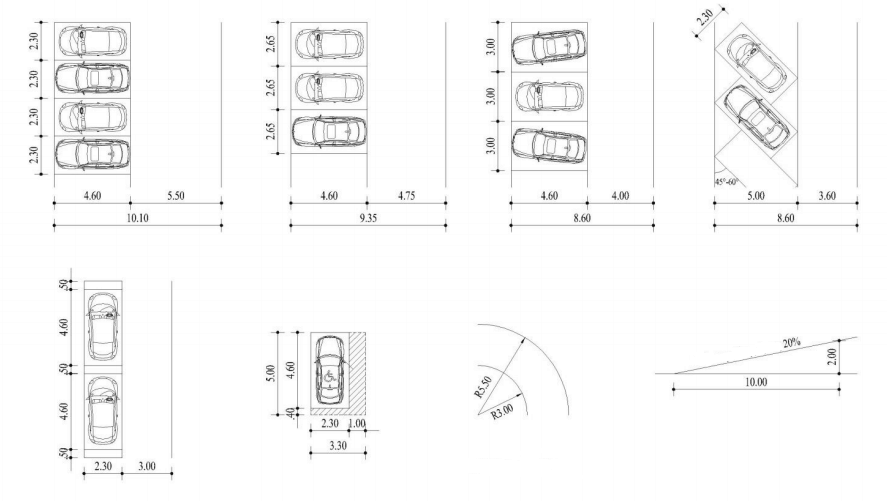
Typical Urban Planning Regulations
The AI Dream: Parsing Policy with a Prompt
The concept was simple: Upload all the legislative documents → Ask a natural-language question → Get a clear, regulation-backed answer.
I tested it with queries like:
“Can I build a residential unit within 14 meters of a stream?”
At first, it worked flawlessly. I uploaded a couple PDFs, and the AI provided coherent answers, even citing relevant clauses.
Then I tried scaling up.
Where It Broke: The Upload Limit Wall
As I fed the system more documents — 20 to be exact— things got messy.
- It didn’t allow me to upload the 21st document, but it also didn’t give me any warnings about reaching the hidden limit.
- Some files weren’t being searched at all.
- Answers became vague or, worse, wrong.
- Citations didn’t always match the original text or document name.
That’s when I hit the hidden limit: You can only upload 20 files in a Custom ChatGPT.
I needed a fix since the Urban Legislation in my country of practice is currently 877 PDFs and will always keep growing..
The Python Workaround That Made It All Work Again
Instead of giving up, I turned to Python scripting. Here’s the strategy that saved the day:
Step 1: Extract Raw Text from PDFs
Using Python libraries like pdfplumber and PyMuPDF, I converted each regulation into clean, readable text.
I also added this little trick:
diff
CopyEdit
=== Filename: BUILDING_CODE_2022.txt ===
Adding filenames as headers helped AI trace references back to their source — super important for legal accuracy and for cross-checking with the original documentation!
Step 2: Group by Theme, Not Size
Rather than dump all content into one massive file, I organized documents into categories like:
LEGISLATION_CORE_PART_1.txt(zoning, planning)FIRE_SAFETY.txtACCESSIBILITY.txt
Each group kept filenames and had clear breaks between documents. This helped the AI “understand” structure without feeling overwhelmed.
Step 3: Upload Fewer, Smarter Files
From 877 disjointed files, I narrowed it down to just 17 thoughtfully merged ones. (I left 3 uploads to spare for future expansion)
The result?
- Faster response times
- More accurate answers
- Reliable source referencing
Honestly, it felt like flipping a switch.
Unexpected Perks: Team Collaboration Supercharged
This wasn’t just a solo win.
Now, during the design process, team calls or site reviews, anyone can:
- Ask a complex compliance question
- Get an answer (with sources) in seconds
- Avoid wading through 300-page regulation docs
- As a plus no premium account is needed for the users of the custom ChatGPT, only for the one setting up the documentation!
Lessons I Learned (the Hard Way)
- AI tools are powerful — but not magical. Understand their limits, and you’ll use them better.
- Structure matters. Feeding the AI “smart bundles” beats flooding it with raw data.
- A little Python goes a long way. You don’t need to be a dev — copy-paste scripting can change the game, and with a little help from A.I. features can be added or changed according to our needs.
Final Thoughts: Smarter Cities Need Smarter Workflows
If you’re in urban planning, architecture, or regulation-heavy engineering, this setup is worth its weight in gold.
It helped me stay compliant, respond faster, and bring AI into the day-to-day workflow in a way that’s actually useful.
Need the script or want to get started? Just reach out.
We’re all trying to build smarter cities. Might as well build smarter workflows while we’re at it.
FAQs: Using AI for Urban Planning Regulations
1. Can ChatGPT read multiple legal PDFs at once? Yes, but its performance drops if you upload too many. Try merging documents by theme and limiting to 20 files.
2. What’s the best way to structure files for AI to understand them?
Add clear headers, filenames, and group by topic. Use tools like pdfplumber to extract clean text.
3. How do I get the AI to cite the correct regulation? Include the filename in your merged file headers. This allows the AI to reference sources more accurately.
4. What if I’m not a programmer — can I still do this? Absolutely! With basic Python and a few open-source libraries, you can follow simple scripts to prepare your files.
5. Is this approach useful outside urban planning? Yes! Any field dealing with dense regulations (healthcare, law, finance, etc.) can benefit.
6. Will this method work with other AI tools besides ChatGPT? Yes. The principles — clean input, grouped files, clear headers — apply across most document-reading AI tools.
🔗 External Resource: Learn how to extract text with pdfplumber here: https://github.com/jsvine/pdfplumber
메타데이터
- post_id
- d1597ffa95ca
- slug
- how-ai-helped-me-navigate-urban-planning-laws-after-hitting-its-limits-d1597ffa95ca
- url
- https://medium.com/current-and-future-design-tools/how-ai-helped-me-navigate-urban-planning-laws-after-hitting-its-limits-d1597ffa95ca
- canonical_url
- https://medium.com/current-and-future-design-tools/how-ai-helped-me-navigate-urban-planning-laws-after-hitting-its-limits-d1597ffa95ca
- author_url
- https://medium.com/@9451210
- status
- ok
- fetched_at
- 2026-08-08 06:04:26




