Snowflake’s ACCUMULATE: Build Custom Aggregates with Lambda Power
When SUM, AVG, and COUNT aren’t enough — here’s how to write the aggregate you actually need, without a single UDF.
Snowflake’s ACCUMULATE: Build Custom Aggregates with Lambda Power
When SUM, AVG, and COUNT aren’t enough — here’s how to write the aggregate you actually need, without a single UDF.

The Gap No One Talks About
Every data engineer has hit the wall. You need a geometric mean, a compound retention factor, a min/max in one pass, or a multi-metric dashboard computed in a single scan — and SQL’s built-in aggregate functions just don’t have you covered.
The traditional escape routes? Write a Python/JavaScript UDF, use a window function workaround, or pull data into a notebook. Each option adds latency, maintenance overhead, or a dependency you didn’t want.
Snowflake’s ACCUMULATE function changes this equation entirely.
What Is ACCUMULATE?
ACCUMULATE is Snowflake's inline, lambda-powered custom aggregate. It lets you define any aggregation logic — in pure SQL — using a map-reduce model:
initialize → accumulate → combine → terminateNo DDL. No stored objects. No language switching. Just a SELECT statement with four lambda expressions.
Here’s the anatomy:
ACCUMULATE(
    input_expression,           -- What to aggregate
    (v)        -> initial_state,       -- Seed state from the first row
    (state, v) -> updated_state,       -- Fold each row into running state
    (s1, s2)   -> merged_state,        -- Merge two partial states (parallelism)
    (state)    -> final_result         -- Transform state to output
)
The combine lambda is what makes this production-safe: Snowflake can partition your data across workers, compute partial states in parallel, and merge them — as long as your combine function is associative.
Official GA Announcement The
ACCUMULATEaggregate function is now generally available. It returns a custom aggregate value computed with four user-defined SQL lambda functions —initialize,accumulate,combine, andterminate— using a map-reduce model. It works withGROUP BY,HAVING, and subqueries the same way built-in aggregate functions do. 👉 Official Snowflake Docs: ACCUMULATE
Setup: The Dataset
All 10 examples in this article use a single e-commerce orders table. Let’s build it:
CREATE OR REPLACE DATABASE accumulate_demo;
CREATE OR REPLACE SCHEMA accumulate_demo.ecommerce;

CREATE OR REPLACE TABLE accumulate_demo.ecommerce.ecommerce_orders (
    order_id        INT,
    customer_id     INT,
    category        STRING,
    amount          NUMBER(12,2),
    quantity        INT,
    order_date      DATE,
    discount_pct    NUMBER(5,2),
    region          STRING
);

INSERT INTO accumulate_demo.ecommerce.ecommerce_orders VALUES
    (1,  101, 'Electronics', 1299.99, 2,  '2026-01-05', 10.00, 'US-West'),
    (2,  102, 'Electronics', 499.99,  1,  '2026-01-08', 5.00,  'US-East'),
    (3,  103, 'Clothing',    89.50,   4,  '2026-01-10', 0.00,  'EU'),
    (4,  101, 'Clothing',    145.00,  2,  '2026-01-12', 15.00, 'US-West'),
    (5,  104, 'Home',        2500.00, 1,  '2026-01-15', 20.00, 'APAC'),
    (6,  105, 'Electronics', 799.00,  3,  '2026-01-18', 0.00,  'US-East'),
    (7,  103, 'Home',        350.00,  2,  '2026-01-20', 5.00,  'EU'),
    (8,  106, 'Clothing',    220.00,  5,  '2026-01-22', 10.00, 'APAC'),
    (9,  102, 'Home',        175.50,  1,  '2026-01-25', 0.00,  'US-East'),
    (10, 107, 'Electronics', 3200.00, 1,  '2026-01-28', 25.00, 'US-West'),
    (11, 108, 'Clothing',    55.00,   3,  '2026-02-01', 0.00,  'EU'),
    (12, 101, 'Electronics', 650.00,  2,  '2026-02-05', 12.00, 'US-West');
10 Production-Ready Examples
Example 1: Weighted Average Price
No built-in equivalent. Calculate the revenue-weighted average unit price per category using an OBJECT state that carries both running sum and count.
SELECT
    category,
    ACCUMULATE(
        amount * quantity,
        (v)        -> {'s': v, 'n': 1}::OBJECT(s FLOAT, n INT),
        (state, v) -> {'s': state:s + v, 'n': state:n + 1}::OBJECT(s FLOAT, n INT),
        (s1, s2)   -> {'s': s1:s + s2:s, 'n': s1:n + s2:n}::OBJECT(s FLOAT, n INT),
        (state)    -> ROUND(state:s / state:n, 2)
    ) AS avg_line_total
FROM accumulate_demo.ecommerce.ecommerce_orders
GROUP BY category
ORDER BY category;
Why OBJECT state? You need two values in flight simultaneously — the running sum and the count. A scalar state can only hold one. The terminate lambda divides them at the end.
Example 2: Geometric Mean
Standard AVG computes an arithmetic mean. For growth rates and financial returns, the geometric mean is what you actually want.
The trick: convert to log-space with LN(), average in log-space, then exponentiate back. This avoids floating-point underflow from multiplying many small decimals together.
SELECT
    region,
    ACCUMULATE(
        LN(1 - discount_pct / 100),
        (v)        -> {'s': v, 'n': 1}::OBJECT(s FLOAT, n INT),
        (state, v) -> {'s': state:s + v, 'n': state:n + 1}::OBJECT(s FLOAT, n INT),
        (s1, s2)   -> {'s': s1:s + s2:s, 'n': s1:n + s2:n}::OBJECT(s FLOAT, n INT),
        (state)    -> ROUND(EXP(state:s / state:n), 4)
    ) AS geometric_mean_retention
FROM accumulate_demo.ecommerce.ecommerce_orders
WHERE discount_pct > 0
GROUP BY region
ORDER BY region;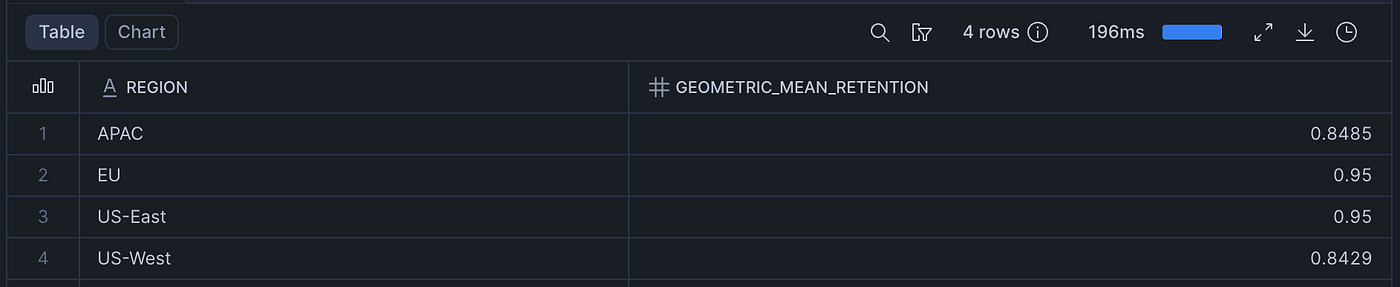
A result of 0.88 means the geometric mean discount retention is 88% — the discounts are compounding to erode 12% of price on average.
Example 3: Min/Max Bounds in a Single Pass
The standard approach requires two scans (MIN(amount) and MAX(amount) separately). ACCUMULATE computes both in one pass.
SELECT
    category,
    ACCUMULATE(
        amount,
        (v)        -> {'mx': v, 'mn': v}::OBJECT(mx NUMBER, mn NUMBER),
        (state, v) -> {
            'mx': CASE WHEN v > state:mx THEN v ELSE state:mx END,
            'mn': CASE WHEN v < state:mn THEN v ELSE state:mn END
        }::OBJECT(mx NUMBER, mn NUMBER),
        (s1, s2) -> {
            'mx': CASE WHEN s1:mx > s2:mx THEN s1:mx ELSE s2:mx END,
            'mn': CASE WHEN s1:mn < s2:mn THEN s1:mn ELSE s2:mn END
        }::OBJECT(mx NUMBER, mn NUMBER),
        (state)    -> state
    ) AS price_bounds
FROM accumulate_demo.ecommerce.ecommerce_orders
GROUP BY category
ORDER BY category;
The terminate lambda is just (state) -> state — no transformation needed, return the OBJECT as-is.
Example 4: Product of Values
SQL has no PRODUCT() aggregate. ACCUMULATE gives you one in four lines. This is also the simplest possible pattern — a scalar state, no OBJECT needed.
SELECT
    category,
    ACCUMULATE(
        quantity,
        (v)        -> v,
        (state, v) -> state * v,
        (s1, s2)   -> s1 * s2,
        (state)    -> state
    ) AS quantity_product
FROM accumulate_demo.ecommerce.ecommerce_orders
GROUP BY category
ORDER BY category;
Notice how initialize, accumulate, combine, and terminate all work on a plain scalar. No OBJECT casting required.
Example 5: Multi-Metric Revenue Dashboard
One ACCUMULATE, one pass, five output metrics per region: total revenue, order count, max order, min order, and average order value.
SELECT
    region,
    ACCUMULATE(
        amount,
        (v) -> {
            'total_revenue': v,
            'order_count': 1,
            'max_order': v,
            'min_order': v
        }::OBJECT(total_revenue NUMBER, order_count INT, max_order NUMBER, min_order NUMBER),
        (state, v) -> {
            'total_revenue': state:total_revenue + v,
            'order_count': state:order_count + 1,
            'max_order': CASE WHEN v > state:max_order THEN v ELSE state:max_order END,
            'min_order': CASE WHEN v < state:min_order THEN v ELSE state:min_order END
        }::OBJECT(total_revenue NUMBER, order_count INT, max_order NUMBER, min_order NUMBER),
        (s1, s2) -> {
            'total_revenue': s1:total_revenue + s2:total_revenue,
            'order_count': s1:order_count + s2:order_count,
            'max_order': CASE WHEN s1:max_order > s2:max_order THEN s1:max_order ELSE s2:max_order END,
            'min_order': CASE WHEN s1:min_order < s2:min_order THEN s1:min_order ELSE s2:min_order END
        }::OBJECT(total_revenue NUMBER, order_count INT, max_order NUMBER, min_order NUMBER),
        (state) -> {
            'total_revenue': state:total_revenue,
            'avg_order_value': ROUND(state:total_revenue / state:order_count, 2),
            'max_order': state:max_order,
            'min_order': state:min_order,
            'order_count': state:order_count
        }
    ) AS metrics
FROM accumulate_demo.ecommerce.ecommerce_orders
GROUP BY region
ORDER BY region;
The terminate lambda reshapes the OBJECT — it can derive new fields (avg_order_value) from the accumulated state before returning.
Example 6: Compound Discount Retention Factor
What fraction of full price remains after all discounts compound across a category’s orders?
SELECT
    category,
    ACCUMULATE(
        1 - discount_pct / 100,
        (v)        -> v,
        (state, v) -> state * v,
        (s1, s2)   -> s1 * s2,
        (state)    -> ROUND(state, 4)
    ) AS compound_retention_factor
FROM accumulate_demo.ecommerce.ecommerce_orders
GROUP BY category
ORDER BY category;
A result of 0.5355 for Electronics means that across all compound discounts applied, only ~53 cents of every full dollar of revenue was retained.
Example 7: Shortest String (Custom Comparator)
MIN() on strings gives you alphabetically smallest. ACCUMULATE lets you define your comparator — here, shortest by character length.
SELECT
    region,
    ACCUMULATE(
        category,
        (v)        -> v,
        (state, v) -> CASE WHEN LENGTH(v) < LENGTH(state) THEN v ELSE state END,
        (s1, s2)   -> CASE WHEN LENGTH(s1) <= LENGTH(s2) THEN s1 ELSE s2 END,
        (state)    -> state
    ) AS shortest_category
FROM accumulate_demo.ecommerce.ecommerce_orders
GROUP BY region
ORDER BY region;
This is the template for any custom ranking or selection aggregate — swap LENGTH() for any scoring function.
Example 8: Multiple ACCUMULATEs in One Query
You can stack independent ACCUMULATEs in a single SELECT. Snowflake evaluates both in a single data pass over the GROUP BY keys.
SELECT
    region,
    ACCUMULATE(
        amount,
        (v)        -> v,
        (state, v) -> state + v,
        (s1, s2)   -> s1 + s2,
        (state)    -> ROUND(state, 2)
    ) AS total_revenue,
    ACCUMULATE(
        amount,
        (v)        -> v,
        (state, v) -> CASE WHEN v > state THEN v ELSE state END,
        (s1, s2)   -> CASE WHEN s1 > s2 THEN s1 ELSE s2 END,
        (state)    -> state
    ) AS max_order
FROM accumulate_demo.ecommerce.ecommerce_orders
GROUP BY region
ORDER BY region;
Multiple ACCUMULATEs in one query is the real efficiency play — you avoid re-scanning the table for each metric.
Example 9: String Concatenation with Deduplication
Build a comma-separated, deduplicated category list per region — with full control over the separator and dedup logic.
SELECT
    region,
    ACCUMULATE(
        category,
        (v)        -> v,
        (state, v) -> CASE WHEN CONTAINS(state, v) THEN state ELSE state || ', ' || v END,
        (s1, s2)   -> s1 || ', ' || s2,
        (state)    -> state
    ) AS categories_sold
FROM accumulate_demo.ecommerce.ecommerce_orders
GROUP BY region
ORDER BY region;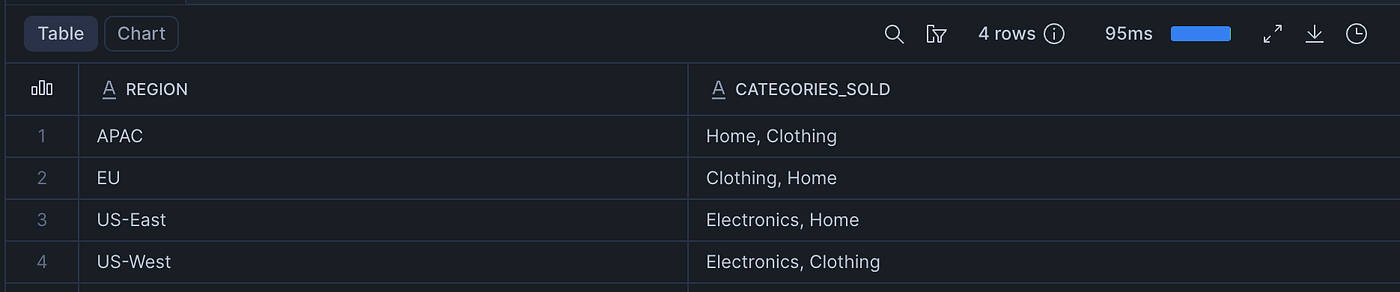
LISTAGG doesn't deduplicate. ACCUMULATE does — with whatever logic you need.
Example 10: Full Multi-Metric Dashboard per Category
The culminating example: a single-scan, five-metric category dashboard that replaces five separate aggregate queries.
SELECT
    category,
    ACCUMULATE(
        amount,
        (v)        -> {'total': v, 'cnt': 1, 'mx': v, 'mn': v}
                      ::OBJECT(total NUMBER, cnt INT, mx NUMBER, mn NUMBER),
        (state, v) -> {
            'total': state:total + v,
            'cnt':   state:cnt + 1,
            'mx':    CASE WHEN v > state:mx THEN v ELSE state:mx END,
            'mn':    CASE WHEN v < state:mn THEN v ELSE state:mn END
        }::OBJECT(total NUMBER, cnt INT, mx NUMBER, mn NUMBER),
        (s1, s2) -> {
            'total': s1:total + s2:total,
            'cnt':   s1:cnt + s2:cnt,
            'mx':    CASE WHEN s1:mx > s2:mx THEN s1:mx ELSE s2:mx END,
            'mn':    CASE WHEN s1:mn < s2:mn THEN s1:mn ELSE s2:mn END
        }::OBJECT(total NUMBER, cnt INT, mx NUMBER, mn NUMBER),
        (state) -> {
            'total_revenue':   state:total,
            'avg_order_value': ROUND(state:total / state:cnt, 2),
            'max_order':       state:mx,
            'min_order':       state:mn,
            'order_count':     state:cnt
        }
    ) AS revenue_dashboard
FROM accumulate_demo.ecommerce.ecommerce_orders
GROUP BY category
ORDER BY category;
Key Patterns and Gotchas
Before you ship ACCUMULATE to production, internalize these:
1. The combine lambda must be associative. Snowflake can split your data across parallel workers and merge partial states. If combine(A, combine(B, C)) ≠ combine(combine(A, B), C), your results will be non-deterministic. Sums, products, and extremes are all safe. Order-dependent operations are not.
2. NULL rows are automatically skipped. ACCUMULATE does not call initialize or accumulate for NULL input values. No COALESCE guard needed — but if all rows in a group are NULL, the function returns NULL.
3. Use FLOAT in OBJECT state for decimals. NUMBER in an OBJECT defaults to scale 0 (integer). If your state carries amount values, cast to FLOAT: ::OBJECT(s FLOAT, n INT). Otherwise your running sum silently truncates.
4. No DDL persistence. ACCUMULATE is an inline function — there’s nothing to SHOW, GRANT, or DROP. If you want to reuse the logic, wrap it in a view or stored procedure.
5. ORDER BY on the result column is not yet supported. Sort by your GROUP BY keys instead. This is a current platform limitation.
6. Avoid nesting in subqueries or CTEs. ACCUMULATE is new and works best when queried directly with GROUP BY. If you hit unexpected behavior, try flattening your query before filing a bug.
7. Don’t nest aggregates, window functions, or non-deterministic functions inside lambdas. These combinations are not supported and will error at parse time.
ACCUMULATE vs. UDAFs: When to Use Which
| Concern             | ACCUMULATE                      | UDAF (Python / JS / Java)                 |
| ------------------- | ------------------------------- | ----------------------------------------- |
| **Setup Time**      | Zero — inline SQL               | Requires DDL, packaging, deployment       |
| **Language**        | SQL only                        | Python, JavaScript, Java                  |
| **Parallelism**     | Built-in via `COMBINE`          | Must be implemented manually              |
| **Reusability**     | Wrap in view / stored procedure | Persistent object, grantable              |
| **Complex Logic**   | Limited to SQL expressions      | Full programming language power           |
| **Maintainability** | Easy, minimal overhead          | Requires versioning & lifecycle mgmt      |
| **Performance**     | Optimized by Snowflake engine   | Depends on implementation quality         |
| **Ideal For**       | Prototyping, ad-hoc, SQL-native | Shared libraries, org-wide reusable logic |
When to Use ACCUMULATE
Use ACCUMULATE when you want:
- Quick, inline aggregations without setup overhead
- SQL-native transformations
- Fast prototyping or experimentation
- Simple-to-moderate aggregation logic
- Tight integration with existing SQL pipelines
Think of it as: “I want results now, and SQL is enough.”
When to Use UDAFs(User-Defined Aggregate Function)
Use UDAFs when you need:
- Complex stateful computations
- Advanced algorithms (ML, statistical models, custom scoring)
- Reusable logic across teams/projects
- Language flexibility (Python/JS/Java ecosystems)
- Enterprise-grade abstraction and governance
Think of it as: “I’m building a reusable data product, not just a query.”
Cleanup
-- DROP DATABASE IF EXISTS accumulate_demo;What’s Next?
ACCUMULATE is one of those features that quietly unlocks an entire class of problems you’d previously given up on or routed around. Once you internalize the initialize → accumulate → combine → terminate model, you'll start seeing custom aggregate opportunities everywhere.
Drop your ACCUMULATE use case in the comments — I’d love to see what you build.
Follow **SnowflakeChronicles** for practitioner-first Snowflake deep dives. If this saved you a UDF, share it forward.
Call to Action
👉 Try it today — copy any example into a Snowflake worksheet and run it against your own data.
🔖 Save this article — bookmark it as your ACCUMULATE pattern library.
🔔 Follow Snowflake Chronicles @snowflakechronicles for weekly Snowflake practitioner content.
📲 LinkedIn post — like & reshare if this unlocked something new for you.
Connect on LinkedIn: satish-kumar-snowflake
#Snowflake #SnowflakeSQL #ACCUMULATE #DataEngineering #SQL #LambdaFunctions #MapReduce #CustomAggregates #Analytics #CloudDataWarehouse #SnowflakeChronicles #DataPlatform #BigData #SQLTips #DataArchitect
메타데이터
- post_id
- d1675248267f
- slug
- snowflakes-accumulate-build-custom-aggregates-with-lambda-power-d1675248267f
- url
- https://medium.com/towards-data-engineering/snowflakes-accumulate-build-custom-aggregates-with-lambda-power-d1675248267f
- canonical_url
- https://medium.com/towards-data-engineering/snowflakes-accumulate-build-custom-aggregates-with-lambda-power-d1675248267f
- author_url
- https://medium.com/@snowflakechronicles
- status
- ok
- fetched_at
- 2026-06-09 15:37:30