Optimizing Healthcare Operations: Developing a Comprehensive Database for HealthyLife Hospital
INTRODUCTION
Optimizing Healthcare Operations: Developing a Comprehensive Database for HealthyLife Hospital

Image source
INTRODUCTION
This project is all about how to build a SQL databasе for a hospital using SQL Server codе chunks. As the database developer, I spearheaded the design, implementation, and population of a robust database system tailored to meet the hospital’s operational and administrative needs. This database serves as a centralized and reliable resource for tracking patient admissions, analyzing prevalent diagnoses, and managing critical hospital operations data. My role involved architecting a scalable database structure, configuring key relational tables, and employing efficient data import and validation processes to ensure data integrity. This documentation details the database architecture, development methodologies, and strategic approaches for data population and maintenance, aimed at enhancing data accessibility and supporting informed decision-making within the hospital.
This project is donе by mе as a frееlancеr data analyst. Thе cliеnt didn’t givе any pеrmission to sharе a bit of information. So, thе information you sее is crеatеd by mе as a rеfеrеncе for thе original data.
Scenario
Imagine you are employed as a database developer for a hospital. They want to develop a new database system that they require for storing information on their patients, doctors, medical records (past appointments, diagnoses, medicines, medicine prescribed date, allergies), appointments, and departments. This system will centralize all key data, enabling the hospital to efficiently capture, store, and analyze critical information on patient admissions, treatments, staffing, and facility management. By implementing this database, HealthyLife aims to gain valuable insights into hospital performance and improve resource allocation, ultimately enhancing patient care and operational efficiency.
Objectives
The main goals for this project are:
- Design a Clear and Flexible Database Structure
- Create a well-organized database structure that accurately captures essential hospital information, including patients, admissions, diagnoses, and wards.
- Make sure the design can be easily maintained, scaled, and adapted as the hospital’s needs grow.
2. Set Up the Database
. Use a reliable database management system (DBMS) that supports high performance, security, and dependability.
- Implement the structure with correct indexing, relationships, and constraints to ensure smooth operation.
3. Add Data to the Database
- Migrate existing hospital data into the new system, ensuring data is accurate and complete.
- Maintain data quality and consistency throughout the migration process.
4. Develop Insightful Queries
- Write SQL queries to analyze key metrics like patient admission trends, common diagnoses, and ward occupancy.
- Provide management with detailed reports and visualizations to support decision-making.
5. Boost Database Performance
- Regularly analyze performance and optimize for quick data retrieval.
- Apply indexing, query tuning, and other performance techniques to keep the database efficient under different loads.
6. Secure Patient Data and Ensure Compliance
- Implement strong security practices to protect patient information.
- Follow healthcare data privacy laws and standards.
7. Create Documentation
- Develop clear and thorough documentation covering database design, setup, and use.
PROCESS
- Database creation/ design
-- Create a database called Healthylifetstyle
CREATE DATABASE Healthylifestyle- Tables creation
-- Create patient table
CREATE TABLE tblPatient (
 PatientID INT PRIMARY KEY,
    FirstName VARCHAR(50) NOT NULL,
    LastName VARCHAR(50) NOT NULL,
    DateOfBirth DATE NOT NULL,
    Gender CHAR(1) NOT NULL,
    PostCode VARCHAR(10)
);

SELECT * FROM tblPatient;

-- Create Specialty Table
CREATE TABLE tblSpecialty (
 SpecialtyCode INT PRIMARY KEY,
    SpecialtyName VARCHAR(50) NOT NULL,
    DoctorName VARCHAR(50) NOT NULL,
    TreatmentFunction VARCHAR(70)
);

SELECT * FROM tblSpecialty;

-- Create Pratice Table
CREATE TABLE tblGPPractice (
 GPPracticeCode INT PRIMARY KEY,
    PracticeName VARCHAR(50),
    PracticePostCode VARCHAR(50)
);

SELECT * FROM tblGPPractice;

-- Create MethodOfAdmission Table
CREATE TABLE MethodOfAdmission (
 MethodOfAdmissionCode INT PRIMARY KEY,
    MethodOfAdmissionType VARCHAR(70)
);

SELECT * FROM tblWard;

-- Create Ward Table
CREATE TABLE tblWard (
 WardCode INT PRIMARY KEY,
    WardName VARCHAR(70),
    WardType VARCHAR(70)
);

-- Create GP Table
CREATE TABLE tblGP (
    GPCode INT PRIMARY KEY,
    GPName VARCHAR(70),
    GPPracticeCode INT,
    FOREIGN KEY (GPPracticeCode) REFERENCES tblGPPractice(GPPracticeCode)
);

-- Create tblDiagnosis Table
CREATE TABLE tblDiagnosis (
 DiagnosisCode INT PRIMARY KEY,
    DiagnosisDescription VARCHAR(70));

-- Create Admissions Table
CREATE TABLE tblAdmission (
  AdmissionID INT PRIMARY KEY,
  PatientID INT,
  SpecialtyCode INT,
  WardCode INT,
  MethodOfAdmissionCode INT,
  LengthOfStay INT,
  AdmissionDate DATE,
  DischargeDate DATE,
  DiagnosisCode INT,
  GPPracticeCode INT,
  FOREIGN KEY (PatientID)
  REFERENCES tblPatient(PatientID),
  FOREIGN KEY (SpecialtyCode) REFERENCES tblSpecialty(SpecialtyCode),
  FOREIGN KEY (WardCode) REFERENCES tblWard(WardCode),
  FOREIGN KEY (MethodOfAdmissionCode) REFERENCES MethodOfAdmission(MethodOfAdmissionCode),
  FOREIGN KEY (DiagnosisCode) REFERENCES tblDiagnosis(DiagnosisCode),
FOREIGN KEY (GPPracticeCode) REFERENCES tblGPPractice(GPPracticeCode) );- Database diagram

The above diagram shows the relationships between the tables in the database and the primary key for each table.
Data Insertion Process
The data insertion process was conducted methodically to ensure high levels of integrity and accuracy across all database tables. Below is a step-by-step overview of how this process was executed:
Data Preparation
Data was gathered from multiple sources, including patient records, diagnosis details, specialty information, admissions logs, and GP practice records. This data was then organized, cleaned, and validated to ensure it was both complete and accurate before insertion.
Data Validation
Comprehensive checks were performed to verify:
- Primary key fields contained no null values, ensuring each record could be uniquely identified.
- Data types were consistent and correct, with appropriate formats for dates, numerical values, and text entries.
- Foreign key references were accurate and aligned with related tables, maintaining relational integrity across the database.
Data Insertion into Tables
--- POPULATE PATIENTS TABLE
INSERT INTO tblPatients (PatientID, Forename, Surname, Gender, DateOfBirth, Postcode)VALUES...

--- POPULATE SPECIALTY TABLE
INSERT INTO tblSpecialty (SpecialtyCode, SpecialtyName) VALUES...

--- POPULATE METHOD OF ADMISSION TABLE

INSERT INTO MethodOfAdmission (MethodOfAdmissionCode, MethodOfAdmissionType) VALUES...

--- POPULATE WARD TABLE
INSERT INTO tblWard (WardCode, WardName, WardType)

--- POPULATE ADMISSION TABLE
INSERT INTO tblAdmissions (AdmissionID, AdmissionDate, DischargeDate, LengthOfStay, PatientID, SpecialtyCode, WardCode, MethodOfAdmissionCode, DiagnosisCode, GPPracticeCode) VALUES...

--- POPULATE DIAGNOSIS TABLE
INSERT INTO tblDiagnosis (DiagnosisCode, DiagnosisDescription) VALUES...

--- POPULATE GPPRACTICE TABLE
INSERT INTO tblGpPractice (GpPracticeCode, PracticeName, PracticePostcode) VALUES...

--- POPULATE GP TABLE
INSERT INTO tbGP (GpCode, GpName, GpPracticeCode) VALUES...
The values have been converted into CSV files for convenient access.
T-SQL QUERIES
Some questions were required to be answered and they are found below:
- Patient and Admission Details:
- List all patients with their details (ID, Name, Gender, Date of Birth, Postcode).
SELECT
    *
FROM
    tblPatient;
Image of result
There were 300 patients.
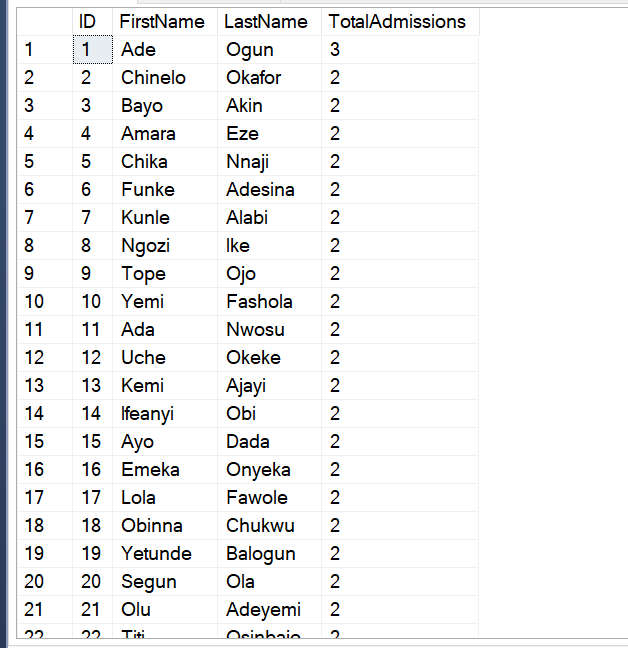
. Retrieve the total number of admissions per patient.
SELECT
    p.PatientID AS ID,
    p.FirstName,
 p.LastName,
    COUNT(a.AdmissionID) AS TotalAdmissions
FROM
    tblPatient p
LEFT JOIN
    tblAdmission a
ON
    p.PatientID = a.PatientID
GROUP BY
    p.PatientID, p.FirstName, p.LastName
ORDER BY
     TotalAdmissions  DESC;
2. Admission Analysis:
- For hospital admissions with a discharge date in the financial year 2014/15 (01/04/2014 to 31/03/2015), find the maximum length of stay where the admission ward was the Endoscopy Suite, and the method of admission type was Elective.
SELECT DATEDIFF(DAY, A.AdmissionDate, A.DischargeDate) AS MaxLengthOfStay,
W.WardName, M.MethodOfAdmissionType
FROM tblAdmission A
JOIN tblWard W
ON A.WardCode= W.WardCode
JOIN MethodOfAdmission M
ON A.MethodOfAdmissionCode = M.MethodOfAdmissionCode
WHERE W.WardName = 'Endoscopy Suite'
AND M.MethodOfAdmissionType = 'Elective'
AND A.DischargeDate BETWEEN '2014-04-01' AND '2015-03-31'
--GROUP BY W.WardName,M.MethodOfAdmissionType
ORDER BY DATEDIFF(DAY, A.AdmissionDate, A.DischargeDate) DESC;
- Retrieve the total number of admissions for each ward in the financial year 2015/16.
SELECT
    a.WardCode,
    w.WardName,
    COUNT(*) AS TotalAdmissions
FROM
    tblAdmission a
JOIN
    tblWard w ON a.WardCode = w.WardCode
WHERE
    a.AdmissionDate BETWEEN '2015-04-01' AND '2016-03-31'
GROUP BY
    a.WardCode,
    w.WardName;

3. Diagnosis and Treatment:
- What was the most common primary diagnosis (include the code and description) for hospital admission episodes where the discharge date was in the financial year 2015/16 (01/04/2015 to 31/03/2016), the method of admission type was Emergency, and the patient lived in the SK2 postcode area?
WITH DiagnosisFrequency AS (
    SELECT
        d.DiagnosisCode,
        d.DiagnosisDescription,
        COUNT(*) AS Frequency
    FROM
        tblAdmission a
        JOIN tblPatient p ON a.PatientID = p.PatientID
        JOIN tblDiagnosis d ON a.AdmissionID = a.AdmissionID
        JOIN MethodOfAdmission m ON a.MethodOfAdmissionCode = m.MethodOfAdmissionCode
    WHERE
        a.DischargeDate BETWEEN '2015-04-01' AND '2016-03-31'
        AND m.MethodOfAdmissionType = 'Emergency'
        AND p.Postcode LIKE 'SK2%'
    GROUP BY
        d.DiagnosisCode,
        d.DiagnosisDescription
)
SELECT TOP 1
    DiagnosisCode,
    DiagnosisDescription,
    Frequency
FROM
    DiagnosisFrequency
ORDER BY
    Frequency DESC;

- For hospital admissions with a discharge date in the financial year 2015/16 (01/04/2015 to 31/03/2016), what was the primary diagnosis (include the code and description) that resulted in the longest average length of stay where the method of admission type was Emergency or NonElective, and there were at least 100 hospital admission episodes with that primary diagnosis?
SELECT
D.DiagnosisDescription,
D.DiagnosisCode,
AVG (datediff(day,a.admissiondate,a.dischargedate)) as AvgLengthOfStay,
COUNT(A.AdmissionID) AS NoOfadmissions
FROM tblAdmission A
JOIN tblDiagnosis D
ON A.DiagnosisCode = D.DiagnosisCode
JOIN MethodOfAdmission M
ON M.MethodOfAdmissionCode = A.MethodOfAdmissionCode
WHERE A.DischargeDate BETWEEN '2015-04-01' AND '2016-03-31'
AND M. MethodOfAdmissionType IN ('Emergency', 'Non-Elective')
GROUP BY D.DiagnosisDescription,D.DiagnosisCode
HAVING COUNT(A.DiagnosisCode) >= 100
ORDER BY AvgLengthOfStay DESC;
4. GP and Practice Analysis:
- For hospital admissions with an admission date in the financial year 2015/16 (01/04/2015 to 31/03/2016), which GP Practice was responsible for the largest number of hospital admission episodes with a method of admission of GP?
SELECT TOP 1
tblGPPractice.PracticeName,
 COUNT(*) AS NoOfAdmission
FROM tblAdmission A
JOIN tblGPPractice ON A.gpPracticeCode = tblGpPractice.GpPracticeCode
JOIN MethodOfAdmission M ON M.MethodOfAdmissionCode = A.MethodOfAdmissionCode
WHERE A.admissionDate BETWEEN '2015-04-01' AND '2016-03-31'
  AND M.MethodOfAdmissionType = 'GP'
GROUP BY tblGPPractice.PracticeName
ORDER BY NoOfAdmission DESC;

5. Comprehensive Episode Analysis:
Generate a list of hospital admission episodes where:
- The admission date (2nd episode) is within 7 days of a discharge date (1st episode) where the PatientID is the same, but the AdmissionID is different.
SELECT
    a1.AdmissionID AS FirstAdmissionID,
    a1.PatientID,
    a1.AdmissionDate AS FirstAdmissionDate,
    a1.DischargeDate AS FirstDischargeDate,
    a2.AdmissionID AS SecondAdmissionID,
    a2.AdmissionDate AS SecondAdmissionDate
FROM
    tblAdmission a1
JOIN
    tblAdmission a2 ON a1.PatientID = a2.PatientID
WHERE
    a1.AdmissionID <> a2.AdmissionID
    AND a2.AdmissionDate BETWEEN DATEADD(day, 1, a1.DischargeDate) AND DATEADD(day, 7, a1.DischargeDate)
ORDER BY
    a1.PatientID, a1.AdmissionDate;

- The admission date of the 2nd episode is after the discharge date of the 1st episode
SELECT
    a1.AdmissionID AS FirstAdmissionID,
    a1.PatientID,
    a1.AdmissionDate AS FirstAdmissionDate,
    a1.DischargeDate AS FirstDischargeDate,
    a2.AdmissionID AS SecondAdmissionID,
    a2.AdmissionDate AS SecondAdmissionDate
FROM
    tblAdmission a1
JOIN
    tblAdmission a2 ON a1.PatientID = a2.PatientID
WHERE
    a1.AdmissionID <> a2.AdmissionID
    AND a2.AdmissionDate > a1.DischargeDate
    AND a2.AdmissionDate <= DATEADD(day, 7, a1.DischargeDate)
ORDER BY
    a1.PatientID, a1.AdmissionDate;

- The method of admission type of the 1st episode is Elective, and the method of admission type of the 2nd episode is Emergency.
SELECT
    a1.AdmissionID AS FirstAdmissionID,
    a1.PatientID,
    a1.AdmissionDate AS FirstAdmissionDate,
    a1.DischargeDate AS FirstDischargeDate,
    a1.MethodOfAdmissionCode AS FirstMethodOfAdmission,
    a2.AdmissionID AS SecondAdmissionID,
    a2.AdmissionDate AS SecondAdmissionDate,
    a2.MethodOfAdmissionCode AS SecondMethodOfAdmission
FROM
    tblAdmission a1
JOIN
    tblAdmission a2 ON a1.PatientID = a2.PatientID
JOIN
    MethodOfAdmission m1 ON a1.MethodOfAdmissionCode = m1.MethodOfAdmissionCode
JOIN
    MethodOfAdmission m2 ON a2.MethodOfAdmissionCode = m2.MethodOfAdmissionCode
WHERE
    a1.AdmissionID <> a2.AdmissionID
    AND a2.AdmissionDate > a1.DischargeDate
    AND a2.AdmissionDate <= DATEADD(day, 7, a1.DischargeDate)
    AND m1.MethodOfAdmissionType = 'Elective'
    AND m2.MethodOfAdmissionType = 'Emergency'
ORDER BY
    a1.PatientID, a1.AdmissionDate;
- The specialty code of both admission episodes is the same
SELECT
    a1.PatientID,
    a1.AdmissionID AS FirstAdmissionID,
    a1.DischargeDate AS FirstDischargeDate,
    m1.MethodOfAdmissionType AS FirstMethodOfAdmissionType,
    a1.SpecialtyCode AS FirstSpecialtyCode,
    a2.AdmissionID AS SecondAdmissionID,
    a2.AdmissionDate AS SecondAdmissionDate,
    m2.MethodOfAdmissionType AS SecondMethodOfAdmissionType,
    a2.SpecialtyCode AS SecondSpecialtyCode,
    DATEDIFF(day, a1.DischargeDate, a2.AdmissionDate) AS DaysBetweenAdmissions
FROM
    tblAdmission a1
JOIN
    tblAdmission a2 ON a1.PatientID = a2.PatientID
JOIN
    MethodOfAdmission m1 ON a1.MethodOfAdmissionCode = m1.MethodOfAdmissionCode
JOIN
    MethodOfAdmission m2 ON a2.MethodOfAdmissionCode = m2.MethodOfAdmissionCode
JOIN
    tblSpecialty s1 ON a1.SpecialtyCode = s1.SpecialtyCode
JOIN
    tblSpecialty s2 ON a2.SpecialtyCode = s2.SpecialtyCode
WHERE
    a1.AdmissionID <> a2.AdmissionID
    AND a2.AdmissionDate > a1.DischargeDate
    AND a2.AdmissionDate <= DATEADD(day, 7, a1.DischargeDate)
    AND m1.MethodOfAdmissionType = 'Elective'
    AND m2.MethodOfAdmissionType = 'Emergency'
    AND s1.SpecialtyCode = s2.SpecialtyCode
ORDER BY
    a1.PatientID, a1.AdmissionDate;

- Retrieve the list of all patients who had more than one admission in the financial year 2015/16.
-- Retrieve the list of all patients who had more than one admission in the financial year 2015/16.--
SELECT
    p.PatientID,
    p.FirstName,
 P.LastName,
    p.Gender,
    p.DateOfBirth,
    p.Postcode,
    COUNT(a.AdmissionID) AS NumberOfAdmissions
FROM
    tblPatient p
JOIN
    tblAdmission a ON p.PatientID = a.PatientID
WHERE
    a.AdmissionDate BETWEEN '2015-04-01' AND '2016-03-31'
GROUP BY
    p.PatientID,
    p.FirstName,
 p.LastName,
    p.Gender,
    p.DateOfBirth,
    p.Postcode
HAVING
    COUNT(a.AdmissionID) > 1
ORDER BY
    NumberOfAdmissions DESC;

- Calculate the average length of stay for all admissions in each ward for the financial year 2015/16.
SELECT
    a.WardCode,
    w.WardName,
    AVG(DATEDIFF(day, a.AdmissionDate, a.DischargeDate)) AS AvgLengthOfStay
FROM
    tblAdmission a
JOIN
    tblWard w ON a.WardCode = w.WardCode
WHERE
    a.AdmissionDate BETWEEN '2015-04-01' AND '2016-03-31'
GROUP BY
    a.WardCode,
    w.WardName
ORDER BY
    AvgLengthOfStay DESC;

- List the top 5 specialties with the highest admissions in the financial year 2015/16.
SELECT TOP 5
    a.SpecialtyCode,
    s.SpecialtyName,
    COUNT(*) AS NumberOfAdmissions
FROM
    tblAdmission a
JOIN
    tblSpecialty s ON a.SpecialtyCode = s.SpecialtyCode
WHERE
    a.AdmissionDate BETWEEN '2015-04-01' AND '2016-03-31'
GROUP BY
    a.SpecialtyCode,
    s.SpecialtyName
ORDER BY
    NumberOfAdmissions DESC;
- Find the GP with the most patients admitted to the hospital in the financial year 2015/16.
SELECT TOP 1 G.GPCode, G.GPName, COUNT(DISTINCT A.PatientID) AS NoOfUniquePatients
FROM tblAdmission A
JOIN tblGP G
ON  A.GpPracticeCode = G.GpPracticeCode
WHERE A.AdmissionDate >= '2015-04-01'AND A.AdmissionDate <= '2016-03-31'
GROUP BY  G.GpCode, G.GPName
ORDER BY  NoOfUniquePatients DESC;

- Retrieve the list of all patients who were admitted to the ICU ward and their corresponding diagnoses.
SELECT
A.PatientID,
A.AdmissionID,
D.DiagnosisCode,
D.DiagnosisDescription,
W.WardName
FROM tblAdmission A
JOIN  tblWard W
ON A.WardCode = W.WardCode
JOIN tblDiagnosis D
ON A.DiagnosisCode= D.DiagnosisCode
WHERE W.WardName = 'ICU';

Recommendation
. For Type 2 Diabetes Mellitus, early screening and intervention programs for high-risk patients should be implemented, focusing on lifestyle changes, dietary management, and regular monitoring of blood glucose levels. Early detection and better management of diabetes could help prevent complications like diabetic ketoacidosis, which may require ICU care.
. Implement a data tracking system to continuously monitor ICU admissions and identify trends over time. Regularly analyze patient data to adjust strategies and prevent common causes of ICU admission, enhancing overall patient care and resource utilization.
. Ensure that patient admissions and discharge data is entered consistently and accurately. This involves standardizing formats for dates and admission types, which will help prevent discrepancies and streamline data analysis, leading to more reliable insights.
CONCLUSION
The development and implementation of the comprehensive database for Healthy Life Hospital has successfully addressed the need for a centralized and efficient system to manage patient admissions, diagnoses, wards, and related healthcare data. This database not only ensures accurate data storage but also enhances the hospital’s ability to monitor, analyze, and make informed decisions regarding patient care and operational performance.
By leveraging structured and validated data entry processes, optimized database performance, and strong security protocols, the hospital is well-equipped to provide timely, data-driven insights to improve patient outcomes. The database also lays the foundation for future scalability and enhancements, ensuring it can accommodate the evolving needs of the hospital.
Through the use of this database, healthcare providers at Healthy Life Hospital will be able to track trends in patient admissions, monitor critical diagnoses, and assess ward utilization more effectively, ultimately leading to improved care delivery and operational efficiency. The ongoing documentation, regular optimization, and continuous monitoring will further ensure that the database remains a robust resource for both clinical and administrative purposes, contributing significantly to the hospital’s long-term success.
메타데이터
- post_id
- d17a4104fc03
- slug
- optimizing-healthcare-operations-developing-a-comprehensive-database-for-healthylife-hospital-d17a4104fc03
- url
- https://medium.com/@chinelonweke/optimizing-healthcare-operations-developing-a-comprehensive-database-for-healthylife-hospital-d17a4104fc03
- canonical_url
- https://medium.com/@chinelonweke/optimizing-healthcare-operations-developing-a-comprehensive-database-for-healthylife-hospital-d17a4104fc03
- author_url
- https://medium.com/@chinelonweke
- status
- ok
- fetched_at
- 2026-06-09 15:37:30
