Scaling Your Database: When to Go Up, Out, and Beyond
Databases are the heartbeat of every modern application. As traffic surges, the single‑node setup that once felt “just right” quickly…
Scaling Your Database: When to Go Up, Out, and Beyond
Databases are the heartbeat of every modern application. As traffic surges, the single‑node setup that once felt “just right” quickly becomes a bottleneck. The result? Slow queries, timeouts, and a frantic scramble for a fix.
If you’ve ever wondered whether to buy a beefier server, add replicas, or completely re‑architect your data layer, you’re not alone. Below is a concise, action‑oriented guide that walks you through the three core scaling strategies — vertical scaling, horizontal scaling, and sharding — so you can choose the right tool for the job without over‑engineering.
1. Vertical Scaling (Scale‑Up)
Vertical scaling means “bigger machine, same system.” You simply add more CPU, RAM, or faster storage to your existing database server.
- Simple to implement — no architectural changes required.
- Minimal downtime — upgrades usually need a brief maintenance window.
- Hardware limits — you’ll eventually hit the ceiling of what a single box can deliver, and costs rise sharply.
“Vertical = Bigger machine, same system.”
A typical upgrade might look like moving from an 8 GB RAM instance to a 64 GB one, or swapping spinning disks for SSDs. While this can buy you time, remember that a single point of failure remains, and you cannot scale infinitely. For a deeper dive on why vertical scaling hits a wall, see the Aerospike guide on database scalability.

2. Horizontal Scaling (Scale‑Out)
When a single server can’t keep up, you spread the load across multiple databases. Horizontal scaling splits into two common patterns: read replicas and replication.
Read Replicas (Read Scaling)
Most workloads are read‑heavy (often 90 % reads, 10 % writes). The trick is to direct writes to a primary (master) node and reads to one or more replica nodes.
- Master DB — handles all write traffic.
- Replica DB(s) — serve read requests, reducing load on the master.
Your application layer must know which endpoint to hit for each operation. A classic example: a user posts a comment (write → master), while everyone else views the comment feed (read → replicas).
Replication (Keeping Copies in Sync)
Replication copies data from the master to its replicas, ensuring consistency. There are two main flavors:
- Synchronous Replication — the master waits for replicas to acknowledge the write. This yields strong consistency but slows down writes. Ideal for payment systems where accuracy is non‑negotiable.
- Asynchronous Replication — the master writes first, and replicas catch up later. This offers faster writes at the cost of temporary inconsistency — perfect for social feeds where speed matters more than immediate perfection.
For a practical overview of these approaches, check out the PlanetScale lesson on database scaling.
3. Sharding: Splitting Data for Write Scaling
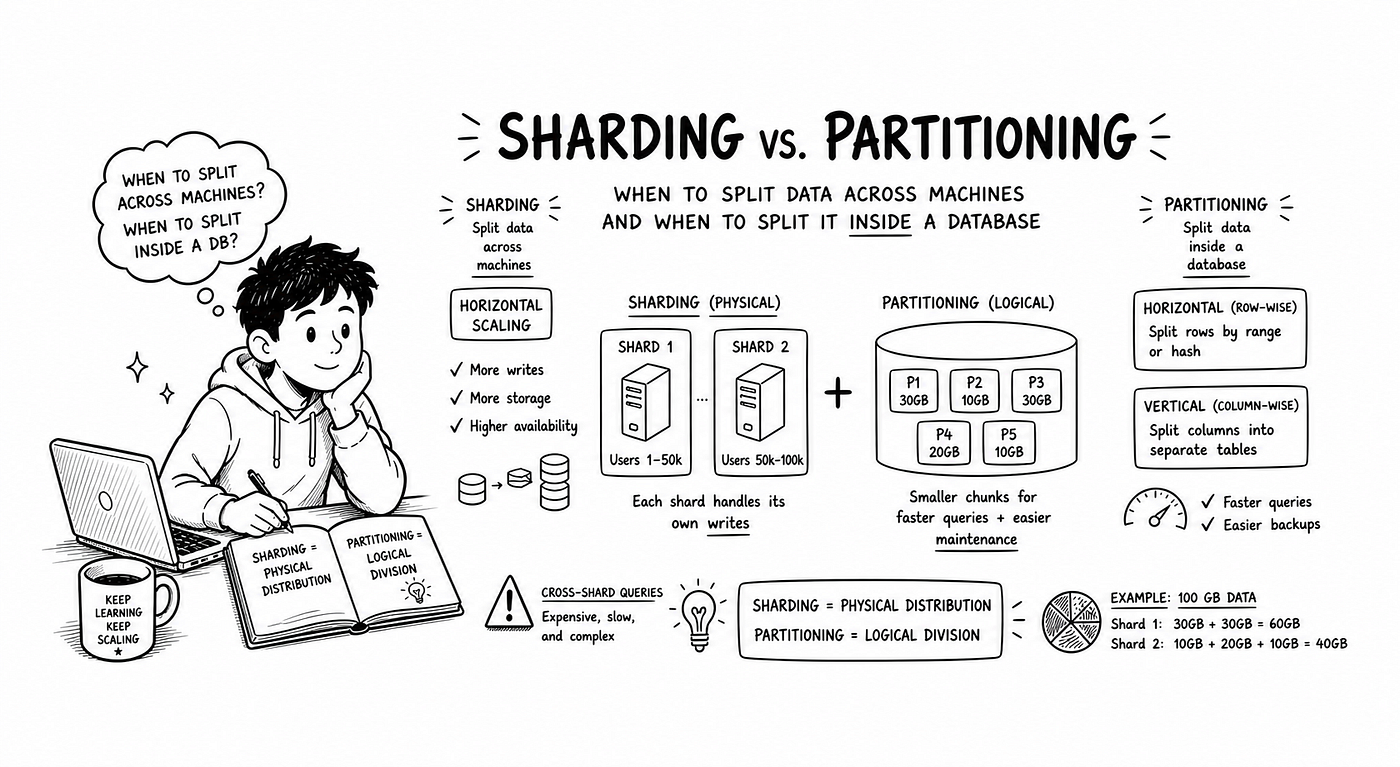
When writes become the choke point — think billions of transactions per day — vertical upgrades and read replicas aren’t enough. Sharding divides your dataset into independent partitions, each hosted on its own database node.
- Data is partitioned so each row belongs to exactly one shard.
- Writes go directly to the shard that owns the data.
- Each shard can still have replicas for read scaling.
A simple sharding scheme might split users alphabetically: Shard 1 holds users A–M, Shard 2 holds N–Z. The application (or a routing proxy) must determine the correct shard for every request.
“Sharding = Split data, not copy data.”
Sharding introduces routing complexity, but it unlocks linear write scalability. For a quick primer on sharding strategies, see the MongoDB scaling basics.
4. Putting It All Together: A Mental Model
- Start small — a single DB works for early stages.
- Scale vertically as a quick fix.
- Add read replicas when reads dominate.
- Introduce replication (sync or async) based on consistency needs.
- Sharding when write throughput outgrows any single node.
“Scaling isn’t a one‑size‑fits‑all; it’s a series of choices that balance cost, performance, and risk.”
Conclusion
Database scaling is a toolbox, not a single lever. By understanding vertical scaling, horizontal scaling, and sharding, you can design a data layer that grows with your product — without unnecessary complexity or expense.
Ready to future‑proof your architecture? Clap if this helped, drop a comment with your scaling challenges, and follow for more practical engineering guides.
Database Scaling Practice Questions
Beginner Questions
- What is database scaling?
- What is vertical scaling?
- What are the limitations of vertical scaling?
- What is horizontal scaling?
- What is a read replica?
- What is a master database?
- Why are read replicas used?
- What is replication in databases?
Medium-Level Questions
- What is the difference between synchronous and asynchronous replication?
- Why is synchronous replication slower than asynchronous?
- What is eventual consistency?
- How does an API server decide which database to connect to?
- What is sharding?
- Why do we need sharding for databases?
- What is the difference between replication and sharding?
- Can shards have replicas? If yes, why?
Advanced Questions
- How would you design a system with heavy reads using database scaling?
- How would you handle write-heavy systems?
- What challenges come with sharding?
- How do you route requests correctly in a sharded system?
- What trade-offs exist between consistency and performance in replication?
- When should you use synchronous vs asynchronous replication?
- How do replication and sharding work together in real systems?
- How would you design a scalable database for millions of users?
Beginner Answers
1. What is database scaling? Database scaling is the process of improving a database’s ability to handle more data and traffic. Example: Adding more servers when user traffic increases.
2. What is vertical scaling? Vertical scaling means increasing the power of a single database server (CPU, RAM, storage). Example: Upgrading a DB server from 16GB RAM to 64GB RAM.
3. Limitations of vertical scaling? It has hardware limits, requires downtime for upgrades, and creates a single point of failure. Example: If that one powerful server crashes, the whole system stops.
4. What is horizontal scaling? Horizontal scaling means adding more database servers and distributing the workload. Example: Using multiple DB nodes instead of one.
5. What is a read replica? A read replica is a copy of the main database used only for read operations. Example: Fetching user posts from replica instead of main DB.
6. What is a master database? The master database handles all write operations like insert, update, and delete. Example: When a user posts content, it is stored in the master DB.
7. Why are read replicas used? They reduce load on the master database by handling read-heavy traffic. Example: 90% of users only view data, so replicas handle those requests.
8. What is replication? Replication is copying data from the master database to replicas to keep them in sync. Example: A new post written to master is copied to all replicas.
Medium Answers
9. Difference between synchronous and asynchronous replication? Synchronous replication updates master and replicas at the same time, ensuring strong consistency. Asynchronous replication updates replicas later. Example: Banking prefers sync, social media prefers async.
10. Why is synchronous replication slower? Because the system waits for all replicas to confirm the write before completing the transaction. Example: A write completes only after multiple DBs acknowledge it.
11. What is eventual consistency? Data becomes consistent over time, but may be temporarily different across replicas. Example: A post appears instantly for you but shows after a delay for others.
12. How does API server decide DB connection? The API routes writes to the master DB and reads to replicas based on operation type. Example: POST request → master, GET request → replica.
13. What is sharding? Sharding splits a database into smaller independent parts called shards. Example: Users A–M in one DB, N–Z in another.
14. Why do we need sharding? When one database cannot handle large data or heavy traffic, sharding distributes the load. Example: Millions of users cannot be handled by a single DB.
15. Replication vs Sharding? Replication copies the same data across databases, while sharding splits data across databases. Example: Replicas = copies, shards = partitions.
16. Can shards have replicas? Yes, each shard can have its own replicas to improve read performance and reliability. Example: Shard 1 has 2 replicas for handling read traffic.
Advanced Answers
17. Design system with heavy reads? Use read replicas to distribute read traffic and reduce load on the master database. Example: News websites where users mostly read articles.
18. Handle write-heavy systems? Use sharding to distribute write operations across multiple databases. Example: Large-scale logging systems where many writes happen continuously.
19. Challenges with sharding? Complex routing, uneven data distribution, and difficulty in joining data across shards. Example: Fetching data from multiple shards increases complexity.
20. Routing in sharded systems? Use hashing, range-based logic, or database proxies to decide which shard to query. Example: user_id % number_of_shards.
21. Trade-offs in replication? Strong consistency (sync) reduces performance, while eventual consistency (async) improves speed. Example: Sync = accurate but slow, Async = fast but slightly delayed.
22. When to use sync vs async? Use sync when accuracy is critical, async when performance matters more. Example: Banking (sync), social feeds (async).
23. Replication + sharding together? Each shard can have replicas, combining both techniques for scaling reads and writes. Example: Multiple shards each with their own read replicas.
24. Scalable DB for millions of users? Use sharding for writes, replication for reads, load balancing, and proper routing. Example: Social media platforms use shards + replicas together.
메타데이터
- post_id
- d19dd5e23a0f
- slug
- scaling-your-database-when-to-go-up-out-and-beyond-d19dd5e23a0f
- url
- https://medium.com/@thearnabsaha/scaling-your-database-when-to-go-up-out-and-beyond-d19dd5e23a0f
- canonical_url
- https://medium.com/@thearnabsaha/scaling-your-database-when-to-go-up-out-and-beyond-d19dd5e23a0f
- author_url
- https://medium.com/@thearnabsaha
- status
- ok
- fetched_at
- 2026-07-18 13:41:51