Linux Storage & Filesystems Explained: From Partitions to LVM
Managing storage in Linux might sound intimidating at first, but once you understand the basics, it becomes straightforward. In this…
Linux Storage & Filesystems Explained: From Partitions to LVM
Managing storage in Linux might sound intimidating at first, but once you understand the basics, it becomes straightforward. In this article, we’ll start with the traditional storage workflow and then move on to the modern, flexible approach using LVM (Logical Volume Management).
The Traditional Storage Workflow
Whenever we add a new disk to a Linux system, it’s not immediately ready for use. We first need to create a filesystem on it. A filesystem is like the “formatting” process, it defines how files are stored and retrieved.
Even after formatting, the disk isn’t usable until we mount it to a directory path. Once mounted, we can store data on it. The mounting can be temporary or permanent.
The traditional process looks like this:
- Add the disk
- Format it with a specific filesystem (e.g., ext4, xfs)
- Mount it to a directory
- Start storing data
A Note on Partitions
In our example, we used the disk as a single partition. In reality, we often divide a disk into multiple partitions so that each section can be managed separately.
Older Linux systems using BIOS relied on MBR (Master Boot Record) partitioning, which comes with two major limitations:
- Maximum 4 primary partitions
- Maximum 2 TiB size per partition
To bypass the first limitation, one primary partition could be made extended, inside which multiple logical partitions could be created.
The Limitations of the Traditional Approach
While extended partitions solved the number-of-partitions problem, they didn’t fix resizing limitations. Once a partition size was set, changing it meant:
- Backing up data
- Unmounting the device
- Resizing the partition and filesystem
- Restoring the data
This meant downtime, and in some cases, data loss.
Enter LVM: Logical Volume Management
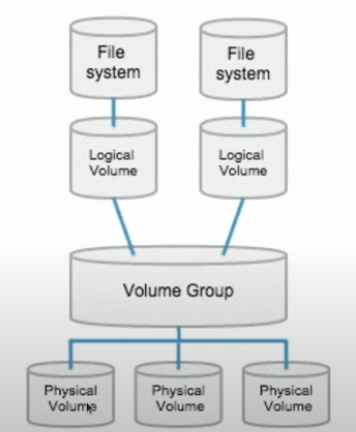
Logical Volume Management
LVM was designed to overcome these limitations by making storage management far more flexible.
Here’s how it works:
1. Create Physical Volumes (PVs)
A physical volume is any storage device: a full disk, a partition, or another block device. When disks are connected to the system, we convert them into PVs.
2. Create a Volume Group (VG)
We then create a volume group and add the PVs to it. Think of a volume group as a storage pool that combines space from multiple devices into a single, unified pool.
3. Create Logical Volumes (LVs)
From this pool, we carve out logical volumes. These behave just like traditional partitions, but with one big difference: they can be resized easily.
4. Format and Mount
Once an LV is created, we format it with a filesystem and mount it to a directory, making it ready for use.
What Benefits Can LVM Give?
- Extending Logical Volumes online — Grow your storage without downtime.
- Shrink filesystem and LV safely — Reduce size when needed.
- Moving data between PVs — Migrate data from one physical device to another seamlessly.
- Creating snapshots — Take instant backups for recovery or testing.
- Thin Provisioning — Allocate storage on-demand to save space.
- RAID with LVM — Implement redundancy for better performance and reliability.
Traditional storage methods in Linux work fine for small-scale setups, but their limitations become apparent when dealing with large, dynamic storage needs.
LVM solves these problems by offering:
- Flexible resizing
- Easy storage pooling
- Minimal downtime
- Advanced features like snapshots and thin provisioning
If you’re managing servers, databases, or any system where uptime matters, LVM should be your go-to storage management tool.
In the next part, I’ll walk you through a complete hands-on setup using Linux commands. Stay tuned!
메타데이터
- post_id
- d2c1bfbd9f11
- slug
- linux-storage-filesystems-explained-from-partitions-to-lvm-d2c1bfbd9f11
- url
- https://medium.com/@sangizubair/linux-storage-filesystems-explained-from-partitions-to-lvm-d2c1bfbd9f11
- canonical_url
- https://medium.com/@sangizubair/linux-storage-filesystems-explained-from-partitions-to-lvm-d2c1bfbd9f11
- author_url
- https://medium.com/@sangizubair
- status
- ok
- fetched_at
- 2026-07-30 10:53:43


