Why Your AI Keeps Lying to Users (And 10 Proven Ways to Fix It)
📚 Quick Reference: The RAG Method Cheat Sheet
Why Your AI Keeps Lying to Users (And 10 Proven Ways to Fix It)
📚 Quick Reference: The RAG Method Cheat Sheet
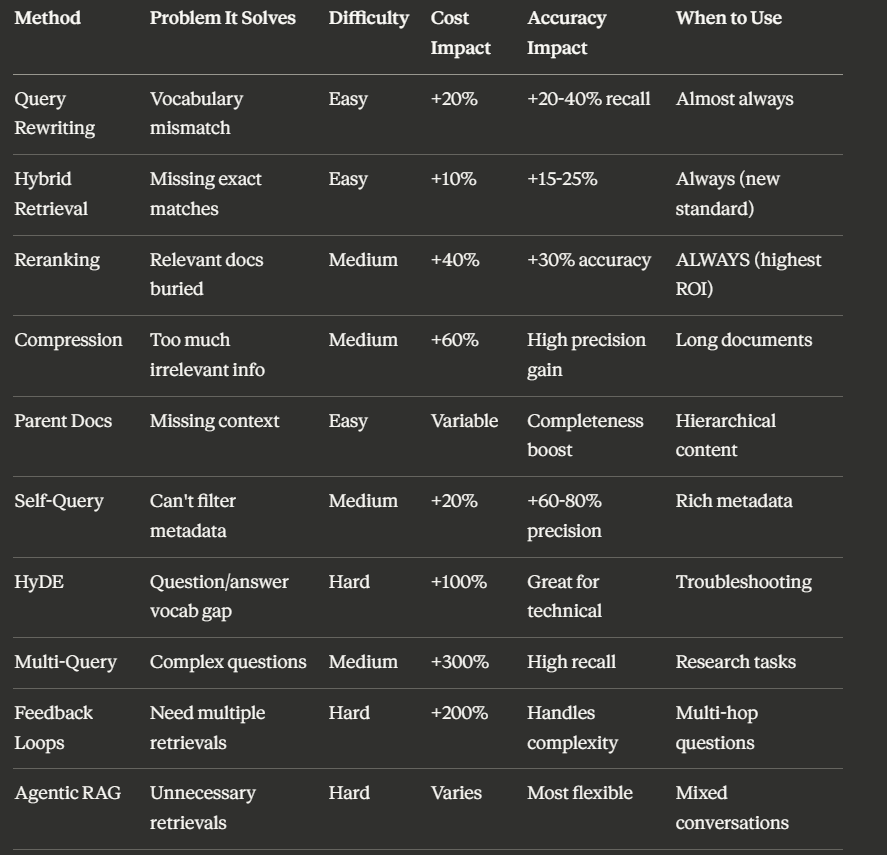
Simple priority ranking:
- 🥇 Reranking (always implement)
- 🥈 Hybrid Retrieval (new standard)
- 🥉 Query Rewriting (easy win)
- Everything else (targeted to specific problems)
💡 Real-World Success Stories
Case Study 1: E-commerce Support Bot
Problem: Customer service bot giving wrong product information 40% of the time
Solution implemented:
- Hybrid retrieval
- Reranking
- Self-query (for filtering by product category, brand, availability)
Results:
- Accuracy: 65% → 87%
- Customer satisfaction: +34%
- Support ticket reduction: 45%
- Cost: 1.6x baseline
- Worth it? Absolutely
Case Study 2: Technical Documentation Assistant
Problem: Developers couldn’t find solutions to error codes and troubleshooting
Solution implemented:
- Hybrid retrieval
- Reranking
- HyDE (for “why is X broken” questions)
- Parent document retrieval
Results:
- Accuracy: 68% → 89%
- Time to resolution: -52%
- Developer satisfaction: +67%
- Cost: 2.1x baseline
- Worth it? Yes (time savings justified higher cost)
Case Study 3: Internal Knowledge Base
Problem: Employees couldn’t find company policies and procedures efficiently
Solution implemented:
- Hybrid retrieval
- Reranking
- Self-query (filtering by department, date, policy type)
- Compression (policies are long documents)
Results:
- Accuracy: 72% → 91%
- Search time: -68%
- Onboarding speed: +40%
- Cost: 1.8x baseline
- Worth it? Massive ROI from productivity gains
🎓 The Simple Library Analogy for Everything
Think of RAG like searching for books in a massive library. Here’s how each method maps to real-world library behavior:
Standard RAG = Walking up to a librarian, asking your question once, taking whatever 5 books they hand you, hoping they’re relevant.
Query Rewriting = Asking the same question 3 different ways so the librarian really understands what you need.
Hybrid Retrieval = Searching both the card catalog (exact keywords) AND asking the experienced librarian who knows the collection (conceptual understanding).
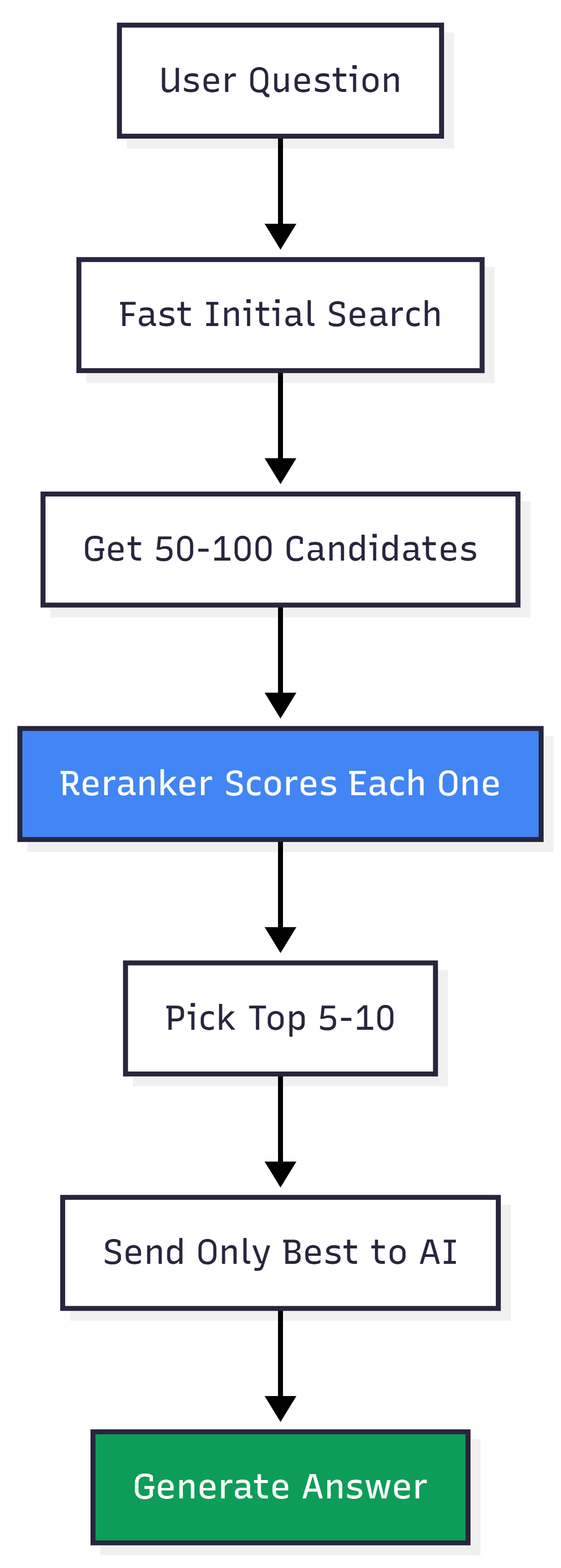
Reranking = The librarian pulls 50 books, then a specialist quickly reviews each one and hands you only the 5 most relevant. (This single step = biggest difference)
Contextual Compression = Photocopying just the relevant pages from each book instead of carrying entire volumes filled with irrelevant chapters.
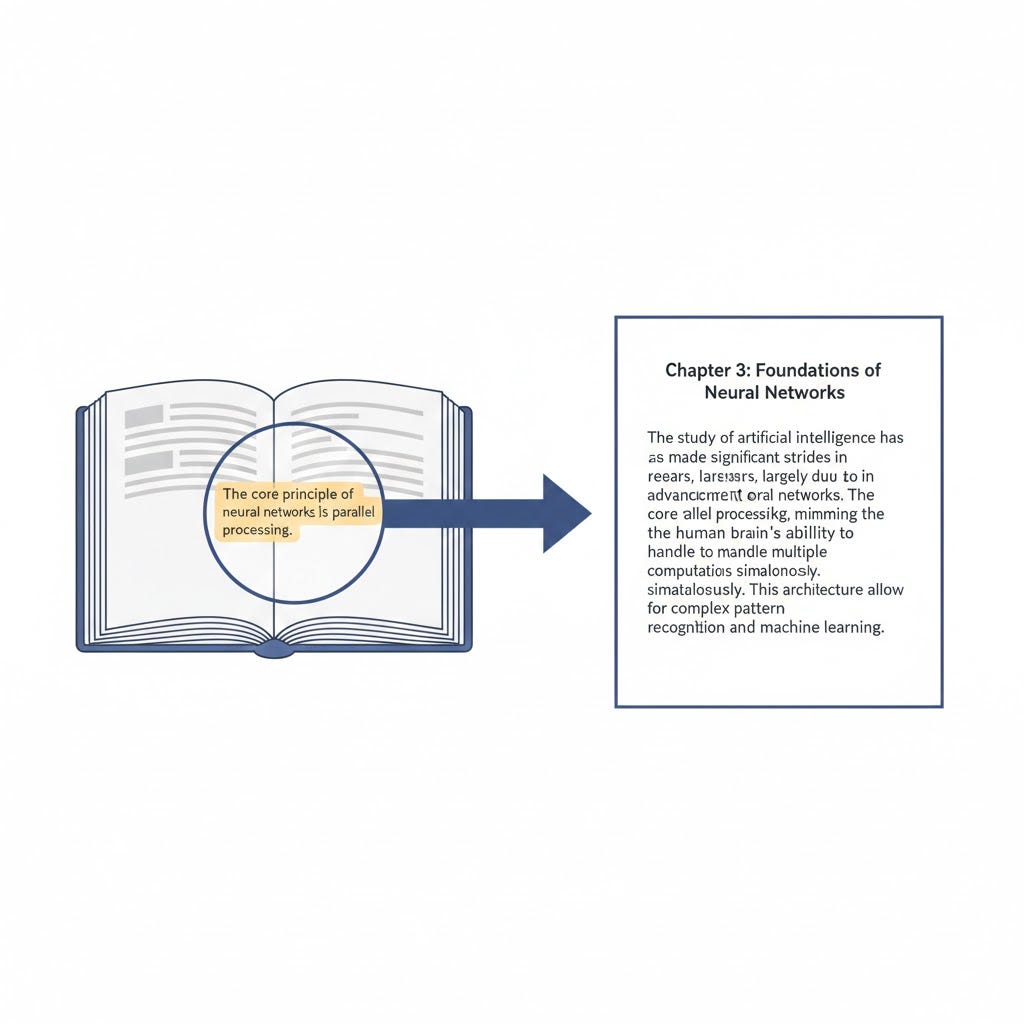
Parent Document Retrieval = Finding the exact paragraph you need but photocopying the entire chapter so you get full context.
HyDE = Writing down what you think the answer should look like, then asking the librarian to find books matching your hypothetical answer instead of your question.
Multi-Query = Sending 5 different librarians to search simultaneously with slightly different versions of your question.
Feedback Loops = Starting with a few books, realizing you need more information on a specific subtopic, going back to get more targeted books.
Agentic RAG = Having a smart assistant who decides whether you even need to visit the library or if they can answer from memory.
Each pattern solves a specific problem. The art is knowing which problems you actually have.
🔧 Practical Code Examples (Simplified)
Example 1: Basic Query Rewriting (Python)
def rewrite_query(original_query, llm):
    prompt = f"""
    Given this user query: "{original_query}"

    Generate 3 alternative phrasings that mean the same thing
    but use different words. Return as JSON array.
    """

    variations = llm.generate(prompt)
    return [original_query] + variations
# Usage
user_query = "auth bug"
all_queries = rewrite_query(user_query, llm)
# Returns: ["auth bug", "authentication error", "login failure", "authorization issue"]
# Now search using all variations
all_results = []
for query in all_queries:
    results = vector_search(query, top_k=20)
    all_results.extend(results)
# Deduplicate and return top results
final_results = deduplicate(all_results)[:10]
Example 2: Simple Reranking (Python)
def rerank_results(query, initial_results, reranker_model):
    # Score each result against the query
    scored_results = []

    for result in initial_results:
        score = reranker_model.score(
            query=query,
            document=result.text
        )
        scored_results.append((score, result))

    # Sort by score (highest first)
    scored_results.sort(reverse=True, key=lambda x: x[0])

    # Return top N
    return [result for score, result in scored_results[:5]]
# Usage
initial_results = vector_search(query, top_k=50)
final_results = rerank_results(query, initial_results, reranker)
Example 3: Hybrid Search (Conceptual)
def hybrid_search(query, top_k=10):
    # Vector search (semantic)
    vector_results = vector_index.search(query, top_k=50)

    # Keyword search (BM25)
    keyword_results = bm25_index.search(query, top_k=50)

    # Reciprocal Rank Fusion
    fused_results = reciprocal_rank_fusion(
        vector_results,
        keyword_results
    )

    return fused_results[:top_k]
def reciprocal_rank_fusion(list1, list2, k=60):
    # Combine rankings from both lists
    scores = {}

    for rank, doc in enumerate(list1):
        scores[doc.id] = scores.get(doc.id, 0) + 1 / (rank + k)

    for rank, doc in enumerate(list2):
        scores[doc.id] = scores.get(doc.id, 0) + 1 / (rank + k)

    # Sort by combined score
    sorted_docs = sorted(scores.items(), key=lambda x: x[1], reverse=True)
    return sorted_docs
🏁 The Bottom Line: What Really Matters
Here’s what nobody tells you about RAG: The difference between a system users trust and one they ignore isn’t revolutionary architecture.
It’s 2–3 well-chosen methods applied to specific failure modes you’ve actually measured.
You don’t need every technique in this guide.
You probably need:
- ✅ Hybrid retrieval
- ✅ Reranking
- ✅ Maybe 1–2 others depending on your use case
The teams that succeed with RAG aren’t using the most advanced patterns. They’re the ones who:
- Ruthlessly measure where their system breaks
- Fix those specific problems
- Ignore everything else
The gap between 70% and 90% accuracy is smaller than you think. But that 20-point difference is the gap between:
- A system that gets abandoned
- A system that becomes indispensable
Your Success Checklist
✅ Start with hybrid retrieval + reranking (always)
✅ Measure actual failures before adding complexity
✅ Add patterns that fix your specific problems
✅ Track accuracy vs cost trade-offs
✅ Stop when you hit “good enough” for your use case
✅ Don’t chase perfection — chase reliability
Remember: The best RAG system isn’t the most sophisticated one.
It’s the one your users trust enough to rely on every single day.
💬 Final Thoughts
RAG is like a garden. You can’t just plant seeds and walk away. You need to:
- Observe what’s growing (measure)
- Pull weeds (fix failures)
- Add water and nutrients where needed (targeted improvements)
- Stop adding stuff when the garden is healthy (don’t over-engineer)
Start simple. Measure religiously. Add complexity only where data proves it helps.
And most importantly: Your RAG system will never be “done.” It’s a living system that needs ongoing care and adjustment.
But with the methods in this guide, you can build something users actually trust — and that’s what matters.
Now go build something bulletproof. 🚀
Keywords: RAG optimization, retrieval augmented generation, AI accuracy, semantic search, vector database, hybrid searchYour “Smart” AI Assistant Just Told Someone the Wrong Password Reset Instructions. Again.
You spent weeks building it. The demo was flawless. Leadership loved it. Users were excited.
Then you launched to production.
Now your AI chatbot is confidently telling customers that your return policy is 90 days when it’s actually 30. It’s pulling random paragraphs from your knowledge base that have nothing to do with the question. It’s making stuff up when it doesn’t know the answer.
The worst part? It sounds so confident while being completely wrong.
This isn’t a rare bug. It’s not bad luck. It’s what happens when you build a basic RAG system and think you’re done.
Here’s the truth nobody tells you: The gap between a RAG system that works in demos and one that works in production is massive. But the gap between a broken production system and a bulletproof one? That’s actually pretty small — if you know the right fixes.
In this guide, I’ll show you exactly why standard RAG systems fail and give you 10 battle-tested methods to fix them. These aren’t theoretical concepts. These are practical solutions used by teams running RAG in production serving millions of users.
Ready to stop embarrassing yourself with AI hallucinations? Let’s dive in.
🤔 First Things First: What Even Is RAG?
Before we fix it, let’s make sure we understand what we’re dealing with.
RAG stands for Retrieval Augmented Generation. Fancy name, simple concept.
Think of it this way: Regular AI is like a really smart person who can only answer questions based on what they learned in school. They can’t look things up. So when you ask about your company’s vacation policy, they just make up something that sounds believable.
RAG changes the game. It’s like giving that smart person access to Google and your company’s documentation before they answer.
How RAG Actually Works (The Simple Version)
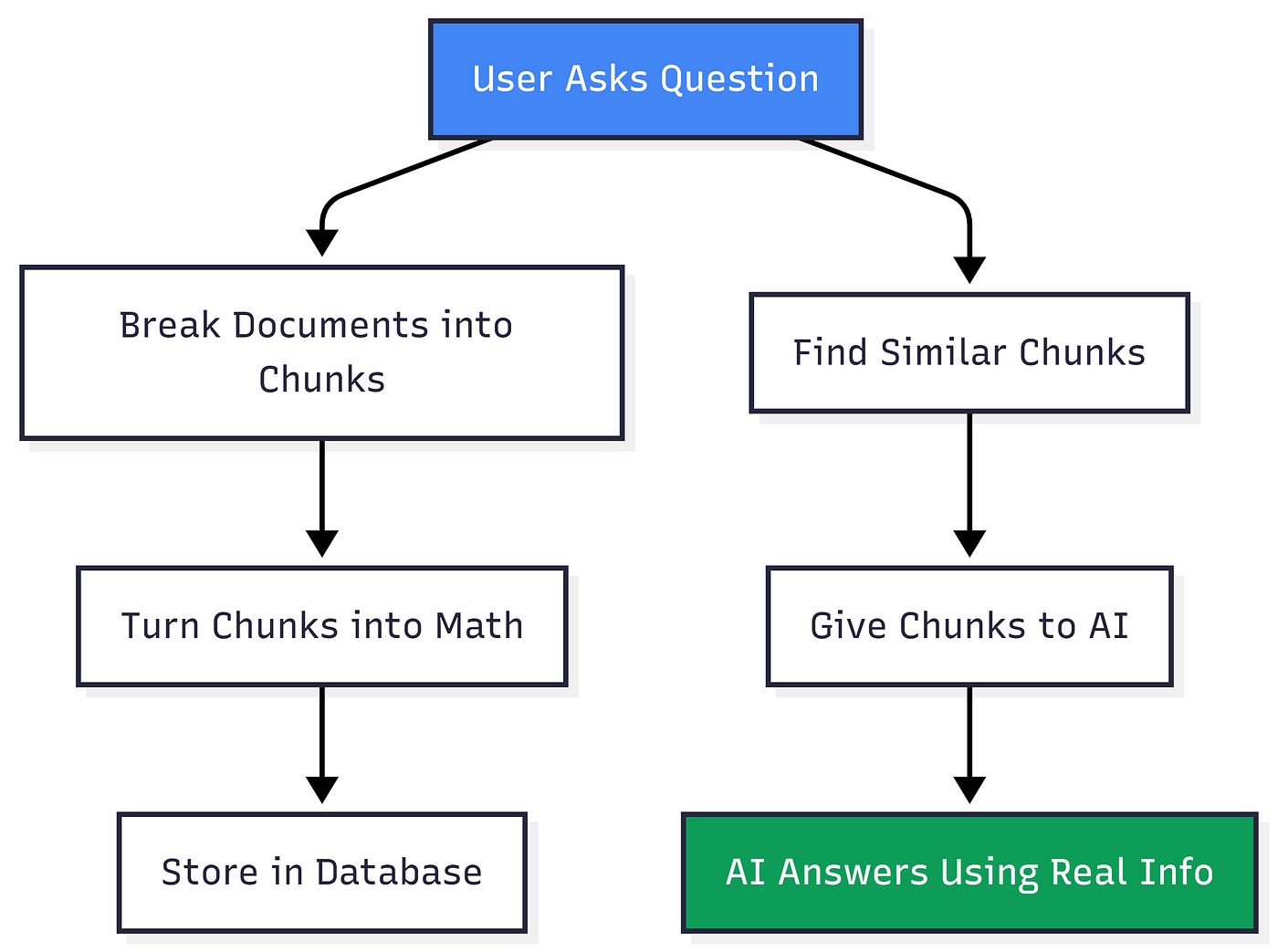
Step-by-step breakdown:
- Chunk Your Documents — Break everything into smaller pieces (like paragraphs or sections)
- Create Vector Embeddings — Convert these chunks into mathematical representations (don’t worry about the math, just know it helps find similar content)
- Store in Database — Keep everything organized and searchable
- User Asks Question — “What’s your return policy?”
- Find Relevant Chunks — System searches for chunks related to returns
- Feed to AI — Give these chunks to the AI as context
- Get Accurate Answer — AI responds using your actual policy, not made-up nonsense
Real-World Example
Without RAG:
- User: “What’s your return policy?”
- AI: “We accept returns within 60 days with original receipt.” ❌ (Completely made up)
With RAG:
- User: “What’s your return policy?”
- System finds actual return policy document
- AI: “We accept returns within 30 days of purchase with proof of purchase. Items must be unused and in original packaging.” ✅ (Accurate)
This works great for simple questions. Fast, cheap, and good enough… until it isn’t.
💥 Where Standard RAG Falls Apart (And Why You Should Care)
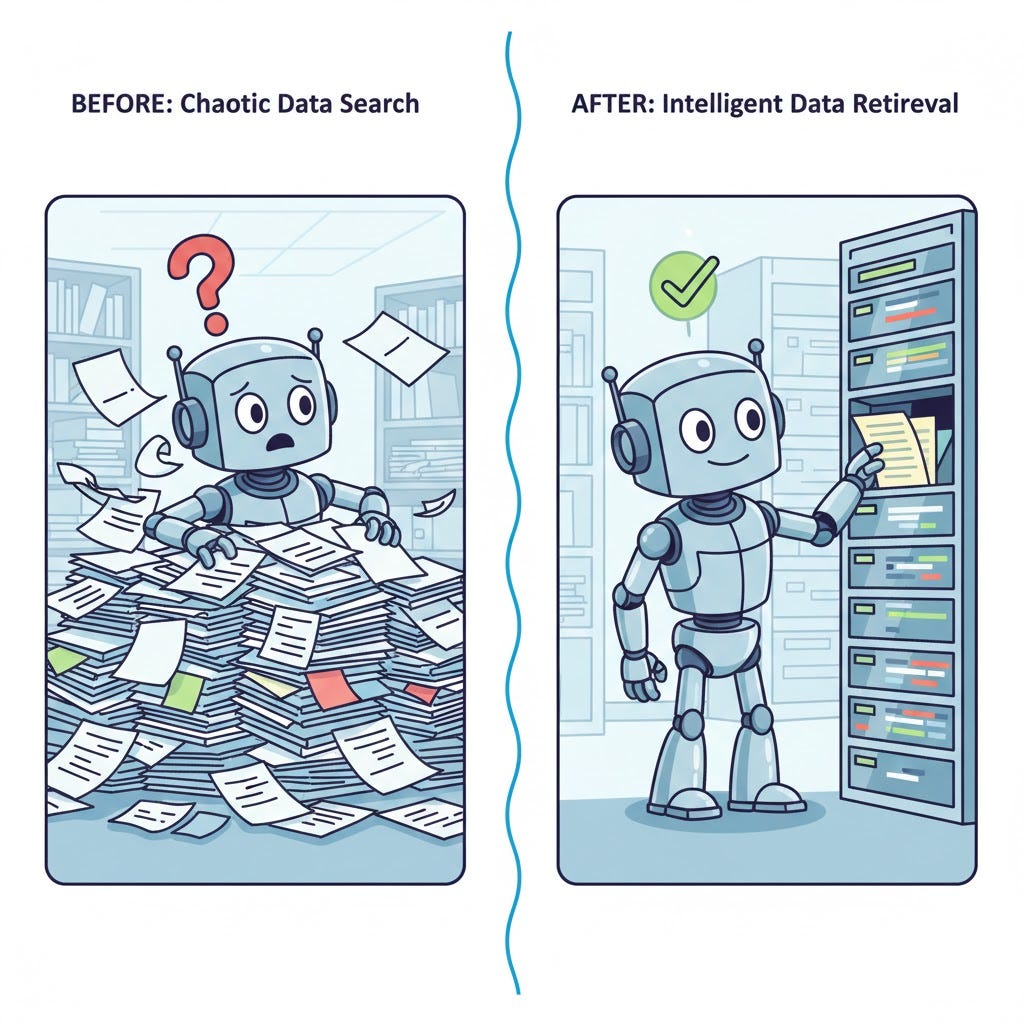
Here’s the dirty secret: Basic RAG fails predictably.
Not occasionally. Not in edge cases. Predictably.
Common Failure Scenarios You’ve Probably Seen:
Scenario 1: The Vocabulary Mismatch
- User says: “auth bug”
- Your docs say: “authentication error”
- Result: System finds nothing ❌
Scenario 2: The Keyword Trap
- User searches: “python socket timeout error 10060”
- Vector search finds: General networking guides ❌
- Misses: The exact error code documentation you actually need
Scenario 3: The Context Disaster
- User asks: “How do I reset my password?”
- System retrieves: A chunk about network security protocols (because both mention “authentication”)
- AI tries to answer password reset questions using firewall documentation
- Result: Confused user, embarrassed company ❌
Scenario 4: The Buried Treasure
- System retrieves 50 documents
- The perfect answer is at position 23
- Mediocre, barely-relevant answers are at positions 1–5
- AI uses the mediocre stuff because it comes first ❌
Sound familiar? These aren’t bugs. They’re the natural limitations of basic RAG.
The good news? Each failure mode has a specific solution. Let’s explore them.
🛠️ The 10 Methods That Actually Fix RAG (Not Just Theory)
I’m going to show you each method, explain what problem it solves, and give you real examples. Think of these as tools in a toolbox — you don’t need all of them, just the right ones for your specific problems.
Method 1: Query Rewriting — Stop Feeding Bad Questions to Your System
The Problem
Your users speak like humans. Your documentation is written formally. These different “languages” don’t match, so retrieval fails.
Real example:
- User types: “auth bug”
- Your docs say: “authentication error troubleshooting”
- Standard search: No match found ❌
The Solution
Before searching, rewrite the user’s question multiple ways to bridge the vocabulary gap.
How It Works

Concrete Example
Original query: “auth bug”
AI rewrites as:
- “authentication error troubleshooting”
- “login failure resolution steps”
- “authorization issue debugging guide”
- “user authentication problem fix”
Now the system searches using ALL these versions and combines the results. Suddenly, it finds relevant docs.
When to Use This
✅ Your users and documentation use different terminology ✅ Queries are often vague or use slang ✅ You serve a non-technical audience asking about technical things
The Trade-offs
- Benefit: 20–40% improvement in finding relevant stuff
- Cost: Adds 200–300ms delay and slightly higher API costs
- Worth it? Almost always yes for customer-facing systems
⚠️ Important Note: Don’t go overboard. 3–5 variations is the sweet spot. More than that and you’re just adding noise and cost.
Method 2: Hybrid Retrieval — Combine Two Search Superpowers
The Problem
Imagine you have two search engines:
- Engine A understands meaning but misses exact matches
- Engine B finds exact matches but misses meaning
You’re using only Engine A. You’re missing half the picture.
The Solution
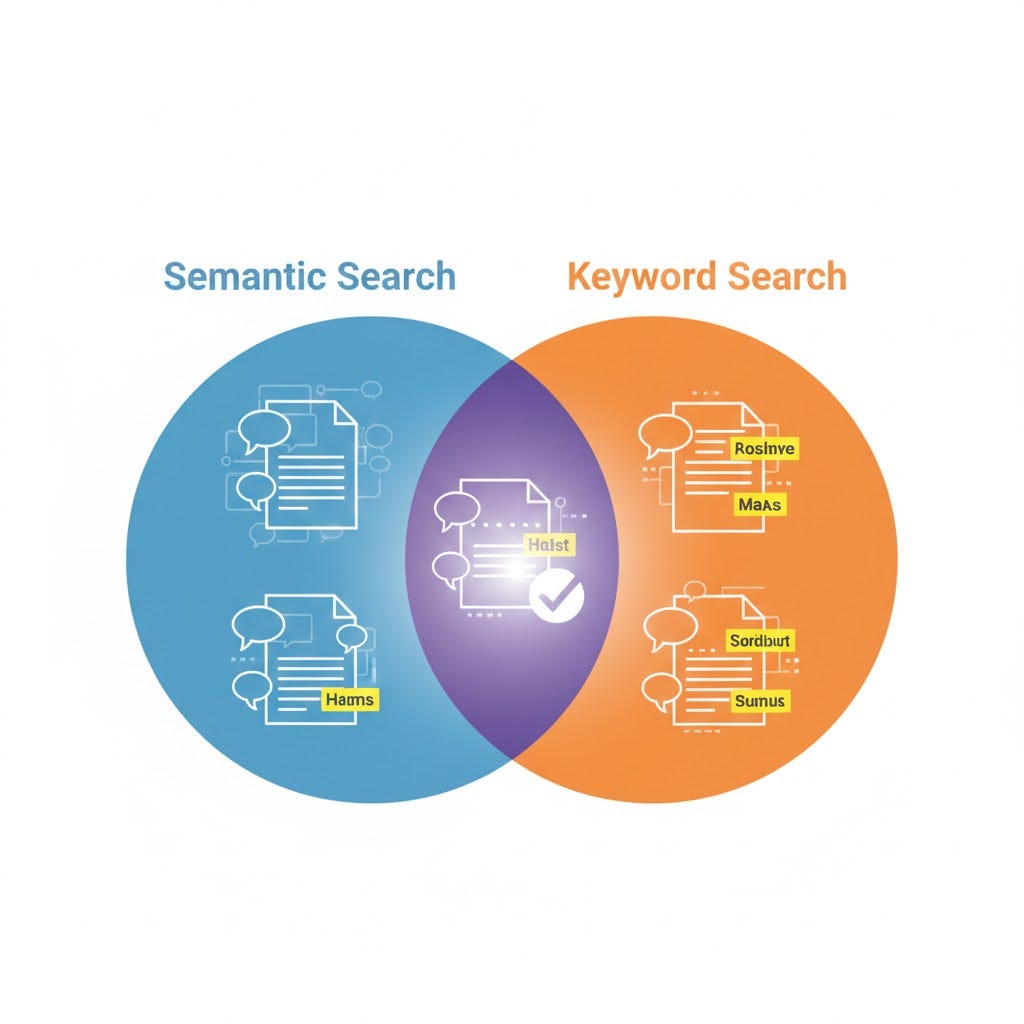
Use BOTH search methods simultaneously and combine the results.
The two engines are:
- Vector Search (Semantic) — Finds conceptually similar content
- BM25 (Keyword) — Finds exact keyword matches
Real-World Example
User searches: “python socket timeout error 10060”
Vector search finds:
- General networking troubleshooting guides
- Python socket programming tutorials
- Network connectivity best practices
BM25 keyword search finds:
- Documentation specifically about error code 10060
- Stack Overflow answers mentioning this exact error
- Changelog where this error was fixed
Hybrid search combines both lists and surfaces the perfect results that include both the concept AND the specific error code.
How the Merging Works
Both searches return their top 50 results. Then a technique called Reciprocal Rank Fusion merges them intelligently, giving you the best of both worlds in your final top 10.
When to Use This
✅ You have technical content with specific codes, IDs, or product names ✅ Users sometimes search for exact things, sometimes for concepts ✅ Pretty much always (it’s becoming the industry standard)
The Trade-offs
- Benefit: 15–25% improvement in finding what users actually need
- Cost: Minimal (about 1.1x the baseline cost)
- Worth it? Absolutely. Should be your default.
Method 3: Reranking — The Single Best Upgrade You Can Make
The Problem
Your initial search is fast but sloppy. It returns 50 documents, sorted by rough similarity. The really perfect answer? It’s buried at position 15 or 23, while mediocre matches sit at the top.
Think of it like this: Your search did a speed-dating session with 50 candidates and picked matches based on first impressions. Now you need someone to actually have conversations with each candidate and figure out who’s truly compatible.
The Solution
After the initial quick search, use a specialized AI model to carefully score each document against the user’s question. Only send the top-ranked results to your final AI.
The Two-Stage Process
Real Example
User asks: “How do I tune PostgreSQL indexes for better performance?”
Initial vector search returns 50 chunks about:
- Database optimization (position 1–10)
- General SQL performance (position 11–20)
- PostgreSQL-specific indexing (position 15) ⭐
- MySQL indexing (position 21–30)
- PostgreSQL index tuning strategies (position 23) ⭐
- Random database articles (position 31–50)
After reranking:
- PostgreSQL index tuning strategies (was #23, now #1) ⭐
- PostgreSQL-specific indexing (was #15, now #2) ⭐
- Database index optimization general (was #5, now #3)
- PostgreSQL performance guide (was #18, now #4)
- SQL index best practices (was #7, now #5)
The truly relevant docs jumped to the top!
When to Use This
Always. Seriously. This is the highest-return-on-investment improvement you can make to any RAG system.
The Trade-offs
- Benefit: 30% accuracy improvement (takes you from 70% to 85–88% accuracy)
- Cost: 1.4x your baseline cost
- Worth it? Absolutely worth it every single time
💡 Pro Tip: If you implement only ONE thing from this entire guide, make it reranking. It’s the difference between a system users tolerate and one they trust.
Method 4: Contextual Compression — Cut the Fluff, Keep the Gold
The Problem
You retrieve a 2,000-word article about cloud architecture because it mentions Kubernetes. But the user only asked about Kubernetes autoscaling. Now your AI has to wade through 1,900 irrelevant words about networking and storage to find the 100 words that actually matter.
Result? Slow responses, wasted money, and often confused answers.
The Solution
After retrieving large documents, use AI to extract only the sentences directly relevant to the user’s question. Compress the context down to pure signal.
How It Works
Step 1: Retrieve 10–20 large chunks (normal RAG) Step 2: Send each chunk through a compression AI with the user’s question Step 3: Extract only relevant sentences Step 4: Send compressed results to your main AI for the final answer
Real Example
User asks: “How does Kubernetes autoscaling work?”
Retrieved document (2,000 words):
- Introduction to cloud architecture (300 words)
- Networking basics (400 words)
- Kubernetes autoscaling explanation (200 words) ⭐
- Storage solutions (500 words)
- Security considerations (600 words)
After compression (200 words):
- ✅ Kubernetes autoscaling explanation (200 words)
- ❌ Everything else removed
Your AI now gets exactly what it needs, nothing it doesn’t.
When to Use This
✅ Your documents are long-form articles or guides ✅ Answers often include irrelevant tangents ✅ You’re hitting token limits or paying too much for generation
The Trade-offs
- Benefit: Reduces tokens by 70–90%, dramatically improves precision
- Cost: 1.6x baseline (compression AI costs extra, but you save on generation)
- Worth it? Yes, especially if you work with long documents
Method 5: Parent Document Retrieval — Small for Search, Big for Understanding
The Problem
You’re stuck in a frustrating trade-off:
- Small chunks are precise for search but lack context
- Large chunks have great context but are too vague for search
Pick one, lose the other.
The Solution
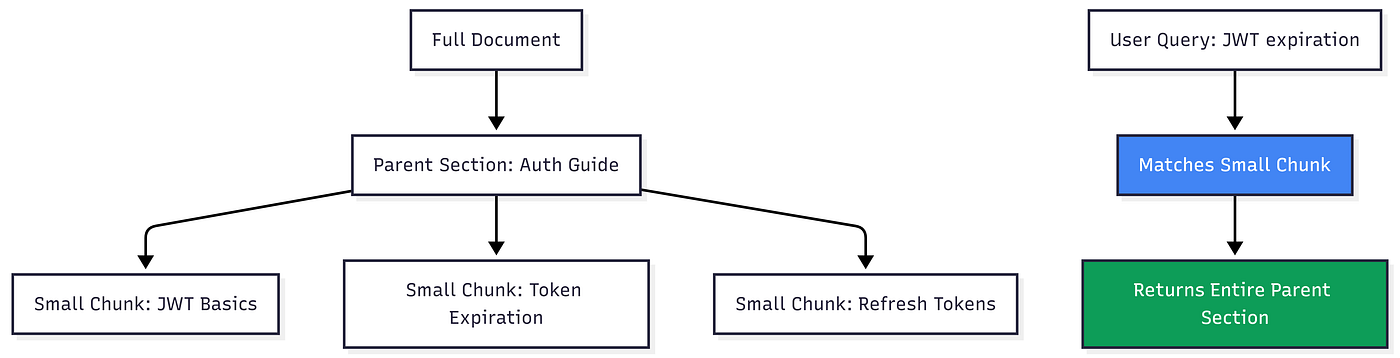
Use small chunks for searching, but return large parent documents for the AI to read.
The Clever Trick
During indexing:
- Break documents into small child chunks (100–200 words)
- Keep references to large parent sections (500–1000 words)
During retrieval:
- Search against the small, precise chunks
- Return the full parent document as context
Visual Explanation
Real Example
User asks: “How long do JWT tokens last?”
Search matches: One sentence in a small chunk: “JWT tokens expire after 15 minutes.”
System returns: The entire “Authentication Security Best Practices” section (800 words) which includes:
- JWT token lifecycle
- Why tokens expire
- How to handle expiration
- Refresh token strategies
- Security implications
Now the AI has enough context to give a complete, nuanced answer instead of just “15 minutes.”
When to Use This
✅ Retrieved chunks often feel incomplete or confusing ✅ Questions need surrounding context to answer properly ✅ Your content is naturally hierarchical (sections, chapters, topics)
The Trade-offs
- Benefit: Solves context fragmentation, much better answer quality
- Cost: Higher token usage (you’re returning bigger chunks)
- Worth it? Yes if your answers currently feel incomplete
Method 6: Self-Query Retrieval — Let AI Build the Search Filters
The Problem
Your database has amazing metadata: dates, categories, teams, permissions, product types. But users don’t phrase questions like database queries.
They say: “Show me mobile team product launches from last year” Not: SELECT * FROM docs WHERE team='mobile' AND type='launch' AND year=2024
The Solution
Let AI automatically extract the search query AND the metadata filters from natural language.
How It Works
User asks: “Show me mobile team product launches from 2024”
AI extracts:
- Semantic query: “product launches”
- Filters:
{ "team": "mobile", "year": 2024, "type": "launch"}
Search executes: Semantic search for “product launches” BUT only within documents matching those filters
The Magic
Instead of searching through 10,000 documents, you’re searching through maybe 50 that match the filters. Much faster, much more accurate.
Real Example
Without self-query:
- Search through all 10,000 documents for “product launches”
- Get launches from every team, every year, mixed results
- User has to manually filter through noise
With self-query:
- AI extracts filters automatically
- Search only the 50 mobile team docs from 2024
- Perfect results immediately
When to Use This
✅ You have rich metadata (dates, categories, teams, permissions) ✅ Users need to filter by these attributes regularly ✅ You want to respect document-level permissions automatically
The Trade-offs
- Benefit: 60–80% noise reduction through smart pre-filtering
- Cost: Requires one extra AI call to extract filters
- Worth it? Absolutely if you have good metadata
⚠️ Critical Requirement: This only works if you’ve actually tagged your documents with metadata. Garbage in, garbage out.
Method 7: HyDE (Hypothetical Document Embeddings) — Search for the Answer, Not the Question
The Problem
Sometimes questions and answers use completely different vocabulary.
User asks: “What causes database connection timeouts?” Your docs say: “Connection pools become exhausted when…”
These use totally different words! Standard search misses the match.
The Wild Solution
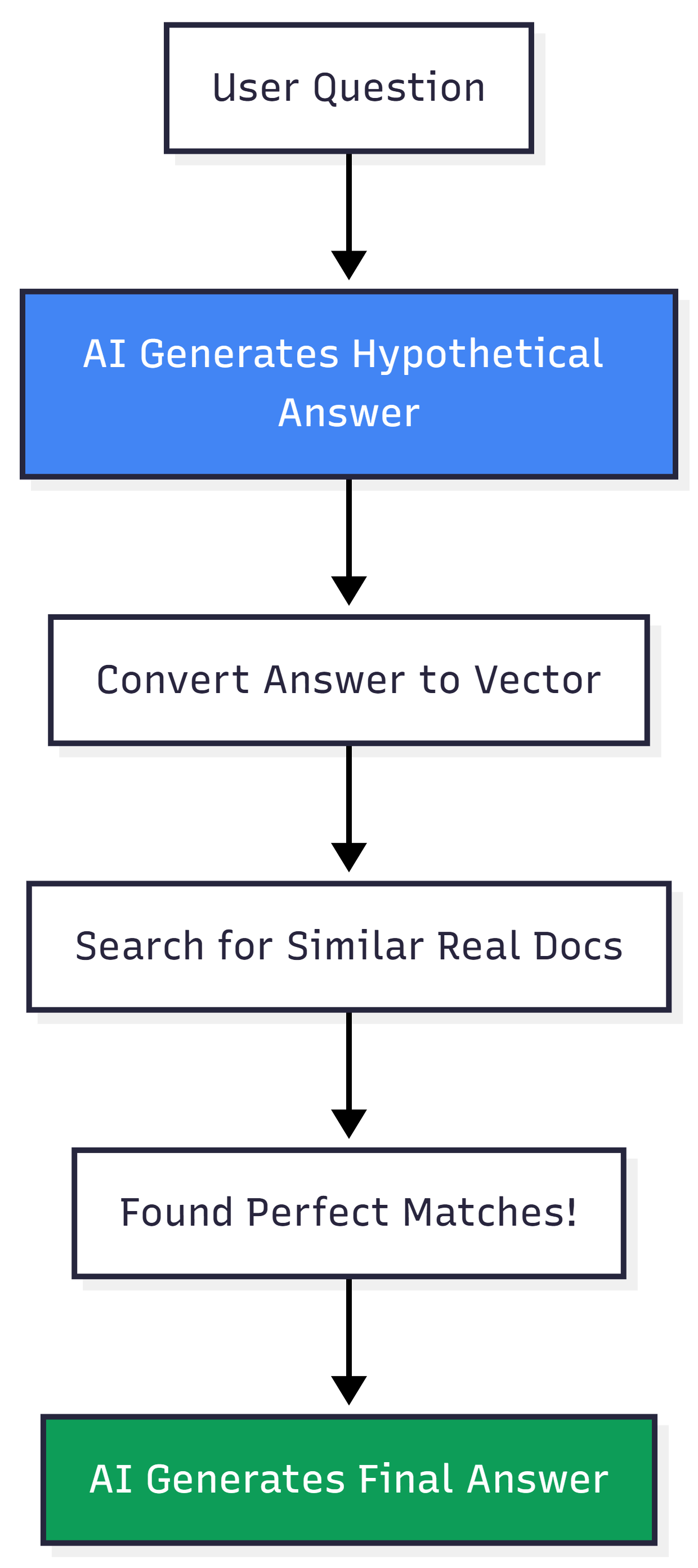
Instead of searching for the question, have AI generate what a good answer would look like, then search for THAT.
Mind-Bending Example
Traditional approach:
- User asks: “What causes database connection timeouts?”
- Search for documents similar to that question
- Often fails because questions and answers use different vocabulary
HyDE approach:
- User asks: “What causes database connection timeouts?”
- AI generates hypothetical answer: “Database connection timeouts typically occur due to network latency, exhausted connection pools, firewall rules blocking ports, or DNS resolution failures.”
- Search for documents similar to this hypothetical answer
- Find real documentation that matches the answer vocabulary
- Give those docs to AI for final answer
When to Use This
✅ Technical troubleshooting (“why is X broken?”) ✅ How-to queries (“how do I do X?”) ✅ Any domain where questions and answers speak different languages
The Trade-offs
- Benefit: Dramatically better for technical queries
- Cost: Requires extra AI call to generate hypothesis
- Risk: If hypothetical answer is wrong, you retrieve wrong docs
- Worth it? Yes for technical/troubleshooting content, probably not for simple FAQs
⚠️ Warning: This can backfire if the hypothetical answer hallucinates and points you in the wrong direction. Use with caution.
Method 8: Multi-Query Expansion — Ask the Same Question Multiple Ways
The Problem
Some questions are complex or ambiguous. One search angle isn’t enough to capture everything relevant.
User asks: “Why did sales drop last quarter?”
This might need information about:
- Market conditions (external factors)
- Internal changes (team changes, product updates)
- Customer feedback (satisfaction issues)
- Competitor actions
One search query won’t find all of this.
The Solution
Have AI generate 3–5 different variations of the question, search for each one simultaneously, and combine results.
Real Example
User asks: “Why did sales drop last quarter?”
AI generates:
- “What caused Q3 revenue decline?”
- “What external market factors affected Q3 sales?”
- “What internal changes happened in Q3?”
- “What did customers say about products in Q3?”
- “What did competitors do in Q3?”
System:
- Runs 5 parallel searches
- Retrieves results from each
- Removes duplicates
- Combines into comprehensive context
- AI generates answer using all perspectives
When to Use This
✅ Genuinely complex questions needing multiple angles ✅ Ambiguous queries that could mean different things ✅ Research-heavy use cases
The Trade-offs
- Benefit: Massively increases recall, finds comprehensive information
- Cost: 3–5x retrieval cost and latency
- Worth it? Only for complex questions. Overkill for simple FAQs
💡 Pro Tip: Use this selectively. Detect complex questions first, then apply multi-query. Don’t use it for “What’s your phone number?”
Method 9: Retrieval with Feedback Loops — Self-Correcting RAG
The Problem
Sometimes one retrieval pass isn’t enough. The AI realizes mid-answer “I need more information about X” but has no way to go get it.
The Solution
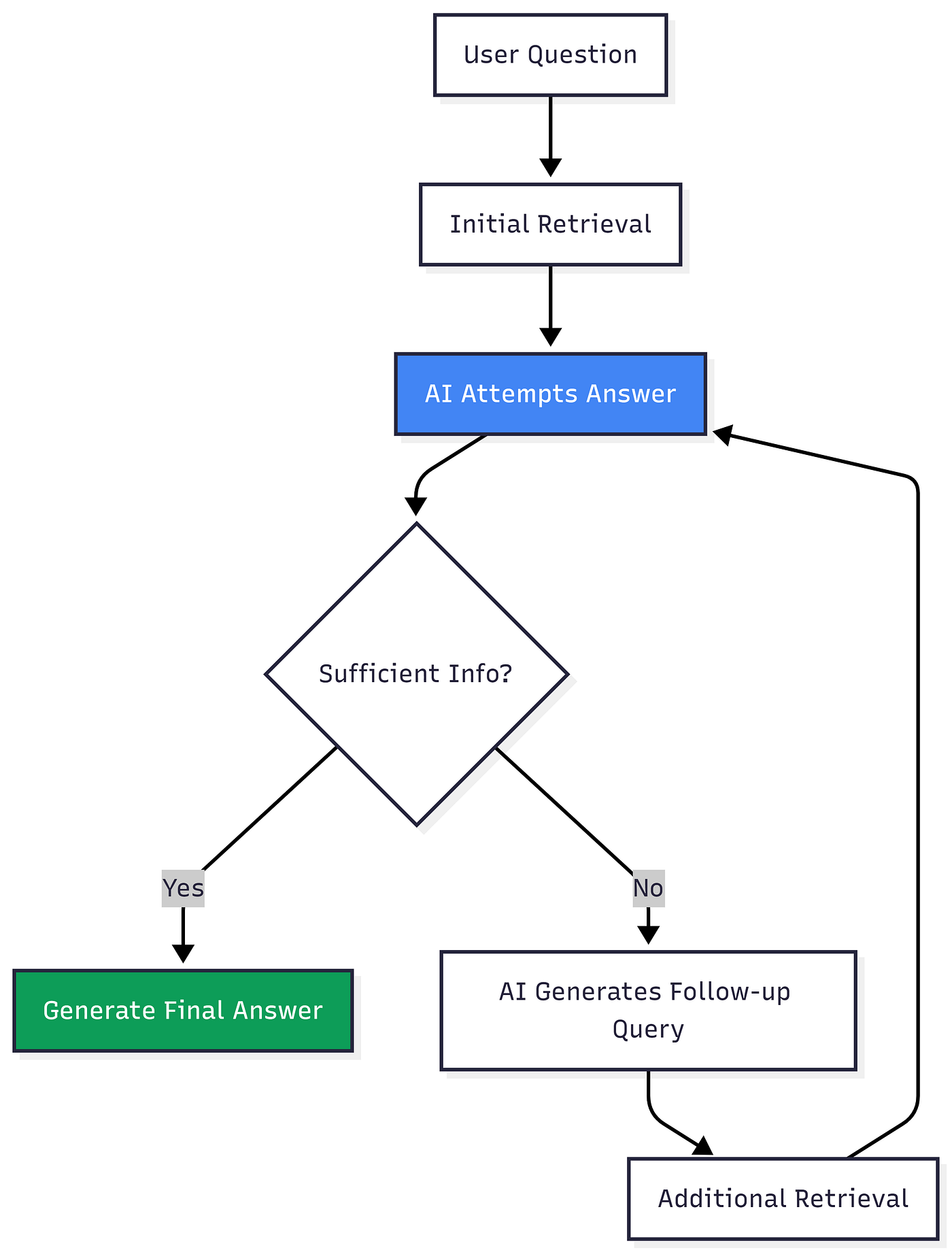
Let the AI recognize when it needs more information and trigger additional retrieval rounds.
How This Actually Works
Real Example
User asks: “What’s our remote work policy for contractors in Germany?”
Round 1:
- Initial retrieval gets general remote work policy
- AI reads it and realizes: “This doesn’t cover contractors specifically OR Germany specifically”
Round 2:
- AI generates query: “contractor-specific work policies”
- Retrieves contractor handbook
Round 3:
- AI generates query: “Germany employment regulations”
- Retrieves country-specific guidelines
Final answer:
- Combines all three sources
- Gives accurate, complete answer about German contractor remote work policies
When to Use This
✅ Complex multi-step questions ✅ Questions requiring information from multiple disparate sources ✅ When answers genuinely need synthesis across documents
The Trade-offs
- Benefit: Handles complex questions that would otherwise fail completely
- Cost: Can take 2–5 seconds, costs multiply per iteration
- Worth it? Yes for complex B2B tools, probably overkill for simple customer FAQs
⚠️ Important: Set a maximum iteration limit (2–3 rounds) or this can spiral into endless retrievals.
Method 10: Agentic RAG — Let AI Decide When Retrieval Is Even Needed
The Ultimate Evolution
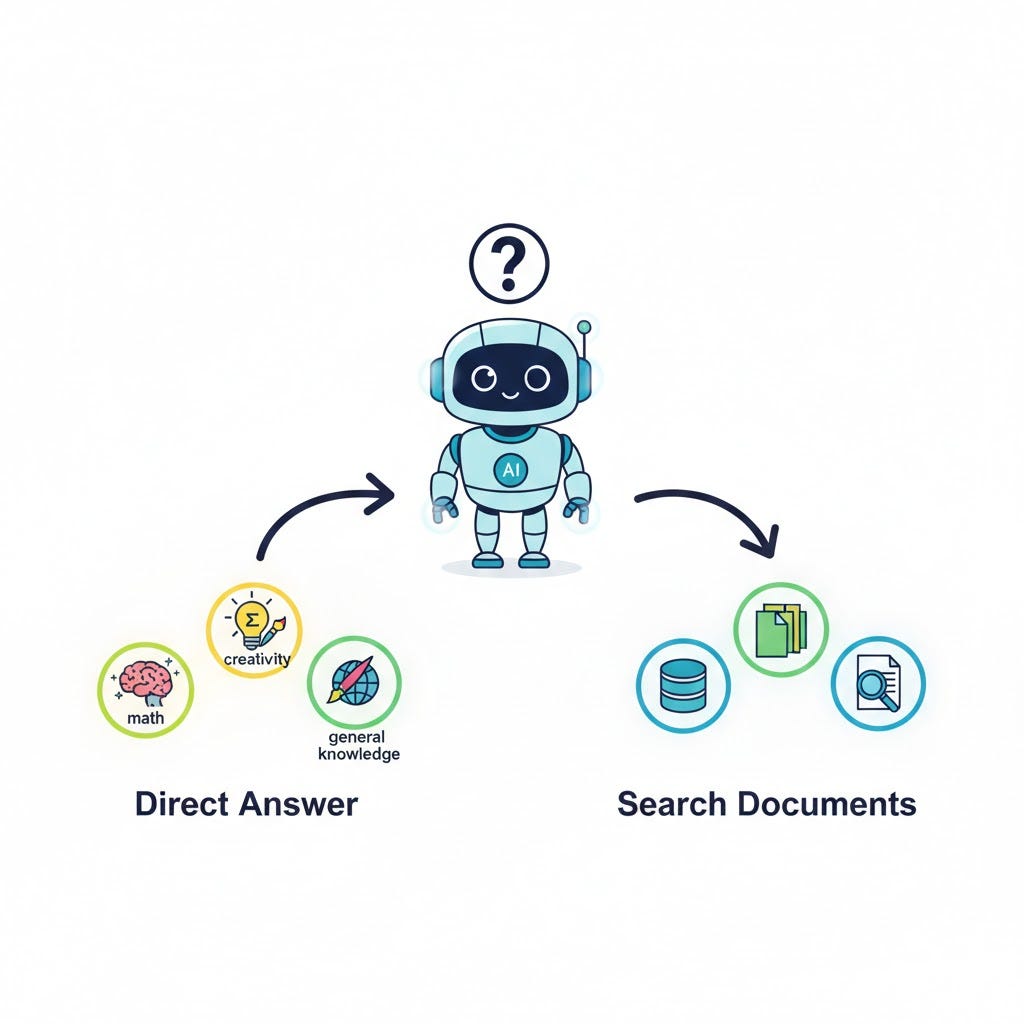
Not every question needs retrieval. Some questions are better answered directly.
Questions that DON’T need retrieval:
- “What’s 25% of 80?” (Math)
- “Write a poem about spring” (Creative)
- “Explain how photosynthesis works” (General knowledge)
Questions that DO need retrieval:
- “What was our Q4 revenue?” (Your specific data)
- “How do I reset my password?” (Your specific process)
The Solution
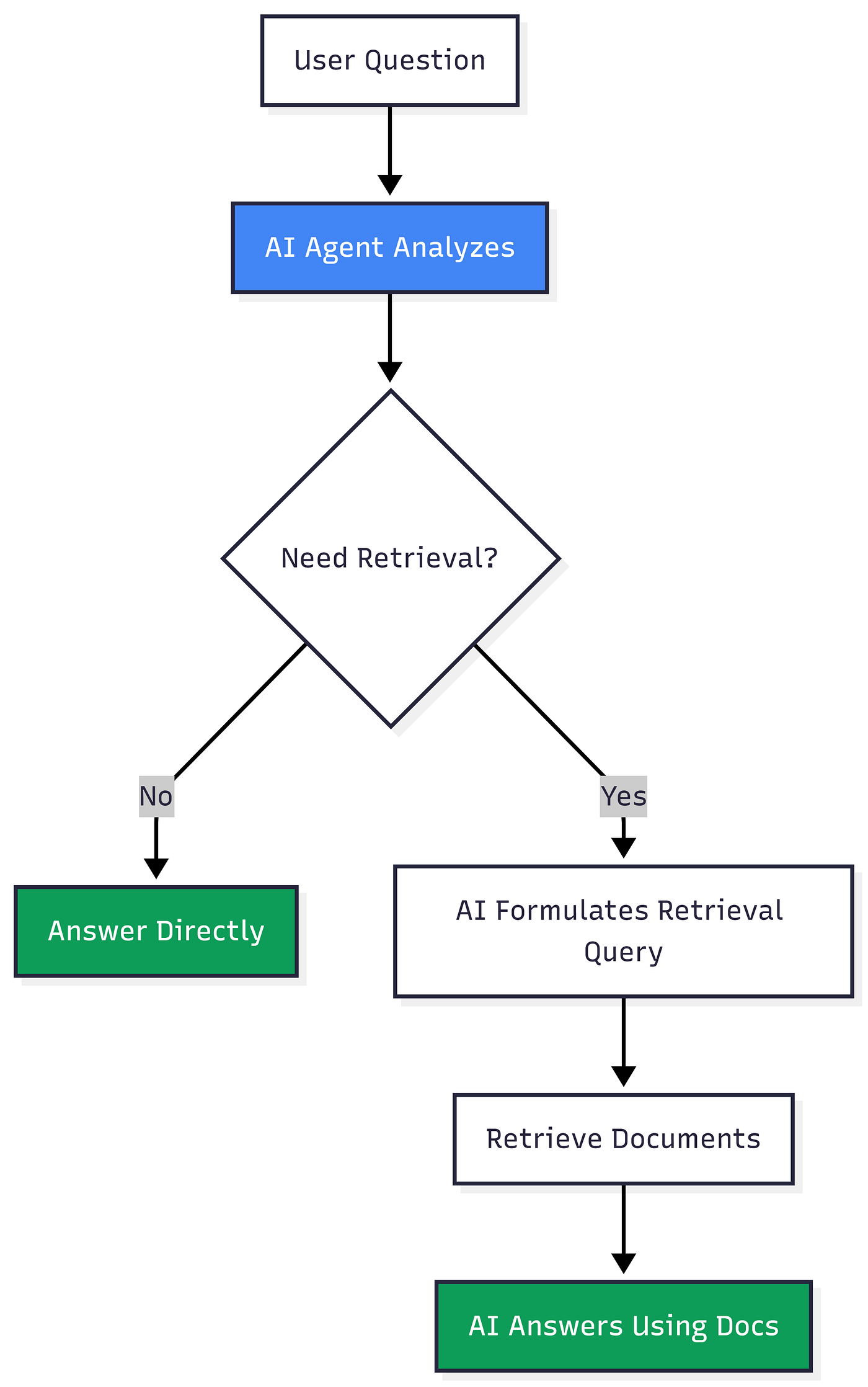
Give AI the ability to choose whether to retrieve or answer directly. Make retrieval a tool the AI can use when needed.
How Agentic RAG Works
Real Conversation Example
User: “What’s 15% of 200?” Agent thinks: No retrieval needed, this is math Answer: “30” ✅
User: “What was our revenue last quarter?” Agent thinks: Need to retrieve financial data Agent: Searches financial documents Answer: “Based on the Q4 financial report, revenue was $2.3M” ✅
User: “How do I reset my password?” Agent thinks: Need to retrieve help docs Agent: Searches support documentation Answer: “To reset your password, go to Settings > Security > Reset Password…” ✅
When to Use This
✅ Mixed conversations where some queries need retrieval, others don’t ✅ Chatbot scenarios with diverse question types ✅ When retrieval is expensive and you want to avoid unnecessary searches
The Trade-offs
- Benefit: Eliminates unnecessary retrievals, most flexible pattern
- Cost: Requires function-calling capable AI models
- Complexity: Harder to debug when agent makes wrong decisions
- Worth it? Yes for sophisticated chatbots, probably overkill for simple search
⚠️ Critical Requirement: Your AI model must support function calling or tool use. Not all models do.
🎯 The Decision Framework: Which Methods Do You Actually Need?
Here’s the truth: You don’t need all 10 methods.
Adding complexity without solving real problems just makes your system slower, more expensive, and harder to maintain.
Use this framework to decide what to implement:
Start Here (The Foundation Everyone Needs)
Implement these three first:
- ✅ Hybrid Retrieval (semantic + keyword search)
- ✅ Reranking (with a solid model)
- ✅ Query Rewriting (basic version)
This stack:
- Takes you from 70% to 85% accuracy
- Costs about 1.4–1.5x your baseline
- Solves 80% of production RAG problems
Don’t add anything else until you’ve implemented and measured these three.
Add These Only If You Have Specific Problems
Problem Solution When to Add Getting lots of irrelevant chunks Contextual Compression After measuring precision issues Answers lack context Parent Document Retrieval When answers feel incomplete Need to filter by metadata Self-Query Parsing If you have rich metadata Technical/troubleshooting heavy HyDE For how-to and why-is-this-broken queries Complex multi-hop questions Feedback Loops When single retrieval isn’t enough Mixed conversations Agentic Layer For chatbots with diverse question types
The Critical Question
Before adding ANY pattern, ask yourself: “What specific failure mode am I solving?”
If you can’t point to actual failed queries that this pattern would fix, don’t add it.
Cost vs Accuracy Trade-offs
Here’s what to expect:
Tier 1: Foundation (Always worth it)
- Hybrid + Reranking + Query Rewriting
- Cost: 1.5x baseline
- Accuracy: 70% → 85%
- ROI: Excellent ⭐⭐⭐⭐⭐
Tier 2: Targeted Improvements (Often worth it)
- Add Compression or Parent Docs
- Cost: 1.8–2.0x baseline
- Accuracy: 85% → 88%
- ROI: Good for specific use cases ⭐⭐⭐⭐
Tier 3: Advanced Stack (Rarely worth it)
- Full advanced implementation
- Cost: 2.0–2.5x+ baseline
- Accuracy: 88% → 90–92%
- ROI: Only for high-stakes domains ⭐⭐
The Law of Diminishing Returns: Going from 70% to 85% is easy and cheap. Going from 85% to 90% is hard and expensive. Going from 90% to 95% is brutally hard and extremely expensive.
Know where to stop.
🚨 Common Mistakes to Avoid
Mistake 1: Adding Complexity Too Early
Don’t: Implement all 10 methods on day one Do: Start with foundation, measure, then add targeted improvements
Mistake 2: Not Measuring
Don’t: Assume your changes helped Do: Measure accuracy before and after each change
Mistake 3: Ignoring Cost
Don’t: Optimize for 95% accuracy at 5x cost when 85% at 1.5x cost is good enough Do: Find the sweet spot for your use case
Mistake 4: Over-Engineering Simple Use Cases
Don’t: Use agentic RAG with feedback loops for an FAQ bot Do: Match complexity to your actual needs
Mistake 5: Forgetting About Latency
Don’t: Add 6 seconds of latency for 3% accuracy improvement Do: Balance accuracy with user experience
🔗 Let’s Connect & Collaborate! I’m passionate about sharing knowledge and building amazing AI solutions. Let’s connect:
- 🐙 GitHub: Link — Check out my latest projects and code repositories
- 💼 LinkedIn: Link — Connect for professional discussions and industry insights
- 📧 Email: [Pinreddy Abhinaya] — Reach out directly for inquiries or collaboration
- ☕ Support me: Buy Me a Coffee Link — Support my work and help me create more content

메타데이터
- post_id
- d2d7f3f0a2ce
- slug
- why-your-ai-keeps-lying-to-users-and-10-proven-ways-to-fix-it-d2d7f3f0a2ce
- url
- https://pub.towardsai.net/why-your-ai-keeps-lying-to-users-and-10-proven-ways-to-fix-it-d2d7f3f0a2ce
- canonical_url
- https://pub.towardsai.net/why-your-ai-keeps-lying-to-users-and-10-proven-ways-to-fix-it-d2d7f3f0a2ce
- author_url
- https://medium.com/@Abhinayapinreddy
- status
- ok
- fetched_at
- 2026-07-30 03:13:15