DATA DEFINITION LANGUAGE CREATE, ALTER, & DROP TABLE
In this article, we will discuss the types of Data Definition Language (DDL) commands. DDL itself is an SQL command used to organize/manage…
DATA DEFINITION LANGUAGE CREATE, ALTER, & DROP TABLE
In this article, we will discuss the types of Data Definition Language (DDL) commands. DDL itself is an SQL command used to organize/manage the structure of a database or its objects.
DDL has several commands, including CREATE, ALTER, and DROP. Here’s an explanation of these three DDL commands :

CREATE, used to create new objects in the database, such as Database, Table, View, Index, Function / other Procedures.
Here is an example query :
CREATE TABLE IF NOT EXISTS mytable (
    Nama_Kolom Tipe_Data Tabel_Constraint DEFAULT default_value,
    another_column Tipe_Data,
    …
);
IF NOT EXISTS can be used or not, but it is better to use it, because this clause is useful for avoiding errors and skipping the process if the related table is already available.
ALTER, is used to change the database structure, such as adding new columns, changing column data types, deleting columns, changing table or column names, & adding/removing constraints (Primary Key, Foreign Key, etc.). You can combine it with the FIRST or AFTER clause to specify whether to insert a new column.
Here is an example query :
- Adding Columns:
ALTER TABLE mytable
ADD column Tipe_Data Optional_Table_Constraint
    DEFAULT default_value;
2. Deleting Columns :
ALTER TABLE mytable
DROP column_to_be_deleted;
3. Change Table Name :
ALTER TABLE mytable
RENAME TO new_table_name;
DROP, used to permanently delete database objects, Objects that are deleted include Database, Table, View, Index, Constraint, & Other Function.
Here is an example query :
DROP TABLE IF EXISTS mytable;In the DROP action, you can add an IF EXIST clause or not, but it is better to use it to avoid errors if the specified table does not exist.
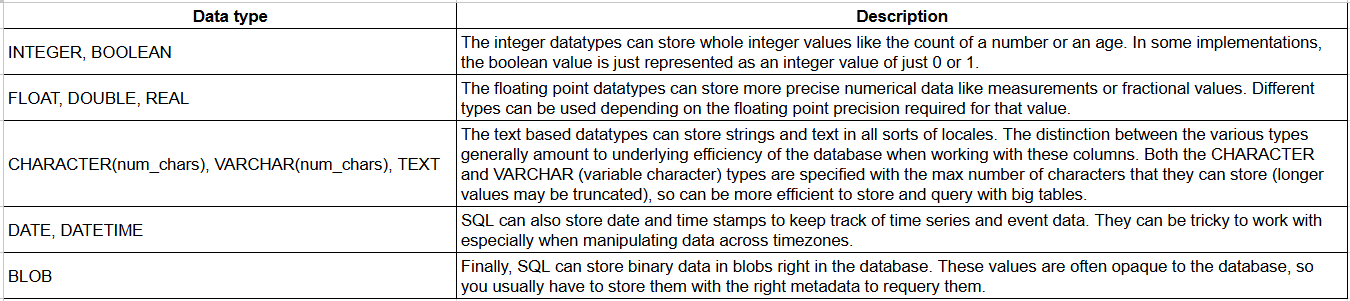
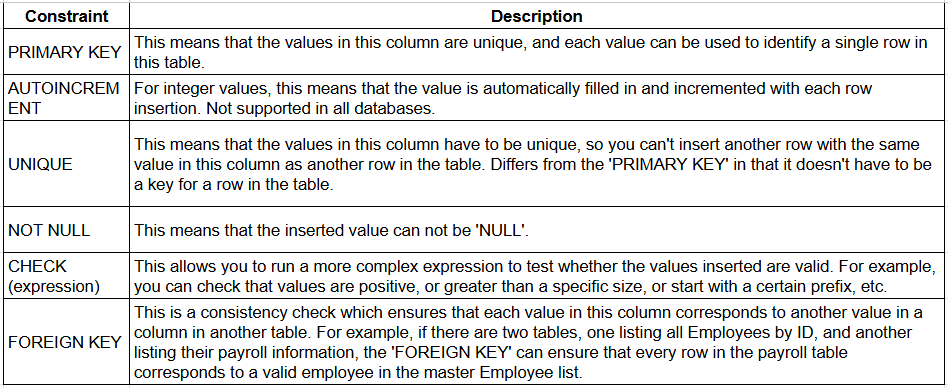
Before we go further regarding the process of using the three DDL above, the following will discuss table data types & Table Constraints.
Table of Types of Data Types
SQL Constraint Table
The following is a Case Study & Query of the DDL command explained above :
- Create a new database named product_data in MySQL 9.5 Command Line Client :
CREATE DATABASE product_data;- Create a new table named Database_Product with the following columns :
– product_id, Has a data type (VARCHAR) with a data length of 10, this is the product ID and this is the primary key
– unit_price, Has data type (REAL), this section contains the price
– stock, has a data type (INTEGER), this section contains the total stock of a particular product
CREATE TABLE Database_Product (
    product_id VARCHAR(10) PRIMARY KEY,
    unit_price REAL,
    stock INTEGER
);- Add a column to the previous database with the name product_name with the data type TEXT :
ALTER TABLE Database_Product
ADD COLUMN product_name TEXT;
You can also insert a FIRST clause to add a new column at the very beginning or between columns with an AFTER clause, For example from the case study above, we want to place the product_name column next to product_id so the query will be like this :
ALTER TABLE Database_Product
ADD COLUMN product_name TEXT AFTER product_id;
And if you want the new product_name table to be in the first column (left), the query is like this :
ALTER TABLE Database_Product
ADD COLUMN product_name TEXT FIRST;
Additional note : The FIRST & AFTER clause cannot be used in all RDBMS, for the above case, it currently applies to one of them in MySQL.
- Delete the product_name column :
ALTER TABLE Database_Product
DROP product_name;- Rename the database_product table to products
ALTER TABLE database_product
RENAME TO products;- Rename the unit_price column to price :
ALTER TABLE products
RENAME COLUMN unit_price TO price;- Create a Made_In table with default Indonesian
ALTER TABLE products
ADD COLUMN Made_In VARCHAR(25) DEFAULT “Indonesia”;- Make the default stock column 0
UPDATE products
 SET stock = 0
WHERE stock IS NULL;- Delete the products table
DROP TABLE IF EXISTS products;- Delete the product_data database :
DROP DATABASE product_data;Note: Please create a database in MySQL 9.5 Command Line Client then after that create a table and execute it in DBeaver. Here are the download links for both and the process display:
- Link Download MYSQL Server :
https://dev.mysql.com/downloads/mysql/
2. Download DBeaver Community :
Steps to create a MySQL 9.5 Command Line Client database :
- Open MySQL 9.5 Command Line Client :
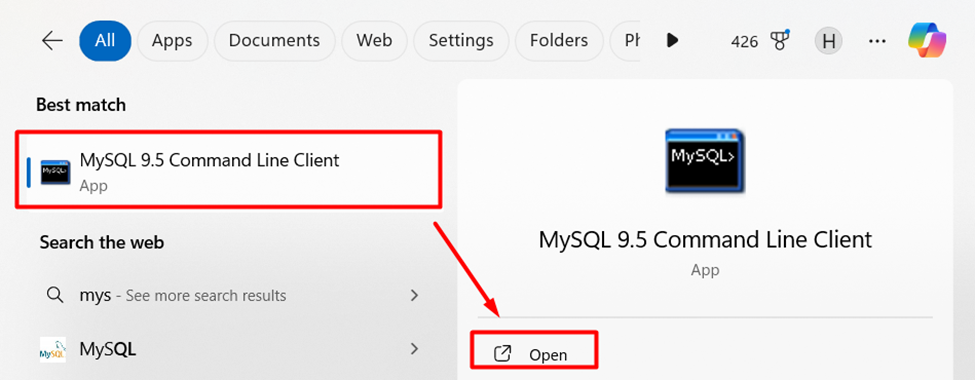
- Enter the MySQL 9.5 Command Line Client Password :

- Create Database

To create a database, you can enter the following query:
CREATE DATABASE product_data;- Show Database :
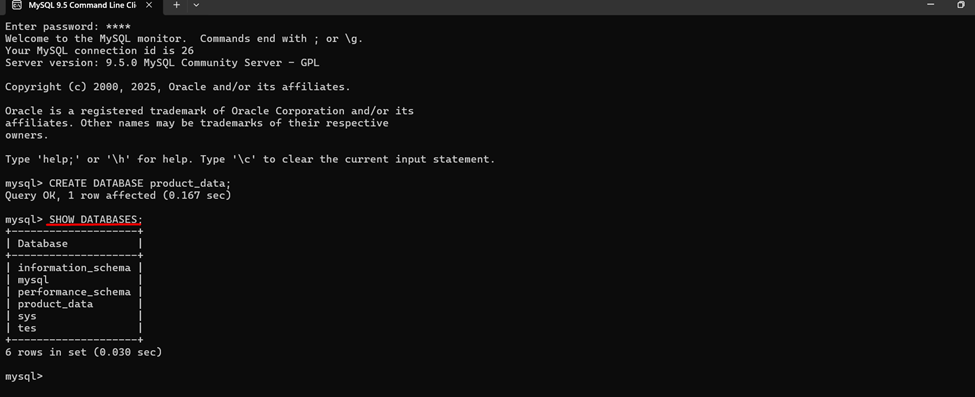
To check whether the database has been successfully created, you can check with the following query :
SHOW DATABASES;- Connect to MySQL Database in DBeaver :
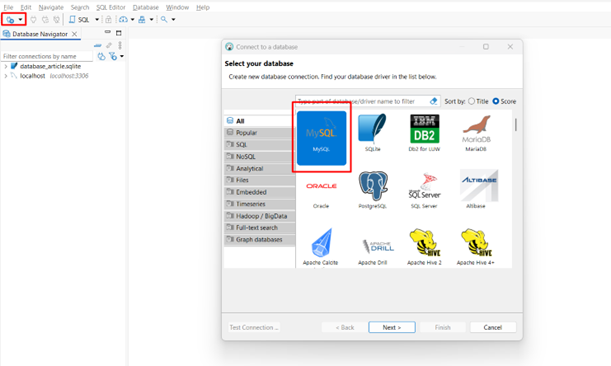
5.1. Open DBeaver and click the New Database Connection icon > select MySQL > Next
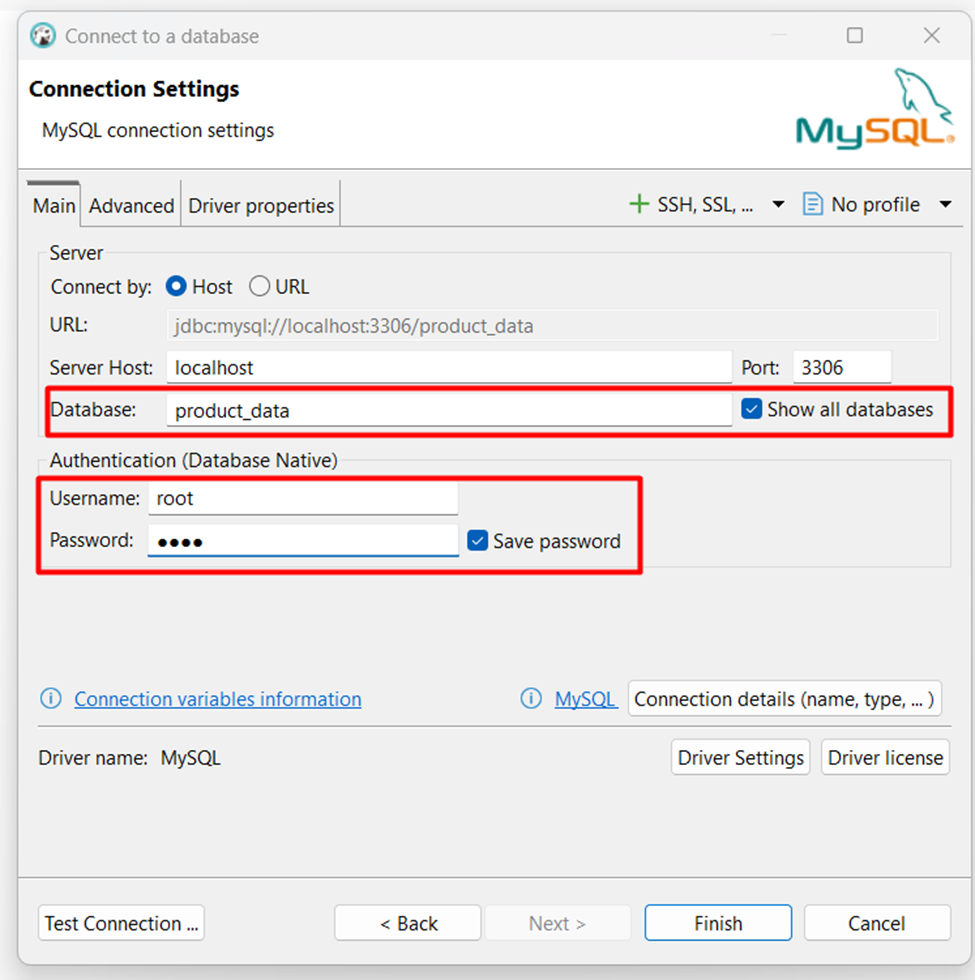
5.2. Type the database name and user-password that have been created in the MySQL 9.5 Command Line Client :
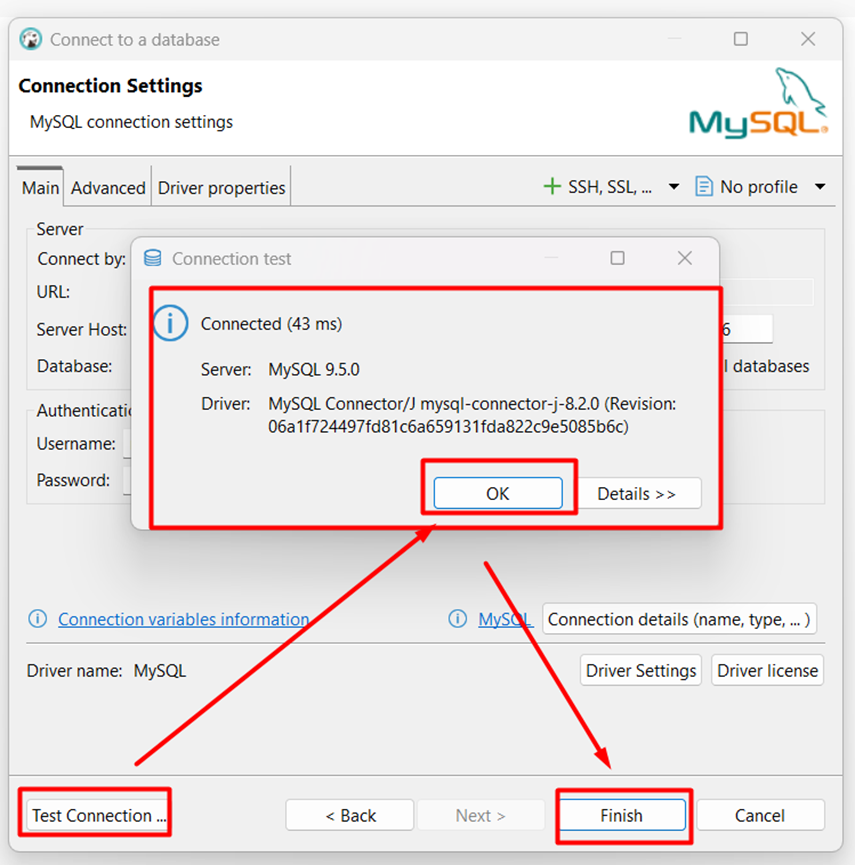
5.3. Make sure the connection with a test connection
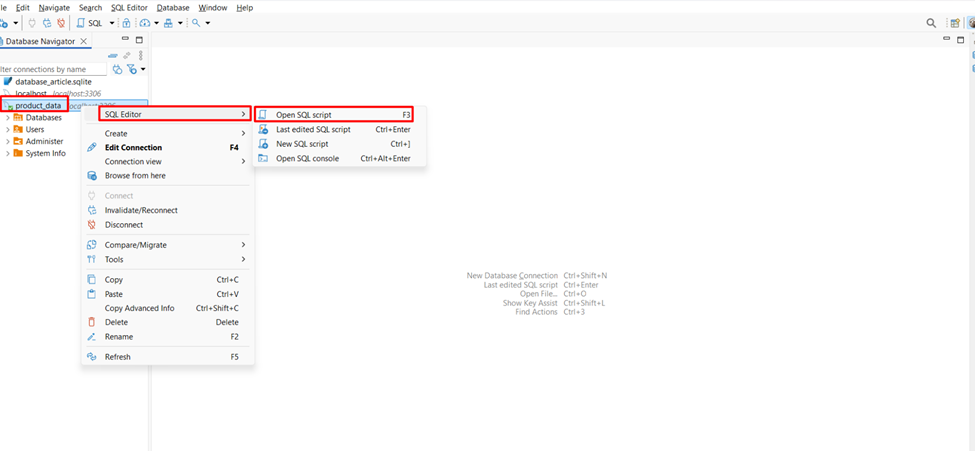
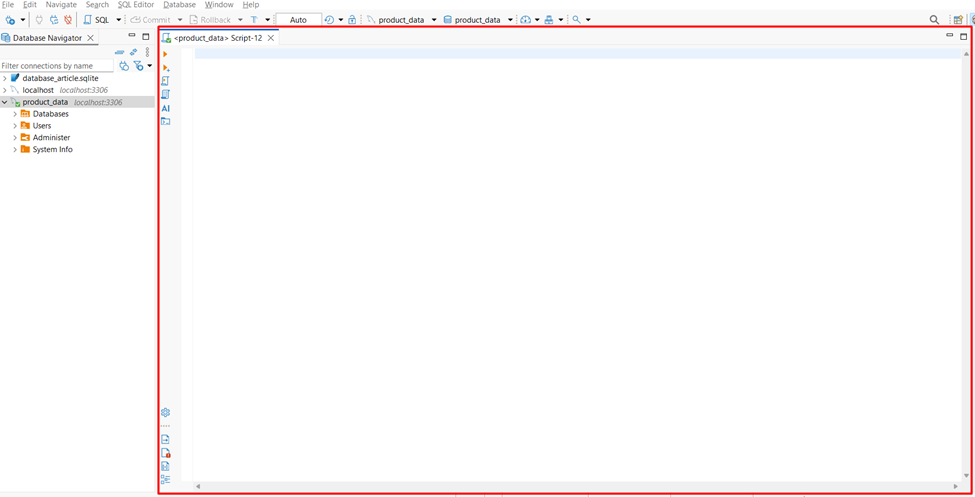
5.4. Open Query Editor by right-clicking on the database > SQL Editor > Open SQL script
5.5. Enter the SQL query in the following SQL Editor section :
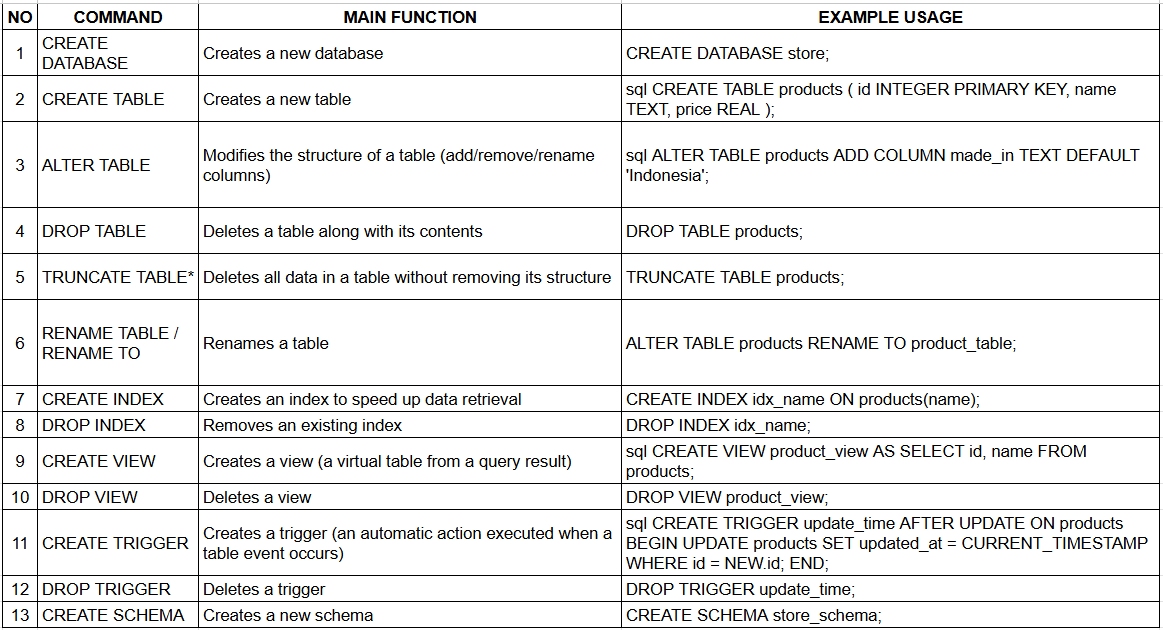
Additional Summary Information from the DATA DEFINITION LANGUAGE Command List
Date Created : November 02, 2025 Author : Satria Bagaskara
메타데이터
- post_id
- d2d980328aa3
- slug
- data-definition-language-create-alter-drop-table-d2d980328aa3
- url
- https://medium.com/@satriadevopsindonesia/data-definition-language-create-alter-drop-table-d2d980328aa3
- canonical_url
- https://medium.com/@satriadevopsindonesia/data-definition-language-create-alter-drop-table-d2d980328aa3
- author_url
- https://medium.com/@satriadevopsindonesia
- status
- ok
- fetched_at
- 2026-06-22 12:55:45