Embedding Genie API for a Multi‑Tenant Application
Implementation Guide for Attribute-Based Access Control (ABAC) for a Multi-Tenant Architecture for AI/BI Genie
Embedding Genie API for a Multi‑Tenant Application
Implementation Guide for Attribute-Based Access Control (ABAC) for a Multi-Tenant Architecture for AI/BI Genie
By Josh Rosenberg (Sr. Solutions Engineer @ Databricks) & Josh Bae (Delivery Solutions Architect @ Databricks)
Summary
- Embed the Genie Conversation API directly inside multi-tenant apps to deliver stateful analytics conversations backed by a curated Genie space.
- Authenticate requests through your application using OAuth M2M with service principals, not individual Databricks user accounts or external workspace provisioning.
- Securely personalize data with Unity Catalog ABAC policies and implement row-level security guardrails.
Introduction
Since the launch of AI/BI Genie spaces, we have seen enterprise-scale adoption of self-service analytics using natural language for many Databricks users. While this served customers well for internal reporting and operational visibility, the lack of access for external audiences to the UI-native experience on Databricks made it difficult to share this capability more broadly.
However, with the Public Preview release of the AI/BI Genie Conversation API across AWS, Azure, and GCP, users could now serve Genie-level insights from any application, even external or custom-built ones. The API provided a seamless way for business users to “talk to their data” from any surface, but it raised an immediate governance issue: how would the app ensure that only the data that is permitted for a particular viewer could be returned?
It is a problem we have seen many of our customers wrestle with, so this blog offers guidance on designing your multi-tenant Genie space apps with robust per-tenant guardrails via service principals (using OAuth M2M authentication) and Unity Catalog ABAC (attribute-based access control) policies.
Reference Architecture
This section outlines the high-level request flow and required infrastructure components for the integration.
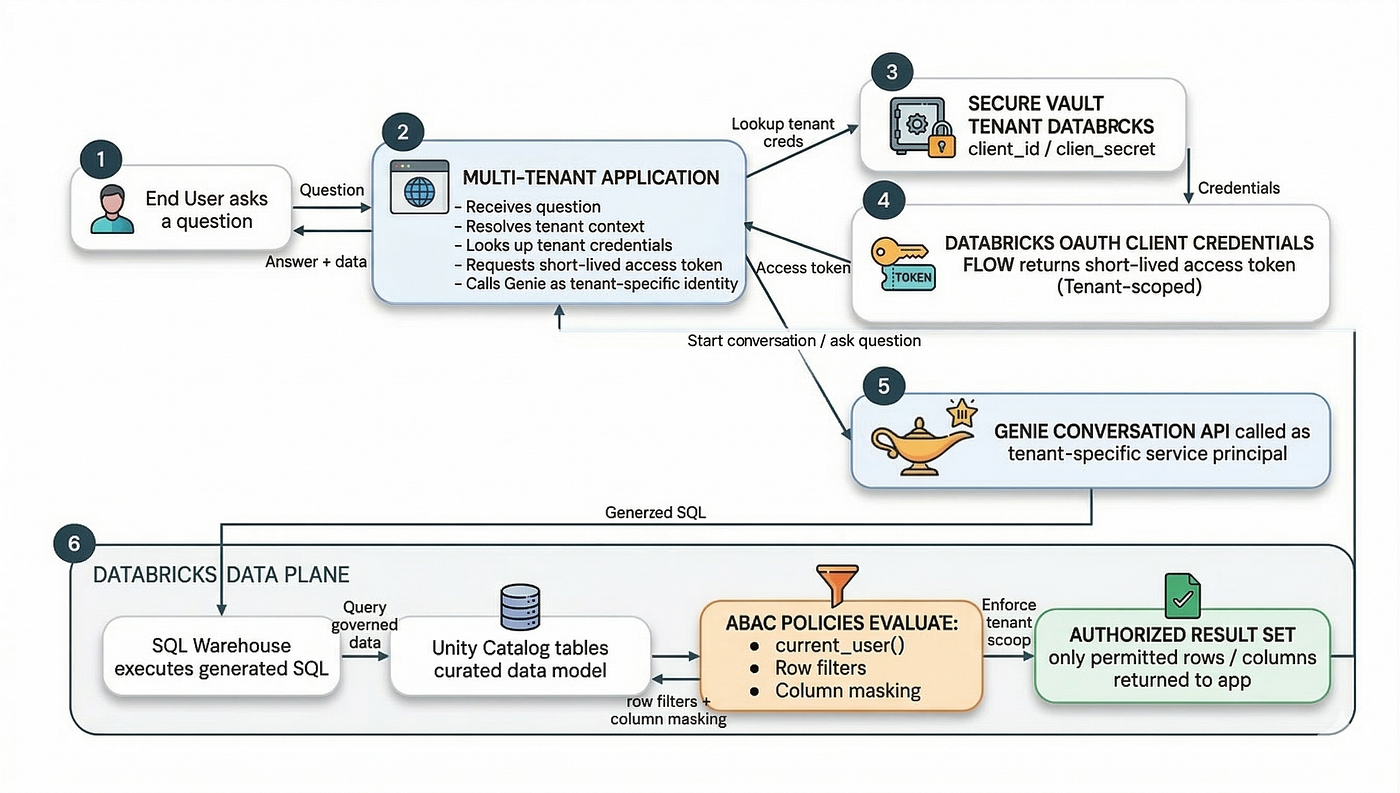
At a high level, the runtime flow looks like this:
- Your application receives a question from a user in a multi-tenant app.
- The app determines which tenant the request belongs to.
- The app retrieves that tenant’s Databricks service principal credentials from a secure vault.
- The app uses the OAuth client credentials flow to get an access token.
- The app calls the Genie Conversation API using that tenant-specific identity.
- Genie generates SQL against curated Unity Catalog tables (in a Genie space).
- ABAC policies evaluate current_user() during query execution.
- Only the rows and columns that the identity is allowed to access are returned.
That basic runtime architecture is what makes the pattern powerful: every request runs as a tenant-specific principal, so identity becomes the control point for access.
Why this pattern works
The major design choice here is to use a dedicated service principal (SP) per tenant (which we will elaborate on in later sections). That way, your application no longer has to be the primary enforcement layer for data isolation. Instead, Databricks governance via Unity Catalog handles it at query time.
When a request runs, Unity Catalog evaluates policies using the current caller, and because each tenant has its own SP, you can write rules directly against that identity. This dramatically simplifies the mental model. Rather than sprinkling tenant filters throughout your app and hoping they are always applied correctly, you let the Databricks Platform evaluate access where it matters most: when the SQL actually runs. The tradeoff is operational: you now have many identities and secrets to manage, so automation is essential.
Multi-Tenancy Design
Tenant isolation hinges on how you structure service principals and how Unity Catalog ABAC evaluates row filters and column masks at query time. Let’s clarify these terms to better articulate how they will serve the implementation in the proposed solution later in this blog.
What’s a service principal (SP)?
Databricks recommends using SPs as specialized identities for accessing Databricks resources because they avoid relying on individual user credentials. It provides a programmatic way to grant/restrict access to the Genie space(s) without defining how each individual user will query the underlying data. Since all requests run under the tenant SP, filters/masks apply consistently without per-user identity.
What’s an attribute-based access control (ABAC) policy?
ABAC in Unity Catalog is a governance model that lets you centrally express access rules using attributes and have them enforced automatically at query time. In practice, ABAC policies typically take the form of row filters (to limit which rows are visible) and column masks (to redact sensitive fields), and those policies can be inherited down the object hierarchy (catalog → schema → table). Under our recommended design, applications can authenticate via SPs and rely on ABAC to enforce tenant boundaries at the data layer, rather than implementing security solely in application code.
We will cover authoring ABAC policies in a later section, but you can read more at Unity Catalog attribute-based access control (ABAC). (AWS | Azure | GCP)
Implementation Guide
Prerequisites
Before implementing this pattern, make sure you have the following in place:
- Be an account admin and/or workspace admin (SP creation, generating OAuth secrets, etc.)
- Have access to the following:
- A Databricks workspace with the Databricks SQL entitlement
- At least CAN EDIT permissions on the Genie space
- CAN USE access on at least one pro or serverless SQL warehouse
- SELECT privileges on the data used in the space
- A control-plane process or service for onboarding tenants
- A secure secret store or vault to manage SP credentials
Additionally, to create OAuth secrets for SPs, you should also account for several ABAC-related constraints when designing this architecture. ABAC in Unity Catalog requires Serverless compute (AWS | Azure | GCP) or Standard compute running on Databricks Runtime (DBR) 16.4+, and there are policy limits to consider, such as one row filter per table per user and one mask per column per user. Those constraints should help inform how you design your governance and policy layer from the outset, avoiding conflicts or unnecessary complexity later.
For best practices, limitations, and example user-defined functions (UDFs), see UDFs for ABAC policies best practices (AWS | Azure | GCP)
Step 1: Provision a service principal for each tenant
The first step is to treat tenant identity as a first-class component of your onboarding process.
When a new tenant is created, your provisioning system should create (or retrieve) a dedicated SP for that tenant, assign it to the appropriate workspace, and treat that identity as the credential your application will use whenever it needs to execute requests on the tenant’s behalf. Your app should not create identities dynamically at runtime. Instead, identity provisioning should live in a separate onboarding or control-plane process responsible for identity lifecycle management.
Maintaining this separation is important. Your application runtime should consume tenant credentials rather than manage tenant identities directly. Centralizing identity provisioning within a control plane ensures clearer lifecycle management, stronger security practices, and a more maintainable multi-tenant architecture.
You can leverage the Account SCIM REST API to do this.
To execute the HTTP requests, you will need your Databricks account ID, the account console URL (such as https://accounts.cloud.databricks.com for AWS), and an account-level access token. You will also need the exact SCIM ID of the group where you plan to assign the new service principal.
Note: The code can also be run with WorkspaceClient since workspace admins can also add SPs to the Databricks account.
import os
import requests

# Retrieve configuration from environment variables
ACCOUNT_ID = os.environ["DATABRICKS_ACCOUNT_ID"]
ACCOUNT_HOST = "https://accounts.cloud.databricks.com"
TOKEN = os.environ["DATABRICKS_ACCOUNT_TOKEN"]  # admin token

# Define a function that creates a new service principal
def create_service_principal(display_name: str):

    # Build the account-level API endpoint for creating a service principal
    url = (
        f"{ACCOUNT_HOST}/api/2.0/accounts/{ACCOUNT_ID}"
        f"/scim/v2/ServicePrincipals"
    )

    # Send a POST request to Databricks to create the service principal
    response = requests.post(
        url,
        headers={
            "Authorization": f"Bearer {TOKEN}",
            "Content-Type": "application/scim+json"
        },
        json={
            "schemas": ["urn:ietf:params:scim:schemas:core:2.0:ServicePrincipal"],
            "displayName": display_name
        },
        timeout=30,
    )

    # Raise an exception if Databricks returns an HTTP error status
    response.raise_for_status()
    return response.json()
Not included above, but Databricks recommends assigning each SP in Unity Catalog to groups. They simplify access to workspaces, data, and other securable objects.
Check out Manage service principals (AWS | Azure | GCP) for more explanations on how to manage SPs for your Databricks account and workspaces.
Step 2: Generate and store the OAuth secret
Once the tenant’s SP has been created and registered in Unity Catalog, the next step is to generate an OAuth secret that your application can use as the client_secret in the OAuth client-credentials flow.
You can create this secret programmatically using the Databricks API.
Note: A service principal can have up to five OAuth secrets, each with a configurable lifetime (up to two years).
import os
import requests

# Retrieve configuration from environment variables
ACCOUNT_ID = os.environ["DATABRICKS_ACCOUNT_ID"]
ACCOUNT_HOST = "https://accounts.cloud.databricks.com"
TOKEN = os.environ["DATABRICKS_ACCOUNT_TOKEN"]  # admin token

# Define a function that creates an OAuth secret for a given SP ID
def create_oauth_secret(service_principal_id: str):

    # Build the account-level API endpoint for creating a SP secret
    url = (
        f"{ACCOUNT_HOST}/api/2.0/accounts/{ACCOUNT_ID}"
        f"/servicePrincipals/{service_principal_id}/credentials/secrets"
    )

    # Send a POST request to Databricks to create the OAuth secret
    response = requests.post(
        url,
        headers={"Authorization": f"Bearer {TOKEN}"},
        json={"lifetime": "15552000s"},  # 180 days
        timeout=30,
    )

    # Raise an exception if Databricks returns an HTTP error status
    response.raise_for_status()

    return response.json()
One important detail is that the OAuth secret string value is displayed only once in the API response and cannot be retrieved again. As soon as it is shown, you should immediately store it in a secure secrets manager and never persist it in plaintext outside the vault. In practice, you will store the tenant’s client_id, client_secret, secret_id, and expires_at so you can authenticate at runtime and rotate secrets safely later.
Check out Authorize service principal access to Databricks with OAuth (AWS | Azure | GCP) for more information and instructions on how to do this via UI.
Step 3: Grant the minimum permissions during provisioning
After the SP and its associated OAuth secret are created, the next step is to grant only the permissions required for the tenant to use Genie and query the data it is authorized to access.
To use a Genie space, the SP must have two things:
- The consumer access or Databricks SQL entitlement
- At least SELECT privileges on all of the Unity Catalog data objects used in the space
Note: Queries run using the compute credentials embedded by the author who configured the warehouse. End users do not need direct warehouse permissions.
This should be part of your automated provisioning flow, not a manual admin step. A Python example using the Databricks SDK for Genie permissions looks like the following:
import requests

WORKSPACE_HOST = "https://<your-workspace-instance>.cloud.databricks.com"
WORKSPACE_TOKEN = os.environ["DATABRICKS_WORKSPACE_TOKEN"]

def provision_genie_client_permissions(
    host: str,
    token: str,
    sp_app_id: str,      # client_id of the tenant SP
    genie_space_id: str,
):
    headers = {"Authorization": f"Bearer {TOKEN}"}

    # Allow the service principal to run the Genie space
    requests.patch(
        f"{WORKSPACE_HOST}/api/2.0/permissions/genie/{genie_space_id}",
        headers=headers,
        json={
            "access_control_list": [{
                "service_principal_name": sp_app_id,
                "permission_level": "CAN_RUN"
            }]
        },
        timeout=15
    ).raise_for_status()
To grant SELECT permissions on the data, you can use SQL:
GRANT USE CATALOG ON CATALOG main TO `<service_principal>`;
GRANT USE SCHEMA ON SCHEMA main.sales TO `<service_principal>`;
GRANT SELECT ON ALL TABLES IN SCHEMA main.sales TO `<service_principal>`
At this point, the SP has sufficient permissions to function (to query the underlying tables of the Genie space). However, we still have not defined the guardrails that control what data it can actually see. This is where ABAC policies come into play, enforcing which rows and columns are visible to the SP at query time.
Step 4: Enforce tenant isolation with ABAC
With identities and permissions in place, you can now enforce the actual tenant boundary. Because each tenant has its own SP, you can write ABAC policies that evaluate the current identity directly.
A common pattern is to maintain a mapping table between SPs and tenant IDs, then use a function that checks whether the current caller is authorized for a given row. For example:
CREATE OR REPLACE FUNCTION main.sec.filter_by_tenant(tenant_id STRING)
RETURNS BOOLEAN
RETURN EXISTS (
  SELECT 1
  FROM main.sec.tenant_acl t
  WHERE t.tenant_id = tenant_id
    AND t.principal = current_user()
);
You can then apply that function as a row filter:
ALTER TABLE main.sales.customer_orders
SET ROW FILTER main.sec.filter_by_tenant ON (tenant_id);
At that point, queries are automatically scoped at execution time. It does not matter whether the SQL was written by hand or generated by Genie — if the current SP is not allowed to see a row, that row will not be returned.
This is one of the strongest aspects of the pattern: enforcement stays close to the data rather than in the application layer.
Column masking follows the same idea. If you have fields such as SSNs, account numbers, or other sensitive attributes, you can apply a masking policy so those values are exposed only when the SP is explicitly authorized.
Step 5: Curate the Genie space for quality answers
Once the security model for your tenants is in place, you can focus on improving the quality of responses in your Genie space. A Genie space is only as good as the data model and business context it understands, so it is worth spending time curating it.
Focus on adding clear table and column descriptions, defining joins and key measures, and including business-friendly synonyms or metadata so Genie can interpret questions accurately. Provide a small set of high-quality example queries — typically five to ten — to demonstrate common questions and correct SQL patterns. Keep the space focused on a small number of well-understood tables, and use a Serverless SQL Warehouse when available for better performance and scalability.
See Curate an effective Genie space (AWS | Azure | GCP) for more best practices defining a new space.
Step 6: Authenticate per tenant at runtime
With provisioning complete, your runtime path becomes straightforward. When the application receives a request for a given tenant, it loads that tenant’s stored credentials and exchanges them for a Databricks access token using the OAuth client-credentials flow.
A simple example looks like this:
import requests

ACCOUNT_HOST = "https://accounts.cloud.databricks.com"
ACCOUNT_ID = "<your_account_id>"
CLIENT_ID = "<tenant_client_id>"
CLIENT_SECRET = "<tenant_secret>"

resp = requests.post(
    f"{ACCOUNT_HOST}/oidc/accounts/{ACCOUNT_ID}/v1/token",
    auth=(CLIENT_ID, CLIENT_SECRET),
    data={"grant_type": "client_credentials", "scope": "all-apis"},
    timeout=15
)

resp.raise_for_status()
token = resp.json()["access_token"]
These tokens are short-lived (roughly one hour), so your application should cache and refresh them automatically rather than requesting a new token for every call. If you are using the Databricks SDK, token handling is typically abstracted for you.
At this point, you have everything you need for secure tenant-scoped execution: a tenant-specific SP, a short-lived access token, and ABAC policies that evaluate that identity when the query runs.
Step 7: Call the Genie conversation API
You can now call Genie. The API is stateful, so the typical pattern is to start a conversation, receive a conversation ID and message ID, and then poll until the message completes and results are available.
The simplified flow looks like this:
import time
import requests

WORKSPACE_HOST = "https://<your-workspace-instance>.cloud.databricks.com"
WORKSPACE_TOKEN = os.environ["DATABRICKS_WORKSPACE_TOKEN"]
SPACE_ID = "<your_genie_space_id>"

headers = {"Authorization": f"Bearer {WORKSPACE_TOKEN}"}

# 1. Start the Genie conversation
start = requests.post(
    f"{WORKSPACE_HOST}/api/2.0/genie/spaces/{SPACE_ID}/start-conversation",
    json={"content": "Top customers by revenue last month"},
    headers=headers,
    timeout=15
)
start.raise_for_status()

# Extract conversation and message IDs
conversation_id = start.json()["conversation"]["id"]
message_id = start_data["message"]["id"]

# 2. Poll for the execution to finish
for _ in range(60):
    poll = requests.get(
        f"{WORKSPACE_HOST}/api/2.0/genie/spaces/{SPACE_ID}/conversations/"
        f"{conversation_id}/messages/{message_id}",
        headers=headers,
        timeout=15
    )
    poll.raise_for_status()

    status = poll.json()["status"]

    if status == "COMPLETED":
        break

    time.sleep(2)
In production, you will want to add robust retry logic, exponential backoff, timeout handling, and monitoring around failures or API limits. But conceptually, this is the full runtime loop: authenticate as the tenant, call Genie, let Genie generate SQL, and rely on ABAC to enforce tenant boundaries during execution.
Check out Best practices for using the Genie API (AWS | Azure | GCP) to maintain performance and reliability when using the Genie API.
Operating this pattern in production
Once your core flow is live, the heavy lifting shifts from initial implementation to ongoing operations. To keep your system secure, efficient, and easy to maintain, focus on four key areas.
1. Secret lifecycle management
Secrets are never a one-time setup step. They require regular rotation, with a reasonable rule of thumb being every 60 to 180 days. Fortunately, Databricks supports multiple active secrets per SP, enabling zero-downtime rotation. The overlap between old and new secrets is what keeps your production environment safe during the transition.
A step-by-step flow for rotating your secrets:
- Create a new secret and store it securely in your vault
- Update your application to use this newly generated secret
- Verify that all traffic has successfully switched over
- Revoke the old secret only after confirming the new one works
2. Clean deprovisioning
When a tenant is offboarded, you should carefully reverse the initial setup steps. Keeping this teardown process as part of your standard control-plane lifecycle makes the entire system much easier to reason about over time. Be sure to revoke active secrets, remove permissions, and optionally delete the SP entirely.
3. Observability and Genie space hygiene
As your platform usage grows, you need deep visibility into how the system is behaving. Keep a close eye on query patterns, performance bottlenecks, conversation volume, and audit signals tied to policy enforcement. You also need to maintain good space hygiene by deleting old records, especially since spaces often have strict conversation limits.
Note: As of the date of this publication, a Genie space has a limit of 10,000 conversations.
4. Evolving Your ABAC Model
Finally, expect your ABAC model to evolve as your data model changes. New tables, new sensitive fields, and new use cases will almost certainly require updates to your filters and masks. That is normal. The advantage of this architecture is that these changes occur in the governed policy and metadata layers, rather than by rewriting application filtering logic.
Operating this pattern in production
What makes this pattern highly effective is its clean separation of responsibilities, decoupling application logic from data governance. Service principals establish clear tenant identities, while OAuth provides a secure mechanism for your application to assume those identities at runtime. At the data layer, Unity Catalog ABAC policies dynamically enforce row and column-level access rules, freeing your application from managing complex, error-prone tenant filters. By combining these robust governance guardrails with the Genie Conversation API, you can confidently scale self-service analytics and securely deliver a rich, natural language data experience to external users directly within your application. Ultimately, this approach yields a multi-tenant architecture that is fundamentally easier to secure, scale, and maintain than pushing tenant filters deep into application code.
Resources
- Genie Conversation APIs/SDK
- For more on embedding Genie into your custom web apps with Genie Conversation APIs, check out Use Genie Everywhere with Enterprise OAuth.
- For more on building a Genie space from scratch to production-ready through benchmark evaluation and systematic optimization, check out How to Build Production-Ready Genie Spaces, and Build Trust Along the Way.
메타데이터
- post_id
- d307bfbfc89b
- slug
- embedding-genie-api-for-a-multi-tenant-application-d307bfbfc89b
- url
- https://medium.com/dbsql-sme-engineering/embedding-genie-api-for-a-multi-tenant-application-d307bfbfc89b
- canonical_url
- https://medium.com/dbsql-sme-engineering/embedding-genie-api-for-a-multi-tenant-application-d307bfbfc89b
- author_url
- https://medium.com/@rosenberg.josh34
- status
- ok
- fetched_at
- 2026-06-14 16:15:44