Expo Go Is Changing on the App Store: What It Means for How You Learn React Native
The free app every tutorial tells beginners to install is stuck on an older version — and the fix quietly changes the first thing you learn…
Expo Go Is Changing on the App Store: What It Means for How You Learn React Native
The free app every tutorial tells beginners to install is stuck on an older version — and the fix quietly changes the first thing you learn about building mobile apps.
You follow the tutorial exactly. You run npx create-expo-app, install Expo Go from the App Store on your phone, start the dev server, and scan the QR code that pops up in your terminal. This is supposed to be the magic moment — your code, running on your actual phone, in seconds.
Instead you get: “Project is incompatible with this version of Expo Go.” You didn’t write a single line yet. You’re staring at an error on an empty starter app, googling frantically, wondering what you broke. The answer is: nothing. You did everything right. The on-ramp itself moved.
Here’s what actually happened, and my thesis for this piece: Expo Go — the free, install-from-the-store app beginners have always used as their first step — is no longer guaranteed to match the latest React Native version, and that mismatch is quietly pushing the “real” first step toward something called a development build. This isn’t a disaster. But if you’re learning React Native right now, the very first instruction in half the tutorials online is subtly out of date, and nobody warns you before you hit the error.

What Expo Go is, and why beginners live on it
If you’re newer to this, a quick grounding. Expo Go is a free app you install from the App Store or Play Store that can run your in-progress React Native code without you building a real app first. You write JavaScript, scan a QR code, and your project appears inside Expo Go on your phone. No Xcode, no Android Studio, no waiting on a compile. Expo itself describes it as first and foremost an educational tool — a sandbox to help beginners take their first steps into mobile.
That convenience is exactly why every beginner tutorial reaches for it. It removes the scariest, most environment-specific part of mobile development — the native build toolchain — from day one. For years, “install Expo Go, scan the QR code” has been the reliable first win that keeps newcomers from quitting in the setup phase.
The catch is structural, and it’s the root of everything in this article. Expo Go is a single prebuilt app that bundles a fixed set of native code for one specific Expo SDK version. It can only run projects built for the SDK version it ships with. When your project’s SDK and the store’s Expo Go drift apart, the app does the only thing it can: it refuses the project.
What actually changed in May 2026
Here’s the precise sequence, from Expo’s own changelog — and it matters because the headlines oversimplify it.
As of early May 2026, Expo Go for SDK 55 was still waiting for approval on the Apple App Store, and Expo said plainly they couldn’t give a timeline. In the meantime, the App Store and Play Store versions of Expo Go stayed on SDK 54. Then SDK 56 shipped. So the store app was sitting on 54 while the newest projects defaulted to 56 — a two-version gap.
Expo Go is first and foremost an educational tool to help beginners take their first steps into mobile. If you’re using it for another purpose, migrate to a development build. — paraphrased from Expo’s changelog, “Expo Go and the App Store in May 2026”
That quote is the whole strategy in two sentences. Expo is narrowing what Expo Go is for. It’s a learning sandbox — and for anything past learning, the recommended path is a development build, which I’ll unpack shortly. The store-approval delay didn’t create this direction; it accelerated a nudge Expo had been giving since at least SDK 55.
Worth being clear about who actually feels this. If you’re an experienced developer already on development builds, this changed almost nothing for you — you left the shared Expo Go bottleneck behind long ago. The people who hit the wall are the newest ones: someone following a six-month-old YouTube tutorial, a bootcamp student on week one, a curious web developer testing whether mobile is approachable. They’re also the least equipped to diagnose a version mismatch, because they don’t yet have the mental model that “SDK version” is even a thing that can drift. The cost of this change lands almost entirely on the people with the least context to absorb it — which is exactly why writing it down plainly matters.
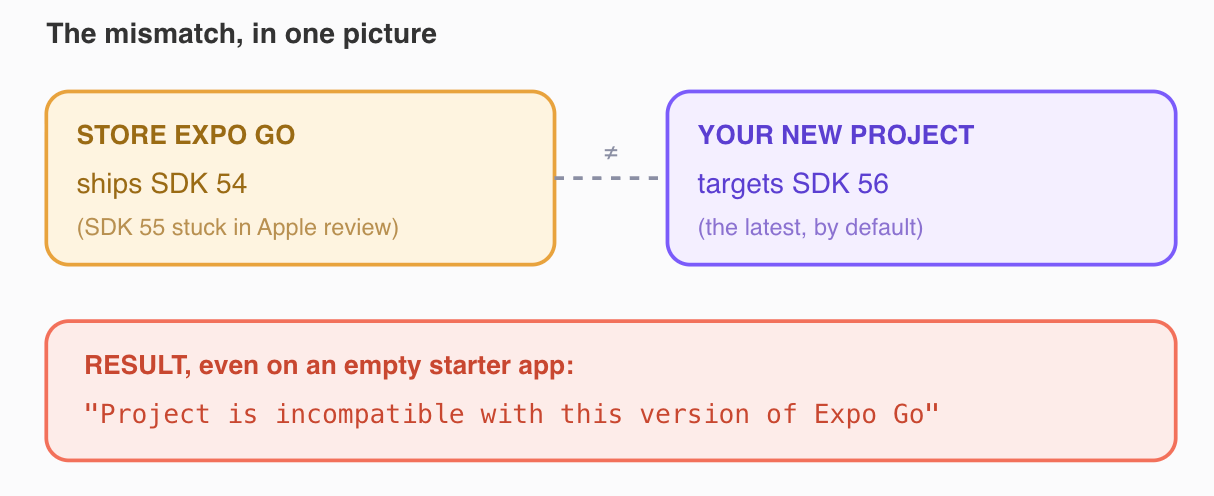
Why the error appears. The store’s Expo Go bundles one SDK (54, with 55 stuck in Apple review); a fresh project targets the newest (56). Because Expo Go can only run the SDK version it ships with, a newer project is rejected — and per Expo issue #46846, this reproduces on an untouched create-expo-app template, so beginners hit it with zero code written.
The honest correction to my own title
My title says “Expo Go is changing on the App Store.” That’s true, but two words would mislead you if I left them unqualified, so let me fix them.
Expo Go isn’t being removed. It’s not disappearing from the stores, and it’s not deprecated. The SDK 54 version remained downloadable throughout; you can still install Expo Go today and learn with it. What changed is that the store version stopped reliably tracking the latest SDK — a meaningful shift for anyone starting a brand-new project, but not the death of the app.
And “changing” undersells how fluid this is. Some of what I’m describing is a deliberate strategy (Expo steering serious use toward development builds) and some is a temporary situation (an Apple approval delay). Those are different things with different lifespans. By the time you read this, the specific version numbers may have moved — SDK 55 or 56 may have cleared review. The direction is what’s durable: Expo Go is being repositioned as a learning tool, full stop. Treat the exact version states in this piece as a snapshot, and verify the current status on Expo’s changelog before you teach anyone the old “just install Expo Go” line.
Honesty flag (first-person): The hook is written in second person (“you follow the tutorial…”) and describes a real, documented failure — per Expo issue #46846, the incompatibility error reproduces on an untouched create-expo-app template — but I am not claiming I personally sat and hit this error on my own device in a timed test. Every version number (54, 55, 56), the Apple-review delay, and the eas go mechanics come from Expo's published changelog, not from my own machine. If you want a first-person version, reproduce it yourself by creating an SDK 56 project and opening it in a store-installed Expo Go.
The three paths forward (and which one beginners should take)
Expo didn’t just shrug and leave learners stranded. There are three documented ways through, and they’re genuinely different in effort and payoff.
Path 1: Match the store — learn on the older SDK
The gentlest option. Starting with SDK 56, create-expo-app now prompts you to choose: initialize a project compatible with the App Store version of Expo Go, or use the latest Expo SDK. Pick the App-Store-compatible option and the classic flow still works — install Expo Go from the store, scan, done.
# SDK 56+ prompts you at creation time (simplified — check current docs)
npx create-expo-app@latest my-app
# → "Compatible with App Store Expo Go" or "Latest SDK"?
# Beginners: pick App-Store-compatible to keep scan-the-QR-code working.
For your first week of learning, this is the right call. You want to learn React Native concepts — components, state, navigation — not debug a version mismatch on day one. Staying on the store-compatible SDK keeps the friction near zero.
Path 2: Build your own Expo Go with eas go
For iOS, Expo offers eas go — an EAS CLI command that creates your own build of Expo Go and uploads it to TestFlight under your Apple Developer account, supporting SDK 55 and 56. The honest caveat, straight from Expo: this requires a paid Apple Developer Program membership. That's a real gate for a hobbyist beginner, so I'd file this under "for people who've already decided they're serious," not "for your first weekend."
# build your own Expo Go to TestFlight, iOS (simplified — check current docs)
eas go            # requires a paid Apple Developer Program membership
There’s also a no-account option worth knowing: you can download and install Expo Go for the iOS simulator at any SDK version straight from Expo CLI or expo.dev/go. That sidesteps the store entirely, but it only helps if you’re comfortable running a simulator on your machine — which again nudges you toward a little more setup than the pure scan-on-your-phone flow.
Path 3: The development build (where Expo is steering everyone)
This is the destination. A development build is your own custom version of the Expo Go runtime — it includes the exact native code your specific project needs, instead of the one-size-fits-all bundle the store app ships. You build it once, install it on your device or simulator, and from then on it behaves like Expo Go but always matches your project.
# the development-build path (simplified — check current docs)
npx expo install expo-dev-client
npx expo run:android   # or run:ios — builds + installs your custom client
npx expo start          # then scan as usual, into YOUR build
The tradeoff is real and worth saying clearly: a development build requires the native toolchain (Android Studio or Xcode) or a cloud build via EAS, which is precisely the setup step Expo Go was invented to skip. So Expo’s long-term direction asks beginners to confront the native build a little earlier than before — gentler than raw React Native, but not the pure zero-setup experience of the old days.
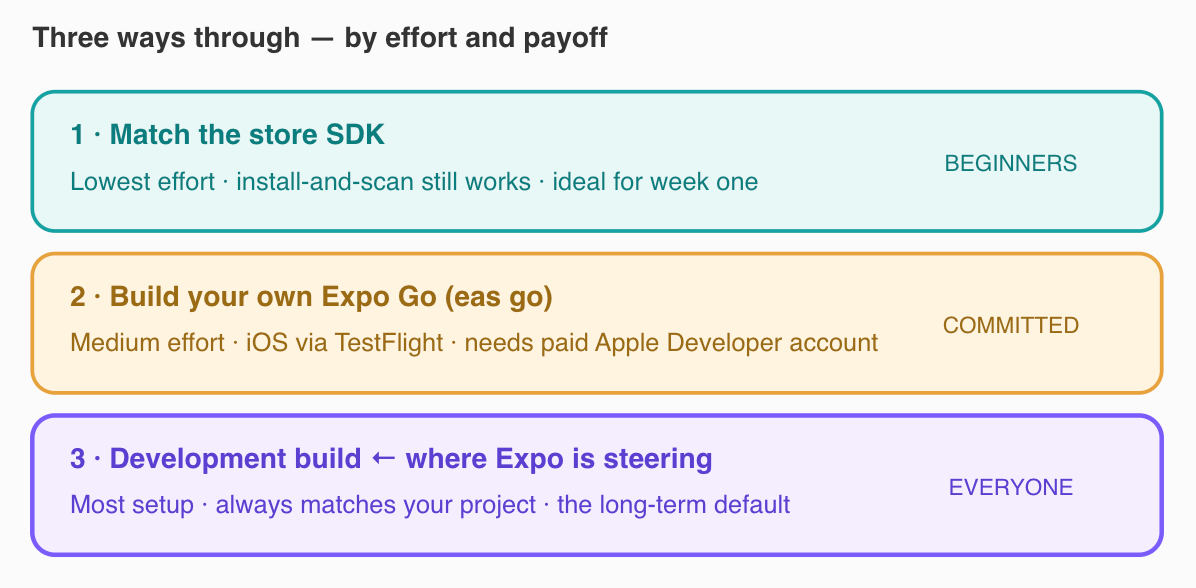
The three paths, ranked by effort. Beginners should start on Path 1 (match the store SDK, keep install-and-scan). eas go (Path 2) needs a paid Apple Developer account. The development build (Path 3) is where Expo is steering everyone long-term — it always matches your project, but asks you to meet the native build toolchain earlier than Expo Go ever did.
The honest counterargument: “this is good for beginners, actually”
Let me steelman the view that Expo is right to do this — because it’s a strong case, and I mostly believe it.
The argument goes like this. Expo Go always taught a small, comfortable lie. It let beginners build for weeks inside a sandbox that can’t represent a real shipped app — it can’t include custom native libraries, can’t reflect your real build, and eventually every learner hits a wall the moment they need a library Expo Go doesn’t bundle. At that point they have to learn development builds anyway, except now they’re emotionally invested in a project and frustrated that “the thing that worked” suddenly doesn’t. Front-loading the development build means you learn the real workflow from the start, on a throwaway project, when the stakes are zero. Ripping the band-aid early is kinder than ripping it at the worst moment.
There’s also a maintenance reality. A single prebuilt Expo Go that must bundle every popular native module for every SDK, shipped through two app-store review processes on someone else’s timeline, is a genuinely fragile thing to keep current — the Apple-review delay is proof. Development builds sidestep that entire bottleneck by letting each project carry its own native code. From an engineering standpoint, steering people off the shared bottleneck is just sound architecture.
Where the steelman cracks, though, is the on-ramp. The counterargument is right about eventual truth and wrong about first-touch psychology. The thing that makes React Native learnable for non-native developers is the ten-minute first win — code on your phone before your motivation runs out. Every minute of toolchain setup you move earlier is a minute closer to the quitting point for someone who isn’t yet sure they can do this at all. “Learn the real workflow immediately” is the correct advice for someone who’s already committed and the wrong advice for someone you’re trying to convert from curious to hooked. Both can be true. The tension isn’t a flaw in anyone’s reasoning; it’s a genuine trade between honesty and accessibility, and Expo has chosen honesty.
So the honest position isn’t “Expo is wrong.” It’s that they’ve optimized for the committed learner over the curious one — defensible, maybe even correct, but a real cost paid by the exact people who most need the easy win.
Practical takeaways
- If you’re in your first week, pick the App-Store-compatible option. When
create-expo-appprompts you, choose the version that matches store Expo Go so install-and-scan keeps working. Learn concepts first; meet the build toolchain later. - If you hit “incompatible with this version of Expo Go,” you didn’t break anything. It almost always means your project’s SDK is newer than the store app’s. Check your project’s SDK against the Expo Go version before debugging your code.
- Plan to learn development builds — just not on day one. It’s where Expo is steering everyone, so budget an afternoon for it once the basics click.
expo-dev-client+expo run:android/iosis the entry point. - Only reach for
eas goif you have a paid Apple Developer account. It rebuilds Expo Go to TestFlight for newer SDKs on iOS, but the membership requirement makes it a poor fit for casual first steps. - Verify version states before trusting any tutorial — including this one. SDK numbers and approval statuses are moving; Expo’s changelog is the source of truth. A tutorial that says “just install Expo Go” without a version caveat may already be stale.
- If you teach or write tutorials, add the SDK caveat. One sentence — “make sure your project SDK matches your Expo Go version” — saves a beginner an hour of self-blame.
What you keep
The lasting lesson here isn’t about one app or one version gap — those resolve and reshuffle constantly. It’s about how learning tools quietly shape what we believe is “normal.” A whole generation of React Native developers learned that mobile development starts with scanning a QR code, because that’s the on-ramp they were handed. Change the on-ramp and you change the mental model of the people who come after. The interesting question Expo is really asking — and it’s bigger than Expo — is whether a learning tool should optimize for the easiest possible first step, or the most honest one. There’s no clean answer. But the next time a tool makes something feel effortless, it’s worth asking what it’s quietly deciding you don’t need to understand yet — and when that bill comes due.
And tell me in the comments: what was the error that made you think you’d broken everything, when really the tool had just moved underneath you? Drop the error message and what it actually turned out to be — those stories save the next beginner an afternoon of self-doubt.
메타데이터
- post_id
- d339b4c20acd
- slug
- expo-go-is-changing-on-the-app-store-what-it-means-for-how-you-learn-react-native-d339b4c20acd
- url
- https://medium.com/react-native-journal/expo-go-is-changing-on-the-app-store-what-it-means-for-how-you-learn-react-native-d339b4c20acd
- canonical_url
- https://medium.com/react-native-journal/expo-go-is-changing-on-the-app-store-what-it-means-for-how-you-learn-react-native-d339b4c20acd
- author_url
- https://medium.com/@sureshdotariya
- status
- ok
- fetched_at
- 2026-06-21 12:17:11