Root Permissions in Linux🐧
Overview
Root Permissions in Linux🐧

Overview
This project focused on implementing secure and efficient IT infrastructure management for LevelUp Bank by leveraging Linux user and group permissions. The project mirrors real-world IT administration challenges, including access control, file management, and automation — critical skills for system administrators, DevOps engineers, and IT security professionals.

well not the root I'm speaking of
What is Root User?
A root user is a special user account with unrestricted access to a system’s files, programs, and resources. It’s also known as the superuser.
Linux and Unix
- The root user has a User ID (UID) of 0, which gives it the highest level of permissions
- The root user can execute any command, change file permissions, and alter files
- System administrators often have their own root accounts with passwords
- Misuse of the root user can damage system security and integrity
Mac
- The root user is disabled by default
- It’s recommended to use the sudo command-line tool instead of logging in as the root user
- You can use Directory Utility to enable the root user or change the root password
AWS
- The AWS account root user has complete access to all AWS services and resources in the account
- You should safeguard your root user credentials and only use them for tasks that require root access
I accessed my Ubuntu server via AWS console and connected using ssh command on local machine
Then used switched to root user sudo su


- sudo → Runs the command with superuser (root) privileges.
- su → Switches to the root user.
- Your prompt should change from $ to #, indicating root access.
Create Role-Specific Directories
I ran this command mkdir /Development /Operations /Analytics
- mkdir → Creates new directories in / (root directory).📁
- /Development, /Operations, /Analytics → These directories will store departmental files
These directories correspond to different business units within LevelUp Bank.
Create Dummy Files
I used the touch command which lets you create empty files 📁
touch /Development/dev_file1 /Development/dev_file2
touch /Operations/ops_file1 /Operations/ops_file2
touch /Analytics/analytics_file1 /Analytics/analytics_file2

Each directory contains blank files representing work-related data.
Need to run ls -l/ to verify
Create User Groups 👥
I had to use the following commands
groupadd Developers
groupadd Operations
groupadd “Data Analysts”
Each team is assigned a Linux group for controlled access
Assign Group Ownership to Directories
What is chown?
chown command changes the owner of a file or directory on Unix-like operating systems. You can use chown to specify a new user or group to own a file or directory
chown :Developers /Development
chown :Operations /Operations
chown :”Data Analysts” /Analytics
This ensures that each group owns its respective directory.

Set Directory Permissions

No it’s chmod
What is chmod?
chmod is the command and system call used to change the access permissions and the special mode flags of file system objects. Collectively these were originally called its modes, and the name chmod was chosen as an abbreviation of change mode.
chmod 770 /Development
chmod 770 /Operations
chmod 770 /Analytics
- 7 (rwx) — Full access for the group owner.
- 0 ( — -) — No access for others.

Create Users and Assign Them to Groups
I used the useradd command
useradd -m -s /bin/bash -G Developers -c “Jess Waller” jwaller
useradd -m -s /bin/bash -G Operations -c “Blake Dorsey” bdorsey
useradd -m -s /bin/bash -G “Data Analysts” -c “Joey Ewart”
The -m option creates a home directory (/home/username) for the new user.
- If this option is not used, the user will be created without a home directory.
- The default configuration files from
/etc/skel/are copied into the new home directory. - The
-soption sets the default shell for the user. - If this option is not specified, the default shell is usually
**/bin/sh** or whatever is set in/etc/default/useradd
Each user is associated with their respective team.
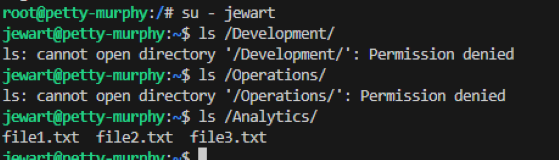
Verify Group-Based Access Control
Switch to each user and confirm access:
su — jwaller
ls /Development # Should work
ls /Operations # Should deny access
I had to repeat for other users.


Restrict Users to View Only Their Own Profile
su -bdorsey
chmod 700 /home/jwaller
chmod 700 /home/bdorsey

chmod 700 /home/jewart
- 7 (rwx) — Owner can access their own profile.
- 0 ( — -) — Others cannot view it.
Automate Everything you just did with Bash Script

What is a Bash script
A bash script is a sequence of commands written in a file that can be executed in the Bash shell. It is used to automate tasks, create tools, and perform complex operations on a Linux or Unix-like system.
A bash script typically starts with a shebang line, which specifies the interpreter for the script. For bash scripts, the shebang line is usually #!/bin/bash. After the shebang, the script contains a series of commands, comments, and control structures.
Common Uses
- Automation: Automating repetitive tasks such as file processing, system administration, and software deployment.
- Scripting tools: Creating custom tools for specific tasks, such as data analysis, system monitoring, and network management.
- System administration: Managing users, files, and processes on a Linux or Unix system.
- Software development: Building and deploying software applications.

Oh Baby
Create and Run a Script
I need to make sure I am in the correct path/directory where i want to run this script.
I need to use a text editor and its a type of computer program that edits plain text.

I will b using nano as my text editor
Nano is a command-line text editor that comes pre-installed with most Linux distributions. It’s designed to be user-friendly, with a simple interface that resembles popular graphical text editors..
nano setup_levelup.sh
#!/bin/bash
# Creating directories
mkdir /Development /Operations /Analytics

# Creating groups
groupadd Developers
groupadd Operations
groupadd "Data Analysts"

# Assigning group ownership
chown :Developers /Development
chown :Operations /Operations
chown :"Data Analysts" /Analytics

# Setting permissions
chmod 770 /Development
chmod 770 /Operations
chmod 770 /Analytics

# Creating users
useradd -m -s /bin/bash -G Developers -c "Jess Waller" jwaller
useradd -m -s /bin/bash -G Operations -c "Blake Dorsey" bdorsey
useradd -m -s /bin/bash -G "Data Analysts" -c "Joey Ewart" jewart

# Restricting user profile access
chmod 700 /home/jwaller
chmod 700 /home/bdorsey
chmod 700 /home/jewart

echo "Setup complete!"
Save and exit, then make the script executable:
chmod +x setup_levelup.sh
Run the script:
sudo ./setup_levelup.sh

In order to make my script executable i need to give permissions to the file chmod +x setup_levelup_bank.sh
No longer running this as root by the way so sudo ./setup_levelup_bank.sh

What Does ./ Mean?
**.refers to the current directory**.**./setup_levelup_bank.sh** tells Bash "run the script from the current directory."
Conclusion
This project successfully demonstrates secure and organized IT infrastructure management by implementing proper user permissions, directory access control, and automation
메타데이터
- post_id
- d35c0e144d53
- slug
- root-permissions-in-linux-d35c0e144d53
- url
- https://medium.com/@derrick.pope75/root-permissions-in-linux-d35c0e144d53
- canonical_url
- https://medium.com/@derrick.pope75/root-permissions-in-linux-d35c0e144d53
- author_url
- https://medium.com/@derrick.pope75
- status
- ok
- fetched_at
- 2026-06-26 06:47:43


