Everything You Wanted to Know about eBooks, but Were Afraid to Ask
I get a ton of clients who come to me wanting me to turn their book into an eBook. We get two questions into the conversation, and it’s…
Everything You Wanted to Know about eBooks, but Were Afraid to Ask
I get a ton of clients who come to me wanting me to turn their book into an eBook. We get two questions into the conversation, and it’s clear they don’t know what an eBook is. “eBook” has become this catch-all term that sounds simple on the surface and turns into digital black magic the second you have to work with it.
I’m not trying to knock anyone for a knowledge gap, but if you’re an author, you need to understand what an eBook is and isn’t. If you don’t understand what an eBook is, you slow everything down. You ask for things that don’t translate. You can’t review files. You create friction where there shouldn’t be any.
And at a certain point, that friction costs money or kills the project outright, so let’s strip this down and make understanding eBooks practical.
What an eBook Is Not
Let’s clear this up, because this is where the confusion lives. An eBook is not:
- A print book listed on Amazon. That’s a listing, not a digital reading file.
- A PDF. That’s a fixed layout document. Different purpose, different behavior.
- A fillable workbook. eBooks are not built for typing into fields. Some devices fake it; most don’t. You’ll frustrate readers fast.
- A Word file with a cover added. That’s a draft, not a finished product.
- A guarantee of identical appearance across devices. Different apps render differently.
Once you understand that, you stop asking the format to do things it was never designed to do.
What Is an eBook
An eBook is a digital book file designed to be read across desktops, tablets, and phones. That’s the clean definition, but it doesn’t tell the whole story. Under the hood, eBooks are a lot like websites. Both websites and ebooks use HTML and CSS. Your chapters are essentially individual web pages. Your headings, paragraphs, and images are all defined with code that tells the device how to display them.
Most of the time, that ball of code is in EPUB format. This is a structure that interprets and organizes all of that code and spits out an eBook. All EPUBs are eBooks, but not all eBooks are EPUBs. It’s often enough that you can treat EPUBs as the default starting point. Just as PDF has become the go-to format for static documents, EPUB has become the go-to format for digital books. It’s built for reading on an electronic device, not printing.
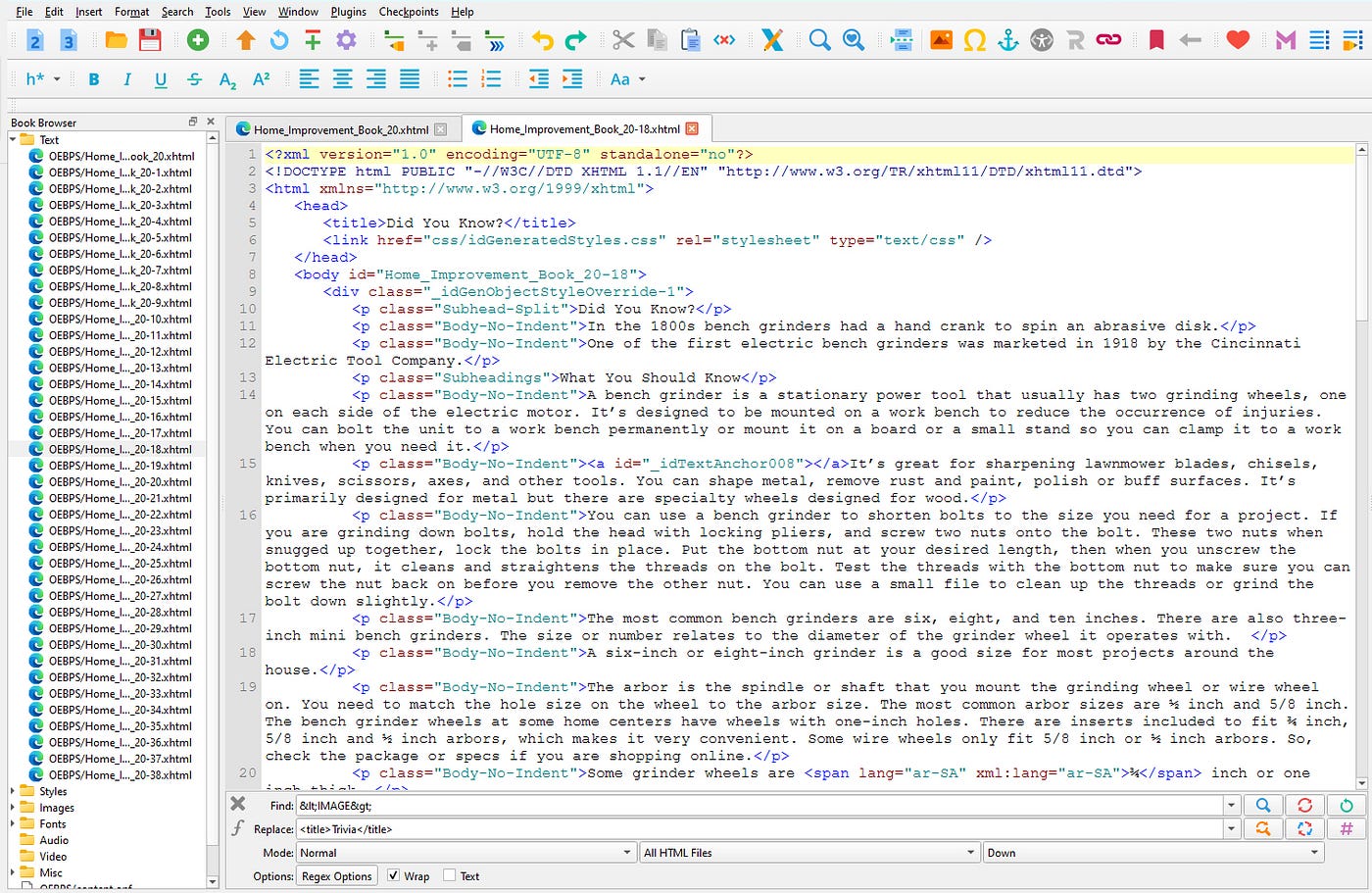
What an ePub file looks like under the hood.
A reflowable eBook is closer to a side-scrolling webpage than a printed page. The text flows. It adjusts. It responds to the device and the reader’s settings. That’s why most standard books, especially those that are text-heavy, exist as reflowable EPUB 2.0.1 files.
A fixed-layout eBook, often tied to EPUB 3.0, behaves more like a PDF. The layout is locked in place. That sounds great until you try reading it on your phone. Now you’re pinching, zooming, and panning just to get through a paragraph. The experience breaks down fast.
So while fixed layout has its place, think children’s books, comics, heavily designed content, it’s not the default for a reason.
This is where I see projects bog down. The real-world takeaway isn’t “newer is better.” It’s “what actually works everywhere.”
EPUB vs MOBI (And Why You Can Stop Worrying About It)
This is where a lot of outdated advice still lingers. MOBI is Amazon’s proprietary eBook format for Kindle devices. For a long time, people thought you needed both an EPUB and MOBI file to publish properly.
You didn’t and still don’t. Amazon gave up that fight years ago. Through Kindle Direct Publishing (KDP), they’ve been recommending EPUB uploads for a long time now. You upload an EPUB, and KDP automatically converts it to their internal Kindle format.
Technically, many modern Kindle devices can now open EPUB files. It’s not always seamless, and there are still hoops to jump through depending on how you send the file, but the point stands. You do not need to create and manage both formats. One clean EPUB file is the standard workflow.
What Trips People Up
This is where I see projects bog down with reflowable eBooks. People think:
- An eBook should look exactly like a print book.
- They can control every line break and page layout.
- A Word document is basically an eBook already.
- A PDF is “close enough” or is an eBook.
None of that holds up in practice. An eBook is flexible by design. You control the structure. The reader controls how it’s displayed. That means tables can shift. Images can move to their own screen. Text can rewrap. If you try to force it to behave like print, you’re fighting the format.
That’s because there are no pages in an eBook. What you’re really working with is a continuous flow of content that the device divides into screens on the fly. Change the font size, and suddenly your Chapter 1 is three screens longer. Switch from a tablet to a phone, and everything reshuffles again. Once you understand that, a lot of the frustration disappears.
You stop asking for pixel-perfect control that doesn’t exist. You start focusing on a clean structure, a clear hierarchy, and a reading experience that works no matter how or where your book is opened. If you can accept that early in the process, everything else becomes a whole lot easier.
Open the File
This sounds basic, but it’s where a surprising number of people get stuck. If you’re working on an eBook, you need to be able to open and review an EPUB file. Two tools make that easy:
- Adobe Digital Editions — simple desktop reader for EPUB files
- Kindle Previewer — shows how your book will render across Kindle devices
If someone sends you your book and your response is “I can’t open this,” you’re not reviewing your work.
Why This Matters
Understanding eBooks isn’t about becoming a tech expert. You don’t want to slow down a process you’re paying for. If you’re going the traditional publishing route, agents or publishing houses don’t want to spend time teaching you the basics. That has long-lasting repercussions on your relationship with them. Imagine getting dropped because you’re difficult to work with.
When I have to stop and explain how an eBook works, how to open it, or why something won’t behave like print, that time gets billed. I don’t do that to gouge a client. I quote a price based on my scope of work. If it’s outside that scope, you get billed. You wouldn’t think the kid you pay to cut your grass should also make you dinner and wash your car for free. So why would you think a freelancer should teach you a skill?
Understanding what an eBook is doesn’t make you a better writer. It keeps you from wasting time, money, and goodwill on things that shouldn’t be problems in the first place.
My website: www.briankannard.com
Instagram: https://www.instagram.com/briankannard/
Facebook: https://www.facebook.com/profile.php?id=61579818699044
메타데이터
- post_id
- d366b8d3db0c
- slug
- everything-you-wanted-to-know-about-ebooks-but-were-afraid-to-ask-d366b8d3db0c
- url
- https://medium.com/@briankannard/everything-you-wanted-to-know-about-ebooks-but-were-afraid-to-ask-d366b8d3db0c
- canonical_url
- https://medium.com/@briankannard/everything-you-wanted-to-know-about-ebooks-but-were-afraid-to-ask-d366b8d3db0c
- author_url
- https://medium.com/@briankannard
- status
- ok
- fetched_at
- 2026-06-16 19:09:56