Building an Enterprise Event-Driven DevOps Platform on Azure: From Commit to Kubernetes (Part 1)
Modern platform engineering is less about deploying a single application and more about designing an ecosystem where infrastructure, CI/CD…
Building an Enterprise Event-Driven DevOps Platform on Azure: From Commit to Kubernetes (Part 1)

Modern platform engineering is less about deploying a single application and more about designing an ecosystem where infrastructure, CI/CD, security, and runtime orchestration work together seamlessly.
In this project, I set out to build a production-style DevOps platform using Azure, Kubernetes, GitOps, and microservices.
The result is a system where a developer can push code to GitHub and have it automatically built, scanned, containerized, and deployed into an AKS cluster through ArgoCD and Helm.
This article covers Part 1 of the project, where the focus is on:
- Infrastructure as Code
- CI/CD pipelines
- GitOps deployment
- Kubernetes platform setup
- Running a multi-language microservices architecture
In Part 2, I’ll extend this system by integrating Cosmos DB, Redis Cache, Azure Service Bus event processing, and deep observability layers.
The full project code is available here:
GitHub Repository → https://github.com/jaeveloper/sre-proj-upgrade
The microservices used in this project are based on Google’s well-known microservices demo: https://github.com/GoogleCloudPlatform/microservices-demo/tree/main
The Architecture
Below is the architecture diagram I designed for this project.
It represents the entire lifecycle from developer commit to running microservices inside Kubernetes.
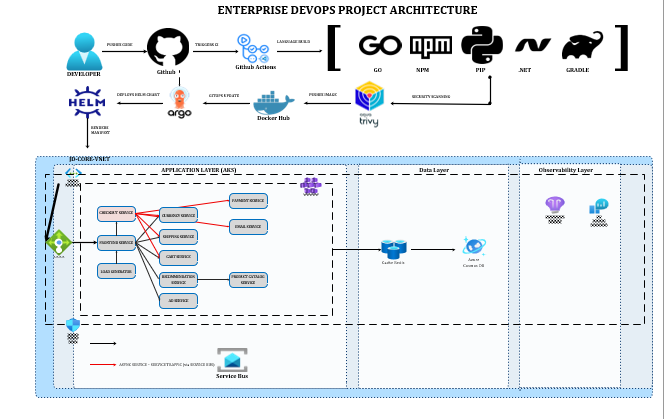
The architecture consists of several layers::
A developer writes code. The code is pushed to GitHub. CI pipelines build the application. Security scanners check for vulnerabilities. Containers are built and stored in a registry. A GitOps controller deploys those containers into Kubernetes.
That entire lifecycle is what this project implements.
When a developer pushes code, the platform automatically moves it through the following flow:
Developer → GitHub → GitHub Actions → Trivy Security Scan → DockerHub → ArgoCD → Helm → Kubernetes
Once deployed, the application runs inside Azure Kubernetes Service (AKS) as a distributed microservices system.
At runtime the application behaves like this:
Browser ↓ Frontend ↓ Core Microservices (gRPC) ↓ Checkout Service ↓ Azure Service Bus ↓ KEDA Workers ↓ Payment / Email / Shipping
The frontend acts as the single entry point into the system, communicating with the rest of the services internally through gRPC.
This architecture keeps the external surface area minimal while allowing internal services to communicate efficiently inside the cluster.
Starting With Infrastructure
Before any applications could run, the cloud platform had to exist.
Everything in this environment was provisioned using Terraform.
The Terraform modules build the entire Azure foundation required for the platform:
AKS Kubernetes cluster Virtual networking Azure Service Bus Azure Cache for Redis Cosmos DB Azure Workload Identity configuration Observability infrastructure placeholders
Once Terraform finished provisioning the cluster, connecting to it was the first real confirmation that the platform was alive.
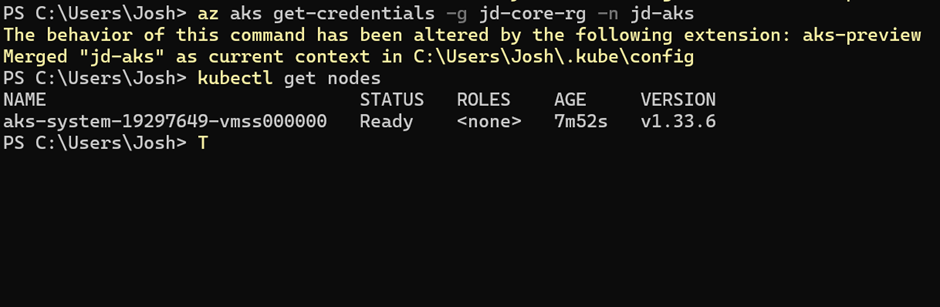
IMAGE A shows the AKS cluster after retrieving credentials and listing the nodes.
At this stage, Kubernetes was running but completely empty — the perfect blank canvas.
A Microservices Playground
To simulate a realistic distributed system, I used Google’s Online Boutique microservices application.
It’s a perfect candidate for a platform project because it contains multiple services written in different languages.
Java Go Node.js Python .NET
Each service behaves like an independent application communicating through gRPC.
That means the platform must be capable of handling multiple language build systems simultaneously.
And that is where CI pipelines come in.
Eleven CI Pipelines Later
Each microservice in the project has its own GitHub Actions pipeline.
When a developer pushes code, the pipeline kicks off automatically.
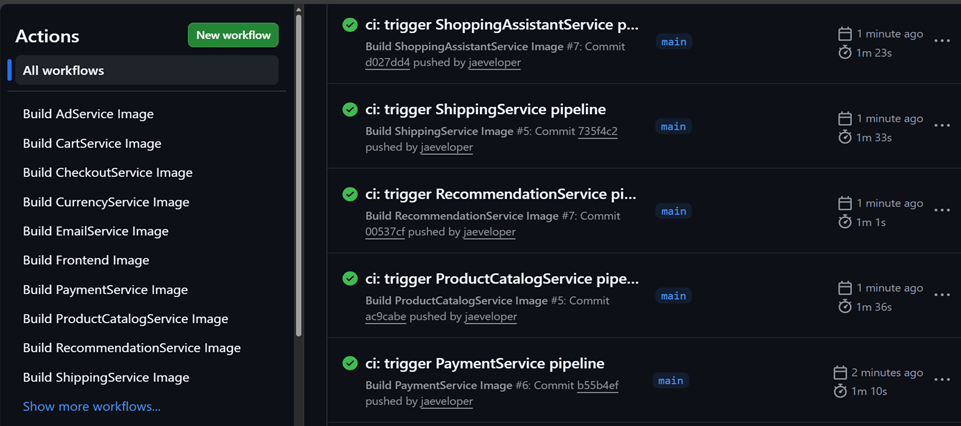
IMAGE D shows these pipelines triggering inside GitHub Actions.
The pipeline does several things before any container is allowed into the platform.
First it installs dependencies. Then the service is compiled or built using its native language toolchain.
Go services are built using go build.
Node services use npm.
Python services rely on pip.
Java services compile with Gradle.
.NET services run the standard dotnet build workflow.
Once the service compiles successfully, the pipeline runs Trivy, a container vulnerability scanner.
This step ensures that any high-severity vulnerabilities are caught before the image is pushed.
Security scanning is a standard part of modern enterprise pipelines, and integrating it here helps mirror what real CI systems do in production.
After scanning, the pipeline builds a Docker image and pushes it to DockerHub.\

IMAGE C shows the container images stored in the registry.
With that step complete, the CI portion of the platform is finished.
But the application still isn’t running yet.
Enter GitOps
Instead of deploying containers directly from CI pipelines, this platform uses a GitOps model.
GitOps flips the usual deployment pattern on its head.
Instead of CI pushing deployments into Kubernetes, Kubernetes pulls its desired state from Git.
That job is handled by ArgoCD.
ArgoCD constantly watches the repository. Whenever Helm charts or configuration files change, ArgoCD synchronizes the cluster to match Git.
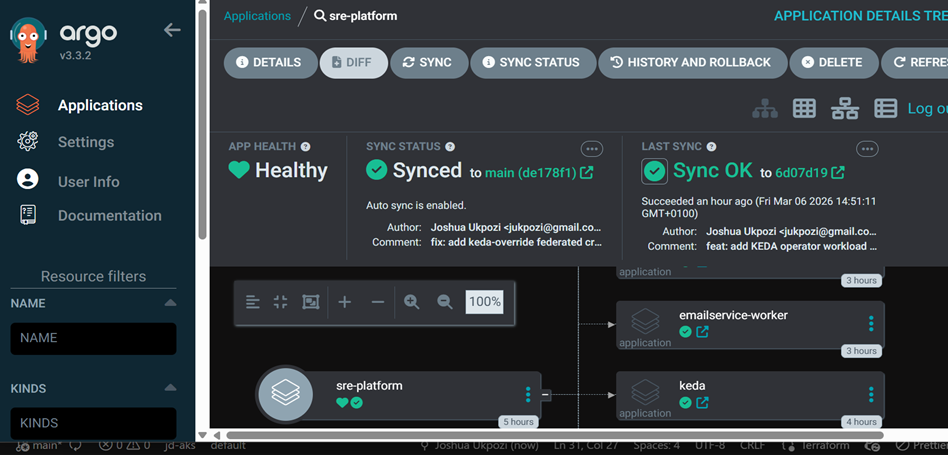
IMAGE F shows the ArgoCD interface managing the applications running inside the cluster.
This approach has a huge advantage: the entire platform state becomes declarative and auditable.
If something breaks, rolling back is as simple as reverting a commit.
Packaging Everything With Helm
To make the microservices deployable through GitOps, each one is packaged as a Helm chart.
Helm acts like a packaging system for Kubernetes.
Instead of writing raw manifests for every service, Helm templates generate them dynamically.
The project repository organizes these charts into two main groups.
Core services contain the synchronous application layer. Workers contain asynchronous processing components.
The core services include the frontend and the main backend services that power the website.
These services communicate synchronously using gRPC.
Once deployed through ArgoCD, the microservices form the primary application layer inside AKS.
The Moment It Finally Worked
After the infrastructure, pipelines, Helm charts, and GitOps configuration were in place, the moment of truth arrived.
Would the entire pipeline actually work end-to-end?
A developer pushes code. GitHub Actions builds it. Images are pushed to DockerHub. ArgoCD detects the change. Helm deploys the services into AKS.
And finally…
The frontend loads.
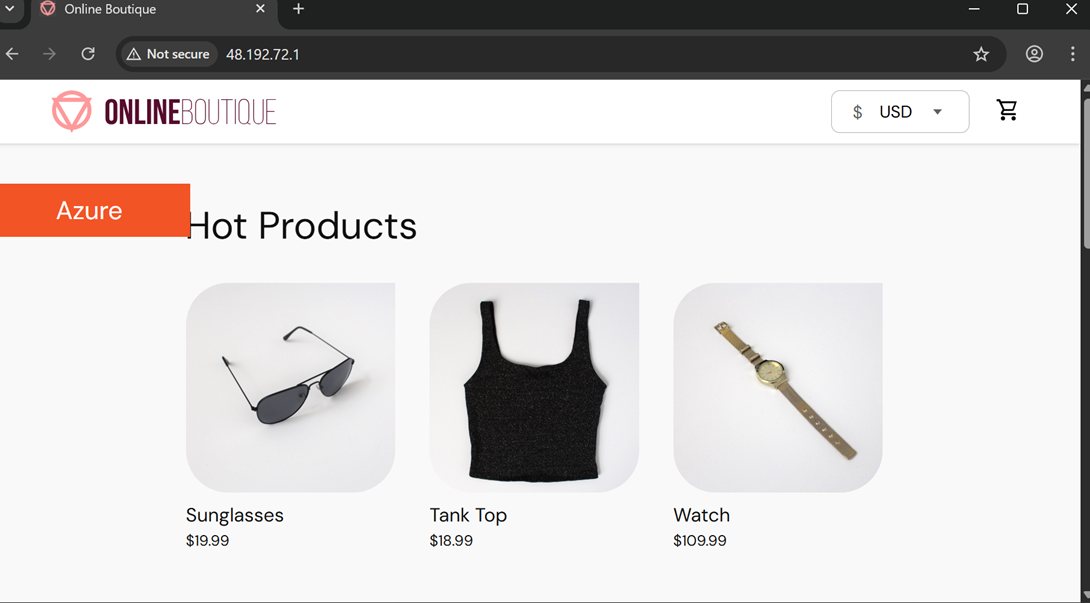
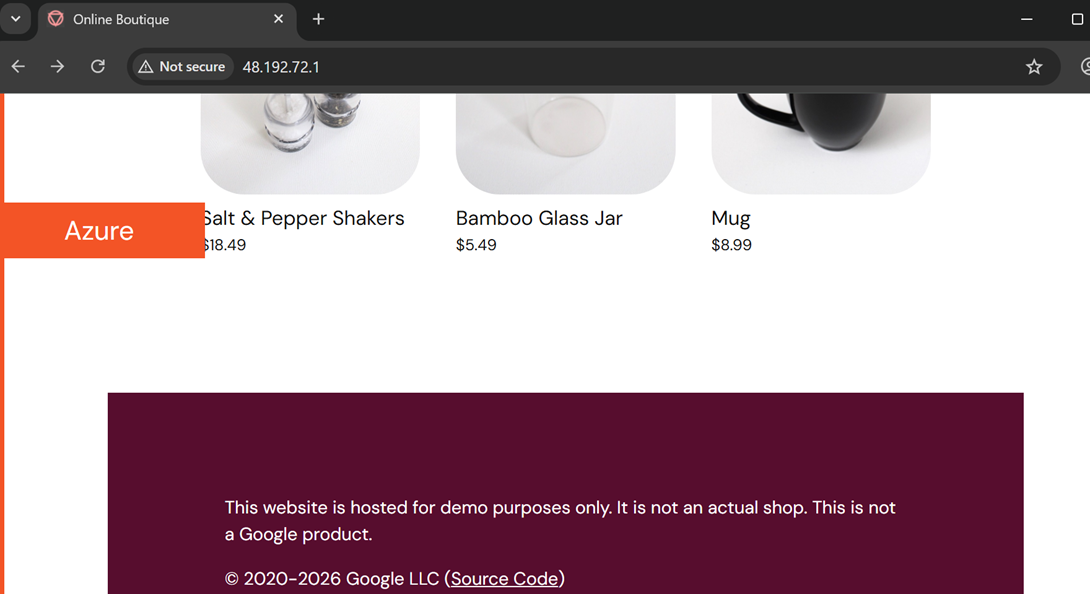
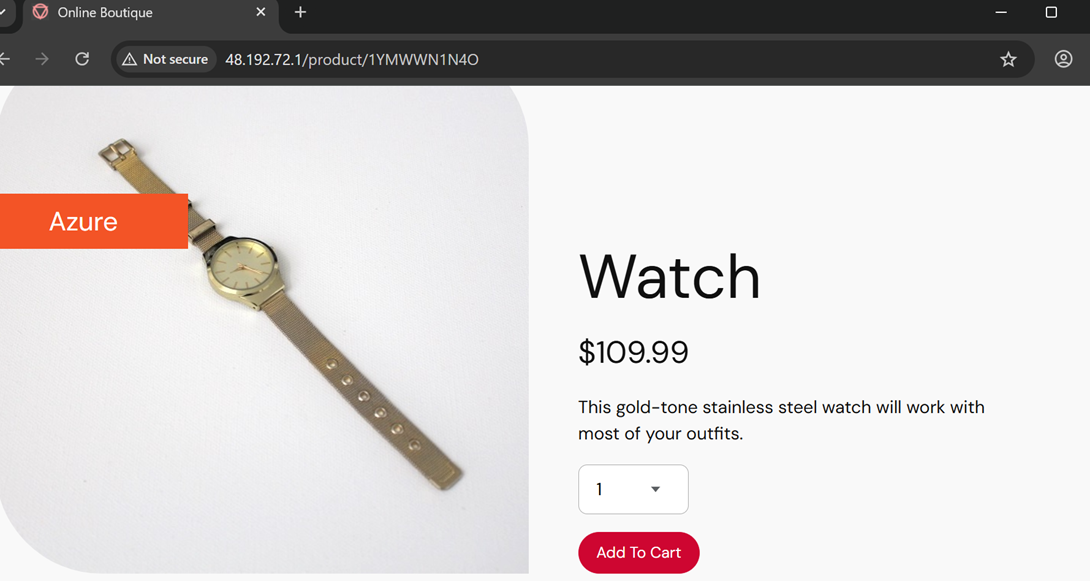
IMAGE G shows the application running successfully in the browser.
That moment confirmed that the full system was working.
Code could now travel all the way from developer commit to running microservice without manual deployment.
The Unexpected Challenge: KEDA and Azure Workload Identity
While most of the platform components came together fairly smoothly, one part of the system ended up taking significantly longer than expected.
KEDA.
KEDA is responsible for scaling event-driven workloads in Kubernetes. Instead of scaling based on CPU or memory, KEDA scales workloads based on external event sources like message queues.
In this architecture, the idea is straightforward.
When a user checks out on the frontend, the checkout service will eventually publish events to Azure Service Bus. Worker services will consume those messages, processing things like payment handling, shipping calculations, or email notifications. KEDA watches the queue and automatically scales the worker pods depending on how many messages are waiting.
Conceptually it’s a clean design.
The difficulty appeared when wiring KEDA to authenticate with Azure using Workload Identity and OIDC.
Modern AKS clusters support federated identity using OIDC. Instead of embedding credentials inside Kubernetes secrets, workloads authenticate to Azure resources through a chain of trust:
Kubernetes Service Account → OIDC token → Azure Managed Identity → Azure resource access.
This approach is much more secure and avoids storing any static credentials in the cluster.
But getting that chain working correctly turned out to be surprisingly delicate.
Several moving pieces have to align perfectly:
The AKS cluster must have OIDC enabled. A Managed Identity must exist in Azure. A federated identity credential must link the identity to the Kubernetes service account. The Kubernetes service account must include the correct Workload Identity annotations. KEDA must reference that identity through its TriggerAuthentication configuration.
If any one of those components is even slightly misconfigured, authentication simply fails.
Sometimes the worker pods would start but fail to access Service Bus. Other times the TriggerAuthentication resource would look correct, but KEDA could not obtain a token.
Debugging these failures required checking both Kubernetes configuration and Azure identity configuration simultaneously, which made the troubleshooting process more complex than most Kubernetes issues.
Eventually, after aligning the service account annotations, federated identity configuration, and KEDA authentication settings, the pieces finally clicked together.
Once it worked, the architecture behaved exactly the way it was designed to.
Worker pods can now authenticate to Azure resources without storing secrets or credentials inside Kubernetes. Authentication happens dynamically through Azure Workload Identity, making the platform significantly more secure and closer to how modern enterprise systems are implemented.
Where the Platform Stands Now
At the end of Part 1, the platform already includes a surprising amount of functionality.
Infrastructure is fully provisioned through Terraform.
A Kubernetes cluster is running in Azure.
CI pipelines build and scan container images.
DockerHub stores those images.
ArgoCD deploys applications through GitOps.
Helm packages the microservices.
And the entire system successfully serves the frontend application.
What started as a collection of tools has become a working platform.
What Comes Next
While the platform is already operational, several pieces are intentionally unfinished.
Part 2 will extend the system into a fully event-driven architecture.
The checkout service will publish events to Azure Service Bus, triggering worker services that process payments, emails, and shipping asynchronously.
The data layer will also be activated, connecting the services to Cosmos DB and Azure Cache for Redis.
Finally, the platform will gain deep observability through metrics, tracing, and centralized logging.
Those additions will transform the project from a working platform into something much closer to a production-grade SRE environment.
But that is a story for the next article.
메타데이터
- post_id
- d3c8dc43f0ba
- slug
- building-an-enterprise-event-driven-devops-platform-on-azure-from-commit-to-kubernetes-part-1-d3c8dc43f0ba
- url
- https://medium.com/@jukpozi/building-an-enterprise-event-driven-devops-platform-on-azure-from-commit-to-kubernetes-part-1-d3c8dc43f0ba
- canonical_url
- https://medium.com/@jukpozi/building-an-enterprise-event-driven-devops-platform-on-azure-from-commit-to-kubernetes-part-1-d3c8dc43f0ba
- author_url
- https://medium.com/@jukpozi
- status
- ok
- fetched_at
- 2026-06-20 20:29:01