Practical Networking & Communication- Bluetooth Low Energy
This tutorial is part of a youtube series that aims to explore networking protocols with the help of devices that are easily accessible…
Practical Networking & Communication- Bluetooth Low Energy
This tutorial is part of a youtube series that aims to explore networking protocols with the help of devices that are easily accessible, such as the ESP32 and Raspberry Pi.
In this tutorial, we will take a look at Bluetooth Low Energy or BLE, and examine its working principle, whereas in the next tutorial, we will implement what we have learned through a simple Arduino sketch and ESP32. The tutorial will be split into three main sections:
- Introduce Bluetooth Low Energy and the BLE Stack
- Then we will take a look at the GATT Protocol layer
- Finally we will briefly take a look at GAP Protocol layer.
Bluetooth
luetooth is a wireless technology that enables devices to communicate over short distances using radio waves. Initially aimed at audio devices like headphones and speakers, it has expanded into various applications, including file transfers and internet connectivity.
Bluetooth employs frequency-hopping spread spectrum (FHSS) technology, rapidly switching among different frequency channels within the 2.4 GHz band to transmit data packets.
Bluetooth Low Energy
Introduced in 2011, BLE is a wireless personal area network technology developed by the Bluetooth Special Interest Group (Bluetooth SIG) for applications in healthcare, fitness, security, and home entertainment.
Bluetooth Low Energy vs. Classic Bluetooth
BLE was designed to significantly reduce power consumption and costs while maintaining a similar communication range compared to Classic Bluetooth, which also operates in the 2.4 GHz band. While Classic Bluetooth can transmit larger data amounts, it depletes battery life quickly, making it suitable for devices like headsets and speakers.
In contrast, BLE remains in sleep mode until a connection is needed, allowing for brief connection times that transfer small data packets. This efficiency enables BLE devices to operate on battery power for years and at a lower cost. While BLE and Classic Bluetooth are not compatible, devices can support either or both under the Bluetooth 4.0 specification.
Now let’s look at the functionality of this protocol:
The BLE protocol consists of a stack divided into three main components:
- Controller (grey)
- Host (blue)
- Application (green)
- The HCI (red): is the interface that manages the communication between the Controller and the Host.
The Host Controller Interface (HCI) (red) manages communication between the Controller and Host. The protocol layers stack from the physical (PHY) layer at the bottom to the Application layer at the top, with encapsulation and fragmentation processes indicated by arrows.
Encapsulation is when the raw data, acquired from the antenna, is consequently encapsulated in a standard BLE packet, shown by the arrow on the left. On the other side, a BLE packet that shall be sent by a transmitter is fragmented in raw data and then managed by the PHY layer, as the arrow on the right shows.
This tutorial will briefly present these layers, and then take a look at the GAP & GATT aspect of BLE:
Key Protocol Layers
- Physical Layer:
- Operates in the 2.4–2.5 GHz ISM band, sharing it with Wi-Fi and Classic Bluetooth.
- Divided into 40 channels, with channels 37, 38, and 39 reserved for advertising packets, as can be seen in the figure below.

These channels have a center frequency that can be calculated by the equation:
2402 + k × 2 MHz,
where k = 0, …, 39.
Three of these channels (37, 38 and 39) are reserved for advertising packets, while the other 37 are used to exchange data packets in connections.
To avoid interference and fading with other wireless communications in the same radio band, BLE implements an Adaptive Frequency Hopping.
2. Link Layer (LL)
The LL is the part of the stack that directly interfaces with the physical layer. It is a combination of a hardware (HW) and a software (SW) part. The LL defines the type of communications that can be created between BLE devices and defines the different roles a device can play:
- master
- slave
- advertiser
- scanner
3. The Host Controller Interface (HCI)
HCI is a standard protocol that takes care of the communication between the Controller, that is the lowest part of the protocol, and the Host, which manages the communication between the HW and the user application. It mainly is responsible for converting raw data into packets.
4. Logical Link Control and Adaptation Protocol (L2CAP)
The L2CAP is a protocol which acts as a multiplexer; it handles the data from lower layers and encapsulates them into the standard BLE packet format. It also fragments the standard BLE packet into a format that can be used in lower layers in the other way around.
5. The Security Manager Protocol (SMP)
- Implements algorithms for encrypting and decrypting data packets.
6. The Attribute Protocol (ATT):
The attribute protocol defines how a server exposes its data to its clients, and how that data is structured. It also defines server-client roles where servers expose data and clients interact with it. The data is structured into attributes, which are made up of:

Adapted from: https://youtu.be/JSQhRyTKnW4?si=pMq73GxvlqSfEG7h
This protocol is then encapsulated in the GATT, which uses the roles (SERVER OR CLIENT) defined in the ATT to perform connections.
7. Generic ATTribute Profile (GATT)
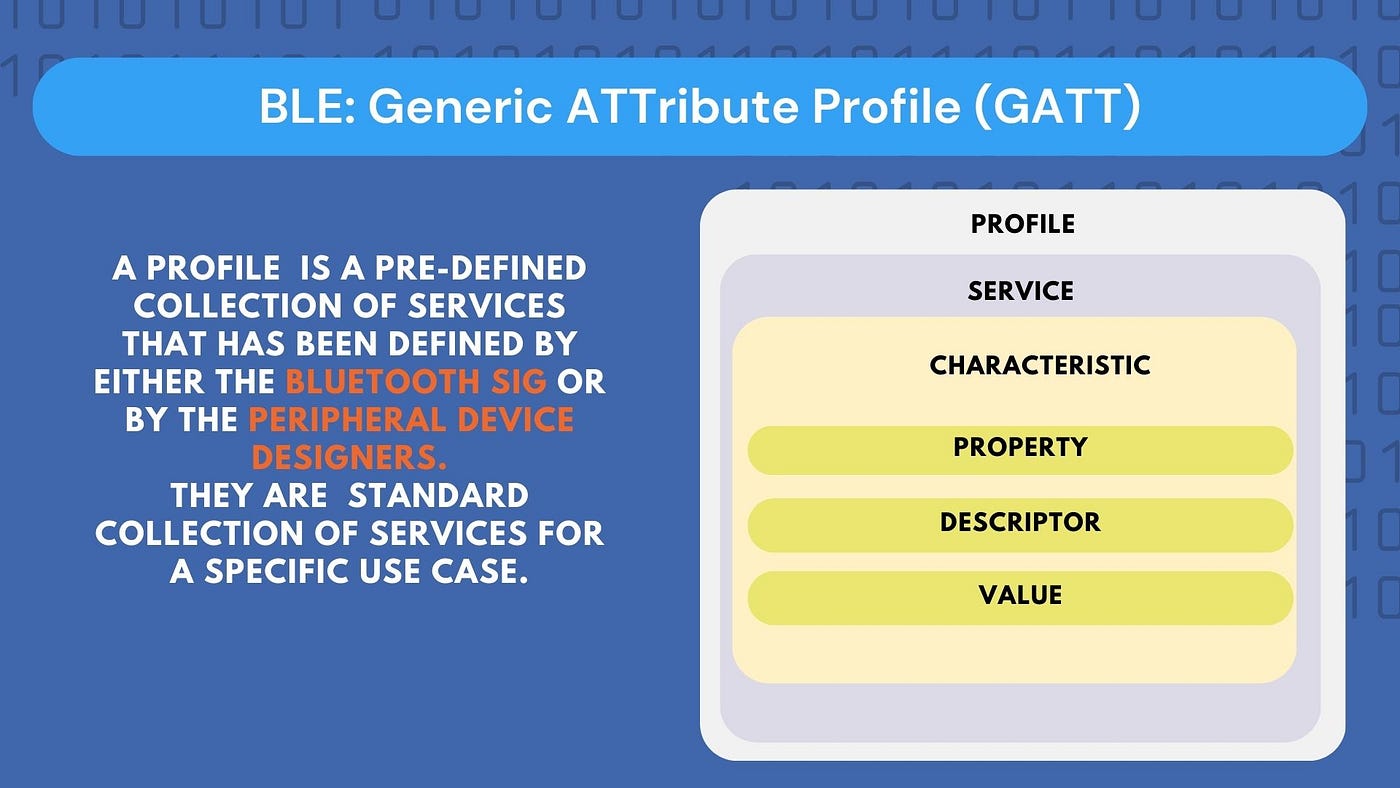
GATT or Generic ATTribute Profile, defines the way that two BLE devices transfer data back and forth using the notion of Services and Characteristics. It encapsulates the attributes made in the attribute protocol layer and groups similar attributes in a Service. These attributes are then called characteristics of this service, and each of them is used to communicate a specific type of data.
Characteristics will contain the data value, a descriptor, which gives additional information about the characteristic, its value and some properties. These properties indicate to the client which operations are allowed to be performed on the characteristic; the properties used most are:
• Broadcast: this allows sending data to BLE devices using advertising packets
• Readable: if set, the client can only read the characteristic value.
• Writable: with this property, the client can only write a new value on the characteristic.
• Notifiable: when it is set, the client receives a notification if the server updates the characteristic, so that it can read the new value.
Then a group of services with characteristics will create a profile.


9. Generic Access Profile (GAP)
BLE devices use two methods for advertising connections: the Advertising Data payload and the Scan Response payload.
The Advertising Data payload is continuously sent out to inform nearby central devices of the peripheral’s presence. The Scan Response payload is an optional secondary response that a central device can request.
A peripheral sets an advertising interval, during which it retransmits its main advertising packet. If a listening central device is interested in the scan response and it’s available, it can request this additional data from the peripheral.
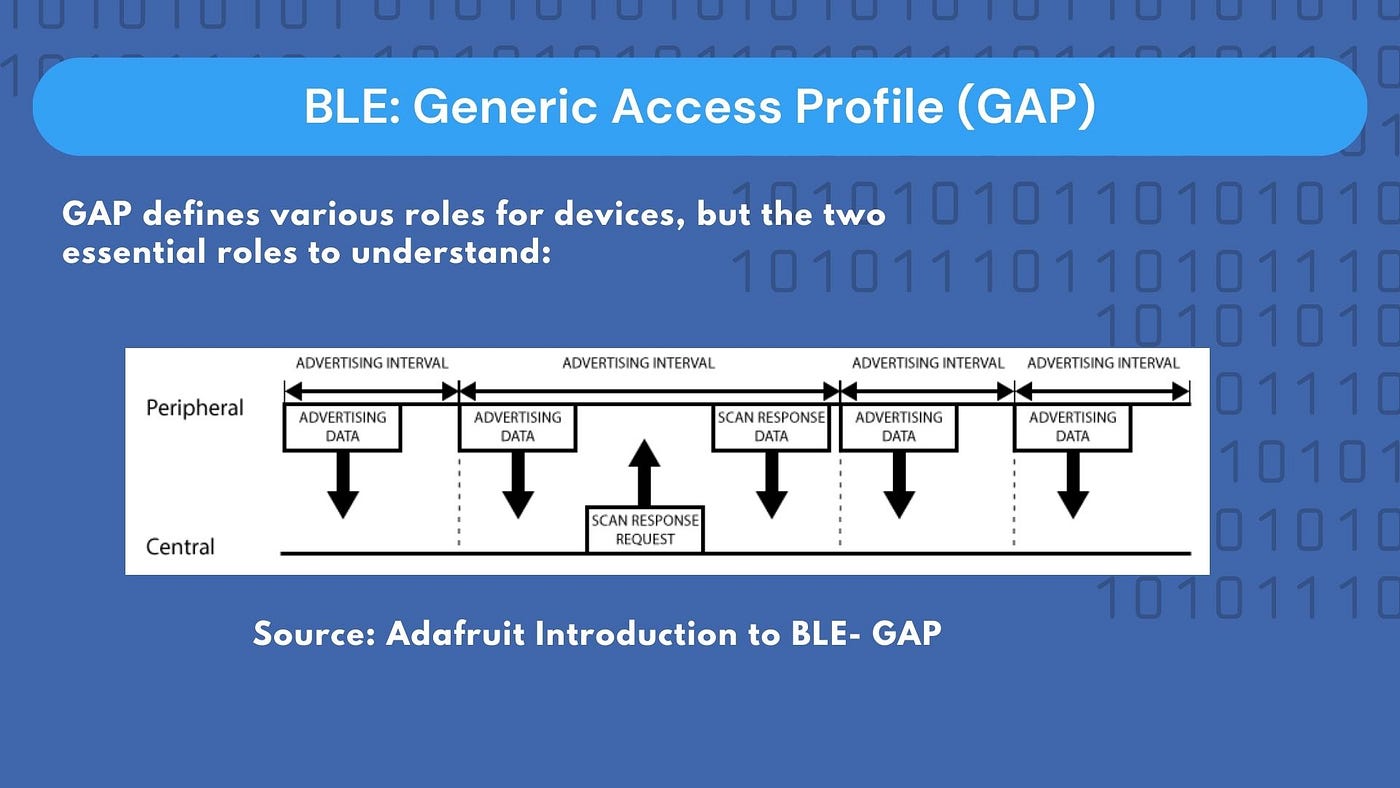
Source: https://learn.adafruit.com/introduction-to-bluetooth-low-energy/gap
Once a connection is established between the peripheral and the central device, the advertising process typically ceases, and the devices communicate using GATT services and characteristics.
Thank you for reading, and be sure to watch the video the article is based on linked here. Happy learning!
Resources:
[embed]
메타데이터
- post_id
- d3e3cf301e8f
- slug
- practical-networking-communication-bluetooth-low-energy-d3e3cf301e8f
- url
- https://medium.com/@amnahhmohammed/practical-networking-communication-bluetooth-low-energy-d3e3cf301e8f
- canonical_url
- https://medium.com/@amnahhmohammed/practical-networking-communication-bluetooth-low-energy-d3e3cf301e8f
- author_url
- https://medium.com/@amnahhmohammed
- status
- ok
- fetched_at
- 2026-06-17 08:20:12