Unlocking Linux Links: The Mystery of Inodes, Soft Links, and Hard Links
The Connections :)
Unlocking Linux Links: The Mystery of Inodes, Soft Links, and Hard Links
The Connections :)
Yeah, even in linux we have links.
In some programming language we have pointers to point memory address of a variables. Similarly in UNIX we have inode numbers to point the actual address of the files and directory.
Fun Fact : Every system provide 1% of disk space only for inode numbers, if all inode numbers are used then we can not create more files and directories.
Links: A link is the direct connection to its inode number, basically a shortcut to access a file and directory. We can create more than one link for a file or directory.
There are two types of links:
- Softlink
- Hardlink
Softlink :
- let’s make some sample files using touch command. By ls -li command it will display all file details like file permissions, user, dir, memory used and time when it’s created. first column is for inode number as you can see every file and directory has a unique number.
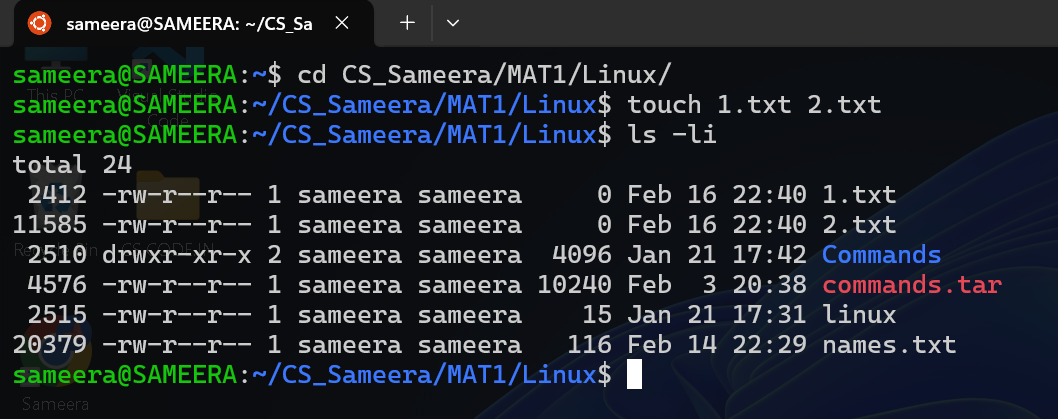
Creating 1.txt and 2.txt using touch command
- Command for creating a softlink is ‘ls -s source link’. As you can observe it inode number and file permissions are for different for links and theirs original files.

Adding a softlink for existing files
- If we remove original file then the softlink will be invaild.

Deleting the original files
- Deleting a softlink will not affect original files.

Deleting a softlink will not affect original file
Hardlink :
- let’s create some files H1.txt and H2.txt and observe their inode numbers

Creating a sample files
- Command for creating hardlink is ‘ln source link’. By observing we can see H1.txt, file1.txt and H2.txt, file2.txt has same inode numbers.
- Changing file permissions of a file, same thing will reflect on the hardlink as well.

Creating a hardlink as file1.txt and file2.txt
- If we delete original file of hardlink, it will not affect the hardlink as both of them points to same inode number.

Deleting the original file H1.txt and existing of hardlink file1.txt with same inode number
- Deleting of hardlink will not affect the original file.

Deleting of file2.txt will not affect H2.txt
메타데이터
- post_id
- d40dface0215
- slug
- unlocking-linux-links-the-mystery-of-inodes-soft-links-and-hard-links-d40dface0215
- url
- https://medium.com/@sameerabegum324/unlocking-linux-links-the-mystery-of-inodes-soft-links-and-hard-links-d40dface0215
- canonical_url
- https://medium.com/@sameerabegum324/unlocking-linux-links-the-mystery-of-inodes-soft-links-and-hard-links-d40dface0215
- author_url
- https://medium.com/@sameerabegum324
- status
- ok
- fetched_at
- 2026-08-27 08:23:07


