How to enable PowerShell in Github Codespaces?
Are you the one stuck with the below issue?
How to enable PowerShell in Github Codespaces?
Are you the one stuck with the below issue?
- Unable to find the PowerShell in the GitHub codespaces terminal.
- PowerShell is not available after installing the extension in the GitHub codespaces.
- Not comfortable with Bash.
See the below image, the PowerShell option is missing in the CodeSpaces terminal and you’re going to learn how to enable it now.
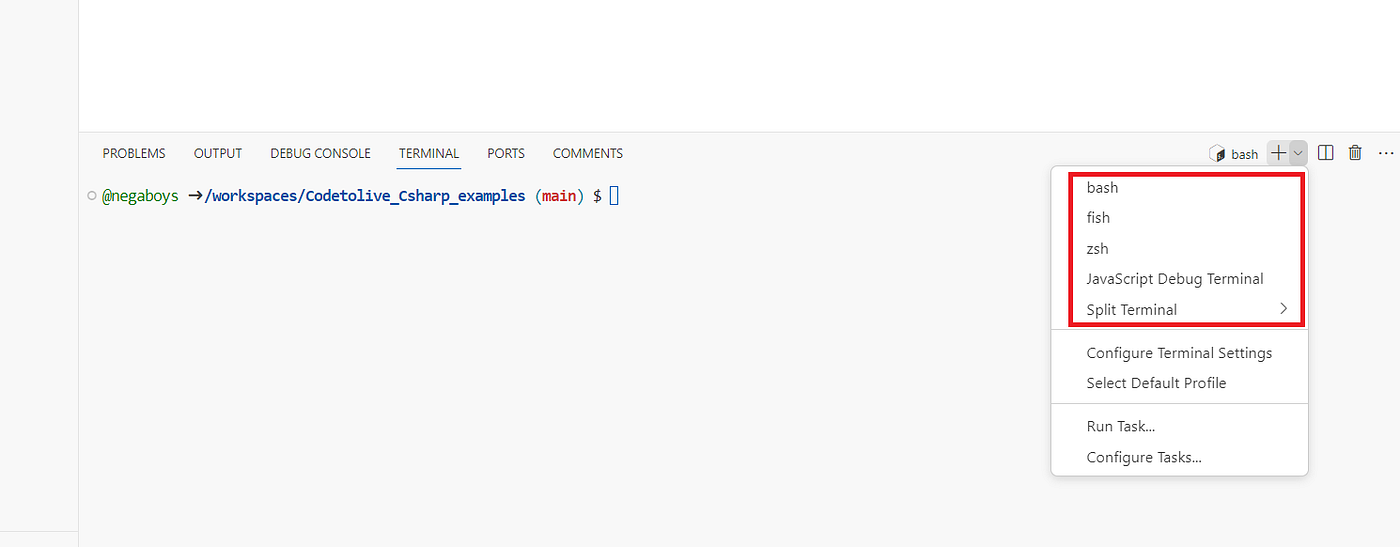
No worries. You can enable the PowerShell in the GitHub codespaces because many of us have done it already.
1. Go to your GitHub repository

2. Open the “devcontainer.json”
Open the file “devcontainer.json”. If you haven’t configured the dev container already then configure the new one by selecting the “configure dev container” option under the CodeSpaces. Refer to the below image,

3. Launch your codespace
4. Add PowerShell to the dev container
Go to the devcontainer folder -> devcontainer.json and add the below lines to enable the PowerShell inside your container.
Rebuild the container,

Here you go, the PowerShell is enabled in your GitHub CodeSpaces terminal.

Originally published at https://codetolive.in on February 24, 2024.
메타데이터
- post_id
- d4eb2ea789bf
- slug
- how-to-enable-powershell-in-github-codespaces-d4eb2ea789bf
- url
- https://medium.com/@negablog/how-to-enable-powershell-in-github-codespaces-d4eb2ea789bf
- canonical_url
- https://medium.com/@negablog/how-to-enable-powershell-in-github-codespaces-d4eb2ea789bf
- author_url
- https://medium.com/@negablog
- status
- ok
- fetched_at
- 2026-06-28 04:42:08