K3s NVIDIA GPU Devices Plugin Troubleshooting
Lab at Friday night 9 PM trying to figure out why your GTX 1650 and RTX 3090 won’t play nice together in K3s, you discover the edge cases…
K3s NVIDIA GPU Devices Plugin Troubleshooting
Lab at Friday night 9 PM trying to figure out why your GTX 1650 and RTX 3090 won’t play nice together in K3s, you discover the edge cases. The gaps. The stuff nobody writes about because most people run homogeneous clusters on modern hardware.
Environment
- OS: Ubuntu 24.04.4 LTS, Kernel 6.17.0–35-generic
- K3s with custom data-root (
/mnt/corestore/k3s/...) - Containerd v2.2.3-k3s1
- NVIDIA Driver 595.71.05, CUDA 13.2
- 2 GPUs: 1x GTX 1650 (4GB), 1x RTX 3090 (24GB)
Symptom
Test pod requesting nvidia.com/gpu: 1 stuck in Pending:
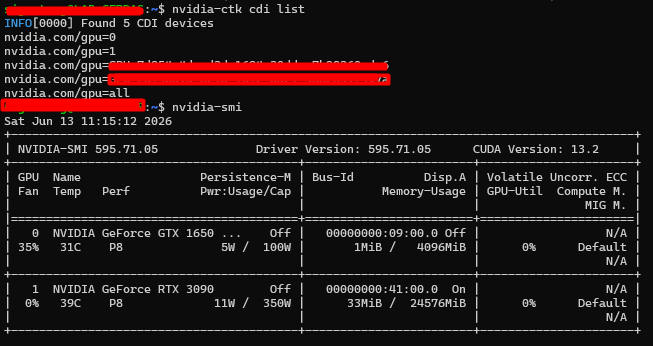
0/1 nodes are available: 1 Insufficient nvidia.com/gpunvidia-smi on the host showed both GPUs correctly. nvidia-ctk cdi list showed 5 CDI device references (2 GPUs exposed via index, UUID, and all) — host-level NVIDIA stack was healthy.
Root Cause Chain
- Device resource not advertised:
kubectl describe nodehad nonvidia.com/gpuunder Allocatable — the NVIDIA device plugin was never successfully registering the resource with kubelet. - Two competing device plugin installs found:
nvidia-device-plugin(Helm release inkube-system)nvdp-nvidia-device-plugin(Helm releasenvdpinnvidia-device-pluginnamespace)
- Plugin pod CrashLoopBackOff with:
could not load NVML library: libnvidia-ml.so.1: cannot open shared object file
   Incompatible platform detected
This happens when the device plugin container runs under the default runc runtime instead of the NVIDIA Container Runtime, so the NVIDIA driver libraries are never mounted into the container.
- Containerd NVIDIA runtime config check: Initially suspected the k3s containerd config-v3.toml.tmpl was missing the
nvidiaruntime class definition. Investigation showed:
- k3s was using a custom data-root (
/mnt/corestore/k3s), not the default/var/lib/rancher/k3s, so earlier edits to the default path had no effect. - Once located at the correct path, the rendered
config.tomlalready contained a correctly configurednvidiaruntime class (runtime_typeio.containerd.runc.v2, BinaryName/usr/bin/nvidia-container-runtime, SystemdCgroup true). Containerd was not the problem. RuntimeClassobjects (nvidia,nvidia-experimental, etc.) already existed in the cluster.
5. Actual fix: The crashlooping device plugin DaemonSet (nvdp-nvidia-device-plugin) had no runtimeClassName: nvidia set in its pod spec. Without it, the plugin pod ran under default runc and couldn't access NVML — hence "Incompatible platform detected."
Resolution Steps
- Patch the DaemonSet directly to confirm the fix (temporary):
kubectl patch ds nvdp-nvidia-device-plugin -n nvidia-device-plugin \
     --type='json' \
     -p='[{"op":"add","path":"/spec/template/spec/runtimeClassName","value":"nvidia"}]'
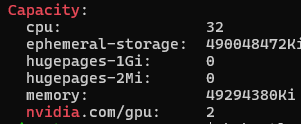
Plugin pod immediately went 1/1 Running, and node Capacity/Allocatable showed nvidia.com/gpu: 2.
- Validate with a test pod:
apiVersion: v1
   kind: Pod
   metadata:
     name: gpu-test
   spec:
     restartPolicy: Never
     runtimeClassName: nvidia
     containers:
     - name: cuda
       image: nvidia/cuda:12.3.2-base-ubuntu22.04
       command: ["nvidia-smi"]
       resources:
         limits:
           nvidia.com/gpu: 1
Pod ran successfully and nvidia-smi output the GTX 1650 details from inside the container.
- Persist the fix via Helm (so a future
helm upgradedoesn't revert the patch):
bash
helm -n nvidia-device-plugin upgrade nvdp nvidia/nvidia-device-plugin \
     --reuse-values \
     --set runtimeClassName=nvidia \
     --set cdi.nvidiaHookPath=/usr/bin/nvidia-cdi-hook
Note: --reuse-values alone failed with a nil pointer on cdi.nvidiaHookPath because that key was unset in the existing release values — had to set it explicitly alongside runtimeClassName.
- Remove the duplicate/conflicting Helm release in
kube-system(older install, not in use, would otherwise cause two device plugins to both attempt to register the same GPUs):
helm -n kube-system uninstall nvidia-device-pluginFinal verification:
kubectl get ds -A | grep -i nvidia
   kubectl describe node <node> | grep nvidia.com/gpu
Result: single nvdp-nvidia-device-plugin DaemonSet running, nvidia.com/gpu: 2 advertised and allocatable.
메타데이터
- post_id
- d5c26bcf7ea2
- slug
- k3s-nvidia-gpu-devices-plugin-troubleshooting-d5c26bcf7ea2
- url
- https://medium.com/@r-sandy/k3s-nvidia-gpu-devices-plugin-troubleshooting-d5c26bcf7ea2
- canonical_url
- https://medium.com/@r-sandy/k3s-nvidia-gpu-devices-plugin-troubleshooting-d5c26bcf7ea2
- author_url
- https://medium.com/@r-sandy
- status
- ok
- fetched_at
- 2026-06-15 20:49:13