How to Remove Duplicate Lines from Text Instantly (And Why It Matters More Than You Think)
If you’ve ever worked with large chunks of text — whether it’s data, code, or content — you’ve probably run into a frustrating problem:
How to Remove Duplicate Lines from Text Instantly (And Why It Matters More Than You Think)
If you’ve ever worked with large chunks of text — whether it’s data, code, or content — you’ve probably run into a frustrating problem:
👉 Duplicate lines.
At first, they might seem harmless. Just a few repeated entries here and there. But as your data grows, those duplicates can quickly turn into a serious issue — affecting accuracy, readability, and productivity.
In this article, you’ll learn what duplicate lines are, why they matter, and how to remove them instantly using a simple tool.
💡 What Are Duplicate Lines?
Duplicate lines are repeated entries within a block of text.
These duplicates often appear when:
- Copying and pasting data from multiple sources
- Exporting data from tools or software
- Merging files or datasets
- Scraping content from the web
Here’s a simple example:
apple
banana
apple
orange
banana
grape
After removing duplicates:
apple
banana
orange
grape
While this example is small, imagine dealing with thousands of lines — that’s where the real problem begins.
🧠 Why Duplicate Lines Are a Bigger Problem Than You Think
Many people underestimate the impact of duplicate data. But in reality, it can cause serious issues across different workflows.
1. Data Accuracy Issues
Duplicate entries can distort your analysis. If you’re working with datasets, repeated values can lead to incorrect conclusions.
2. Poor Readability
For writers and content creators, duplicate lines make text look unprofessional and cluttered.
3. SEO Problems
If you’re working with keywords or content lists, duplicates can reduce effectiveness and create redundancy.
4. Coding Errors
For developers, duplicate lines in scripts or configurations can lead to unexpected bugs or performance issues.
5. Wasted Time
Manually identifying and removing duplicates is time-consuming — especially for large files.
⚠️ The Problem with Manual Removal
You might think:
“I’ll just scroll and delete duplicates manually.”
That works… until it doesn’t.
Manual removal becomes nearly impossible when:
- You have hundreds or thousands of lines
- The duplicates are scattered randomly
- The data is constantly changing
- You need quick results
Even if you try, you’ll likely:
- Miss duplicates
- Delete important lines by mistake
- Waste valuable time
In short — manual cleaning is not scalable.
⚡ The Smarter Way: Automate It
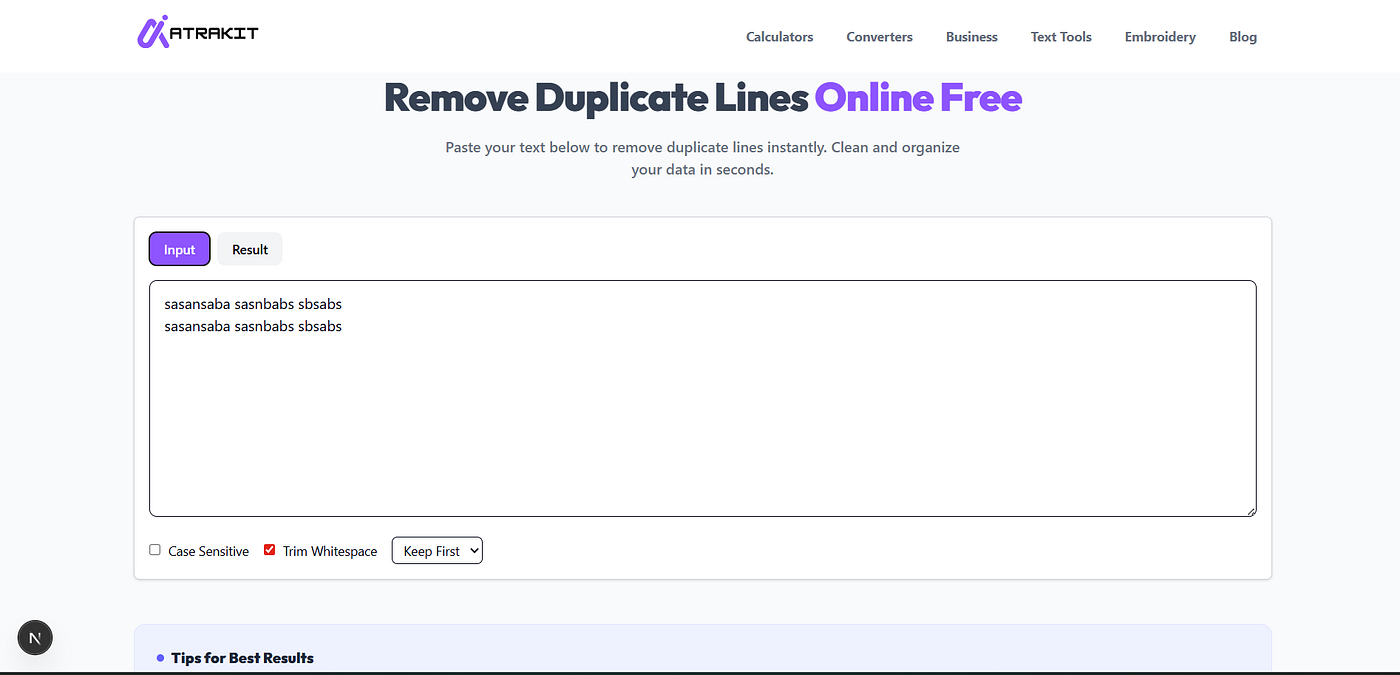
Instead of struggling with manual edits, you can use a simple online tool to remove duplicate lines instantly.
👉 https://www.atrakit.com/text-tools/remove-duplicate-lines
This tool is designed to make text cleaning effortless. You just paste your content, click a button, and get clean, duplicate-free text in seconds.
🚀 Key Benefits of Using a Duplicate Line Remover
1. Instant Results
No waiting, no processing delays. Your text is cleaned immediately.
2. High Accuracy
The tool ensures that only unique lines remain — no risk of missing duplicates.
3. Time-Saving
What could take hours manually can be done in seconds.
4. Easy to Use
No technical knowledge required. Just paste and go.
5. Works for Large Data
Whether it’s 10 lines or 10,000 lines — the tool handles it smoothly.
💻 Who Should Use This Tool?
This isn’t just for developers — it’s useful for almost anyone working with text.
👨💻 Developers
- Clean logs and scripts
- Remove redundant entries
- Optimize code structure
📊 Data Analysts
- Prepare clean datasets
- Remove repeated records
- Improve data quality
✍️ Content Creators
- Clean keyword lists
- Remove duplicate ideas
- Improve writing clarity
📈 SEO Professionals
- Optimize keyword research
- Remove repeated search terms
- Improve content planning
🎓 Students & Researchers
- Organize notes
- Clean references
- Structure data properly
📌 Real-Life Use Cases
Let’s look at how this tool can be used in everyday scenarios:
✔ Cleaning CSV or Excel Data
Before importing data into tools, remove duplicates to ensure accuracy.
✔ Keyword Research for SEO
Avoid repeating keywords and focus on unique search terms.
✔ Log File Cleanup
Developers often deal with logs full of repeated lines — this tool simplifies cleanup.
✔ Content Organization
Writers can refine drafts by removing repetitive content.
✔ Email or Contact Lists
Ensure you don’t send duplicate messages or store repeated contacts.
🧠 Tips for Better Data Cleaning
Removing duplicates is just one step. To truly optimize your workflow:
- Always review cleaned data once
- Keep a backup of original content
- Combine duplicate removal with formatting tools
- Use automation whenever possible
Small improvements in data cleaning can lead to big productivity gains.
🔍 Why Simplicity Wins
You don’t need complex software or coding skills to clean your text.
In fact, simple tools often work best because:
- They’re faster
- They’re easier to use
- They reduce friction in your workflow
The goal isn’t to overcomplicate — it’s to get results quickly and efficiently.
🚀 Final Thoughts
Duplicate lines might seem like a small issue, but they can have a big impact on your work.
From data analysis to content creation, clean and organized text is essential for accuracy and productivity.
Instead of wasting time manually removing duplicates, use a tool that does it instantly and reliably.
👉 Try the Remove Duplicate Lines Tool and simplify your workflow.

메타데이터
- post_id
- d5cf285b4906
- slug
- how-to-remove-duplicate-lines-from-text-instantly-and-why-it-matters-more-than-you-think-d5cf285b4906
- url
- https://medium.com/@deviontech1/how-to-remove-duplicate-lines-from-text-instantly-and-why-it-matters-more-than-you-think-d5cf285b4906
- canonical_url
- https://medium.com/@deviontech1/how-to-remove-duplicate-lines-from-text-instantly-and-why-it-matters-more-than-you-think-d5cf285b4906
- author_url
- https://medium.com/@deviontech1
- status
- ok
- fetched_at
- 2026-06-27 18:20:27