One CDN, Two Origins: Serving Static and Dynamic Content Globally with Amazon CloudFront
The Scenario
One CDN, Two Origins: Serving Static and Dynamic Content Globally with Amazon CloudFront
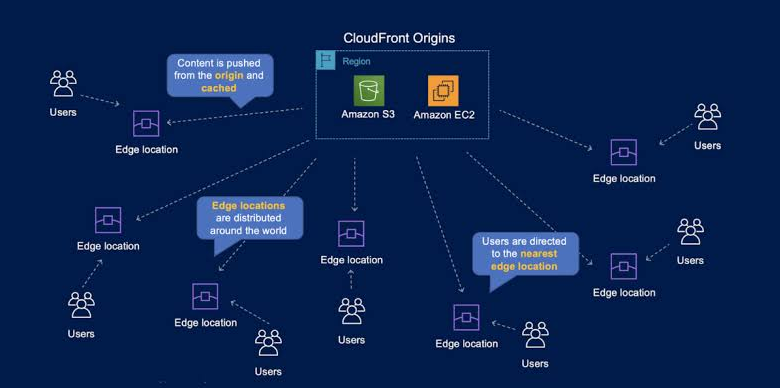
The Scenario
Picture a common architecture: your website serves static assets (images, CSS, JavaScript) from an Amazon S3 bucket, while dynamic content — API responses, personalized pages — comes from an Application Load Balancer sitting in front of your compute layer.
Your users, however, are everywhere: São Paulo, Berlin, Singapore, Sydney. Every request that has to travel back to your primary AWS Region pays a latency tax. For a user in Australia, hitting a bucket in us-east-1, that tax is very noticeable.
So the question becomes: how do you deliver both static and dynamic content to a global audience with minimal latency — without duplicating your infrastructure across regions?
The answer is one of my favorite underused patterns in AWS: a single CloudFront distribution with multiple origins.
Why CloudFront Fits This Problem
Amazon CloudFront is AWS’s content delivery network. It caches and delivers content through a global fleet of edge locations, automatically routing each user’s request to the edge that offers the lowest latency.
Two things make CloudFront the right answer here:
1. It accelerates dynamic content too. A common misconception is that CDNs are only for cacheable files. Even when content can’t be cached, CloudFront still helps: requests travel from the edge to your origin over AWS’s optimized backbone network, with persistent connections and TLS termination at the edge. Your API calls get faster even though nothing is stored.
2. One distribution can talk to many origins. You don’t need separate CDN setups for your bucket and your load balancer. A single distribution can route requests to different backends based on the URL path.
The Architecture
The design looks like this:
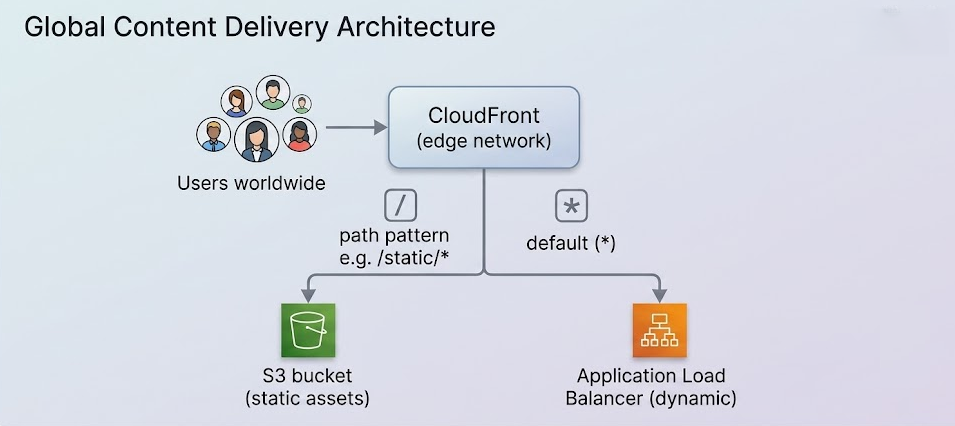
CloudFront decides where to send each request using cache behaviors — rules that match a path pattern and map it to an origin.
Setting It Up
Here’s the flow at a high level:
- Create (or open) a CloudFront distribution in the console.
- Add two origins under the Origins tab: one pointing at your S3 bucket, another at your load balancer’s DNS name. (If you’re using an S3 website endpoint or a custom origin, make sure you enter the correct domain name for the origin.)
- Create a cache behavior with a path pattern that captures your static content — for example,
images/*.jpgor/static/*— and point it at the S3 origin. - *Set the Default (``) behavior's origin to the load balancer**, so everything that doesn't match a static path falls through to your dynamic backend.
That’s it. One domain name, one TLS certificate, one distribution — and every user on the planet gets routed to their nearest edge location, whether they’re pulling a cached image or calling your API.
A few practical tips from running this in production:
- Order matters. CloudFront evaluates behaviors in precedence order and uses the first match. Put your most specific patterns first.
- Tune caching per behavior. Give static assets a long TTL and use cache-busting filenames (
app.3f9c2a.js). For the dynamic behavior, forward the headers, cookies, and query strings your application actually needs — and nothing more, since everything you forward fragments the cache. - Lock down the bucket. Use Origin Access Control so the S3 bucket only accepts requests from CloudFront, not from the public internet.
The Tempting Wrong Answers
This scenario appears in AWS certification exams precisely because the distractors sound plausible. Let’s dismantle them.
Lambda@Edge
Lambda@Edge lets you run code at CloudFront edge locations to customize requests and responses — rewriting URLs, injecting headers, doing A/B testing, and so on. It’s a powerful tool for compute at the edge, but it’s not a content-routing mechanism you need here. CloudFront’s built-in cache behaviors already route requests to different origins by path, with zero code to write, deploy, or debug. Reaching for Lambda@Edge to “serve data programmatically” is solving a solved problem with extra cost and complexity.
AWS Global Accelerator
Global Accelerator also uses AWS’s global network to improve performance, so it’s the most seductive distractor. The difference is what it accelerates and how:
- Global Accelerator gives you two static anycast IPs and routes TCP/UDP traffic to the nearest healthy endpoint (ALBs, NLBs, EC2 instances, Elastic IPs). It does no caching whatsoever.
- It shines for non-HTTP workloads — gaming over UDP, IoT with MQTT, VoIP — or HTTP workloads that specifically need static IP addresses or deterministic, fast regional failover.
- Crucially, S3 is not a supported endpoint type, so it can’t even front your static content.
For an HTTP website with cacheable assets, CloudFront wins on every axis: it caches at the edge, terminates TLS closer to the user, and handles both origin types natively.
CloudFront Origin Groups
The name sounds exactly like what we want — “group my origins!” — but Origin Groups solve a completely different problem: high availability, not routing. An Origin Group pairs a primary origin with a secondary one; if the primary is unreachable or returns configured failure status codes, CloudFront fails over to the secondary. Both origins in a group are expected to serve the same content. It’s a failover mechanism, not a way to split static and dynamic traffic.
(That said, Origin Groups pair beautifully with the multi-origin pattern — for example, failing over between S3 buckets in two regions for your static behavior.)
The Mental Model to Remember
When you see “global users + low latency + static and dynamic content over HTTP,” think:
CloudFront, multiple origins, path-based cache behaviors.
- CloudFront = HTTP(S) content delivery, caching, edge TLS, accelerates dynamic content too
- Global Accelerator = static IPs, TCP/UDP, no caching, no S3
- Lambda@Edge = code at the edge, not a routing configuration
- Origin Groups = failover, not traffic splitting
Simple architectures that lean on managed-service features tend to beat clever ones. One distribution, two origins, a couple of behaviors — and your users in Sydney stop paying the latency tax to us-east-1.
You support me by clapping on the articles you like, which encourages me to provide more content. Follow me for more AWS DevOps articles!
https://help.medium.com/hc/en-us/articles/115011350967-About-claps
메타데이터
- post_id
- d63c1c54707f
- slug
- one-cdn-two-origins-serving-static-and-dynamic-content-globally-with-amazon-cloudfront-d63c1c54707f
- url
- https://awstip.com/one-cdn-two-origins-serving-static-and-dynamic-content-globally-with-amazon-cloudfront-d63c1c54707f
- canonical_url
- https://awstip.com/one-cdn-two-origins-serving-static-and-dynamic-content-globally-with-amazon-cloudfront-d63c1c54707f
- author_url
- https://medium.com/@sn.osmanalp
- status
- ok
- fetched_at
- 2026-07-10 13:01:02