How to Fix Printer Error 0x0000011b in Windows 11/10 (Solved)
Step 1: Open the Run dialog box, and then type regedit and press Enter to open the Registry Editor.
Wiki topics:
📰 · Journalism & News
How to Fix Printer Error 0x0000011b in Windows 11/10 (Solved)
Step 1: Open the Run dialog box, and then type regedit and press Enter to open the Registry Editor.
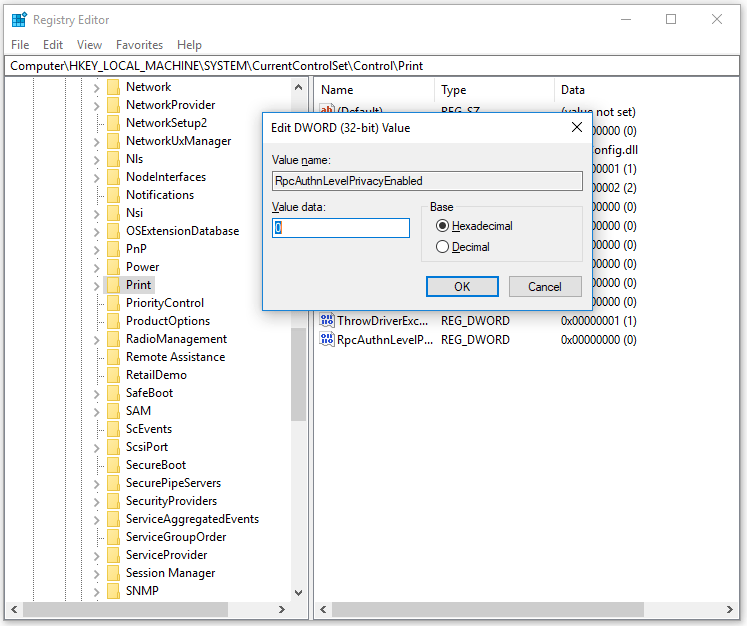
Step 2: Navigate to the following location:
HKEY_LOCAL_MACHINE\System\CurrentControlSet\Control\Print
Step 3: Right click on Print and select New > DWORD (32-bit) Value.
Step 4: Name the new key RpcAuthnLevelPrivacyEnabled.
Step 5: Double click on the new key and set its Value data to 0 and click OK.
메타데이터
- post_id
- d6a82c194948
- slug
- how-to-fix-printer-error-0x0000011b-in-windows-11-10-solved-d6a82c194948
- url
- https://medium.com/@csolutionab1726/how-to-fix-printer-error-0x0000011b-in-windows-11-10-solved-d6a82c194948
- canonical_url
- https://medium.com/@csolutionab1726/how-to-fix-printer-error-0x0000011b-in-windows-11-10-solved-d6a82c194948
- author_url
- https://medium.com/@csolutionab1726
- status
- ok
- fetched_at
- 2026-07-22 16:53:25

