Cutting Android Build Times 2.8x with One Flag in Expo SDK 56
A single config line took one Android CMake task from 17 minutes to 6 in Expo’s benchmark. The number is real — and so are the three…
Cutting Android Build Times 2.8x with One Flag in Expo SDK 56
A single config line took one Android CMake task from 17 minutes to 6 in Expo’s benchmark. The number is real — and so are the three asterisks nobody puts next to it.
Seventeen minutes. You hit “build,” the Android version of your React Native app starts compiling, and seventeen minutes later it’s finally ready to run. Not seventeen minutes of you working — seventeen minutes of watching a progress bar crawl while you make coffee, lose your train of thought, and quietly resent every library you ever added.
That number is real. It’s how long one specific step of the build — the part that compiles C++ code, called the :app:buildCMakeDebug task — ran in one of Expo's own benchmarks for SDK 56. (A "build" is just the process of turning your code into an installable app. A "cold" build, the slow kind, is one starting from scratch with nothing cached — a fresh checkout, or a continuous-integration server that wipes everything between runs.) If you've sat through one of those on a big app, you know seventeen minutes isn't an exaggeration.
Expo SDK 56 shipped a new optional setting that, in that same benchmark, dropped the task to 6 minutes 6 seconds — a 2.81x speedup. One line in your config file. No code changes, no rewrite, no new tool to learn. But here’s the part the celebratory tweets leave out, and it’s my whole thesis: “2.8x” is the best-case number on the worst-case project. Treat it as a universal promise and you’ll feel cheated; understand the conditions behind it and you’ll know exactly what to expect from your app.
Add
android.usePrecompiledHeaders: trueto expo-build-properties, run prebuild, rebuild. Big apps with lots of native libraries see the dramatic speedups; lean apps see about 1.3x. It's experimental, it only speeds the C++ step (not your whole build), and it shines most in CI. Measure your own before/after — don't trust the headline number, including mine.
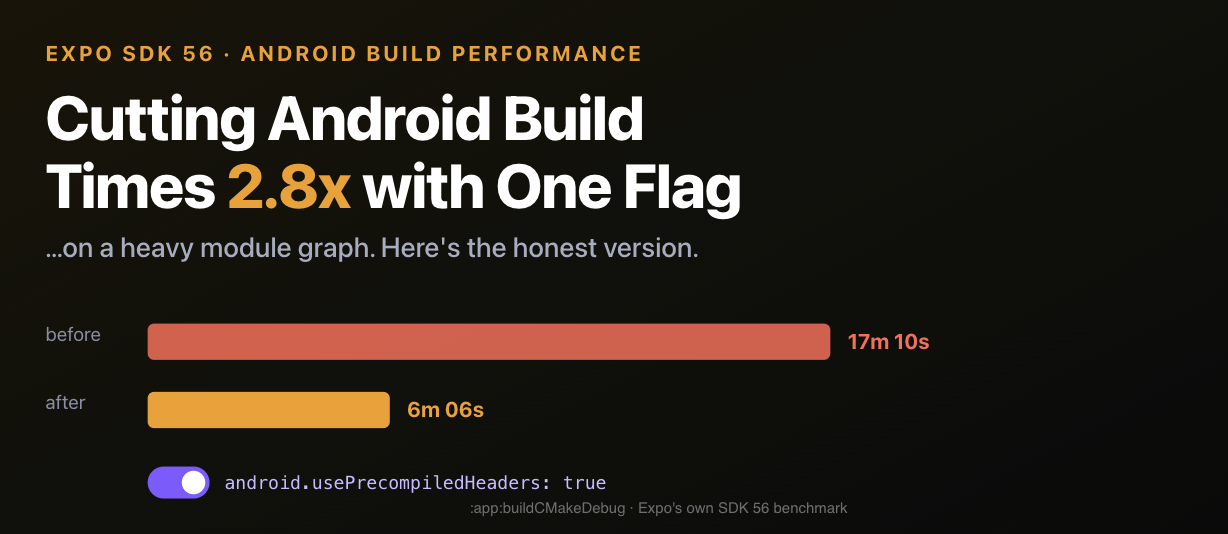
What the flag actually is
The setting is android.usePrecompiledHeaders, and you switch it on through something called expo-build-properties — a "config plugin," which is just a block in your app's config file that lets you tweak the native Android and iOS build without hand-editing the native project files yourself. Per Expo's SDK 56 changelog, the flag applies precompiled headers to the C++ code that connects your JavaScript to native features.
Two quick terms so the rest makes sense. Autolinking is how Expo automatically wires every native library you install into the build, so you don’t connect each one by hand — convenient, but it means the more native libraries you add, the more native code there is to compile. Codegen is the generated “glue” C++ that lets your JavaScript talk to that native code. The flag speeds up compiling exactly that glue.
If “precompiled headers” still means nothing, here’s the plain version. Every C++ file pulls in a stack of shared header files, and normally the compiler re-reads those same headers from scratch for every single file — like re-reading the instructions from page one before assembling each piece of the same furniture. In an app with dozens of native libraries, that repetition adds up fast. Precompiled headers read the shared headers once, save the result, and reuse it for every file — so the compiler stops redoing the same work.
It’s a decades-old trick. What’s new isn’t the idea; it’s that Expo wired it in automatically, so you get it from a one-line setting instead of editing build files you’d rather never open.
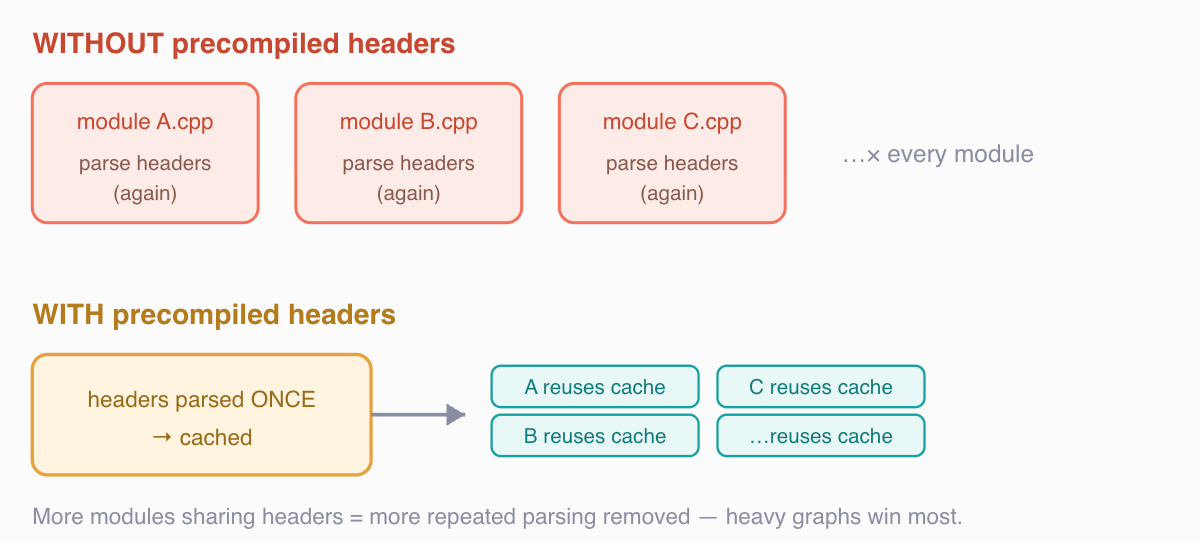
Why it speeds things up. Without precompiled headers, every C++ source file re-parses the same shared headers from scratch. With them, those headers are parsed once and cached for reuse. The win scales with how many modules share headers — so a big autolinked graph benefits far more than a small one.
The same flag is “2.81x faster” and “1.3x faster” depending on who’s measuring — and both numbers are true. The trick is knowing which one is yours. — the honest reading of Expo’s SDK 56 benchmark
That line isn’t me being clever — it’s straight from Expo’s changelog. Their benchmark on a heavy app showed the :app:buildCMakeDebug task fall from about 17 minutes to 6 (the 2.81x), while a plain new project saw roughly 1.3x. Same source, same flag, two wildly different numbers. The dramatic one and the modest one are both honest; which you get depends entirely on your project.
Who actually gets the big win
The deciding factor is simple: how many native libraries your app pulls in. (Native libraries are the ones with platform-specific code under the hood — maps, camera, video, gesture handling — as opposed to pure-JavaScript packages.) Precompiled headers save time in proportion to how much repeated work they let the compiler skip, so the rule of thumb is: more native libraries sharing the same headers, more repeated work removed, bigger speedup.
That gives you a way to guess your own result before running anything. If your package.json is stuffed with native dependencies — maps, camera, video, gesture handlers, vector icons, a dozen Expo modules, a few community native libraries — you're at the heavy end where the dramatic numbers live. If you're building something lean that's mostly JavaScript with a handful of native pieces, you're closer to the 1.3x. Neither is wrong; they're just different starting points, and knowing which one you are spares you the disappointed "but the blog said 2.8x" moment.
There’s a second-order point worth naming: this flag helps clean builds far more than incremental ones. The 17-minute pain is a cold compile — first build, fresh checkout, or a CI runner with no cache. Day-to-day incremental builds on your own machine already reuse a lot of compiled output, so the felt improvement there is smaller. Which means the place this flag earns its keep most is continuous integration, where every run tends to start cold and every minute is billed.
The honest correction to my own title
My title says “2.8x with one flag.” Every word is technically accurate and every word is quietly load-bearing, so let me defuse all three before someone flips the switch and feels lied to.
“2.8x” is a ceiling, not an average. Expo is refreshingly direct about this: the 2.81x came from a heavy autolinked module graph, and a default new project sees about 1.3x. Their own framing is “results will vary by project, but the larger your autolinked module graph, the bigger the win.” If your app is lean, budget for the 1.3x and treat anything above it as a bonus.
“One flag” speeds up one part of the build. The 2.81x is specifically the :app:buildCMakeDebug task — the C++ codegen compile step — not your whole build. Your total wall-clock time also includes Gradle configuration, Kotlin/Java compilation, resource processing, and packaging, none of which this flag touches. A 2.81x improvement on one stage is a smaller improvement on the end-to-end number you actually feel.
The setting is experimental. Expo labels android.usePrecompiledHeaders experimental in SDK 56 while they gather feedback, and notes they're working to fold it into React Native itself so every app benefits eventually. Experimental means: off by default, on by your choice, and worth testing on a branch before you trust it in CI.
Honesty flag : I have not personally run this benchmark on my own machine — every number in this piece (17m 10s, 6m 06s, 2.81x, 1.3x) comes from Expo’s published SDK 56 changelog, not from a build I timed myself. The “seventeen minutes” in the hook is Expo’s figure, framed honestly as theirs. If you want a first-person version, the reproduce-it steps are in the takeaways; time your own :app:buildCMakeDebug before and after and you'll have a real number to report.
How to actually turn it on
This is the satisfying part: the implementation genuinely is one flag. You add it to the expo-build-properties plugin in your app config. Here’s the shape (simplified — check the current expo-build-properties docs, since experimental option names can move):
// app.json — simplified; verify against current expo-build-properties docs
{
  "expo": {
    "plugins": [
      [
        "expo-build-properties",
        {
          "android": {
            "usePrecompiledHeaders": true
          }
        }
      ]
    ]
  }
}
Because expo-build-properties does its work during prebuild — the step where Expo generates your native Android and iOS folders from your config — the flag only kicks in when those native folders get regenerated. One catch from Expo’s docs: this only works if Expo is the one generating your native folders (the setup Expo calls Continuous Native Generation, where you don’t keep the android/ios folders in your repo and let prebuild recreate them). If you've "ejected" to a bare project — meaning you manage those native folders by hand and don't run npx expo prebuild — this particular path isn't available as-is.
After adding it, regenerate and rebuild:
# Continuous Native Generation: regenerate native dirs, then build
npx expo prebuild --clean
npx expo run:android
Then — and this is the part most people skip — measure. Gradle can tell you how long the specific task took, so you can compare the stage this flag actually affects rather than a noisy end-to-end number:
# time the specific CMake task this flag targets
./gradlew :app:buildCMakeDebug --profile
Run it once with the flag off, once with it on, on the same machine with a clean build each time. The delta between those two runs is your number — the only one that matters for your project.
To make that delta matter to a manager, multiply it by your CI volume. A team merging twenty pull requests a day — each kicking off a clean build, plus re-runs — pays the cold-compile cost dozens of times daily. Shaving even a few minutes off the C++ step across all of those is real time handed back to people waiting on green checkmarks, and on metered CI runners, real money. The per-build number looks small; the per-week number rarely does.
Where this fits in SDK 56’s bigger build story
This setting isn’t alone, and seeing the whole picture stops you from over-crediting one switch. SDK 56 shipped several build-speed changes that stack:
- Precompiled XCFrameworks on iOS — the heaviest Expo modules ship prebuilt and are linked instead of compiled from source, which Expo credits for 50%+ faster iOS builds. This is on by default in SDK 56.
- Precompiled Expo Modules — per Expo’s docs, autolinked modules are precompiled, with an env var (
EXPO_USE_PRECOMPILED_MODULES) and abuildFromSourceautolinking option to opt out when you're editing module source yourself. - A C++ compiler cache option for iOS builds in expo-build-properties, which caches results of previous C++ compilations.
- The Android Kotlin compiler plugin that replaces runtime reflection with build-time code generation, which Expo ties to faster cold starts (a runtime win, not a build-time one — easy to conflate).
This flag is the Android C++ piece of that wider effort — and the one you most have to switch on deliberately, which is exactly why it earns its own honest write-up instead of a line in a “what’s new” list.
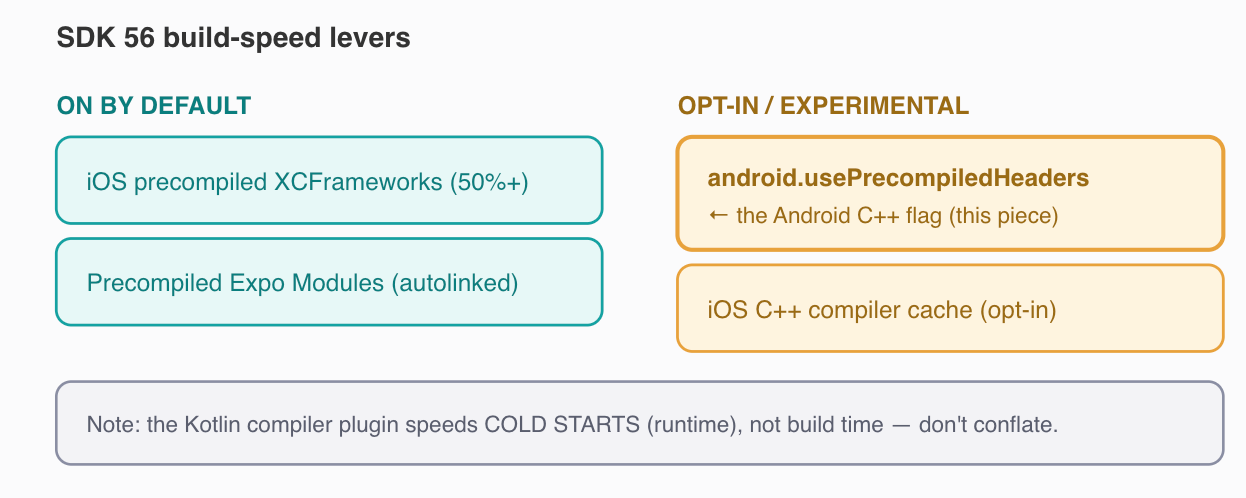
The flag in context. SDK 56’s build wins split into default-on (iOS XCFrameworks, precompiled Expo Modules) and opt-in (this Android CMake flag, the iOS C++ compiler cache). The Kotlin compiler plugin is a runtime cold-start win, not a build-time one — a common conflation worth keeping straight.
The honest counterargument: “just don’t optimize builds, fix your module graph”
Let me steelman the strongest objection to this whole article, because it’s a good one and I half-agree with it.
The argument goes: a 17-minute CMake compile is a symptom, and a flag that makes the symptom hurt less can quietly remove your incentive to cure the disease. If your autolinked native-module graph is heavy enough to spend 17 minutes compiling C++, maybe the real fix is auditing that graph — removing dependencies you don’t use, replacing native-heavy libraries with lighter ones, questioning whether you need every autolinked module that crept in over two years. A faster build of a bloated app is still a bloated app, and the discipline of a slow build sometimes is the thing that keeps a team honest about what it pulls in.
There’s real merit here. The flag’s own benchmark is the tell: the biggest speedups come precisely from the heaviest apps — which means the projects getting the most dramatic “2.8x” wins are often the ones that could most benefit from trimming. Optimization aimed at the worst-off can quietly hide the bloat underneath.
But here’s where the steelman runs out of road. Build speed and dependency hygiene aren’t a zero-sum trade; they’re independent goals, and pretending you must choose is a false economy. Auditing a module graph is slow, political (someone owns each dependency), and often blocked by libraries with no lighter alternative. Meanwhile your team eats the compile cost on every clean build and every CI run, today, regardless of how virtuous your future cleanup intentions are. The flag costs one line and helps now. The audit is worth doing and should still happen. Refusing a free, reversible improvement because it might reduce your motivation for a harder improvement is the kind of purity that feels principled and ships nothing.
So take the flag and book the audit. The honest position isn’t “optimize builds instead of fixing bloat” — it’s that the flag buys you breathing room to do the harder work without your CI queue on fire in the meantime.
Practical takeaways
- Expect 1.3x, hope for more. Per Expo’s changelog, a default project sees ~1.3x and the 2.81x is a heavy-module-graph ceiling. Calibrate your expectation to your graph size, not the headline.
- Turn it on via expo-build-properties, then prebuild. Set
android.usePrecompiledHeaders: true, runnpx expo prebuild --clean, and rebuild — the flag only applies when native dirs regenerate. - It needs Expo-managed native folders. expo-build-properties only works when prebuild generates your
android/iosfolders; if you've ejected to a bare project and manage those by hand, this path isn't available as-is. - Measure the actual task, not vibes. Time
:app:buildCMakeDebugwith the flag off and on, clean builds, same machine. The delta is your real number — report that, not Expo's. - Treat experimental as experimental. Test on a branch and watch CI before relying on it; Expo plans to upstream this to React Native, so the option may move or change.
- Stack it, don’t isolate it. Combine it with SDK 56’s default-on wins (iOS XCFrameworks, precompiled Expo Modules) rather than expecting one flag to carry your whole build.
- Book the dependency audit anyway. The flag buys breathing room; it doesn’t fix a bloated module graph. Do both.
What you keep
The thing worth carrying out of this isn’t a flag name — those get upstreamed, renamed, and made default until nobody remembers they were ever opt-in. It’s a habit: when someone hands you a multiplier, ask “of what, and from which baseline?” A 2.81x speedup of one CMake task on a heavy graph and a 1.3x speedup of a lean project’s same task are the identical change described honestly twice. The flag is great. The instinct to read past the headline number to the conditions underneath it is what actually makes you faster — at builds, and at telling which performance claims to trust.
If this saved you from blindly trusting a “2.8x” headline — or just from one more seventeen-minute coffee — the single most useful thing you can do is follow React Native Journal.
And settle a score in the comments: what’s the longest clean build you’ve ever sat through — and what finally fixed it? Drop the number and the fix. I’ll start the bidding at the all-too-common classic: a clean build that takes longer than the meeting you were rushing to demo in.
메타데이터
- post_id
- d6f616c934a7
- slug
- cutting-android-build-times-2-8x-with-one-flag-in-expo-sdk-56-d6f616c934a7
- url
- https://medium.com/react-native-journal/cutting-android-build-times-2-8x-with-one-flag-in-expo-sdk-56-d6f616c934a7
- canonical_url
- https://medium.com/react-native-journal/cutting-android-build-times-2-8x-with-one-flag-in-expo-sdk-56-d6f616c934a7
- author_url
- https://medium.com/@sureshdotariya
- status
- ok
- fetched_at
- 2026-06-21 12:17:11