Building a context layer from the ground up
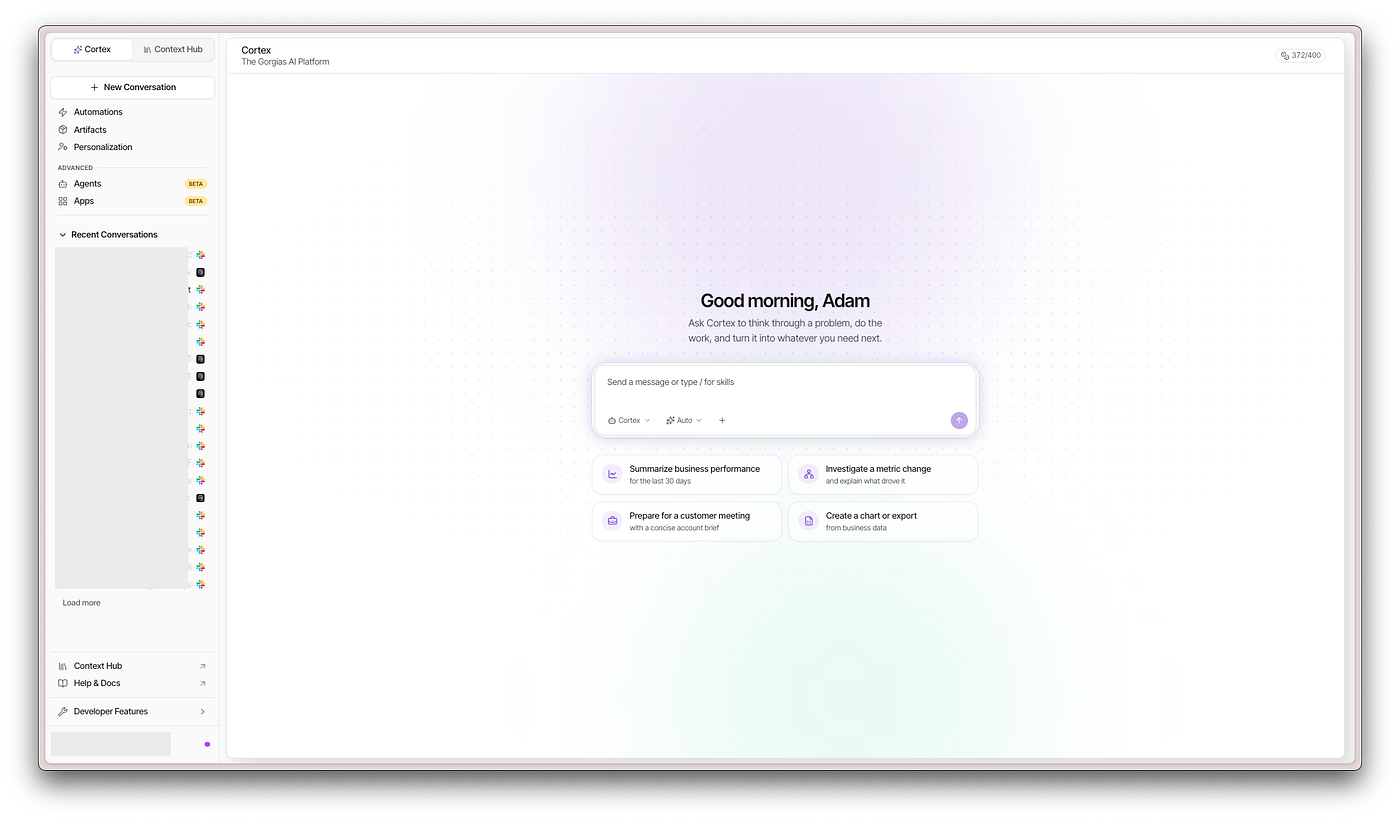
At Gorgias, we built an internal AI agent that can answer business questions across every department: finance, product, sales, and customer…
Building a context layer from the ground up

At Gorgias, we built an internal AI agent that can answer business questions across every department: finance, product, sales, and customer success, by generating SQL queries against our data warehouse. The hardest part wasn’t the agent itself. It was giving the agent enough context to answer questions correctly and consistently.
This article is a deep dive into how we structured that context layer: what it contains, how we organised it, and the specific patterns that made the difference between an agent that sometimes gets it right and one that reliably delivers accurate answers.
What is a context layer?
A context layer is the collection of all information your AI application needs to produce good answers. This includes backend tables, sales call transcripts, internal documentation, product event data, analyst comments, business definitions — everything that a knowledgeable employee would draw on when answering a question.
The definition is intentionally broad because the whole point is inclusivity of sources. The challenge isn’t defining it — it’s making all of that information available, up to date, and navigable by an agent.
Gathering the pieces
At Gorgias, the data our agent needs to work with spans a wide range of sources and formats:
- Backend data: PostgreSQL tables powering the product
- Notion pages: documentation maintained by multiple teams
- Gong transcripts: recordings from CSM and sales calls
- Frontend events: user interaction tracking data
- GitHub PR history: understanding what’s being merged and by whom
- Linear: project progress and status
- Third-party tools: HubSpot, SpotDraft, Customer.io, and others
Structured and semi-structured data was already managed in BigQuery. The missing piece — and the one with a lot of untapped value — was open text content: transcripts, contracts, documentation pages. For that, we evaluated three approaches.
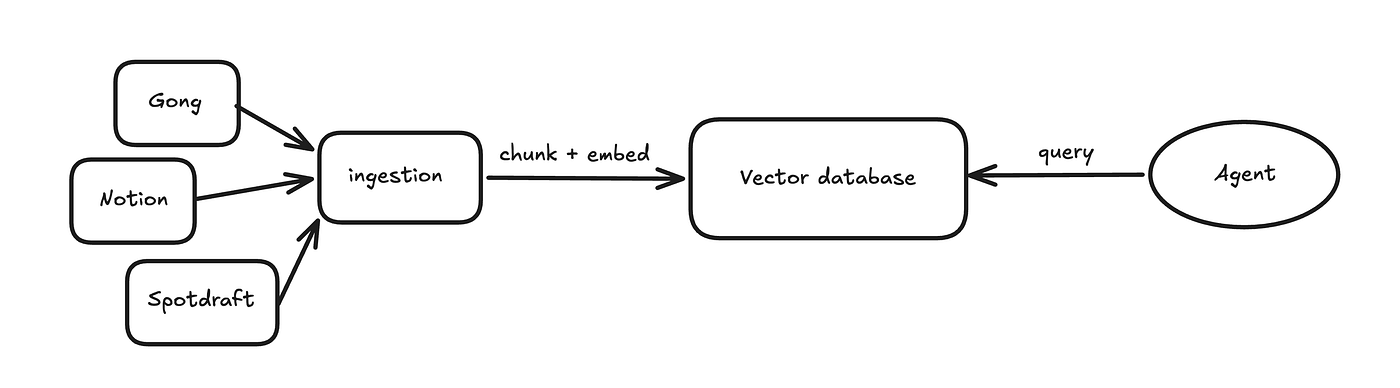
Option 1: A standalone vector database
For open text like Gong transcripts or Notion pages, a dedicated vector database (Pinecone, Weaviate, etc.) would let us chunk, embed, and search content. But it would mean maintaining an entirely separate system alongside our existing data stack.
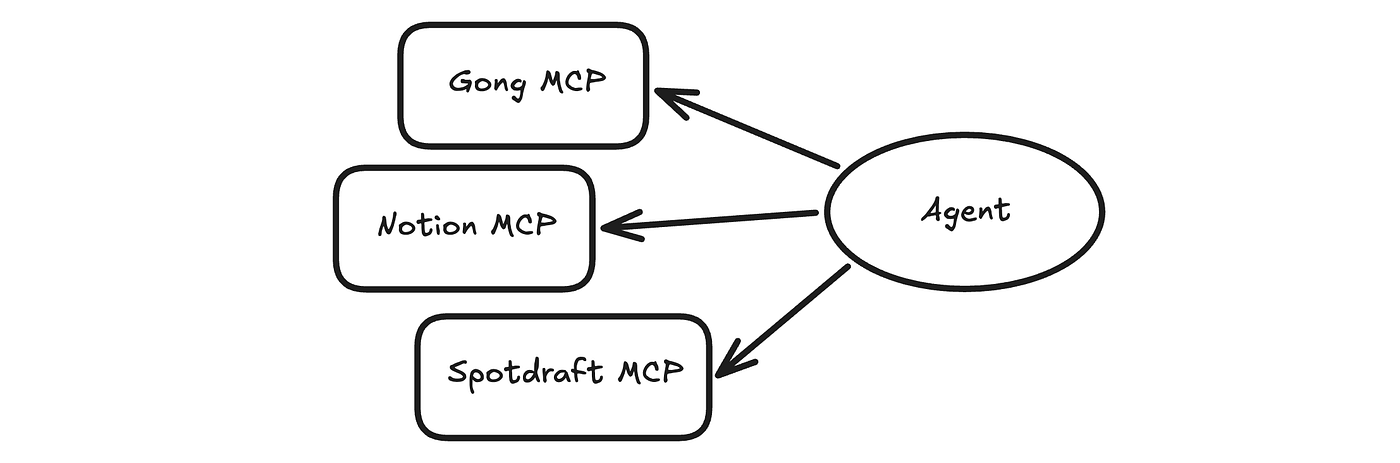
Option 2: Direct MCP connections
Some tools offer MCP (Model Context Protocol) servers that our agent could call directly to retrieve relevant content. In practice, this didn’t work for us. We had no control over retrieval quality or cost, and the inconsistency across different providers made it impractical at scale.
Option 3: BigQuery as the universal layer
This is what we chose. BigQuery recently added native support for vector search, which means we can store embeddings directly in BigQuery tables and run similarity searches without leaving the warehouse. (Documentation here.)
Here’s what a table with embeddings looks like — the ml_generate_embedding_result column stores the vector representation of full_transcript:

I can then run a vector search query on that table to get the top 10 transcripts that are the closest to my question:
-- Find the 10 transcripts most relevant to pricing objections
SELECT distance, base.call_id, base.full_transcript
FROM VECTOR_SEARCH(
    (SELECT * FROM `gorgias-growth-production.context_layer.gong_transcripts_embeddings`),
    'ml_generate_embedding_result',
    (SELECT ml_generate_embedding_result FROM ML.GENERATE_EMBEDDING(
        MODEL `{{embedding_model}}`,
        (SELECT 'pricing objections budget concerns cost too expensive' AS content)
    )),
    top_k => 10
)
This approach gave us the best of both worlds. We ingest content from every tool — using Airbyte’s pre-built connectors or our custom sync tool (Bizon) — then transform it with dbt, chunk it, and embed it when needed. The result: structured data from Postgres tables and unstructured text from Gong or Notion all live in the same format — BigQuery tables — that our agent can query consistently.

Now the question becomes: how does the agent make sense of nearly a hundred tables?
Helping the agent navigate
If you point an LLM at a BigQuery project and ask a business question, it will start sampling tables, reading schemas, and exploring INFORMATION_SCHEMA. Even with dbt documentation uploaded, this is slow, expensive, and unreliable.
Our goal was a single entry point: one table where the agent can see everything available before deciding which tables to query.
We built ctx__model_metadata — a BigQuery table where each row describes one table available to the agent. Each row includes:
- Table description and column descriptions with types
- Owner of the table
**has_semantic_search**: a flag indicating the table contains embeddings for vector search**model_sql**: the actual dbt code that generates the table (useful for answering "how is this metric computed?")**upstream_models/downstream_models**: dependencies in the transformation layer
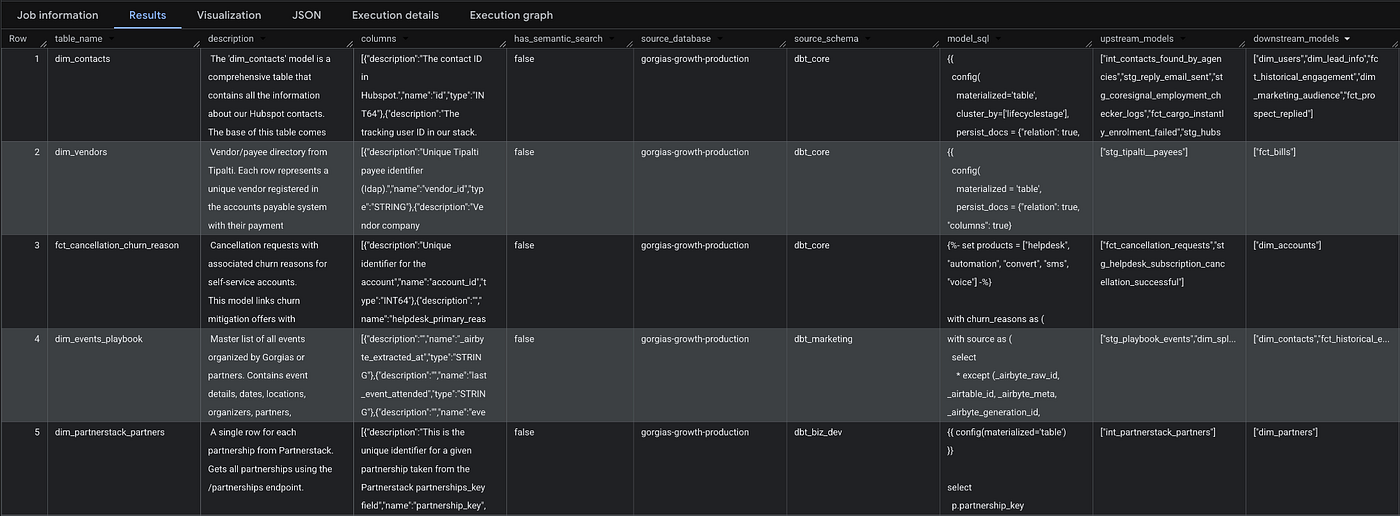
This gives the agent fast, structured access to everything. But metadata alone doesn’t tell it when or how to use each table. That’s why we added two critical fields.
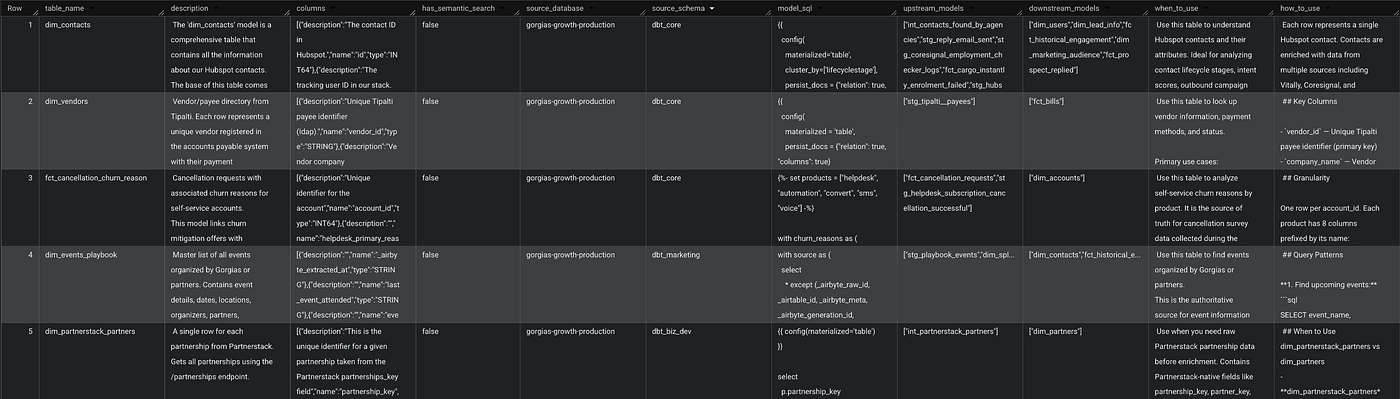
when_to_use
One or two sentences explaining the specific use cases a table serves. Precision matters here — the agent uses this to decide which tables are relevant to a question. Here’s an example for dim_gorgias_employees:
Use this table to find Gorgias employee details, understand the
organizational structure, or look up contact information. It
combines data from Rippling (employee records), Calendly (scheduling),
and HubSpot (CRM user data) to provide a complete view of employees,
including names, emails, departments, teams, locations, manager relationships,
and scheduling links.
how_to_use
This is where the agent learns to generate correct SQL. The field contains general notes (default filters, join keys) and, most importantly, example queries, each pairing a natural language question with the SQL that answers it. The juxtaposition of question and query teaches the agent which columns matter for which types of questions.
### Best Practices
- Always filter by `status = 'ACTIVE'` to get current employees only
- Use `email` as the primary identifier for joining with other tables

### Example Queries
**Find Employee by Name:**
SELECT email, first_name, last_name, department, team, calendly_link
FROM ref("dim_gorgias_employees")
WHERE LOWER(first_name) LIKE '%john%'
   OR LOWER(last_name) LIKE '%doe%'
**Find Employee by Email:**
SELECT *
FROM ref("dim_gorgias_employees")
WHERE email = 'john.doe@gorgias.com'
We recommend including 10–15 example queries per table if you have enough material. Focus on queries that use only that specific table (no joins), cross-table patterns are handled elsewhere.
The final ctx__model_metadata would then look like this:
How we build ctx__model_metadata
There’s a bit of an inception problem here: ctx__model_metadata contains metadata about tables, but that metadata doesn't live in any table itself. Here's how we solved it.
The source of truth is the .yml file in dbt, where we already define table descriptions, column descriptions, and owners. We extended it with three fields: a flag (include_in_context_layer), when_to_use, and how_to_use:
models:
  - name: dim_gorgias_employees
    description: |
      Consolidates data from Rippling (employee records)...
    meta:
      owner: owner@gorgias.com
      include_in_context_layer: true
      context_layer_info:
        when_to_use: |
          Use this table when...
        how_to_use: |
          ### Search Techniques
          **1. Find Employee by Name**
          ...
    columns:
      - name: id
        description: The unique identifier for each employee...
      - name: first_name
        description: The first name of the Gorgias employee...
The pipeline to generate ctx__model_metadata then works as follows:
- Run
dbt parseto produce a clean manifest containing all yml content, SQL code, and model dependencies. - Filter for models with
include_in_context_layer: true. - Extract column descriptions, owner, table description,
when_to_use,how_to_use. - Query
INFORMATION_SCHEMAto get column types. - Create and populate
ctx__model_metadatain batches (necessary because we union all content into insert statements, which can hit BigQuery's 1M character query limit).
We initially tried implementing this as a custom dbt materialization, but parallelization was difficult inside a dbt run. Instead, we wrote a Python script that does the same thing in parallel, significantly speeding up the process. This script runs in CI on every merge to keep ctx__model_metadata in sync with the latest model changes.
Beyond tables
Table metadata gets you surprisingly far, but most real business questions are complex. They require combining multiple tables, understanding business context, and navigating caveats that don’t live in any schema. The when_to_use and how_to_use fields embed some of this knowledge, but not enough for consistent accuracy.
We needed a way for knowledgeable people: analysts, business stakeholders to provide the agent with richer instructions. That’s ctx__instructions: a table of structured, retrievable instructions that the agent consults before accessing ctx__model_metadata.
Why not one big prompt?
The naive approach is a single comprehensive markdown file listing every metric, business context, and caveat across all departments. We tried this. It failed for three reasons:
- Impossible to maintain. Finding and updating information in a massive text file is painful.
- Noisy context window. The agent ingests the entire file for every question, filling its context with irrelevant information and driving up cost.
- No structure for the agent to navigate. Everything is flat.
The obvious fix is to chunk and embed the file, then retrieve relevant pieces via vector search. But this has its own problems:
- Opaque retrieval. It’s hard to debug why certain chunks are retrieved and others aren’t. Comparing embedding vectors is not intuitive.
- Fragile chunking. Some information must stay together. Finding the right chunk size is a balancing act between recall and precision.
- Lost relationships. Chunks have no hierarchy. The connections between related pieces of context disappear.
This led us to a key insight: vector search and chunking are the right tools when you don’t control the text. A Gong transcript is massive, unstructured, and you can’t reshape it. But when you’re writing the context yourself, you can structure it to make retrieval, maintenance, and debugging dramatically better.
Progressive Disclosure
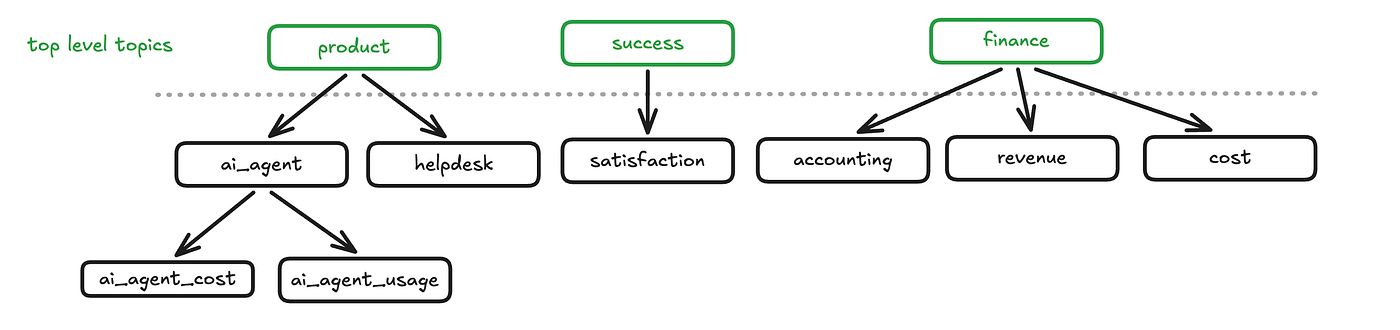
We borrowed a pattern from Anthropic’s Claude Code skill system. The idea: instead of loading everything upfront, give the agent access to names and descriptions of instruction topics. If a topic is relevant, the agent loads it. If that topic references subtopics, the agent can load those too — recursively, on demand.
We organized our top-level instructions around departments at Gorgias (product, finance, go-to-market, customer success). This aligns with how people ask questions — each department has its own vocabulary, its own way of looking at data, and its own set of concerns.
A critical design choice: organize instructions around the questioner, not the data maintainer. Multiple departments will query the same underlying tables, but they ask about different aspects in different ways. A product manager asking about AI Agent performance and a finance analyst asking about AI Agent revenue are hitting overlapping data, but the context they need is different.
Anatomy of a Topic Instruction
Each topic instruction has five sections:
1. Front Matter — metadata including owner, instruction group, type, description, and path.
---
active: true
owner: owner@gorgias.com
instruction_group: product
instruction_sub_group: ai_agent
instruction_type: subtopic
description: >
  Covers:
  - AI Agent configuration (Knowledge, Guidance, Support Actions)
  - AI Agent usage (Ticket, Automated Interaction, Execution)
  - AI Agent feedback and quality metrics
  - AI Agent LLM costs
  Do NOT use this topic for:
  - Other products outside of AI Agent
  - General ticket information not specific to AI Agent
path: product/ai_agent
---
2. Context — open text explaining the business domain.
--- context ---

# AI Agent
AI Agent is Gorgias's flagship automation product that autonomously handles
customer conversations using advanced language models. It serves two functions:
- **AI Support Agent** (`ai_agent_ticket_type = 'support'`): Automates support
  inquiries, replacing legacy tools (Flows, Autoresponders, Quick Responses).
- **Shopping Assistant** (`ai_agent_ticket_type = 'sales'`): Drives sales through
  product recommendations and discount offers.
3. Datasources — which tables are relevant to this topic and why.
--- datasources ---
| Table | Use Case |
|-------|----------|
| `dbt_product.dim_tickets` | Ticket-level information for AI Agent tickets |
| `dbt_product.dim_ai_agents` | AI Agent configuration at shop level |
| `dbt_product.fct_ai_agent_prompt_flow` | Execution-level pipeline run tracking |
4. SQL Examples — question-query pairs showing how to answer common questions in this domain.
--- sql ---
## AI Agent Contribution to Automate ARR
The percentage of total Automate ARR from AI Agent-enabled merchants.
```sql
WITH automate_arr_table AS (
SELECT
date_observed,
gorgias_account_id,
automate_arr,
CASE
WHEN is_ai_agent_support_enabled THEN automate_arr
ELSE 0
END AS ai_agent_arr
FROM ref("accounts_history")
WHERE status = 'customer'
AND automate_subscription_status = 'current_subscriber'
AND automate_arr > 0
)
SELECT
date_observed,
SUM(automate_arr) AS total_automate_arr,
SUM(ai_agent_arr) AS ai_agent_contribution_arr,
SAFE_DIVIDE(SUM(ai_agent_arr), SUM(automate_arr)) AS ai_agent_arr_pct
FROM automate_arr_table
WHERE date_observed >= CURRENT_DATE() - INTERVAL 7 DAY
GROUP BY date_observed
ORDER BY date_observed
```5. Subtopics — children topics the agent can load if it needs to go deeper.
--- subtopics ---

### ai_agent_configurations - Feature Enablement and Configurations
Covers AI Agent enablement, trials, and configuration including Knowledge,
channel settings, and agent personalization.

### shopping_assistant - Shopping Assistant
Covers Shopping Assistant configuration, engagement features, and Quick Replies.

### ai_agent_quality - Quality Metrics
Covers merchant feedback, shopper feedback, CSAT scores, and quality rates.
This composable structure means any instruction can be as shallow or as deep as needed. When an instruction grows too large, split it into children.
To populate ctx__instructions, a Python script parses the front matter of each instruction file and inserts both the metadata and the content into the table.

ctx__instructions
Skill Instructions: Handling Complex, Multi-Step Questions
Topic instructions cover business context and help the agent answer straightforward questions. But some questions require multi-step reasoning: pulling data from several tables in sequence, applying business rules, and formatting the output in a specific way. For these, the agent needs more than context — it needs a playbook.
We call these skill instructions, borrowing the term from Anthropic’s Claude Code for the same reason: they teach the agent how to do something specific. Unlike topic instructions (which are discovered by navigating the hierarchy), skills are directly available to the agent. When a user’s question matches what a skill covers, the agent retrieves and follows it.
Skill instructions share the same five sections as topic instructions, plus three additional ones:
Steps
Ordered actions the agent should follow. Each step includes context and SQL, guiding the agent through the process.
--- step ---
### Step 2: Get Most Recent ARR Movement(s)
Query the most recent movement per product for the customer.
**CRITICAL: Do NOT filter by `change_type` in this query.** Capture ALL
movement types and return the most recent per product. When a user asks about
"contractions," they need to see the full picture - a product churn on the
same day as a contraction would be missed if you filter by change_type.
```sql
WITH ranked_movements AS (
SELECT
pm.date_observed,
pm.billing_customer_id,
a.gorgias_subdomain,
...
)
```Output Format
The exact structure the agent must produce, ensuring consistent answers regardless of who’s asking.
--- format ---

**[Customer Subdomain] - ARR Movement Diagnosis**
**Most Recent Movement:** [Date]
- Type: [Movement Type]
- ARR Change: [+/-$X,XXX]
- Product: [product name]
**What Happened:**
[Brief description]
**Driver(s):**
1. [Driver 1]: [details]
2. [Driver 2]: [details]
Checks
A checklist the agent runs before delivering its answer — verifying that queries were executed, the format is correct, and no steps were skipped.
--- checks ---

- [ ] Followed the output format exactly
- [ ] Always included the Most Recent Movement Report
- [ ] Identified customer(s) correctly by subdomain or billing_customer_id
- [ ] Included movement type and ARR delta for each product
The combination of steps, format, and checks transforms the agent from “try your best” to “follow this procedure.” The difference in consistency is substantial.
The Full Picture
Here’s how it all fits together. The context layer has a clear hierarchy:
- Tables are the atomic units — the data itself, described in
ctx__model_metadata. - Topic instructions connect business questions to the right tables, organized by department and navigable through progressive disclosure.
- Skill instructions provide step-by-step playbooks for complex, multi-step tasks, referencing both topics and tables.

Every time someone asks a question, the agent follows this pattern:
- Check if the question matches a skill. If yes, load and follow it.
- Otherwise, consult
**ctx__instructions** to identify the relevant topic. Load it (and subtopics if needed). - Use the topic’s datasources and the agent’s own judgment to identify relevant tables in
**ctx__model_metadata**. - Read the
when_to_use,how_to_use, and column descriptions for those tables. - Generate and execute the SQL query.
- Formulate the answer.

What We’d Tell You Before You Start
Write when_to_use and how_to_use for your most-queried tables first. Documenting ~100 tables took meaningful effort. We prioritized by query frequency and iterated from there. If you're starting from scratch, begin with 10–15 core tables and expand as you see what questions people actually ask.
Expect to iterate on instructions constantly. Every wrong answer from the agent is a signal that some instruction is missing or unclear. The feedback loop between agent errors and instruction improvements is the most important process to get right — and the topic of our next article.
Progressive disclosure was the single biggest improvement. Moving from one flat prompt to hierarchical, on-demand instructions reduced noise, lowered cost, and made the agent dramatically more reliable. If you take one idea from this article, make it this one.
What’s Next
Now that the structure is in place, the next challenge is operational: how do you coordinate dozens of people across departments to write, maintain, and improve instructions? How do you make the context layer self-service so it scales beyond the data team?
That’s what we’ll cover in the next article — the processes behind the context layer.
Thanks for reading. We believe that context management will be the defining capability for data teams in the agentic era. The agent is only as good as what it knows. 🙏
메타데이터
- post_id
- d6f72713915a
- slug
- building-a-context-layer-from-the-ground-up-d6f72713915a
- url
- https://medium.com/gorgias-engineering/building-a-context-layer-from-the-ground-up-d6f72713915a
- canonical_url
- https://medium.com/gorgias-engineering/building-a-context-layer-from-the-ground-up-d6f72713915a
- author_url
- https://medium.com/@yochankhoi
- status
- ok
- fetched_at
- 2026-06-14 11:28:49