My Journey to AI Agents: Building the AI part of the Agent
the Agent issues requests to an API for weather data, then it uses this data as context and prompt an LLM for recommendation based on…
My Journey to AI Agents: Building the AI part of the Agent

AI Agent
Abstract
As Andrew Ng pointed out, the future of AI is heading to Agents, AI Agents. So that is why we are going to augment the capabilities of our WeatherAssistant Agent with AI. In particular, we’ll incorporate an LLM to help in its decision-making module.
STOP THIS MADNESS 😡 AND SHOW ME THE CODE! (Coming)
Part 2: Real-World Interactions
Architecture of the AI Agent
The literature presents a multitude of variations for an agent’s architecture, but certain components remain consistent.
- Perception module (Sensing the environment)
- Decision making module (Using LLMs for reasoning)
- Action module (Executing decisions)
- Learning module (improvement over time based on feedback)
Currently our WeatherAssistant can sense the environment it lives in (through collecting weather data), it can make decisions (rule-base system), take action on user’s behalf (printing to I/O its recommendation) and learn (well, not quite!)
Implementing the WeatherAssistant Agent
The Goal
The goal of the WeatherAssistant agent is to provide personalised weather-based recommendations to the user.
# Prepare the prompt for the LLM
prompt = f"""
Given the following weather conditions:
- Temperature: {weather_data['temperature']}°C
- Wind Speed: {weather_data['wind_speed']} km/h
- cloudiness: {weather_data['cloudiness']}%

And the following defined thresholds:
- Cold Threshold: {cold_threshold}°C
- Hot Threshold: {hot_threshold}°C
- High Cloudiness: {high_cloudiness}%
- High Wind Speed: {high_wind_speed} km/h

Please provide a recommendation and explain your reasoning.
"""

# Get the LLM's response
llm_response = send_message_to_gemini(prompt)
The Agentic Workflow
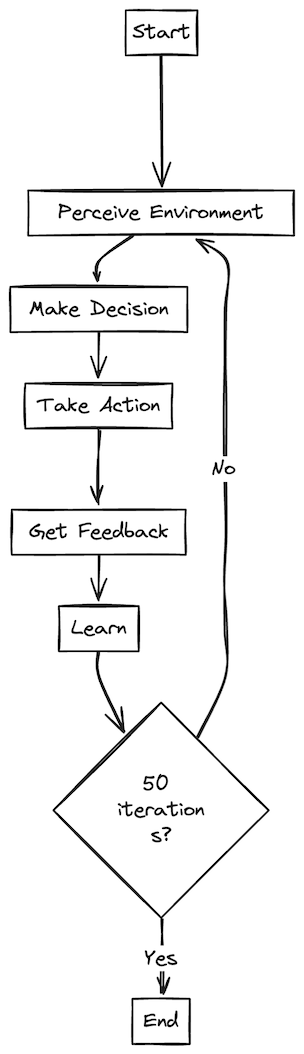
The Agentic Workflow
Environment Perception
Currently our agent fetches real-time weather-data from the OpenWeatherMap API. This data is vital for our agent to make decisions about what to recommend to the user.
Decision Making
The agent recollects info about temperature, cloudiness and wind speed. Then it feeds this data to an LLM, asking for recommendations. We are effectively offloading the whole decision-making process to an LLM.
Action Taking
Our all yet to be powerful is printing the recommendation to the standard output (the terminal). But fear not much, this will be a matter to be improved in upcoming articles.
Feedback Collection
The agent is asking the user to provide feedback so it can improve its behaviour. Note that this goes beyond a simple yes or not, effectively capturing user sentiment.
Learning and adaptation
The feedback collected from the user is fed to an LLM. LLMs are good for sentiment analysis so let’s use them for this process too 😊!
From now on, let’s concentrate on the components that got a significant improvement since our last post ✌️ .
Incorporating AI into the Agent
So far we have been using an inflexible and too boring rule-based system. We currently are in the golden age of LLM, let’s leverage its capabilities to improve our Agent’s decision making capabilities.
1. Translating weather data into actionable advice.
The agent gathers raw weather data like temperature, cloudiness and wind speed from the OpenWeatherMap API. ***def perceive_environment(self)
This data is fed into an LLM as a prompt context along with some defined thresholds (e.g. what is considered “cold” or “windy”). make_decision(self, weather_data)
The LLM acts as a reasoning engine. It takes the weather data and thresholds as input and generates a human-like recommendation, such as ”Wear a jacket, it’s chilly outside” or “It is a perfect day for a picnic!” def make_decision(self, weather_data)
def make_decision(self, weather_data):
    # Define thresholds
    cold_threshold = 15
    hot_threshold = 28
    high_cloudiness = 70
    high_wind_speed = 30

    # Prepare the prompt for the LLM
    prompt = f"""
    Given the following weather data:
    - Temperature: {weather_data['temperature']}°C
    - Wind Speed: {weather_data['wind_speed']} km/h
    - cloudiness: {weather_data['cloudiness']}%

    And the following defined thresholds:
    - Cold Threshold: {cold_threshold}°C
    - Hot Threshold: {hot_threshold}°C
    - High Cloudiness: {high_cloudiness}%
    - High Wind Speed: {high_wind_speed} km/h

    Please provide a recommendation and explain your reasoning.
    """

    # Get the LLM response
    llm_response = send_message_to_model(prompt)

    return llm_response
2. Learning and improving (not quite there but we got a significant upgrade)
The agent uses an LLM to analyse the sentiment of user feedback. This tells the agent whether its previous recommendation was on target. def learn(self, feedback)
def learn(self, feedback):
    self.feedback_count += 1

    # Prompt the model for sentiment analysis (returns 1 for positive 0 otherwise)
    sentiment = send_message_to_model(f"Analyze the following text for sentiment. Output only a 1 if the sentiment is positive or a 0 if the sentiment is negative. Text: {feedback}")

    # Increment positive count only if True
    self.positive_feedback += int(sentiment)

    # Print accuracy every 5 feedback cycles
    if self.feedback_count % 5 == 0:
        accuracy = (self.positive_feedback / self.feedback_count) * 100
        print(f"Current accuracy: {accuracy:.2f}%")
To recap, the Agent issues requests to an API for weather data, then it uses this data as context and prompts an LLM for recommendation based on current weather conditions. The recommendation is printed to the terminal so the user can read it. Then, the user is asked for feedback. The feedback is fed into an LLM for sentiment analysis. But the output for the sentiment analysis is yet to be used for improving the decision making capabilities 😅. Let’s do that in the next article 🤗.
Final Words
AI Agents are the future of AI, and this document explores augmenting an Agent with an LLM for decision-making. The agent’s architecture includes perception, decision-making, action, and learning modules.
Future improvements will focus on utilizing sentiment analysis to enhance the agent’s learning and adaptation capabilities.
Resources
[embed]
메타데이터
- post_id
- d717a5e448d8
- slug
- my-journey-to-ai-agents-building-the-ai-part-of-the-agent-d717a5e448d8
- url
- https://medium.com/google-cloud/my-journey-to-ai-agents-building-the-ai-part-of-the-agent-d717a5e448d8
- canonical_url
- https://medium.com/google-cloud/my-journey-to-ai-agents-building-the-ai-part-of-the-agent-d717a5e448d8
- author_url
- https://medium.com/@luillyfe
- status
- ok
- fetched_at
- 2026-06-27 18:20:27