Demystifying IBM Maximo Application Suite: Licensing, AppPoints, and Deployment Strategies
A comprehensive guide to understanding MAS hosting models, the AppPoints economy, and navigating connected vs. air-gapped architectures.
Demystifying IBM Maximo Application Suite: Licensing, AppPoints, and Deployment Strategies
A comprehensive guide to understanding MAS hosting models, the AppPoints economy, and navigating connected vs. air-gapped architectures.
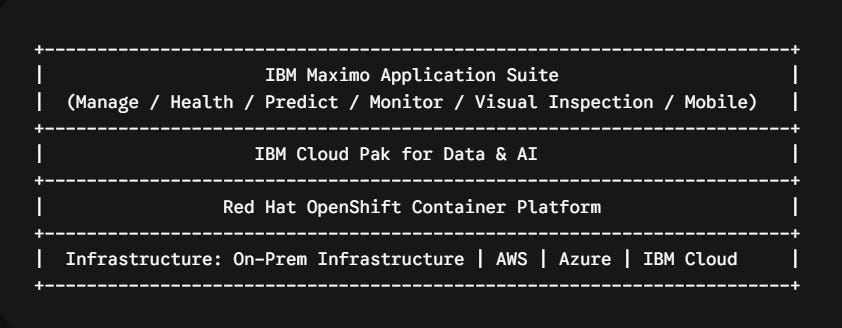
If you’ve been working with enterprise asset management systems, you already know that IBM Maximo Application Suite (MAS) represents a massive evolution from traditional Maximo (7.6.x). IBM hasn’t just updated the user interface; they have completely modernized the underlying architecture, moving to a cloud-native, containerized model built on Red Hat OpenShift.
Along with this architectural transformation comes a fundamental shift in how you buy, license, and deploy the platform.
Whether you are an enterprise architect planning a migration or an IT leader budgeting for your next multi-year upgrade, understanding how MAS handles hosting, licensing, and security boundaries is critical. Let’s break it down into plain English.
1. AppPoints: The New Universal Currency
In older versions of Maximo, licensing was rigid. You bought a fixed number of named or concurrent seats for specific modules — for example, 20 Authorized Users for core Maximo, and 5 Concurrent Users for Transportation. If your business wanted to pilot predictive maintenance or monitor IoT sensors, you had to negotiate and purchase entirely new software module licenses.
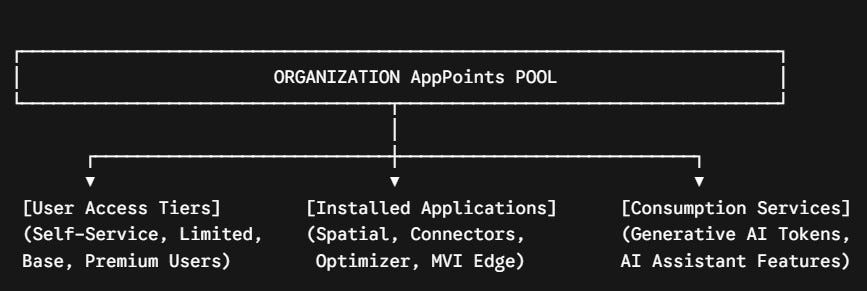
MAS eliminates this model in favor of a flexible, pool-based system called Application Points (AppPoints).
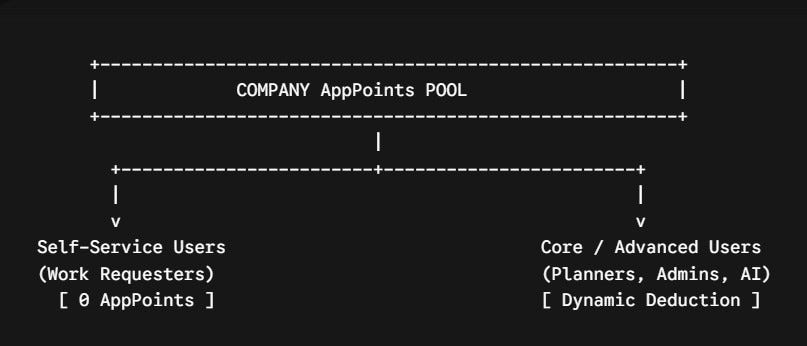
Think of AppPoints like a prepaid arcade card:
- Universal Flexibility: You buy a single pool of AppPoints for your organization. You don’t need to deploy every application on day one. If you only need core Maximo Manage today, you only deploy Manage. If two years from now you decide to enable Maximo Health or Maximo Monitor, you don’t need a new contract — you simply deploy the application on your OpenShift cluster, and it draws from your existing AppPoints pool.
- Dynamic Deductions: AppPoints are consumed dynamically based on active usage. When a user logs in (or when a background processing container runs), the required AppPoints are checked out from your total pool. When the user logs out, those points return to the pool for others to use.
Tiered Access Levels:
- Self-Service Tiers (e.g., standard work requesters) cost 0 AppPoints.
- Core Tiers (e.g., technicians, planners, dispatchers) consume a modest amount of points.
- Advanced Tiers (e.g., system administrators, reliability engineers running AI models) consume a higher point allocation.
Key Takeaway: The AppPoints model shifts your organization from rigid module purchasing to an agile, consumption-based framework that scales naturally as your operational needs evolve.
2. Who Manages the Infrastructure? (Hosting Choices)
When deploying MAS, your first major strategic decision is determining who manages the underlying OpenShift cluster, database engines, container registries, and patch cycles. IBM offers two distinct routes:

Route A: Customer-Managed (You Run It)
You purchase the software entitlements from IBM, but your internal engineering team (or a managed service partner) installs and maintains the platform on your infrastructure of choice:
- On-Premises Hardware: Deployed on your own physical servers or hypervisors (e.g., VMware) inside your company’s data center.
- Public Cloud Infrastructure: Deployed on cloud providers using managed OpenShift offerings such as ROSA (Red Hat OpenShift on AWS), ARO (Azure Red Hat OpenShift), or IBM Cloud.
When choosing Customer-Managed, you can purchase licenses via two models:
- Subscription Licenses: An annual operational expense (OpEx) fee to use the software. If the subscription expires, access ends.
- Perpetual Licenses: An upfront capital expense (CapEx) purchase where you own the software license indefinitely, supplemented by an annual software maintenance and support fee.
Route B: IBM-Managed (IBM Runs It)
If your organization prefers not to build and maintain in-house Red Hat OpenShift expertise, IBM can handle the heavy lifting:
- MAS as a Service (SaaS): A multi-tenant cloud environment managed entirely by IBM. This provides the fastest time-to-market with minimal infrastructure overhead.
- MAS Dedicated: A private, isolated single-tenant cloud environment managed by IBM exclusively for your enterprise. You maintain dedicated control without the operational headache of cluster administration.
3. Deployment Realities: On-Premises vs. Air-Gap
For organizations selecting a Customer-Managed deployment, network topology and security requirements dictate how the system is actually installed and updated. While both On-Premises and Air-Gap run on local infrastructure, their network isolation profiles are fundamentally different.

1. On-Premises (Connected)
In a standard connected on-premises deployment, your OpenShift cluster resides within your local corporate network, but maintains secure outbound internet connectivity.
- Installation Process: The installer connects directly to IBM’s online container registries (e.g.,
cp.icr.io) and Red Hat’s software networks to pull container images, operators, and helm charts automatically. - Maintenance & Licensing: Minor updates, fix packs, and operator upgrades can be pulled on-demand. Licensing statistics and AppPoint usage can report directly back to IBM Cloud automatically.
- Best Suited For: Enterprises that want physical control over their servers and data stores, but can allow outbound encrypted traffic to trusted vendor endpoints for streamlined maintenance.
2. Air-Gap (Fully Isolated)
An Air-Gap environment represents a total network blackout. The target servers have zero direct or indirect internet access — no VPN bridges, no outbound proxies, and no external routing.
- Installation Process: Because the target cluster cannot reach external registries, you must use an intermediate Bastion Host (a temporary machine with internet access outside the secure zone) to mirror all OpenShift and Maximo container images. These assets are then transferred via physical media (such as encrypted drives) or a restricted local enterprise registry inside the secure boundary.
- Maintenance & Licensing: Upgrades are strictly manual. Every interim patch or security update requires repeating the offline mirror-and-transfer procedure. AppPoint licensing cannot sync live with IBM; administrators must manually generate offline license keys from the IBM License Key Center and apply them locally.
- Best Suited For: High-security sectors such as nuclear utilities, defense installations, water treatment infrastructure, and government agencies operating under zero-trust mandates.
Summary Comparison

Final Thoughts
The architecture of IBM Maximo Application Suite reflects the reality of modern enterprise software: containerized, resilient, and flexible. By untangling the hosting choices, understanding the AppPoints model, and selecting the right network deployment topology early, enterprise teams can design a Maximo environment that balances operational agility, financial predictability, and strict cybersecurity compliance.
If you found this helpful, clap 👏 (Medium’s version of a high-five) and follow for more on digital transformation in facility management.
— — — — — — — — — — — — — — — — — — — — — — — — — — — — — —
Contact me on LinkedIn:
https://www.linkedin.com/in/sayed-saeed-ab3286214/
OpenShift #RedHat #CloudPak #DataEngineering #PredictiveMaintenance #IndustrialIoT #MAS9
메타데이터
- post_id
- d71d4752cb03
- slug
- demystifying-ibm-maximo-application-suite-licensing-apppoints-and-deployment-strategies-d71d4752cb03
- url
- https://medium.com/@e.sayedsaeed5/demystifying-ibm-maximo-application-suite-licensing-apppoints-and-deployment-strategies-d71d4752cb03
- canonical_url
- https://medium.com/@e.sayedsaeed5/demystifying-ibm-maximo-application-suite-licensing-apppoints-and-deployment-strategies-d71d4752cb03
- author_url
- https://medium.com/@e.sayedsaeed5
- status
- ok
- fetched_at
- 2026-08-22 12:27:57