Azure Storage Explained : Block vs File vs Object
Cloud architecture decisions are rarely about whether to store data — they’re about how to store it.
Azure Storage Explained : Block vs File vs Object
Cloud architecture decisions are rarely about whether to store data — they’re about how to store it.
In Microsoft Azure, storage is not one-size-fits-all. Azure provides three fundamental storage paradigms, each optimized for a different workload pattern:
- Block Storage
- File Storage
- Object Storage
Choosing incorrectly can lead to performance bottlenecks, scalability constraints, or unnecessary cost.
Let’s break this down architecturally — with practical scenarios you can relate to.
Azure Storage Types at a Glance
| Type            | Best For                                      | Azure Service            |
|-----------------|-----------------------------------------------|--------------------------|
| Block Storage   | VM disks                                      | Azure Managed Disks      |
| File Storage    | Shared file systems                           | Azure Files              |
| Object Storage  | Unstructured data (images, backups, logs)     | Azure Blob Storage       |
Block Storage — Designed for Performance-Critical Workloads
🔹 Core Concept
Block storage splits data into fixed-size blocks, each with a unique identifier.
When an application reads data, the system retrieves and reassembles the required blocks.
From the operating system’s perspective, this behaves like a physical hard drive (HDD or SSD) attached to a machine.
Low latency. High IOPS. Predictable performance.
🔹 Azure Implementation
Azure Managed Disks
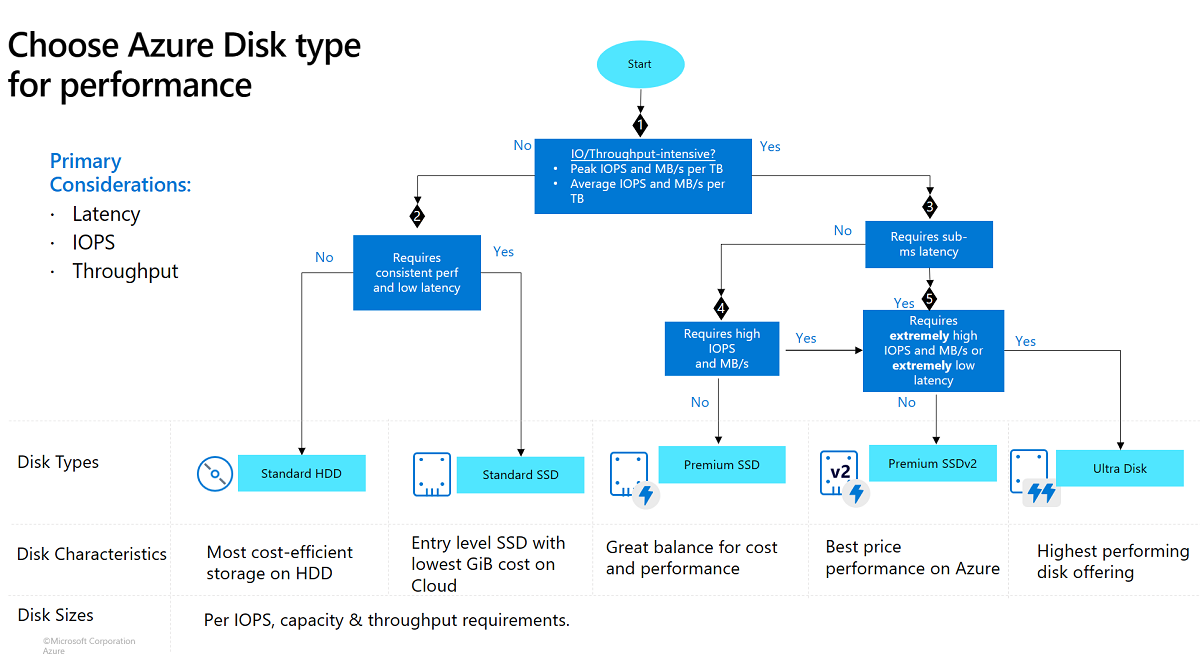
Available disk types:
- Standard HDD
- Standard SSD
- Premium SSD
- Ultra Disk
Each disk is provisioned with specific performance characteristics (IOPS and throughput caps).
🔹 Where It Shines
- VM OS disks
- Database workloads (SQL Server, MySQL, PostgreSQL)
- Transaction-heavy systems
- Enterprise ERP systems
🔹 Real Scenario
When you create a Virtual Machine in Azure, its OS disk and attached data disks are provisioned using Managed Disks.
Think of this as plugging an SSD into a physical server — except it’s virtual and managed by Azure.
File Storage — Shared Access Over the Network
🔹 Core Concept
File storage provides a network-accessible shared file system.
It uses:
- SMB (Server Message Block)
- NFS (for Linux environments)
Multiple virtual machines or applications can mount the same file share simultaneously.
Unlike block storage, this is not attached exclusively to one VM.
🔹 Azure Implementation
Azure Files
Fully managed file shares in the cloud.
🔹 Where It Shines
- Lift-and-shift migrations from on-prem file servers
- Shared configuration files
- Shared logs across multiple services
- Replacing traditional Windows file servers
🔹 Real Scenario
Suppose three VMs in your environment need access to a shared folder containing application logs.
Instead of duplicating data, you mount Azure Files as a shared drive.
It behaves exactly like a network file share in your office.
Object Storage — Built for Massive Scale


🔹 Core Concept
Object storage stores data as objects, where each object contains:
- The data itself
- Metadata
- A globally unique identifier
There is no traditional folder hierarchy — it’s a flat namespace (folders are virtual constructs).
It is:
- Extremely scalable
- Highly durable
- Cost-effective
- Ideal for unstructured data
🔹 Azure Implementation
Azure Blob Storage
Supports access via:
- REST APIs
- HTTPS endpoints
- SDKs
🔹 Where It Shines
- Images and videos
- Backups and disaster recovery
- Logs and telemetry
- Static website hosting
- Data lakes
🔹 Real Scenario
User profile images in your web application? Application logs generated every second?
They are stored as objects in Blob Storage — optimized for durability and global accessibility.
⚖️ Architectural Comparison
| Feature         | Block Storage        | File Storage                 | Object Storage                    |
|-----------------|---------------------|------------------------------|-----------------------------------|
| Azure Service   | Managed Disks       | Azure Files                 | Azure Blob Storage               |
| Data Structure  | Fixed-size blocks   | Hierarchical (folders/files) | Flat (objects + metadata)        |
| Access Model    | Attached to single VM | Network file share         | REST / HTTPS API                 |
| Performance     | High                | Medium                       | Tier-dependent                   |
| Scalability     | Per-disk limits     | Moderate                     | Extremely high                   |
| Best For        | OS/Data disks       | Shared access                | Media, backups, big data         |
🧠 The Analogy That Makes It Click
| Storage Type   | Think of it as…                                    |
| -------------- | -------------------------------------------------- |
| Block Storage  | An SSD attached to your computer                   |
| File Storage   | A shared drive in your office                      |
| Object Storage | A massive cloud bucket like Google Drive’s backend |
🚀 The Architectural Decision Rule
When designing systems in Azure:
- If an application expects a disk → Use Block Storage
- If multiple systems need shared file access → Use File Storage
- If you’re storing scalable unstructured data → Use Object Storage
Understanding this distinction early prevents re-architecture later.
Final Thought
Storage is foundational. It impacts:
- Performance
- Cost
- Scalability
- Disaster recovery strategy
Azure doesn’t offer three storage types for variety — it offers them because different workloads have fundamentally different data access patterns.
메타데이터
- post_id
- d73d09f46bd0
- slug
- azure-storage-explained-block-vs-file-vs-object-d73d09f46bd0
- url
- https://medium.com/@anandtalekattu/azure-storage-explained-block-vs-file-vs-object-d73d09f46bd0
- canonical_url
- https://medium.com/@anandtalekattu/azure-storage-explained-block-vs-file-vs-object-d73d09f46bd0
- author_url
- https://medium.com/@anandtalekattu
- status
- ok
- fetched_at
- 2026-07-23 01:21:39




