Building Robust AI Workflows with Workflow Builder & Factories in .NET
When building real-world applications, a workflow often involves multiple steps, decisions, and interactions — many of which may involve AI…
Building Robust AI Workflows with Workflow Builder & Factories in .NET
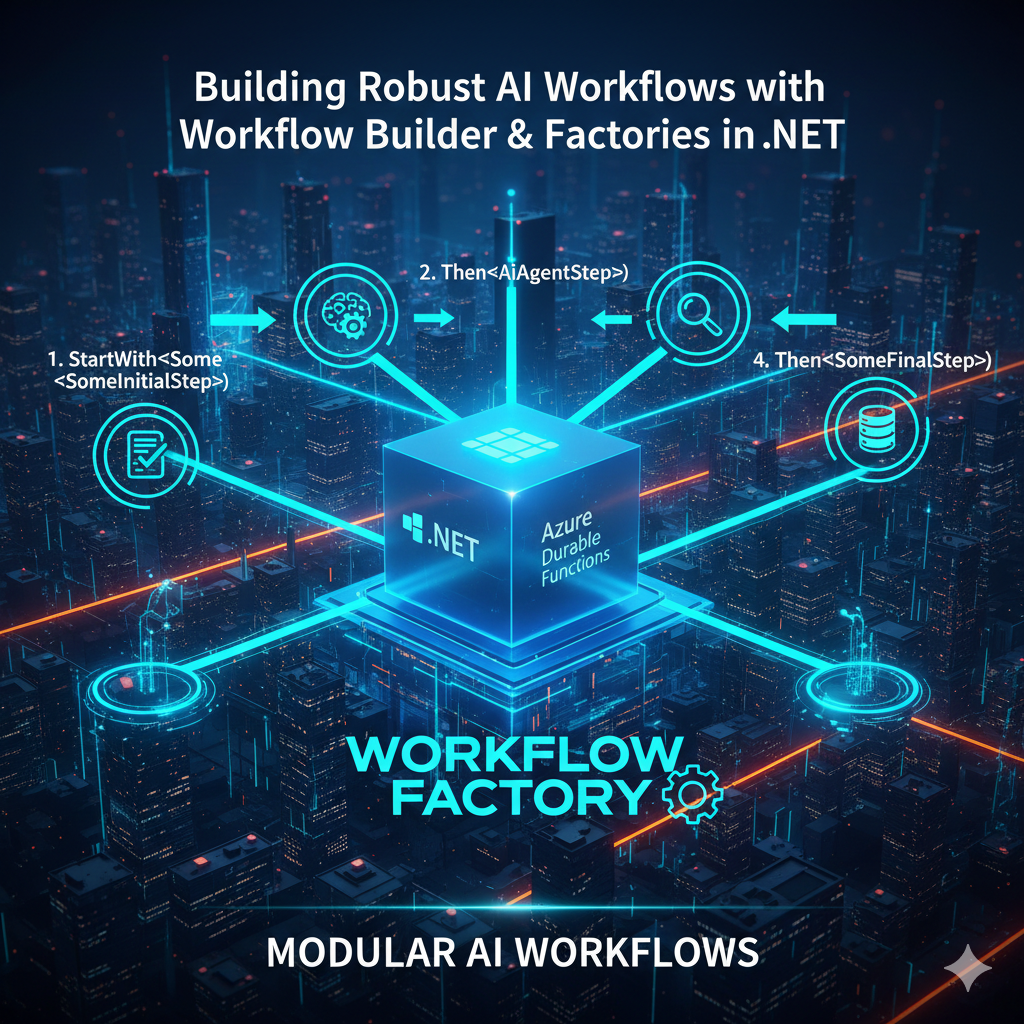
When building real-world applications, a workflow often involves multiple steps, decisions, and interactions — many of which may involve AI agents. To make these workflows easier to construct, maintain, and reuse, Microsoft provides a Workflow Builder with Factories as part of the Agent Framework in .NET.
In this article, I’ll explain what workflow factories are, why they matter, and how to use the Workflow Builder to create dynamic, maintainable workflows that include AI agent steps using C#. All examples and patterns are based on official Microsoft documentation. (Source: learn.microsoft.com)
🤔 Why Use Workflow Builder & Factories?
As your AI workflows become more sophisticated, you’ll want:
✔ A clean abstraction for building flows ✔ The ability to reuse workflow logic ✔ Factory-based creation to avoid repetitive code ✔ Easy branching, sequencing, and orchestration
The Workflow Builder with Factories enables you to define workflows like building blocks — simple to compose, extend, and test — especially when your workflows include AI agent calls and long-running patterns.
🧠 What Is a Workflow Factory?
A workflow factory is a reusable component that defines:
- how a workflow starts
- how steps relate to each other
- what activities must run
- how inputs and outputs flow through steps
Instead of hard-coding workflow logic in the orchestrator, you define it declaratively using builders and factories. This results in cleaner business logic and better modularity.
🛠️ Workflow Builder Basics
Microsoft’s Agent Framework exposes a WorkflowBuilder API that lets you register workflow steps with:
- Start steps
- Activity functions
- Agent runs
- Branching and decisions
And all of them can be declared in a single place.
📍 Step 1 — Define a Workflow Factory
A factory defines the structure of a workflow using WorkflowBuilder. Here’s a simple example:
public static class MyWorkflowFactory
{
    public static Workflow Build()
    {
        return WorkflowBuilder
            .StartWith<SomeInitialStep>()
            .Then<AiAgentStep>()
            .Then<SomeFinalStep>()
            .Build();
    }
}
In this code:
StartWith<SomeInitialStep>()defines the first stepThen<AiAgentStep>()runs an AI stepThen<SomeFinalStep>()defines the last step in the workflow
This declarative style is easier to read and maintain than hard-coding each step inside an orchestrator function.
🧠 Step 2 — Create Individual Workflow Steps
Each step in the workflow is implemented as a class (like an activity), injected into the builder.
Example — Initial Step
public class SomeInitialStep : IWorkflowStep
{
    public Task<StepResult> RunAsync(WorkflowContext context)
    {
        // Business logic
        return Task.FromResult(StepResult.Next());
    }
}
Example — AI Agent Step
public class AiAgentStep : IWorkflowStep
{
    public async Task<StepResult> RunAsync(WorkflowContext context)
    {
        var agent = CreateAgent("You are a helpful assistant.");
        var result = await agent.RunAsync(context.Input);
        return StepResult.Next(result.Text);
    }
}
Each step encapsulates logic — business or AI — allowing you to separate concerns.
🧠 Step 3 — Use the Workflow Factory
Once the factory is defined, you can register the workflow in your application startup or orchestrator code:
WorkflowRegistry.Register(MyWorkflowFactory.Build());This makes the workflow discoverable and ready to run via durable orchestrators or triggers.
📍 Why This Pattern Is Useful
Using workflow factories gives you:
Reusable Workflows
Define a workflow once; reuse it throughout your application.
Clean Separation
Business logic and workflow definitions stay in separate classes.
Testable Components
You can unit-test individual steps or entire factories.
Scalable Orchestration
Workflows can be invoked as durable orchestrations, scheduled tasks, or triggered by external events.
🧠 Real-World Example: AI-Driven Content Pipeline
Imagine a pipeline that:
- Validates incoming text
- Calls an AI agent to clean or enrich it
- Summarizes the processed text
- Stores the result for further analytics
With factories, you define just:
WorkflowBuilder
    .StartWith<TextValidationStep>()
    .Then<AiCleanerStep>()
    .Then<AiSummarizerStep>()
    .Then<StoreInDatabaseStep>()
    .Build();
Then register and use it — no need to write convoluted orchestrator logic.
🧠 My Take as a .NET Developer
The Workflow Builder with factories embraces a declarative programming style that feels natural for workflows involving multiple steps — including AI interactions. It’s similar to building pipelines in middleware or task runners — modular, clean, and easy to extend.
This pattern cleanly separates workflow definitions from execution context, making systems easier to reason about and maintain over time.
🎯 Final Thoughts
As AI systems scale, workflows grow in complexity. Moving to a factory driven workflow builder paradigm makes these systems:
✔ Easier to read ✔ Easier to maintain ✔ Easier to test ✔ Easier to scale
Whether you’re orchestrating simple AI tasks or complex multi-branch flows, this pattern gives structure and clarity — helping you implement production-ready AI workflows in .NET.
🙌 Thanks for reading
If you found this helpful:
👏 Give it a clap on Medium 🔗 Share with fellow .NET developers 🧠 Follow for official-based, easy-to-understand .NET & AI tutorials
메타데이터
- post_id
- d75ff19c23db
- slug
- building-robust-ai-workflows-with-workflow-builder-factories-in-net-d75ff19c23db
- url
- https://blog.gopenai.com/building-robust-ai-workflows-with-workflow-builder-factories-in-net-d75ff19c23db
- canonical_url
- https://blog.gopenai.com/building-robust-ai-workflows-with-workflow-builder-factories-in-net-d75ff19c23db
- author_url
- https://medium.com/@kavathiyakhushali
- status
- ok
- fetched_at
- 2026-09-12 17:12:29