Enterprise Mendix Native CI/CD: Automated Google Play and App Store Releases Using Azure DevOps
In modern enterprise environments, application delivery is no longer limited to just web deployment. Most real-world Mendix applications…
Enterprise Mendix Native CI/CD: Automated Google Play and App Store Releases Using Azure DevOps
In modern enterprise environments, application delivery is no longer limited to just web deployment. Most real-world Mendix applications today include both:
- Web application (Mendix Cloud / On-prem)
- Native mobile application (Android & iOS)
In my project, every release required:
- Web deployment
- Native mobile rebuild (APK/AAB)
- Manual sharing to testers
- Repeated uploads for every change
This quickly became inefficient and error-prone.
So I designed a fully automated CI/CD system where a single command triggers:
✔ Mendix Web Deployment ✔ Android Native Build (Signed AAB) ✔ iOS Build (Extensible) ✔ Artifact publishing & distribution
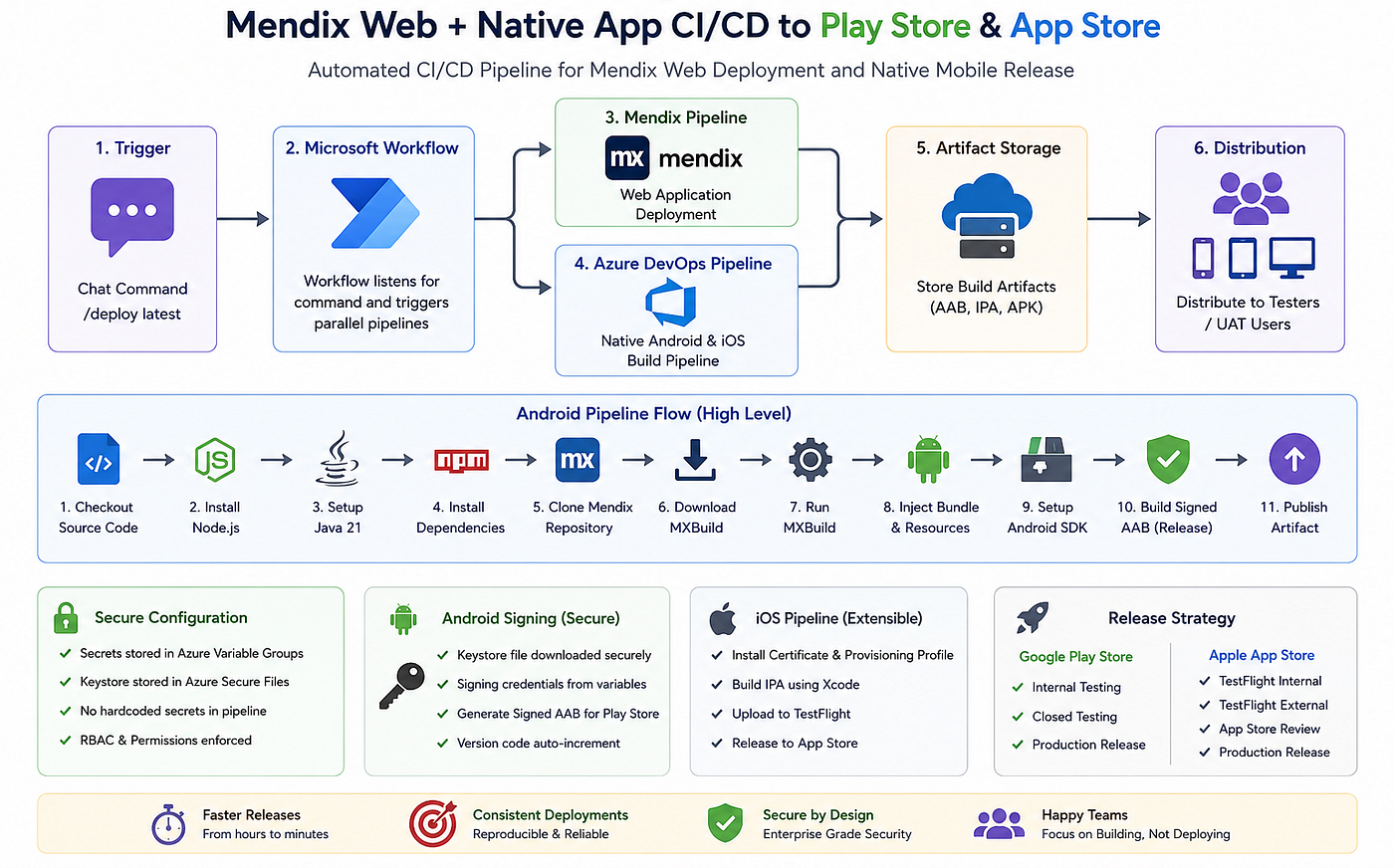
High-Level Architecture
              Trigger
                 ↓
       ────────────────────────
       |                      |
Mendix Pipeline     Azure DevOps Pipeline
(Web Deployment)    (Native Mobile Build)
       |                      |
       └─────────┬────────────┘
                 ↓
      Artifact Storage / Server
                 ↓
       Tester / Distribution
Azure DevOps Secure Configuration
All secrets are stored in Azure Variable Groups + Secure Files.
MENDIX_APP_ID
MENDIX_PAT
MENDIX_BRANCH_LINE
MENDIX_MPR_NAME
MENDIX_MXBUILD_CDN

ANDROID_KEY_ALIAS
ANDROID_KEY_PASSWORD
ANDROID_KEYSTORE_PASSWORD
ANDROID_KEYSTORE_SECURE_FILE

APPLE_CERTIFICATE_SECURE_FILE
APPLE_CERTIFICATE_PASSWORD
APPLE_PROVISIONING_PROFILE
APPLE_TEAM_ID
APPLE_BUNDLE_IDENTIFIER
APPLE_APPSTORE_CONNECT_API_KEY
APPLE_ISSUER_ID
APPLE_KEY_ID
Android Native CI/CD Pipeline (Production Ready)
Below is the complete Azure DevOps pipeline used for Mendix Native Android builds.
- Trigger & Agent Pool
trigger:
  - master

pool:
name: Default- Pipeline Variables
variables:
  - group: Build_Pipeline

  - name: NODE_VERSION
    value: "24.12.0"

  - name: JAVA_VERSION
    value: "21"

  - name: MXBUILD_CACHE_DIR
    value: "$(Agent.WorkFolder)/mxbuild-cache"

  - name: ANDROID_VERSION_CODE
value: $[counter('androidVersionCode', 100)]- Checkout Source Code
- checkout: self
clean: true- Install Node.js
- task: NodeTool@0
  displayName: "Use Node.js $(NODE_VERSION)"
  inputs:
versionSpec: "$(NODE_VERSION)"- Setup Java 21
- script: |
    echo "Setting up Java 21..."
    export JAVA_HOME=/usr/lib/jvm/java-21-openjdk-amd64
    export PATH=$JAVA_HOME/bin:$PATH
    java -version
displayName: "Configure Java"- Install Dependencies
- script: |
    set -euo pipefail
    npm install
displayName: "Install Dependencies"- Clone Mendix Repository
- script: |
    git clone --branch $(MENDIX_BRANCH_LINE) \
    @git.api.mendix.com/$(MENDIX_APP_ID).git">https://pat:$(MENDIX_PAT)@git.api.mendix.com/$(MENDIX_APP_ID).git
displayName: "Clone Mendix App"- Download MXBuild
- script: |
    set -euo pipefail

    mkdir -p "$(MXBUILD_CACHE_DIR)"

    curl -L -o "$(MXBUILD_CACHE_DIR)/mxbuild.tar.gz" \
    "$(MENDIX_MXBUILD_CDN)"

    tar -xzf "$(MXBUILD_CACHE_DIR)/mxbuild.tar.gz" -C "$(MXBUILD_CACHE_DIR)"
displayName: "Download MXBuild"- Run Mendix Build (MXBuild)
- script: |
    set -euo pipefail

    MODELER_DIR="$(Agent.WorkFolder)/mxbuild-cache/modeler"
    cd "$MODELER_DIR"

    "$MXBUILD_CMD" \
      --java-home="/usr/lib/jvm/java-21-openjdk-amd64" \
      --target=deploy \
      --native-packager \
      --loose-version-check \
      "$(Build.SourcesDirectory)/$(MENDIX_APP_ID)/$(MENDIX_MPR_NAME)"
displayName: "Run MXBuild"- Inject Android Bundle
- script: |
    set -euo pipefail

    DEST="$(Build.SourcesDirectory)/android/app/src/main/assets"
    APP_ROOT="$(Build.SourcesDirectory)/$(MENDIX_APP_ID)"

    BUNDLE=$(find "$APP_ROOT" -name "index.android.bundle" | head -n 1)

    cp "$BUNDLE" "$DEST/"
displayName: "Copy JS Bundle"- Merge Android Resources
- script: |
    set -euo pipefail

    RES_DEST="$(Build.SourcesDirectory)/android/app/src/main/res"
    APP_ROOT="$(Build.SourcesDirectory)/$(MENDIX_APP_ID)"

    RES_SRC=$(find "$APP_ROOT" -type d -path "*/deployment/native/bundle/android/res" | head -n 1)

    cp -r "$RES_SRC/"* "$RES_DEST/"
displayName: "Merge Android Resources"- Setup Android SDK
- script: |
    set -euo pipefail

    export ANDROID_HOME=$HOME/android-sdk
    export ANDROID_SDK_ROOT=$ANDROID_HOME
    export PATH=$ANDROID_HOME/platform-tools:$PATH

    yes | sdkmanager --licenses

    sdkmanager \
      "platform-tools" \
      "platforms;android-34" \
      "build-tools;34.0.0"
displayName: "Setup Android SDK"- Build Signed AAB (Play Store Ready)
- script: |
    set -euo pipefail

    cd "$(Build.SourcesDirectory)/android"
    chmod +x ./gradlew

    ./gradlew clean

    ./gradlew bundleRelease \
      -PANDROID_VERSION_CODE="$(ANDROID_VERSION_CODE)" \
      -PANDROID_VERSION_NAME="1.0.$(ANDROID_VERSION_CODE)"
displayName: "Build Signed AAB"- Download Keystore (Secure Signing)
- task: DownloadSecureFile@1
  name: keystore
  inputs:
secureFile: "$(ANDROID_KEYSTORE_SECURE_FILE)"- Publish Build Artifact
- task: PublishBuildArtifacts@1
  inputs:
    PathtoPublish: "$(Build.ArtifactStagingDirectory)"
    ArtifactName: "android-aab"
    publishLocation: "Container"
Security Architecture (Important in Enterprise Systems)
- Keystore stored in Azure Secure Files
- Secrets stored in Variable Groups
- PAT tokens never exposed in code
- Build agents restricted via RBAC
- Release approval gates for production
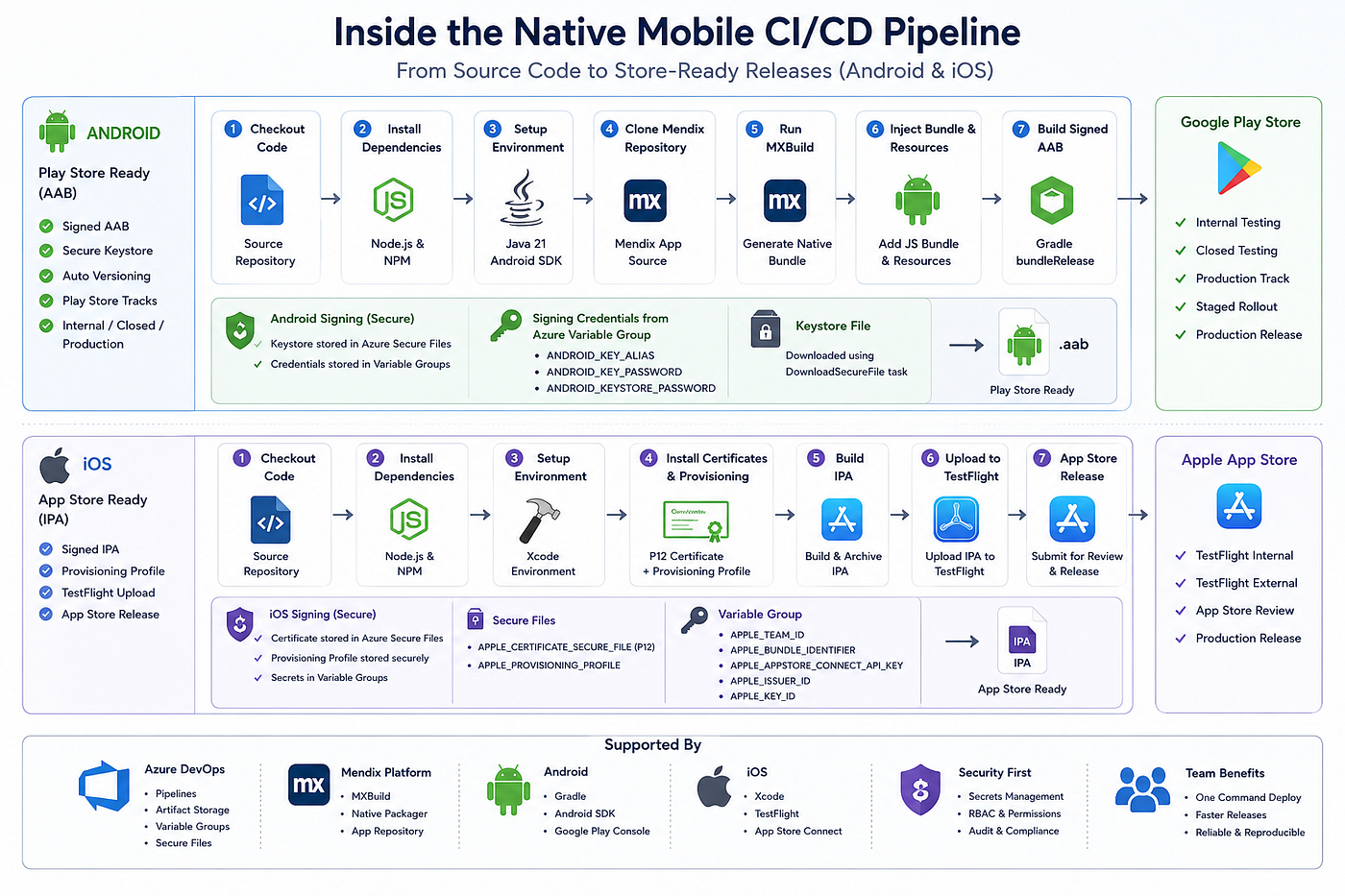
Google Play Store Release Strategy
A proper enterprise release flow follows:
Azure Pipeline
        ↓
Generate Signed AAB
        ↓
Publish Build Artifact
        ↓
Google Play Approval
        ↓
Production Release
This ensures:
- Early bug detection
- Controlled rollout
- Safe production promotion
iOS App Store (Extensible Pipeline)
For iOS, the pipeline extends with:
- Apple Certificate (P12)
- Provisioning Profile
- App Store Connect API Key
Download Certificate
        ↓
Install Provisioning Profile
        ↓
Build IPA
        ↓
Archive Application
        ↓
Upload to TestFlight
        ↓
App Store Review
        ↓
Production Release
Business Impact
After implementing this system:
- Release time reduced from hours → minutes
- Zero manual APK sharing
- Web + mobile always in sync
- Faster cycles
- Reliable build reproducibility
Final Thoughts
Mendix is often seen as a low-code platform, but with the right CI/CD design, it can be transformed into a full enterprise-grade delivery system.
메타데이터
- post_id
- d76e35bde6e2
- slug
- enterprise-mendix-native-ci-cd-automated-google-play-and-app-store-releases-using-azure-devops-d76e35bde6e2
- url
- https://medium.com/@techbykrishna/enterprise-mendix-native-ci-cd-automated-google-play-and-app-store-releases-using-azure-devops-d76e35bde6e2
- canonical_url
- https://medium.com/@techbykrishna/enterprise-mendix-native-ci-cd-automated-google-play-and-app-store-releases-using-azure-devops-d76e35bde6e2
- author_url
- https://medium.com/@techbykrishna
- status
- ok
- fetched_at
- 2026-06-26 06:47:43