Agentic AI with LangChain — Part 3: Tool Calling in LangChain
This is the third installment in the Agentic AI with LangChain series. In Part 2, we built an agentic RAG workflow orchestrated with…
Agentic AI with LangChain — Part 3: Tool Calling in LangChain
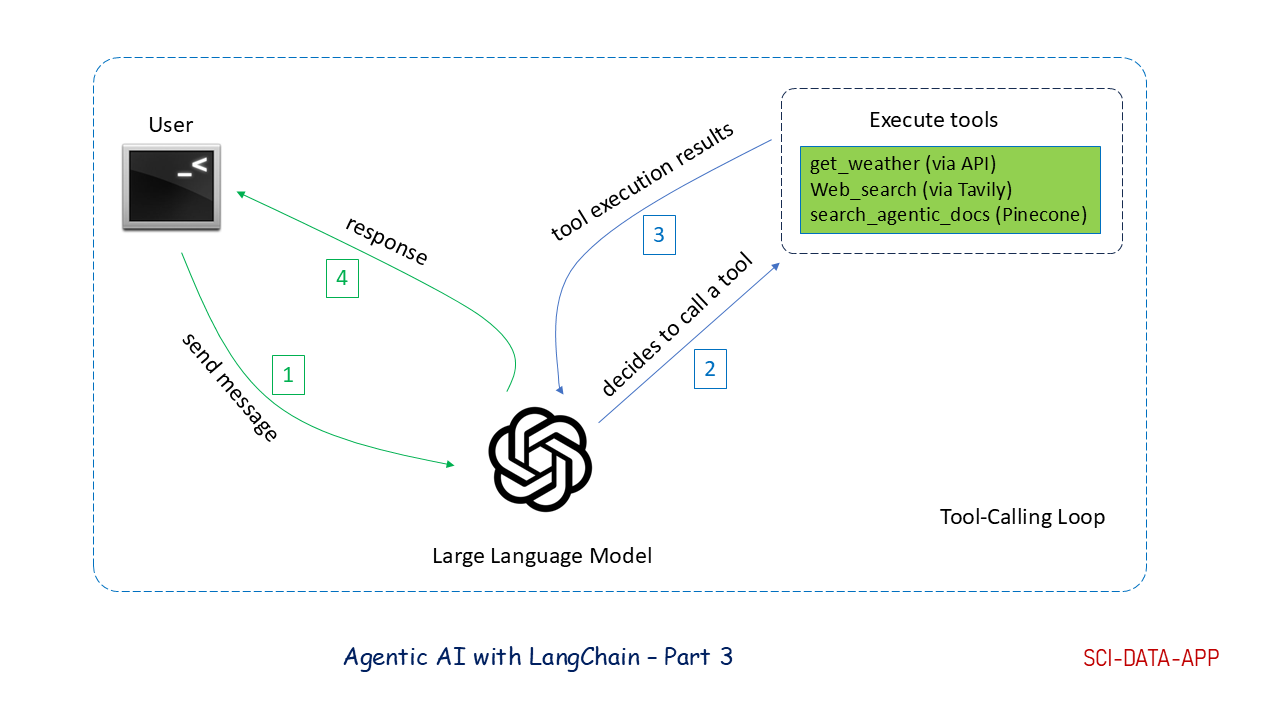
Tool-calling loop
This is the third installment in the Agentic AI with LangChain series. In *Part 2*, we built an agentic RAG workflow orchestrated with LangGraph. Now we want to expand the system’s capabilities into additional domains such as cooking, swimming, classic music, and even provide real-time weather information for cities around the world.
Following the logic from *Part 2, we could* implement these features by adding more nodes: one retrieval node per domain backed by its own Pinecone index, plus a weather node that calls a public weather API. But as the number of nodes grows, the workflow becomes increasingly crowded. More nodes mean more wiring, more branching logic, and a graph that quickly becomes difficult to maintain.
That is where tool calling comes in. Instead of creating a node for every function, we register these functions as LangChain tools and let the LLM decide when to call them, how to use the returned information, and how to incorporate the results into the final answer. Tool calling not only simplifies the workflow, it also extends the LLM’s capabilities with accurate caculations, database queries, web search, and real-time APIs.
This article focuses on the core concepts behind tool calling and how to implement a tool-calling loop in LangChain. This sets the foundation for the next article, where we will explore the ReAct pattern. With a solid understanding of ReAct and its implementation in LangChain and LangGraph, we will return to *Part 2*’s workflow and demonstrate how we can simplify it using these ideas.
The complete code for this article is available in this *GitHub Repo*.
In this article, we will cover:
- tool calling: what it is and why it matters
- LangChain tools: how to implement them
- tool-calling loop: how the four-step cycle works in LangChain
🧰 Tool Calling Concepts
- LangChain Tool: a python function decorated with @tool; automatically exposes function schema and usage instructions to the LLM
- Tool Calling: mechanism allowing the LLM to request external function execution
- Tool Message: message type carrying tool execution results back to the LLM
- Tool-Calling Loop : A structured cycle where the LLM selects a tool, executes it externally, receives the result, and integrate it into the final answer
1. System Configurations
Create a .env file in the project root:
OPENAI_API_KEY="<Your OpenAI API Key>"
TAVILY_API_KEY=<Your TAVILY API Key>
Load these variables using a Pydantic BaseSettings class:
class BaseConfig(BaseSettings):
    OPENAI_API_KEY: Optional[str]
    PINECONE_API_KEY: Optional[str]
    TAVILY_API_KEY: Optional[str]

model_config = SettingsConfigDict(env_file=".env", extra="ignore")
2. Project Structure
project/
|
├── tools
│   ├── get_sum.py    # a simple LangChain tool example
|   └── weather.py    # get_weather LangChain tool using open source APIs
|
|── tool_call.py      # implement tool-calling loop using LangChain tools
├── config.py         # pydantic BaseConfig
├── .env              # environment variable definition
├── .gitignore
└── requirements.txt  # package requirements
3. LangChain Tools
3.1. What Is a LangChain Tool?
A LangChain tool is simply a Python function decorated with @tool:
from langchain.tools import tool

@tool
def get_sum(a: int, b: int) -> int:
    """
    get the summation of two integers
    :param a: int, input integer
    :param b: int, input integer
    :return: int, the sum of a and b
    """
    return a + b
The decorator:
- wraps the function as a LangChain tool
- automatically generates a tool schema from docstrings and type hints.
- provides the LLM with instructions on how to call the tool
3.2. Implement a Weather Tool
code in tools/weather.py
We implement get_weather as a LangChain tool using the free, Open-Meteo API. The tool first retrieves the city’s coordinates, then fetches current weather data.
3.3. Concept of Tool Calling
With tools defined, the next question is: how does the LLM actually use them? The answer is the tool-calling loop, a four-step cycle that governs how the LLM requests and integrates external function results:

- the user sends a request to the LLM
- the LLM determines which tool(s) to call and generates a message specifying the tool name and the arguments to use
- the tool(s) are executed externally, and the results are returned to the LLM as tool messages
- the LLM incorporates the tool results and generate a final response for the user
It is important to note that the LLM can not execute tools on its own. All tools run outside the model, and their outputs are passed back to the LLM as tool messages, which the model then incorporates into its reasoning and final answer.
In addition, an LLM can request multiple tools in the same response, known as parallel tool calls. For example, given the question “what is the temperature of Boston, and what is the sum of 3 and 5”, the LLM may issue two tool calls at once: one for get_weather and one for get_sum, and the loop will execute both before generating the final response.
3.4. Tool Calling in LangChain
code in tools/tool_call.py
With the conceptual loop in place, let’s see how to implement it in LangChain. We define a WeatherAssistant class that provides weather and web-search capabilities using the get_weather and tavily_search LangChain tools.
3.4.1. Setting Up the LLM and Tools
First, we need to set up the LLM and tools:
class WeatherAssistant:
    def __init__(self):

        # initialize llm
        self.llm = ChatOpenAI(api_key=api_key, model="gpt-4o-mini", temperature=0)

        # initialize a tool dictionary
        self.tools = {"get_weather": get_weather,
                      "tavily_search": TavilySearch(max_results=3, tavily_api_key=TAVILY_API_KEY)}
        # bind LangChain tools to llm
        self.llm_with_tools = self.llm.bind_tools(list(self.tools.values()))

        # initialize messages to store message list
        self.messages = []

        # System prompt
        self.system_prompt = f"""You are a helpful assistant for question-answering tasks.
        When users ask about weather, use the get_weather tool to get weather. For other questions,
        use web_search. If you don't know the answer, just say that you don't know.
        Be conversational and helpful in your responses."""

        self.messages.append(SystemMessage(content=self.system_prompt))
We initialize:
- an OpenAI model
- a dictionary of LangChain tools
- a bound LLM
- a message list
- a system prompt instructing the model when to use each tool
This gives the LLM everything it needs to perform tool calling.
3.4.2. Implementing the Tool-Calling Loop
With the LLM and tools configured, we can now implement the tool-calling loop inside the chat() method:
async def chat(self, message: str):
    # Wrap User message in a HumanMessage and add it to message list
    self.messages.append(HumanMessage(content=message))

    # Get AI response (it may or may not contain tool calls)
    response = await self.llm_with_tools.ainvoke(self.messages)
    self.messages.append(response)

    # If there is any tool calls in the AI response
    if response.tool_calls:

        # process tool calls
        for tool_call in response.tool_calls:

            # retrieve function name from tool_call, then
            # retrieve the tool from tool dictionary, and invoke it,
            # append resulting tool message to message list
            tool = self.tools[tool_call["name"]]
            tool_result = await tool.ainvoke(tool_call)
            self.messages.append(tool_result)

        # Get final response after tool execution
        final_response = await self.llm_with_tools.ainvoke(self.messages)
        self.messages.append(final_response)
The chat() method:
- appends the user message to the message list
- invokes the LLM, which may return tool calls
- if tool calls exist, executes each tool in the for loop
- appends each tool call result as a ToolMessage
- invokes LLM again to produce the final response
This implementation supports both single tool calls and parallel tool calls effectively.
3.4.3 Testing the Loop
We test the tool-calling loop by running:
async def main():
    print("hello tool calling!")
    assistant = WeatherAssistant()
    message = "What is the temperature in Tokyo?"
    await assistant.chat(message)
    for msg in assistant.messages:
        msg.pretty_print()
if __name__ == "__main__":
    asyncio.run(main())
The message list produces a clear sequence:

- HumanMessage → user question
- AIMessage → tool call for
get_weather - ToolMessage → weather results
- AIMessage → final answer
This confirms the four-step tool-calling process.
4. Limitations of the Basic Tool-Calling Loop
The basic loop works well for single tool calls, and even parallel ones. But problems arise when tool calls need to be chained.
Example: “Search for ice cream stores in Boston if the temperature is higher than 30 °C”.
The loop handles the first tool call (get_weather) correctly. But if the LLM then decides to call tavily_search when the temperature exceeds 30 °C , that second tool call appears after the loop that has already exited. Because AI messages containing tool calls have no content, the user receives an empty response.
This demonstrates a key limitation:
A simple tool-calling loop can not handle chained tool calls.
We will solve this in the next article using the ReAct pattern, which supports iterative reasoning and tool execution.
5. Closing Summary
In this article, we:
- introduced LangChain tools and how they work
- implemented a weather tool using Open-Meteo API
- bound tools to an LLM and created a system prompt
- walked through the four steps of a tool-calling loop
- demonstrated the loop with a real example
- explained why chained tool calls break the basic loop
In the next article, we will introduce the ReAct Pattern, which is a reasoning-and-acting cycle that solves the chained-tool-call problem and enables multi-step agent workflows.
메타데이터
- post_id
- d7ca1ebeb899
- slug
- agentic-ai-with-langchain-part-3-tool-calling-in-langchain-d7ca1ebeb899
- url
- https://levelup.gitconnected.com/agentic-ai-with-langchain-part-3-tool-calling-in-langchain-d7ca1ebeb899
- canonical_url
- https://levelup.gitconnected.com/agentic-ai-with-langchain-part-3-tool-calling-in-langchain-d7ca1ebeb899
- author_url
- https://medium.com/@yuanhuang100
- status
- ok
- fetched_at
- 2026-07-28 15:41:11







